MOSS-Image Color/Depth Control Arrives in ComfyUI Core
A community adapter steers MOSS-Image with a flat color region map and a depth map, starting from pure noise, and ComfyUI core merged support the same day.
MOSS-Image is the 5B text-and-layout model from OpenMOSS that shipped with a core ComfyUI implementation in the same week. Its existing handles on composition are a JSON layout of boxes and an edit LoRA for reference-driven changes. Neither answers a simpler question: put this person here, at this scale, standing in front of that desk.
The new adapter answers it with two maps instead of a picture. Color encodes where each region sits, depth encodes how far each surface is, and generation still starts from pure noise. Nothing from a reference image is copied through, so the background comes from the prompt rather than from whatever render the maps were traced from.
Two maps as conditioning
The card defines the inputs narrowly, which is what makes it usable:
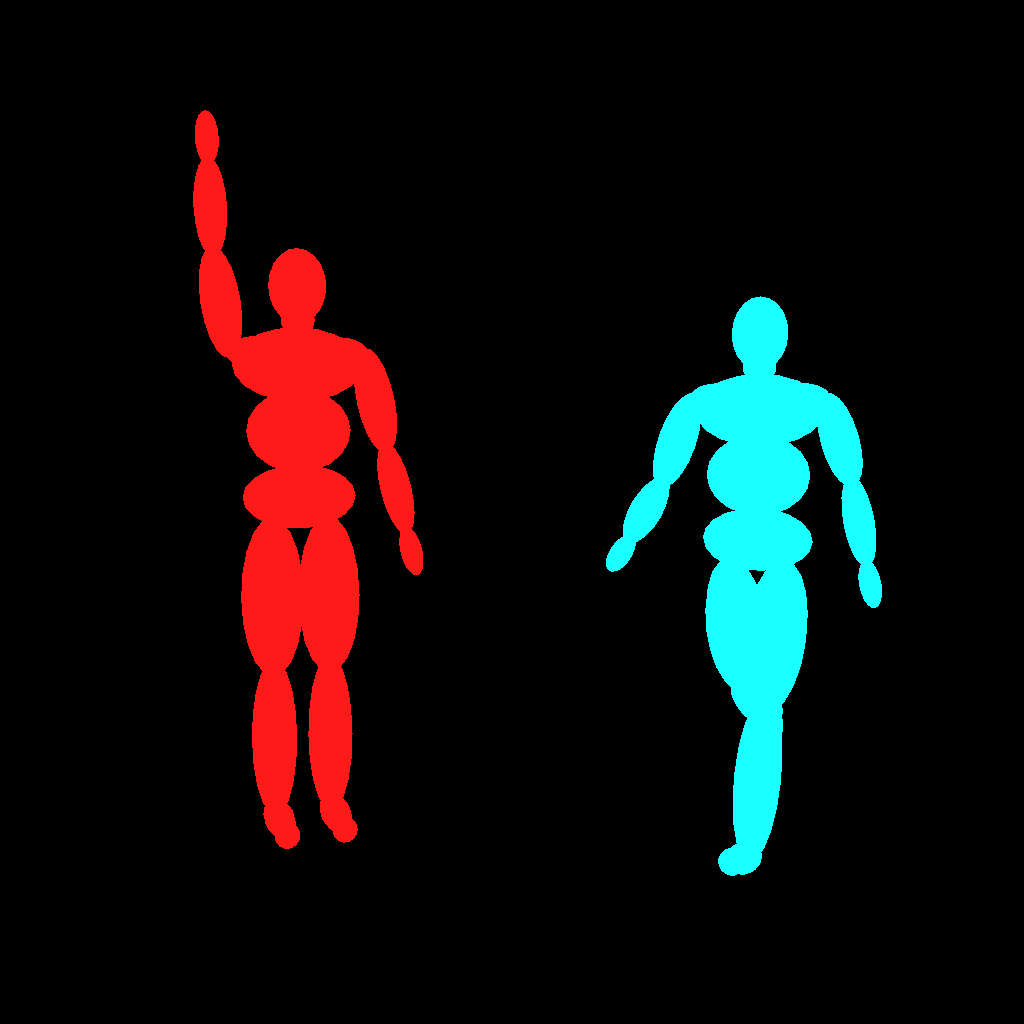
- Color map: an RGB image at the output size where each object or region gets one flat color. The colors are region IDs, not colors to paint with, and black means unspecified.
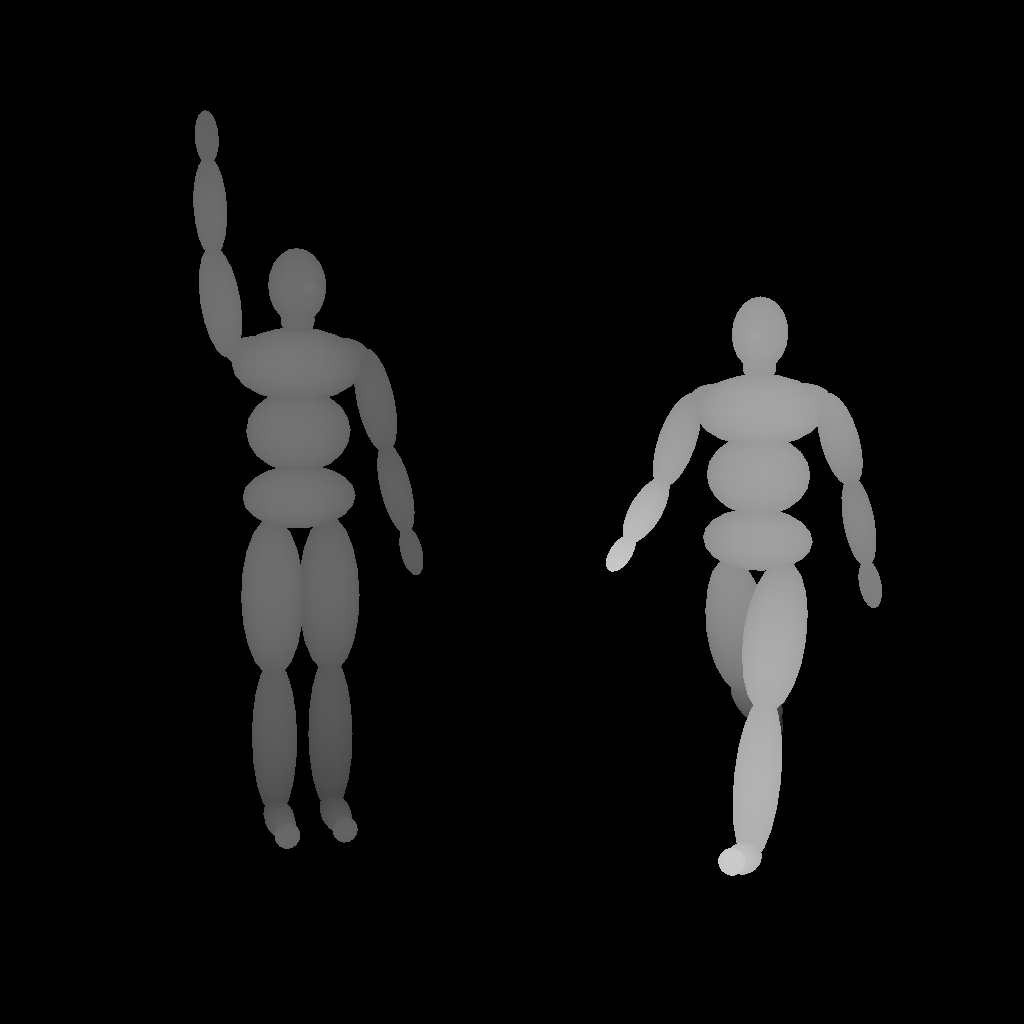
- Depth map: grayscale at the output size, with near as white.
- Either map can be omitted. The adapter was trained with control dropout of 35% color only, 35% depth only, 20% both, 10% neither, so single-map runs stay inside the training distribution.
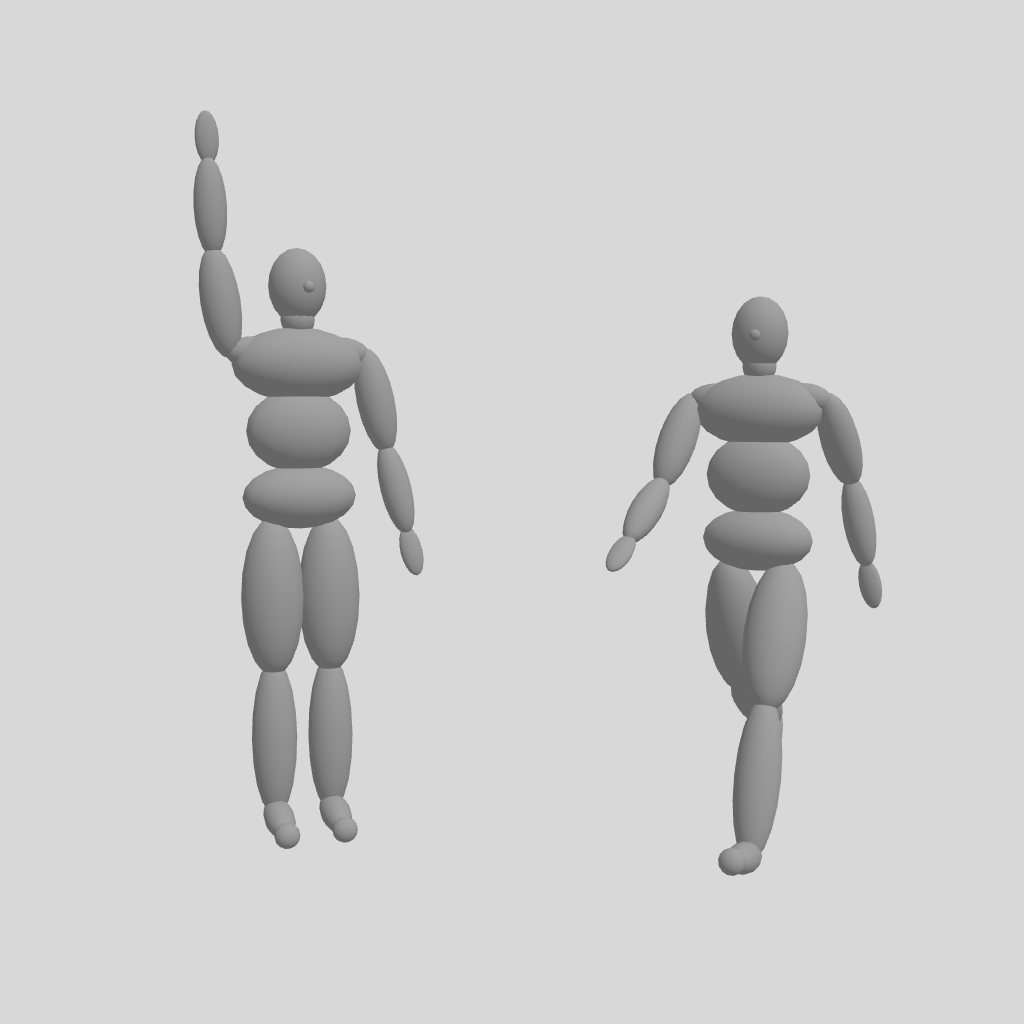
Each scene is authored from a three.js mannequin editor, which exports a shaded render, a color pass and a depth pass together:
 |  |  |
|---|---|---|
| Source render | Color region map | Depth map, near is white |
The comparison that matters is against image-to-image. Feeding a 3D render to an img2img pass keeps the layout but also keeps the render's flat background and gray surfaces. With the adapter, placement, scale and pose follow the maps while material and lighting are generated, which is why the published scenes are 3D mannequins rather than photographs.
What the output looks like
The card's main figure is a grid of the same two-person mannequin scene, with the control held for the whole run versus switched off partway through.
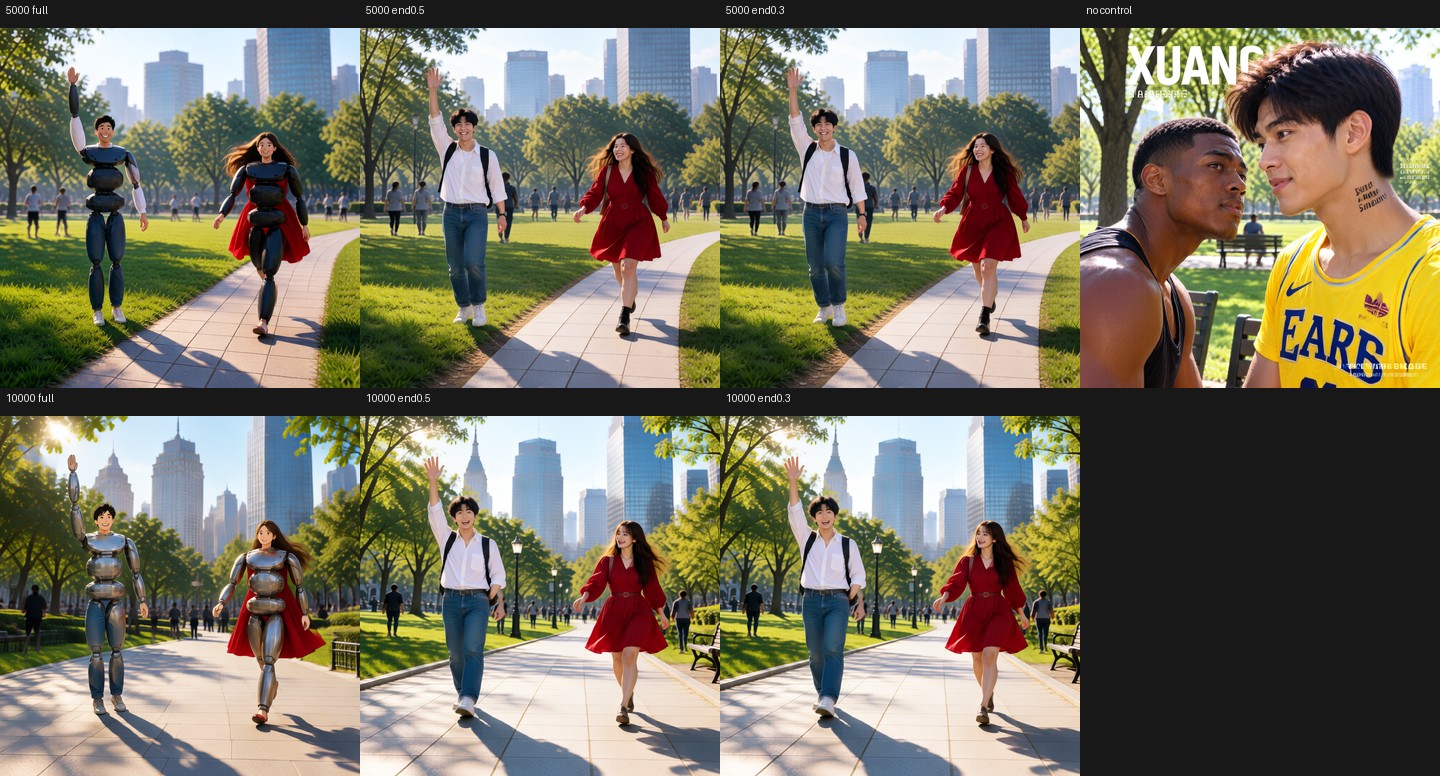
Published with the adapter: top row at 5,000 steps, bottom row at 10,000, comparing control held to the end, ending at 0.5, ending at 0.3, and the base model without control. Held to the end, the mannequin surface shows through; ending at 0.5 places real people where the maps say.
That grid is also the honest statement of the adapter's main weakness. Control for the full run reproduces the mannequin, because the training depth maps came from real photos and nothing in the maps says "stop being wood". Ending the control at half the steps keeps the layout and lets the remaining steps resolve skin, clothing and background.
The same adapter with the maps alone and no per-region prompts gives the other failure mode the card documents: with a manga-style color map, the panel layout drifts and text degrades at the later checkpoints.
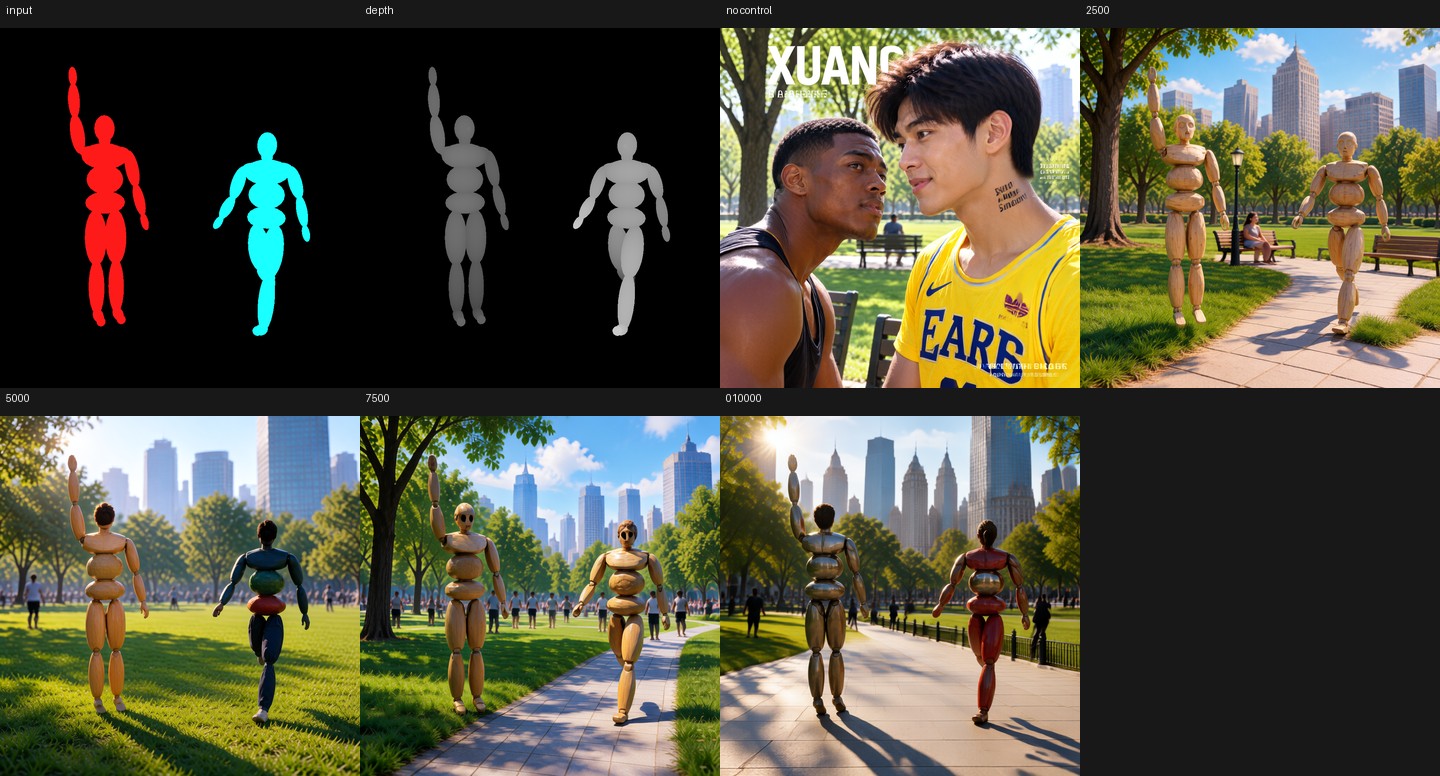
The two-people scene using the maps without per-region prompts. Source: darask0/MOSS-Image-color-depth-control
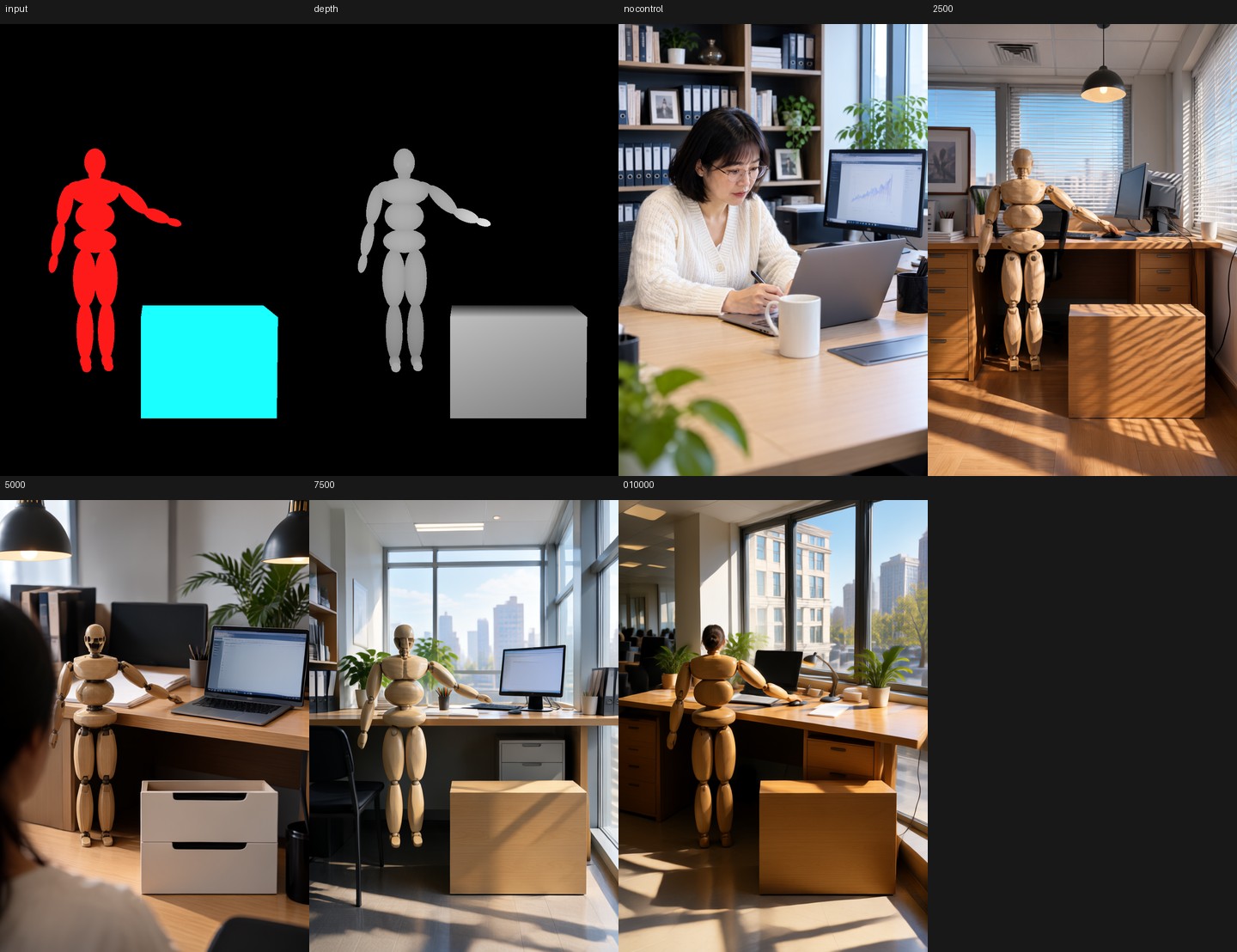
The second published scene, a person at a desk, again with the maps alone.
Core ComfyUI path
PR #17206 by Kijai, merged October 19 at 22:15 UTC, adds one node: MOSS-Image Color/Depth Control (MOSSImageControl), experimental, under model/conditioning/moss_image. It takes the positive and negative conditioning, the VAE, an optional color_map, an optional depth_map, plus strength, start_percent and end_percent, and returns both conditioning streams.
The graph is the ordinary MOSS-Image one with two additions. The adapter loads through the standard LoRA loader on the diffusion model, and the control node sits between the text encode and the sampler. start_percent and end_percent are the core equivalent of the card's color_end and depth_end, so the documented 0.5 for synthetic inputs and 1.0 for maps traced from real images translate directly into node values.
The mechanism is worth knowing because it explains the file format. The adapter widens the model's video_embedder input from 128 to 384 channels: the noisy FLUX.2 VAE latent in the first third, the color map latent in the second, the depth map latent in the third. The PR added a concat_cond to the MOSS-Image model class that upsamples whatever the node passes, appends it to the noise, and substitutes a zero latent when a map is missing, because a zero input is exactly "no control" for a linear embedder. It also added a conversion in lora_convert.py that turns the widened video_embedder keys into replacement patches instead of additions, since the embedder is replaced rather than nudged.
Per-region prompts remain a separate path that predates this PR: MOSS-Image Layout Prompt builds the layout JSON from boxes created by Create Bounding Boxes, with each box's caption as its prompt. The adapter card recommends pairing the control maps with those per-region prompts, and the published examples were sampled that way.
The support merged after the v0.42.1 tag, so a released install needs a build newer than that tag.
Settings from the card
| Setting | Value | Why |
|---|---|---|
| Adapter checkpoint | moss-control.safetensors | 10,000 steps, the recommended one |
strength | 1.0 | trained strength; 0.0 equals no maps |
end_percent (3D mannequin maps) | 0.5 | control drives layout and pose, then releases |
end_percent (maps from real photos) | 1.0 | keep the control through the run |
| Region prompts | one per color | without them, a mannequin-shaped map gets drawn as a mannequin |
Earlier checkpoints are alternatives to the end fraction: 2,500 steps follows the map less tightly and looks less like the mannequin, 7,500 and 10,000 follow it more. All four are in the repository.
For speed, the same author's 4-step rapid-moss adapter from darask0/MOSS-Image_4-step_adapter_lora, which the site covered on October 17, is the documented pairing: the card reports about 1.8 s per 1024² image on an RTX PRO 6000 with it.
How it was trained
Inspecting the safetensors header gives 526 tensors: rank 64, alpha 64 LoRA pairs on q, k, v, o, ffn_up_gate and ffn_down of all 42 DiT layers (252 pairs), five projections per block on two text-embedder blocks (10 pairs), and the replacement video_embedder weight and bias.
Training ran on the MOSS-Image Base transformer, frozen in FP8, with the embedder widened to 384 inputs and its control columns zero-initialized. The data is 10,000 Krea 2 Turbo images at 1024-class resolution across five aspect ratios with their captions; color maps came from Mask2Former Swin-L over COCO panoptic segmentation, depth maps from Depth Anything V2 Large. Optimization is AdamW at 1e-4 with 10x learning rate on the embedder's control columns, batch 1, 10,000 steps at 0.8 s per step on one RTX PRO 6000, MOSS's logit-normal timestep distribution, and 10% empty captions. The config and training script ship with the weights.
Limits worth knowing
The card is unusually direct about what does not work:
- Mannequin look. Full-run control on a 3D render reproduces the render's wooden or metal surface, since the training depth came from photographs.
- Pose precision is coarser than the map. Fingers and faces are generated, not projected.
- Control alone is not enough for layouts. On a manga color map it loses panel structure and garbles text from 7,500 steps up.
- Combination is limited in the author's Hayate runtime. The card reports the adapter cannot be combined with img2img or inpainting there, one or the other.
- Style prior is photographic. Training data was Krea 2 Turbo output.
- No benchmark. Evaluated on a handful of scenes and two seeds, per the card.
The adapter is also not an official OpenMOSS release: weights, training code, and reference runtime come from one author, while the core support is the part ComfyUI maintainers reviewed.
Availability
- Adapter: darask0/MOSS-Image-color-depth-control, four checkpoints, about 30 likes a week after upload.
- ComfyUI core: PR #17206, merged October 19, 2026, after the v0.42.1 release.
- Speed pairing: darask0/MOSS-Image_4-step_adapter_lora.
- Base models: MOSS-Image-Base and MOSS-Image-SFT, with single-file ComfyUI weights in Comfy-Org/MOSS-Image.
Comments
Sign in with GitHub to join the discussion.