Pruna 5-Step and 8-Step Qwen-Image 2.1 LoRAs in ComfyUI
PrunaAI's Pruna-Qwen-Image-2.1 LoRAs cut Qwen-Image 2.1 generation and editing to 5 or 8 steps with no CFG, with community ComfyUI conversions and per-step sigma schedules.
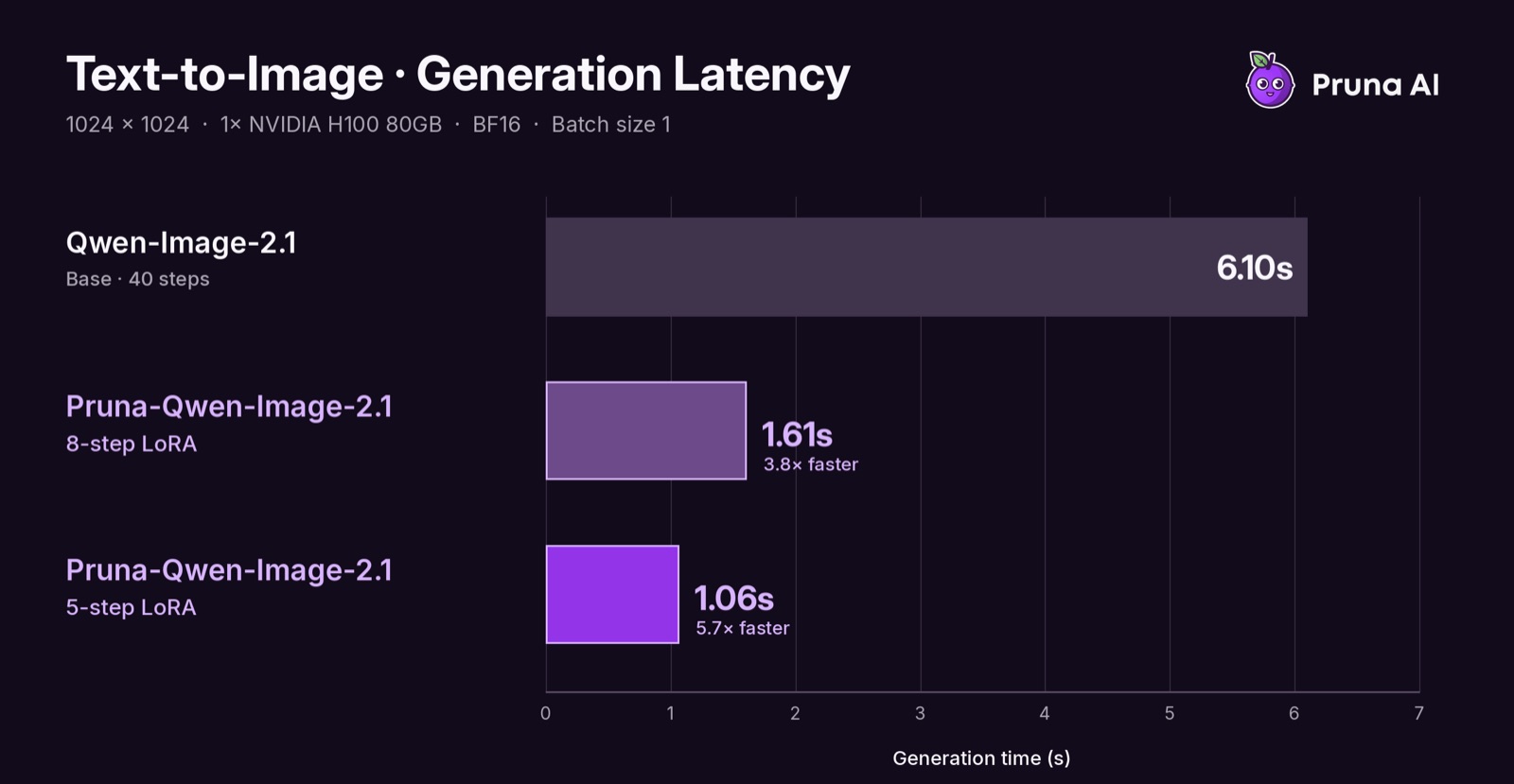
Text-to-image comparisons from the official model card.
Two adapters, two schedules
The release is not one distilled model but two separately trained students, and PrunaAI expects you to pick one based on whether you want quality or speed:
| Adapter | Steps | Trade-off |
|---|---|---|
p_qwen_image_2.1_8step_v0.1.safetensors | 8 | Higher quality, the recommended default |
p_qwen_image_2.1_5step_v0.1.safetensors | 5 | Faster, with visibly worse images |
Each adapter was trained for its own sigma schedule, and the model card asks you to load only one at a time. The schedules are the part that has to be copied exactly, because the students were not trained for a step count that a sampler derives on its own:
| Steps | Sigmas |
|---|---|
| 5 | 1.0, 0.94, 0.857142857, 0.666666667, 0.4 |
| 8 | 1.0, 0.933333333, 0.857142857, 0.769230769, 0.666666667, 0.545454545, 0.4, 0.222222222 |
Both are DMD-trained, both run at CFG 1.0 with an empty negative prompt, and the terminal 0 is appended by the scheduler rather than written into the schedule. Other step counts, schedules or CFG values are outside what the adapters were trained for.
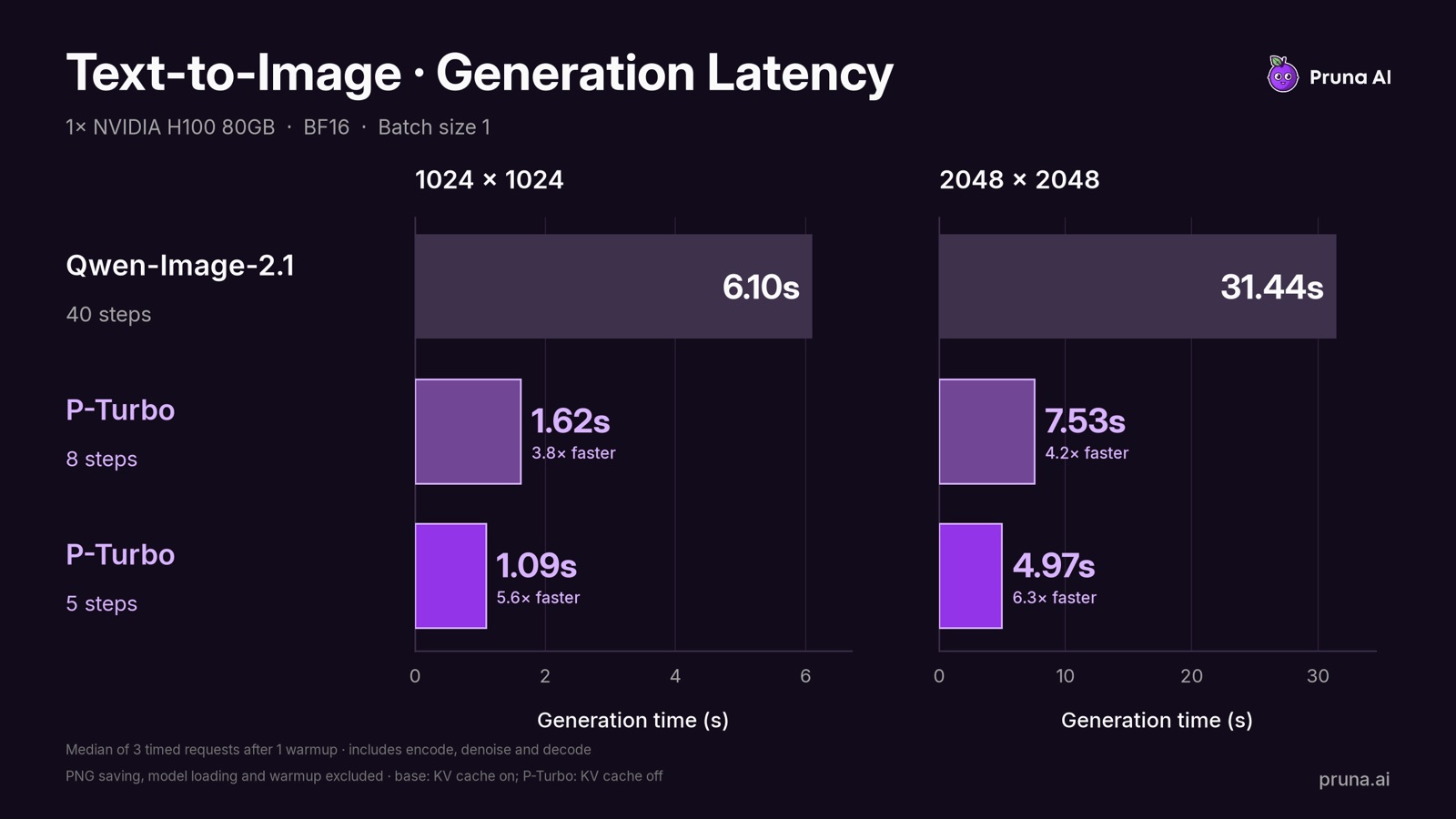
The card's text-to-image latency chart, measured on a single H100 80GB: median of three requests after one warmup, including prompt encoding, denoising and decoding, with the base model at 40 steps with KV cache and the adapters at 5 or 8 steps without it.
PrunaAI's headline number is up to 6.3x faster, and the card is careful about what it does not claim: the timings do not imply equal image quality, the LoRAs were kept unmerged for the benchmark, and the example images enable KV caching while the chart was not remeasured with that setting.
Training coverage and limits
The adapters were trained at 1K resolution only, on a mix of plain and upsampled prompts, covering text-to-image and single- or multi-image editing with up to 3 reference images. PrunaAI recommends starting at 1024x1024 and treats 2K output, more reference images and short vague prompts as outside the coverage, where quality may vary.
The release is explicitly labeled v0.1, work in progress:
- Quality is below that of the 40-step base model, and the repository will be updated as the distillation improves.
- The 5-step adapter is the fast one, and its images are visibly worse than the 8-step adapter's.
- It is not a standalone model: the
Qwen/Qwen-Image-2.1base weights are still required.
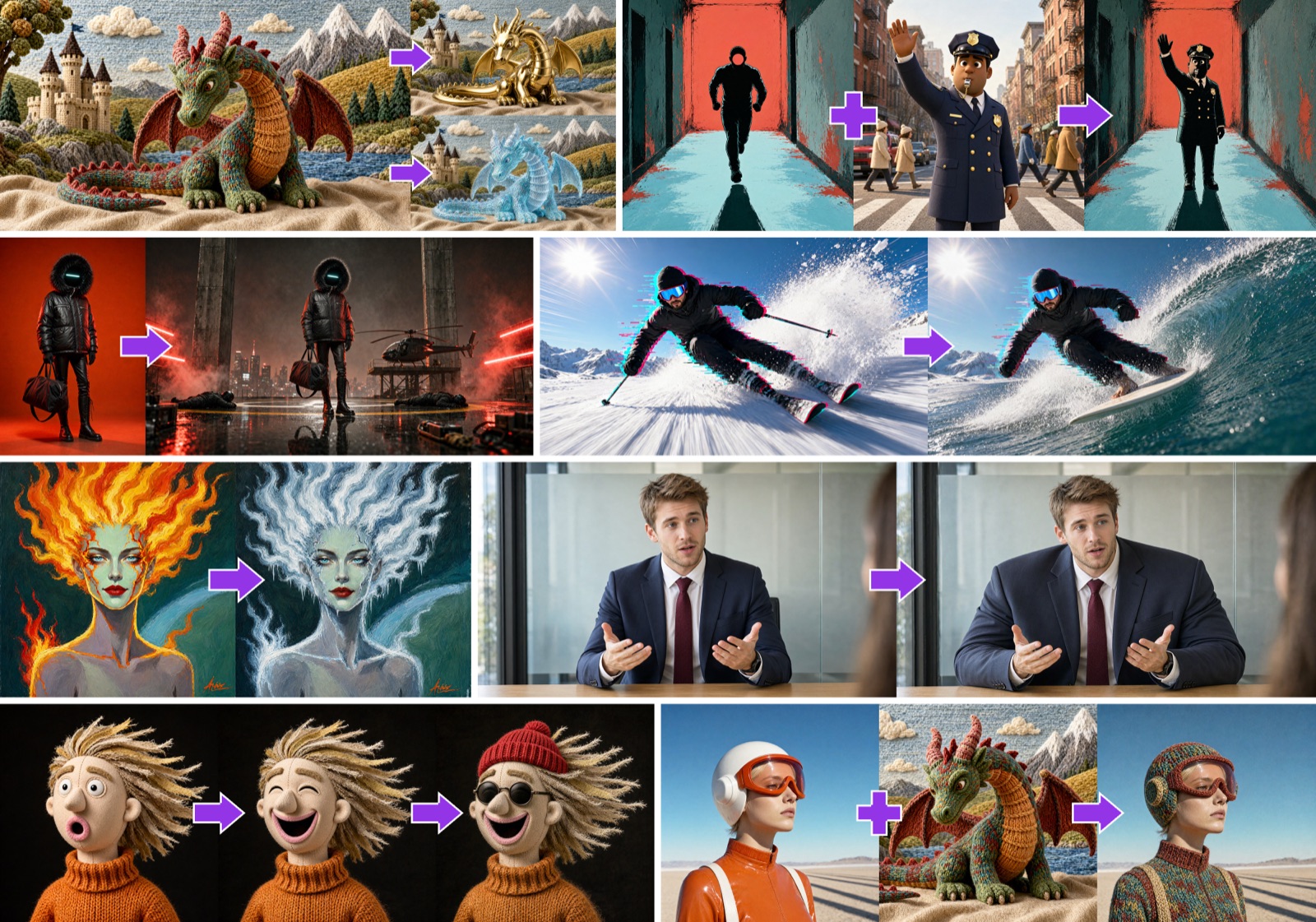
Editing grids from the official model card.
ComfyUI availability
There is no official ComfyUI package for the adapters yet: they ship as diffusers/PEFT files with rank 64 and a PEFT alpha of 128, and the alpha is stored in safetensors metadata rather than in the tensors that ComfyUI's LoRA loader reads, so a straight drop-in would run at the wrong scale. The community closed that gap within a day of the release:
NidAll/pruna-image-2.1-comfyui-lorasis an unofficial conversion that adds a scalar.alphatensor to each of the 224 LoRA targets so the adapters run at the intended scale at LoRA strength 1.0, leaving the A and B weights untouched. It ships its own 5-step and 8-step workflow JSONs.- Those workflows use only native ComfyUI nodes:
ManualSigmas,SamplerCustom, Euler, CFG 1.0, LoRA strength 1.0, no negative prompt, and text-to-image at 1024x1024. The base files come fromComfy-Org/Qwen-Image-2.1, which means theint8_convrottransformer is the practical target for anyone on consumer VRAM.
ComfyUI has supported Qwen-Image 2.1 natively since the Day-0 release, so nothing extra has to be installed: a recent ComfyUI with ManualSigmas and SamplerCustom covers both shipped workflows.
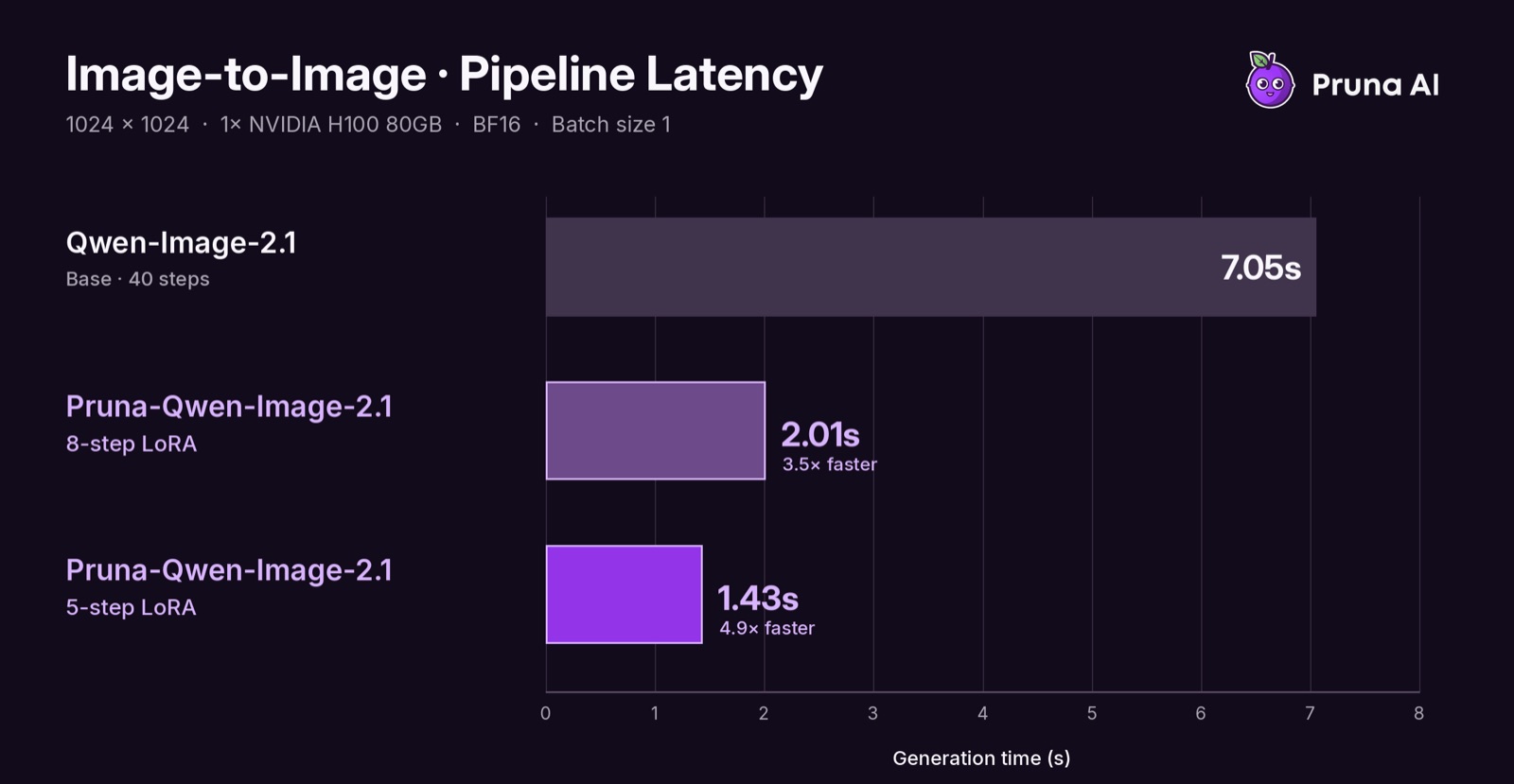
An editing sample from the model card, run with the few-step adapters.
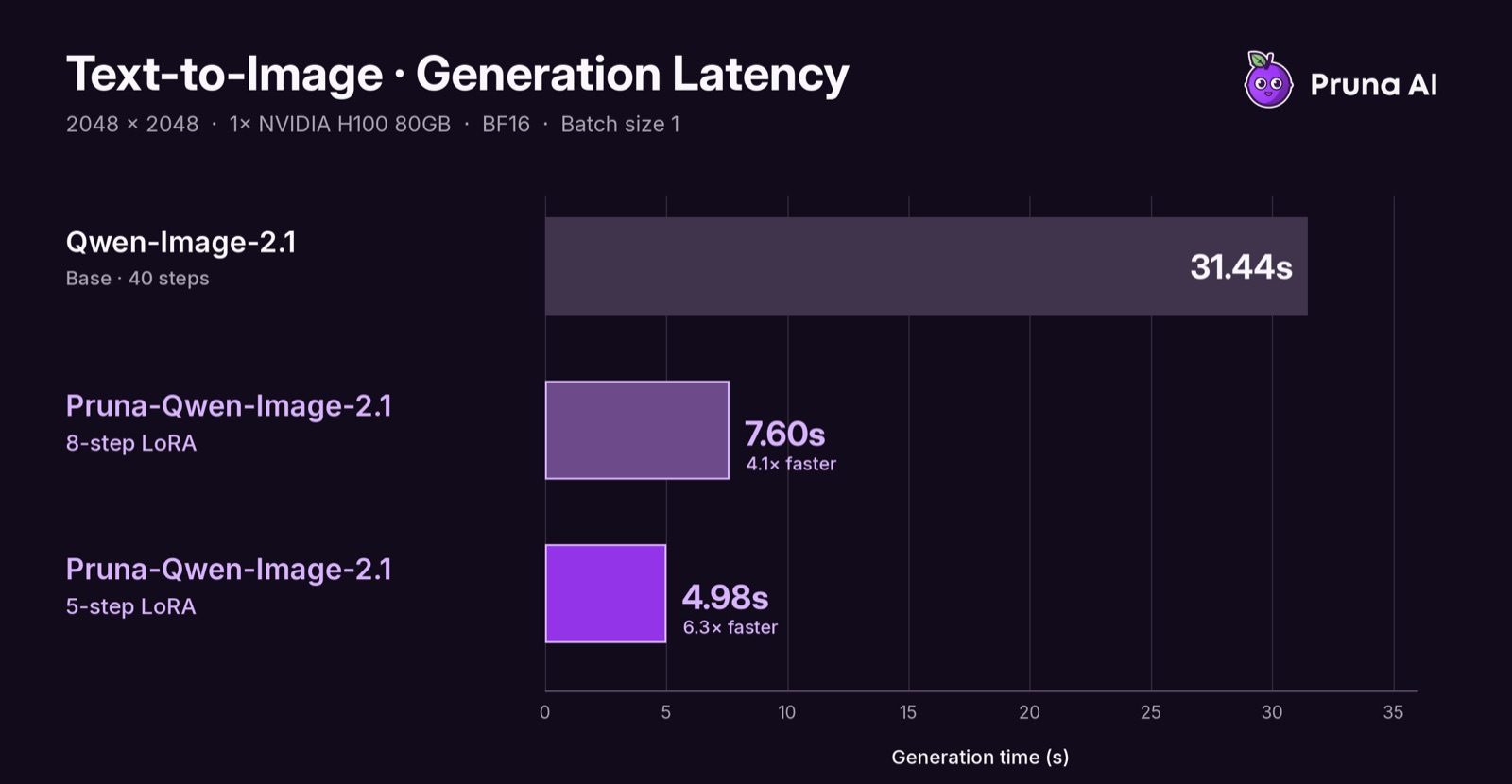
Text-to-image at 2048, outside the 1K training coverage but part of the published latency measurements.
Early testing is coming mostly from the ComfyUI community rather than from the release itself: the adapters were compared against Viggle's turbo and the official Qwen Acc LoRAs in the Banodoco #qwen-image channel, where testers singled out the 8-step adapter, and they were posted to r/StableDiffusion and X shortly after the weights went up.
Comments
Sign in with GitHub to join the discussion.