SenseNova-U1.5 in ComfyUI: Official 4K T2I and Editing Nodes
SenseTime's official ComfyUI node pack (v0.2.0) runs SenseNova-U1.5 locally: native 4K text-to-image, single/multi-image editing and region control at about 17GB peak VRAM.
SenseTime has shipped the official ComfyUI-SenseNova-U1 node pack (v0.2.0, released 2026-08-16) for its unified multimodal model SenseNova-U1.5-8B-MoT-Preview. The pack runs the model fully locally inside ComfyUI: native 4K text-to-image, single- and multi-image editing, region-controlled edits via masks / bounding boxes / visual markers, and interleaved generation, with a peak VRAM footprint of about 17 GB for text-to-image on a 24 GB card.
The model itself was covered in our earlier news: SenseNova-U1.5 Preview: 4K Image Generation and Editing From SenseTime.
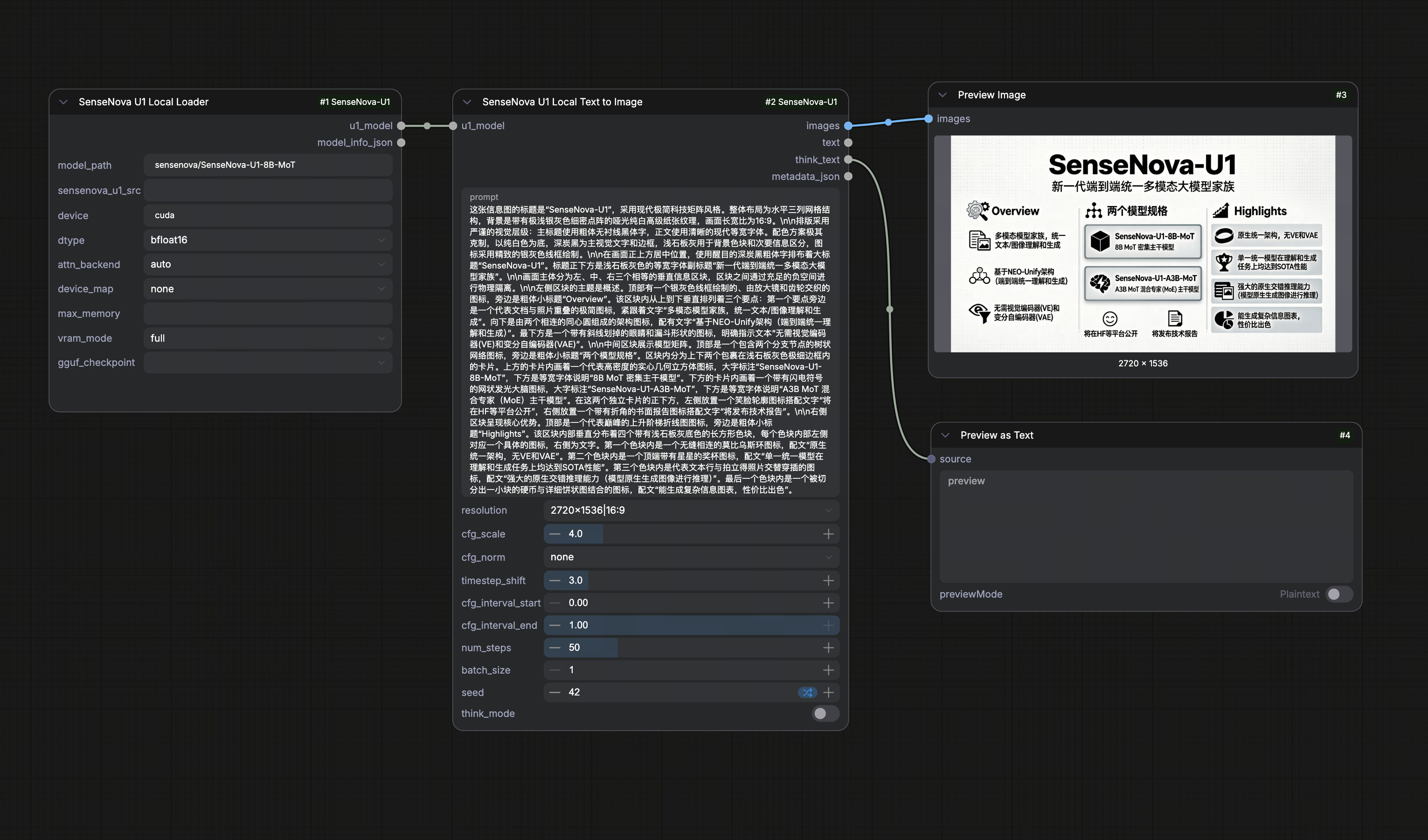
The official local text-to-image example workflow. Drag the JSON below onto the canvas to load the same graph.
What the official pack adds (v0.2.0)
- Published on the Comfy Registry as
ComfyUI-SenseNova-U1. Install it from ComfyUI Manager (search "SenseNova-U1") or runcomfy node install ComfyUI-SenseNova-U1; dependencies, including thesensenova-u1Python package, are installed automatically. - U1.5 local inference for text-to-image, image editing and interleaved generation. The nodes use the model's own sampling loop (
t2i_generate,it2i_generate,interleave_gen) rather than plugging intoKSampler, so they can be combined freely with ComfyUI image IO and post-processing nodes. - VRAM-friendly offload modes:
full/fast/balanced/low. Peak allocation is 17.34 GiB for text-to-image and about 20 GiB for editing;balancedandloware 36-50% faster in v0.2.0 while producing bit-identical outputs. - Broad runtime support:
transformers>=4.57.1,<6(verified on both 4.x and 5.x). The nodes require a ComfyUI build with the v3 node API (comfy_api.latest); older installs that only support v1 registration will not load them. - GGUF support: the
SenseNova U1 Local Loaderhas agguf_checkpointdropdown that picks up files frommodels/gguf/ormodels/diffusion_models/, so quantized checkpoints such as smthem's 19.9 GB Q8 of U1.5 can be used without extra tooling.
Nodes
| Node | Purpose |
|---|---|
| SenseNova U1 Local Loader | Loads a local or Hugging Face SenseNova-U1 checkpoint (safetensors or GGUF) |
| SenseNova U1 Local Text to Image | Runs local t2i_generate |
| SenseNova U1 Local Image Edit | Runs local it2i_generate with single/multi-image references and region control |
| SenseNova U1 Local Interleave | Runs local interleave_gen for interleaved text/image generation |
| SenseNova Interleave Preview | Renders ordered interleaved text / image results |
| SenseNova Prompt Builder | Rewrites raw ideas into image-generation prompts |
| SenseNova Image Generate / Chat / Vision | API nodes for the SenseNova cloud endpoint (credentials via SN_API_KEY / SN_BASE_URL) |
Workflows
The official example workflows cover the local text-to-image and image-editing paths:
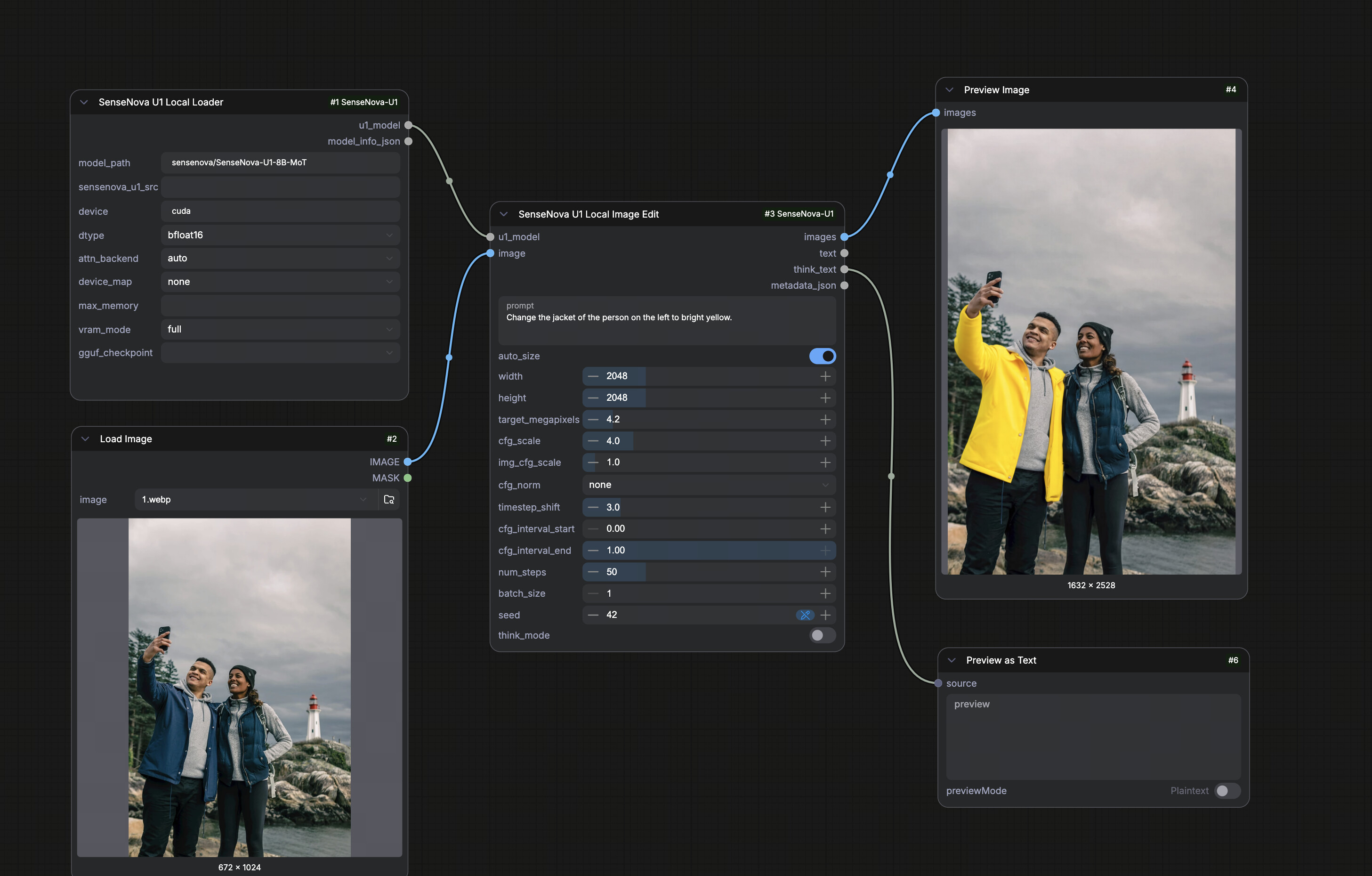
The official local image-editing example workflow with reference and region-control inputs.
More examples live in apps/comfyui/example_workflows/ in the repo, including an API-based U1-Fast workflow (sensenova_api_gen_t2i.json), an interleave workflow (interleave.json) and an infographic-series workflow (infographic_series_t2i_edit.json).
Quick start
- Install the pack via ComfyUI Manager (search "SenseNova-U1") or
comfy node install ComfyUI-SenseNova-U1, then restart ComfyUI. - If you have a manually copied legacy node directory such as
ComfyUI_SenseNova_U1, remove it first, so ComfyUI does not import the same node IDs twice. - Drag one of the example workflows onto the canvas, then set
model_path,deviceanddevice_mapon the loader. - For a smoke test use
num_steps1-2; the recommended setting is 50.
Availability
- Node pack: OpenSenseNova/SenseNova-U1 under
apps/comfyui/(source of truth); registry mirror at OpenSenseNova/ComfyUI-SenseNova-U1 - Model weights: sensenova/SenseNova-U1.5-8B-MoT-Preview on Hugging Face
- GGUF checkpoints: smthem/SenseNova-U1-8B-MoT-Merger-gguf (community-maintained)
Comments
Sign in with GitHub to join the discussion.