SenseNova-U1.5 Preview: 4K Image Generation and Editing From SenseTime
SenseTime's SenseNova-U1.5-8B-MoT-Preview brings 4K text-to-image and stronger image editing in one unified model, with ComfyUI support via the SenseNova_U1 custom node pack.
SenseTime has open-sourced SenseNova-U1.5-8B-MoT (Preview), the latest model in its U-series of natively unified multimodal models. Built on the NEO-unify architecture, the preview focuses on image generation and editing: it can generate up to native 4K images from text and follow detailed editing instructions on single or multiple reference images.
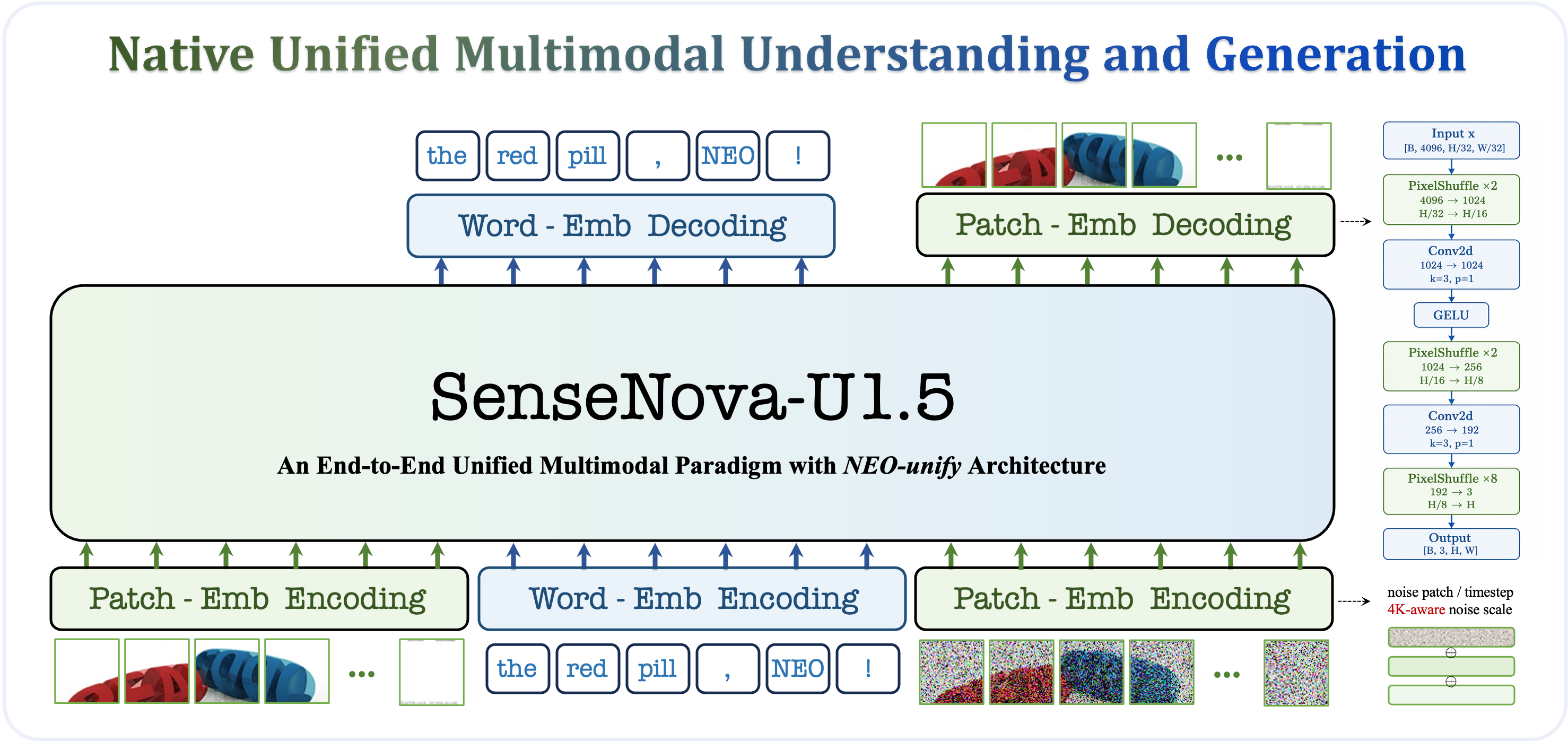
Overview of the technical advances in SenseNova-U1.5 (Preview)
The release follows the original SenseNova-U1 series and ships alongside open-sourced pre-training launcher and configuration files. Weights are available on Hugging Face and ModelScope.
What U1.5 Improves
From patchwise prediction to patch-joint reconstruction
The original U1 reconstructs each RGB patch independently with an MLP head, which can expose token boundaries as grid patterns at high resolution. U1.5 adopts progressive spatial reconstruction through a ConvDecoder: visual tokens are reshaped into a 2D feature grid and upsampled through multiple Pixel Shuffle stages, with intermediate 3x3 convolutions letting neighboring patches interact and merge into a continuous image. This substantially suppresses grid-like artifacts and improves robustness during downstream fine-tuning.
From instruction following to visual preservation
U1.5 extensively cleans, filters, and synthesizes its image-editing corpus, improving the Chinese-English balance and expanding coverage of both single-image and multi-image reference settings. The encoder-free architecture achieves strong instruction following together with subject-identity and structural preservation using only a single sequence of reference-image tokens.
From format exposure to cross-task generalization
Although the generation and editing corpora contain only simple JSON-formatted prompts, U1.5 generalizes well to long and structured instructions — a sign that native unified multimodal modeling can transfer comprehension and visual-planning skills across tasks without dedicated prompt-template training.
Showcase: Text-to-Image

A detailed retro advertising poster generated by SenseNova-U1.5, showing dense text rendering and complex layout control
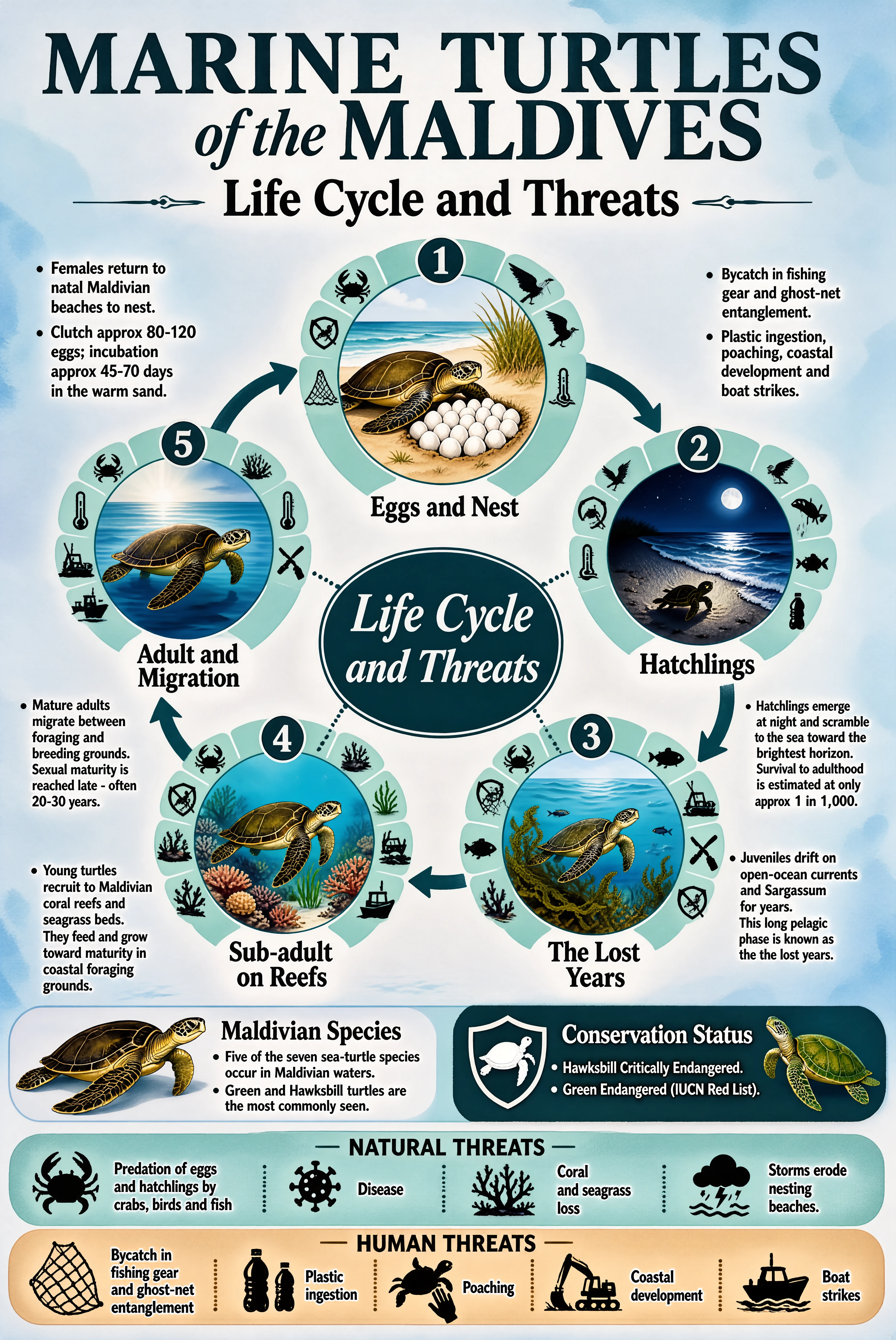
A photorealistic underwater scene with fine texture and lighting detail
Showcase: Image Editing


Editing examples covering style transfer, subject-identity preservation, and region-controllable changes
Benchmark Highlights
On the Qwen-Image Bench, U1.5-Preview improves over the original U1 across every category, with the largest gains in aesthetics and alignment. With Prompt Enhance (PE) enabled, the preview scores 55.17 (EN) / 55.22 (ZH) overall — close to Qwen Image 2 in the same evaluation.
On image editing, U1.5-Preview reaches 4.37 on ImgEdit-Bench overall (up from 3.90 for U1) and 6.852 average on WeEdit, outperforming Qwen-Image-2, FireRed-Image-Edit, and LongCat-Image-Edit in the reported comparison.
ComfyUI Support
Community developer smthemex has added U1.5 support to the ComfyUI_SenseNova_U1 custom node pack, covering GGUF, INT8, and FP8 weight formats (see smthem/SenseNova-U1-8B-MoT-Merger-gguf). The pack also supports the A3B-MoT MoE variants, the 8-step LoRA, and Infographic-V3 checkpoints.
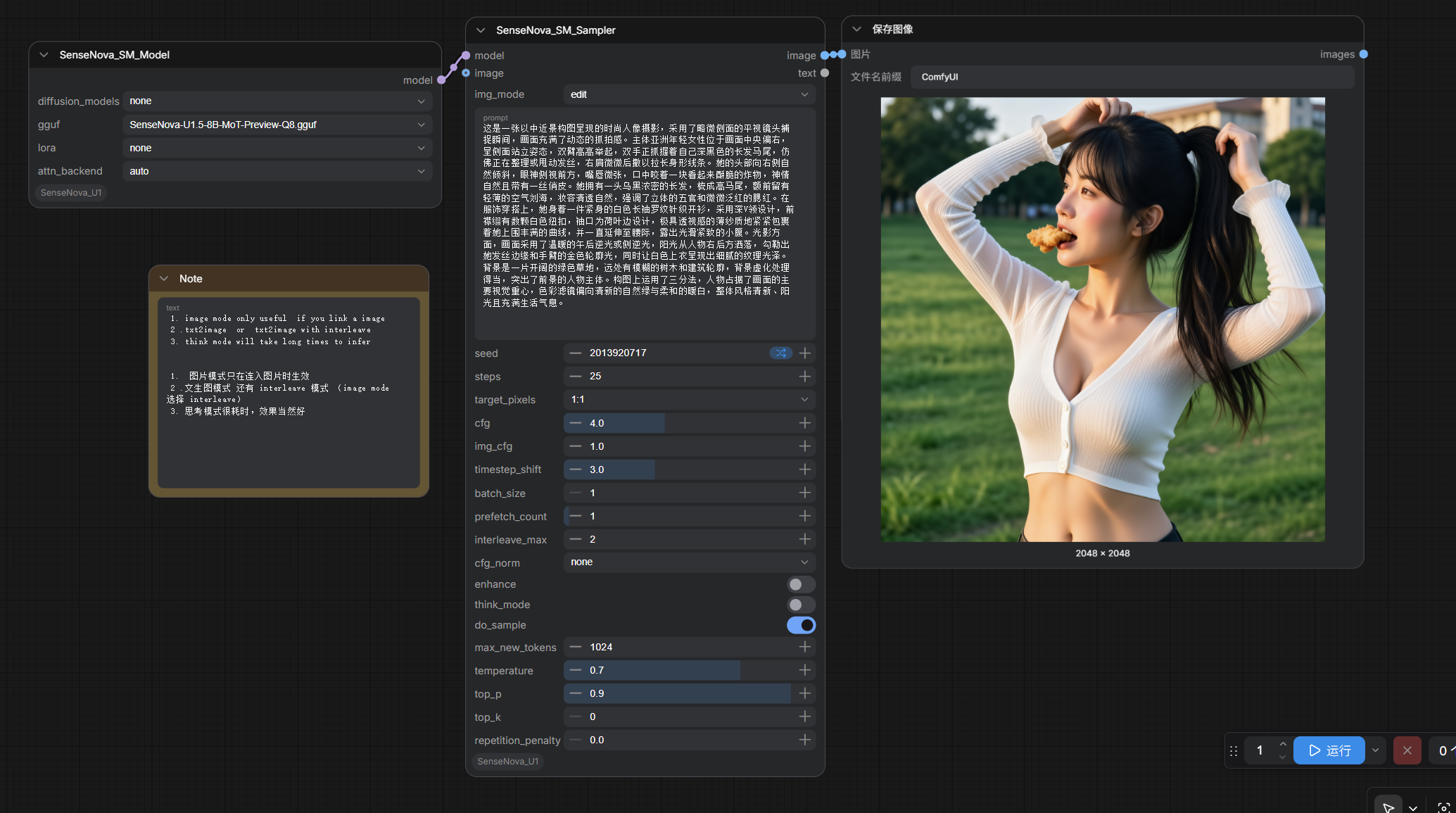
Click to enlarge. The custom node pack ships ready-to-run example workflows for text-to-image and image-to-image.
To run it locally, install the custom node and place the quantized weights in ComfyUI/models/gguf/ or ComfyUI/models/diffusion_models/:
cd ComfyUI/custom_nodes
git clone https://github.com/smthemex/ComfyUI_SenseNova_U1
pip install -r ComfyUI_SenseNova_U1/requirements.txt
Availability
- Model weights: sensenova/SenseNova-U1.5-8B-MoT-Preview on Hugging Face and SenseNova-U1.5-8B-MoT-Preview on ModelScope
- Code: OpenSenseNova/SenseNova-U1 (inference, training, and PE tooling)
- Paper: arXiv 2605.12500
- ComfyUI node: smthemex/ComfyUI_SenseNova_U1
For official Python inference, use cfg_scale=4.0, timestep_shift=3.0, and num_steps=50 with the reference implementation. SenseNova also provides optional Prompt Enhance (PE) and reference-image retrieval tooling to push generation quality further.
Comments
Sign in with GitHub to join the discussion.