Direct3D-V3: Latent-Free Voxel Mesh Refinement in ComfyUI
Direct3D-V3 refines a coarse 3D mesh with latent-free voxel diffusion instead of a VAE, and a community ComfyUI node pack now runs it on Windows GPUs.
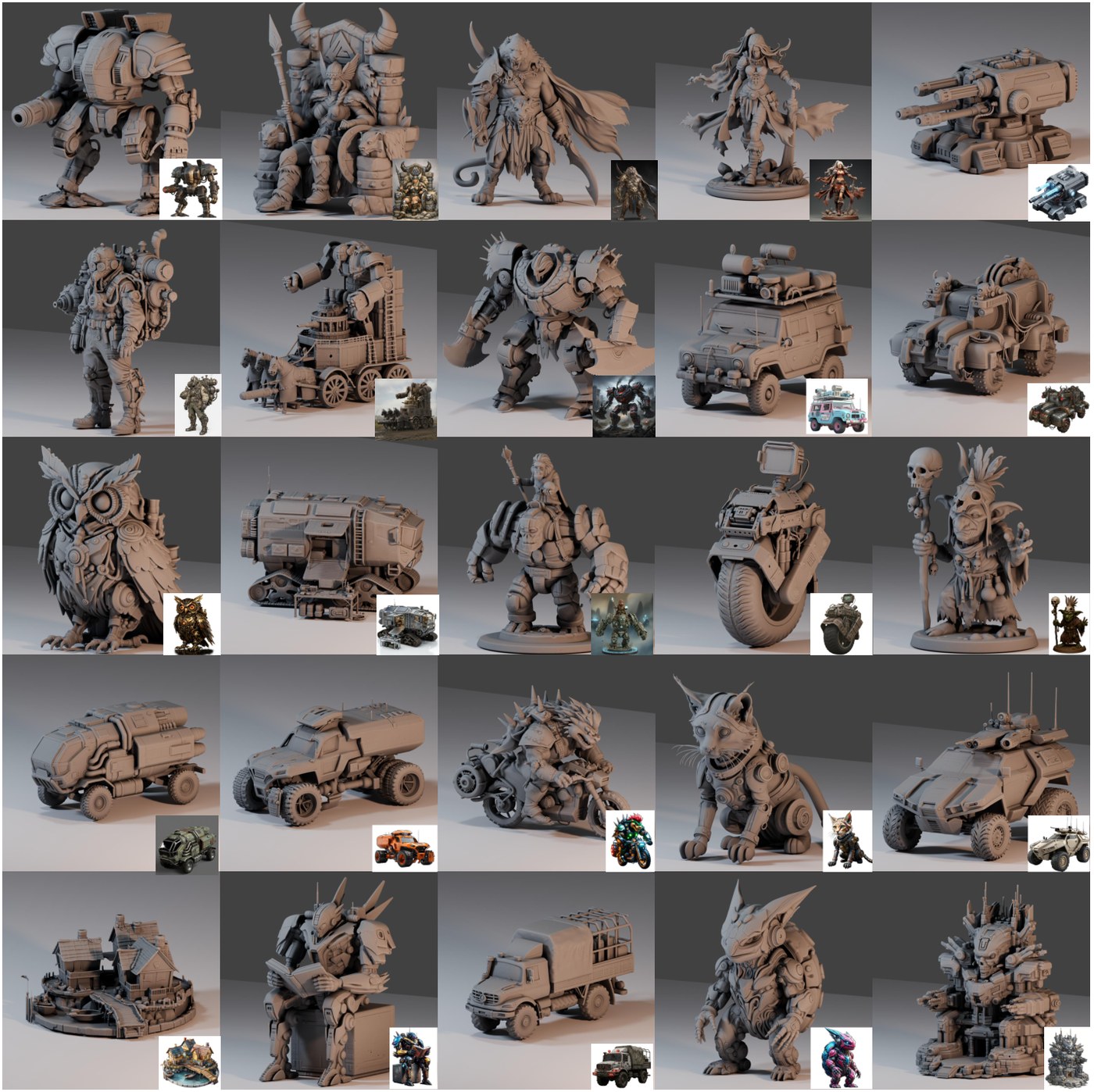
Generated meshes and surface detail, from the paper's additional results.
What it does
Feed it a coarse mesh in the same orientation as your reference image, and it refines the shape: grooves, bevels, thin structures and sharp edges that the coarse stage smoothed away. Implicit manifold regularization keeps the surfaces closed. The mesh is simplified to 2M triangles by default (target_faces) and exports as GLB.
The paper's argument is that every image-to-3D stack built on latent diffusion throws away fine geometry twice: once when the VAE compresses the shape, and again because the VAE is trained for reconstruction while the generator is trained for distribution matching. Direct3D-V3 drops the VAE and models raw SDF voxel grids directly with a diffusion transformer, adding manifold regularization over neighboring voxels plus an auxiliary camera-prediction task so the conditioning image lines up with the generated geometry.
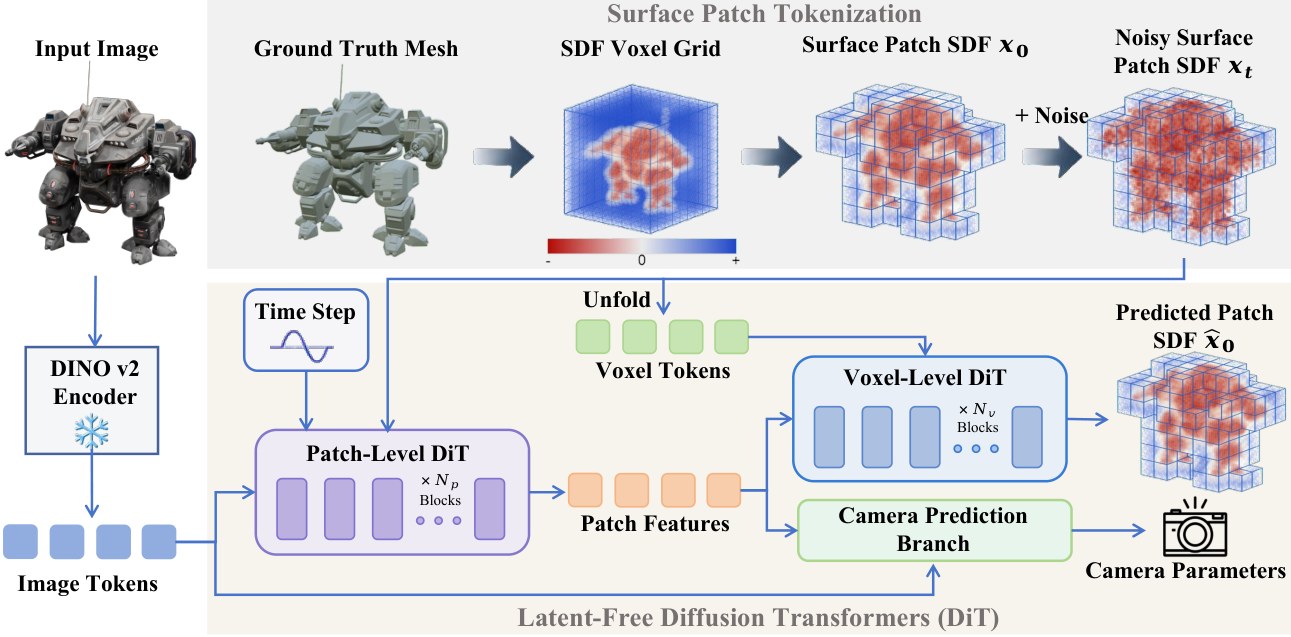
Training and sampling happen on the voxel grid itself; meshes come out through Marching Cubes.
Three checkpoints ship: 512, 1024 and 1536. They can run as a cascade or a single stage, and the reference numbers to start from are 15 steps and CFG 4 at 512 and 1024.
Run it in ComfyUI
- Grab one of the Windows builds from Direct3D-V3_Comfyui_Nodes (cu128 for Python 3.12 and PyTorch 2.8, cu130 for Python 3.13 and PyTorch 2.12.1) and extract the folder into
ComfyUI/custom_nodes. - Request access to DINOv3 ViT-H+ on Hugging Face. The node uses it as the image encoder, and setup asks for a read token.
- Run
setup.cmdin the node folder. It builds a private.runtimePython environment, downloads PyTorch, DINOv3 and the 1536 checkpoint. Reserving several GB of disk is expected. - Add Direct3D-V3 Clean | Mesh File Path and Refine (Mesh File, Low VRAM), connect the mesh path, the reference image and a foreground mask, then start with
resolution = 1536andstage_mode = single_stage.
Both node builds are self-contained: no CUDA Toolkit or Visual Studio, prebuilt voxelizers for RTX 20 through 50 series, and ComfyUI keeps its own Python and PyTorch. Attention defaults to efficient; cudnn_fp16 is faster on FP16 but changes rounding, so fix the seed when comparing exports.
What testers see
- MostAadTech, who built the node pack, ran the 1536 stage with 114,832 voxel patches at 6,008 MiB peak reserved VRAM and finished a full dragon in 9 min 56 s with the cuDNN preset, at zero shrink.
- A second run reported 4.15M vertices / 8.3M triangles with the prompt completing in 325 s.
- Kijai measured roughly 4.9 GB activation peak at about 100k tokens, of which about 2 GB is skip tokens that stay resident.
- The realistic full pipeline is longer than the refiner alone: coarse mesh from Pixal3D or TRELLIS.2, a normal map from Qwen-Image-2.1, then Direct3D-V3, then texturing with UltraTex.
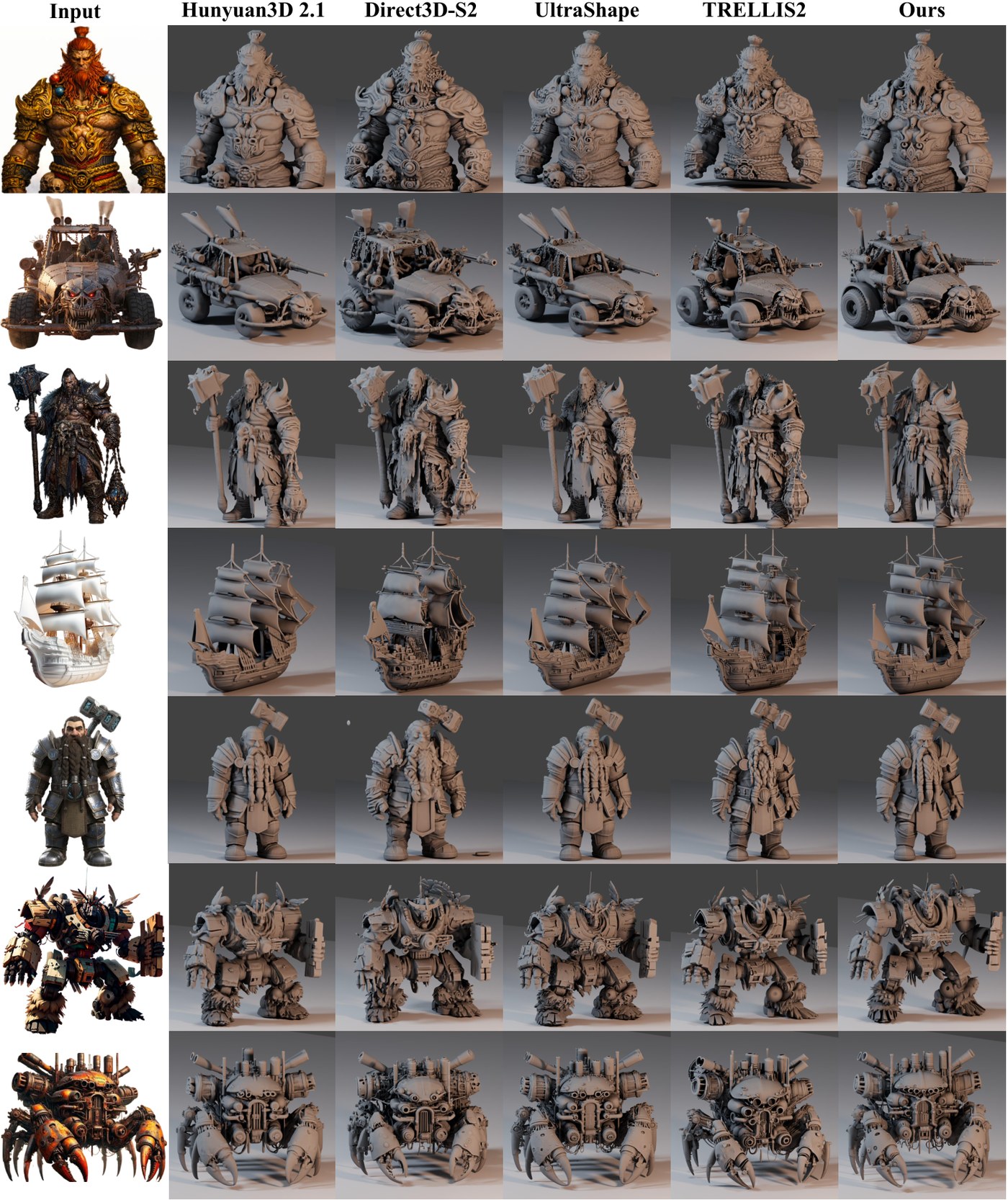
Qualitative comparison against other open-source image-to-3D methods, from the paper.
Before you start
- There is no coarse stage in the release. The authors point to Hunyuan3D-2.1 or UltraShape-1.0 for the initial mesh; their own coarse models are still on the to-do list.
- The reference image matters more than usual. A surface normal map or white clay render gives noticeably finer detail than a textured RGB image. The repo suggests ChatGPT (GPT Image 2.5) or Lotus-2 for that conversion, and Qwen-Image-2.1 works as a no-cost option.
- The released weights are newer than the paper. The authors state that released checkpoints use four DINOv3 layers, the Muon optimizer and produce finer surfaces than the model evaluated in the paper, so paper figures understate the current output.
- Texturing and training code are not out yet. Only mesh refinement is in this release, so texture comes from a separate model.
Get it
- Weights: wushuang98/Direct3D-V3 (512, 1024 and 1536 stage checkpoints)
- Official code, Gradio demo and inference examples: DreamTechAI/Direct3D-V3
- Paper: SIGGRAPH Asia 2026, arXiv 2611.26511 with results on the project page
- ComfyUI adapter (Windows): Mstafa-awad/Direct3D-V3_Comfyui_Nodes
Comments
Sign in with GitHub to join the discussion.