PAN 2: MBZUAI's 29B World Model in ComfyUI, 20-Second Clips
MBZUAI IFM opens PAN 2, a 29B world model that simulates 20-second 704x1248 video from text or a start frame, plus a community ComfyUI node that loads fp8 weights.
PAN 2 is a 29B world model from the Institute of Foundation Models at MBZUAI. Describe an action in text, optionally hand it a starting frame, and it simulates what happens next as one clip of up to 20 seconds at 704x1248 and 24 fps. It was announced on 10 November with weights, inference code and training configs already in the repository, and a community ComfyUI node appeared the next day.

One frame from the official demo clip. Source: IFM/PAN2
26 seconds of the official demo, re-encoded at 1280x720. Source: IFM/PAN2
How it works
Two models take turns. A frozen LLM, called the conceptual reasoner, rewrites your request as a structured world-state caption: events with time ranges, actions bound to actors, camera moves. The 29B MMDiT then predicts the video latents that fill in the detail the caption leaves open, and a stock Wan 2.2 VAE decodes them.
The text encoder is Qwen3.5-9B and it stays frozen, so what you tune is the prompt, not the model.
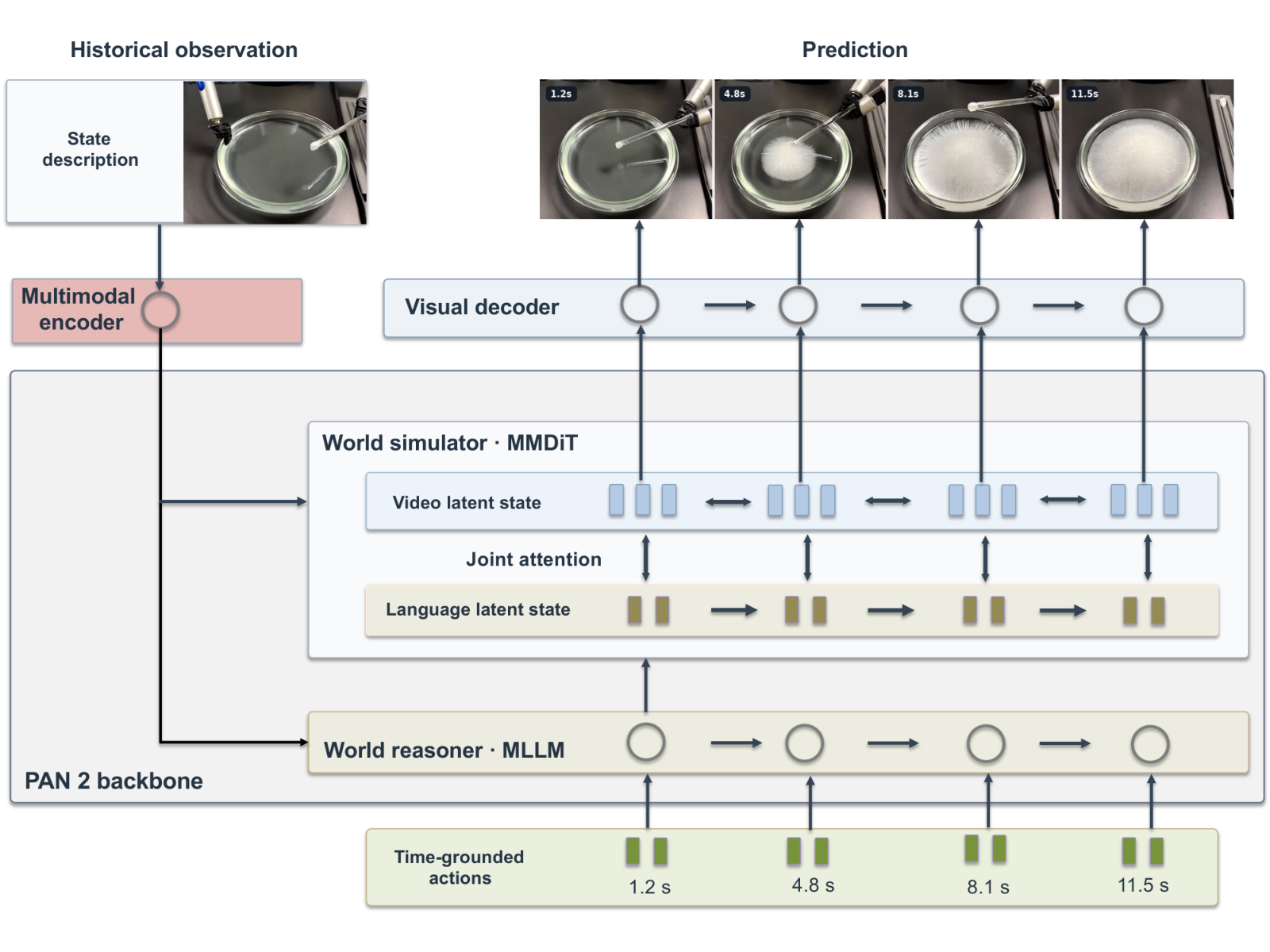
The two backbones and the frozen encoder and decoder. Source: IFM/PAN2
In ComfyUI
There are no official nodes yet, but ComfyUI-PAN2 is a working port published on 11 November: pure PyTorch with SDPA, so it also runs on Windows. It loads the diffusers-layout weights directly.
- Diffusion model: bf16
transformer/from IFM/PAN2, or the 33.7 GB community fp8 repack zombothe26/pan2-fp8. - VAE: the stock Wan 2.2 VAE in ComfyUI.
- Text encoder:
Qwen/Qwen3.5-9B. - Graph:
PAN2 Model LoaderandPAN2 Prompt BuilderfeedPAN2 Text Encode (Qwen3.5), thenPAN2 Samplergoes to the core VAE Decode and Create Video at 24 fps.
Defaults match the official ones: 50 steps, CFG 2.5, shift 9, 704x1248, 241 frames. The node author measured a coherent 448x256, 13-frame, 16-step clip in about 65 s on a 5090 and 129 s on a 4090, with the weights kept in RAM and 44 blocks swapped to the GPU one at a time.
Prompt formatting is not optional here. PAN 2 was trained on structured captions, and a one-line prompt with an empty negative gives blown-out, mushy clips. Use the bundled PAN2 Prompt Builder to write the scene, event, subject, lighting, viewpoint and style fields before sampling.
What the report measures
The technical report benchmarks six simulation capabilities and multi-step plans, then three public benchmarks: Physics-IQ Verified for image-to-video, PhyGround and RBench. A blind human study adds 1,400 pairwise comparisons over 140 prompts, scored as Elo.
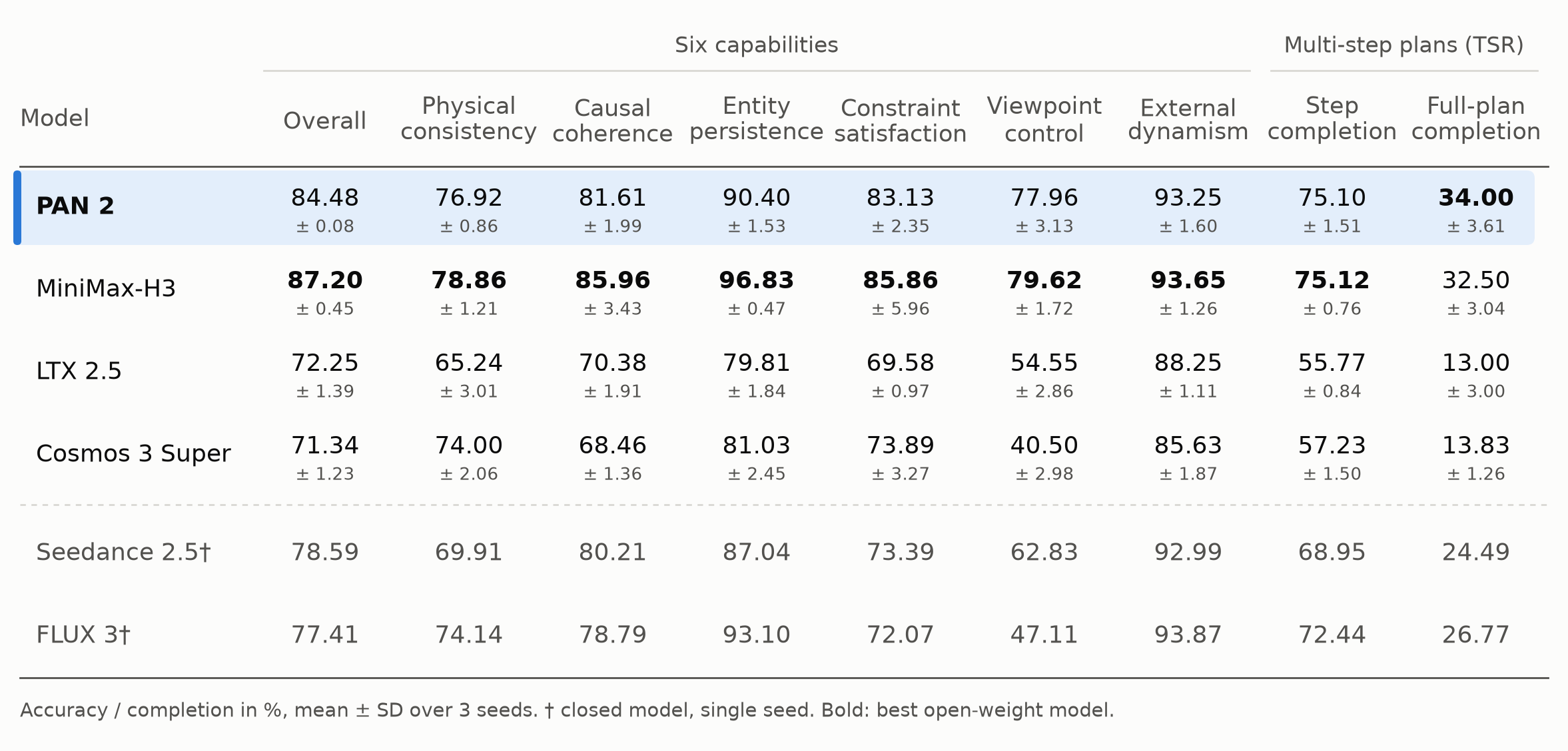
Capability accuracy and multi-step plan completion, PAN 2 highlighted. Source: IFM/PAN2
The authors are direct about the weak spot: about two in three simulated multi-step plans contain at least one step the model does not carry out. Each clip is also simulated from at most one starting frame plus text, so appearance drifts across a long sequence.
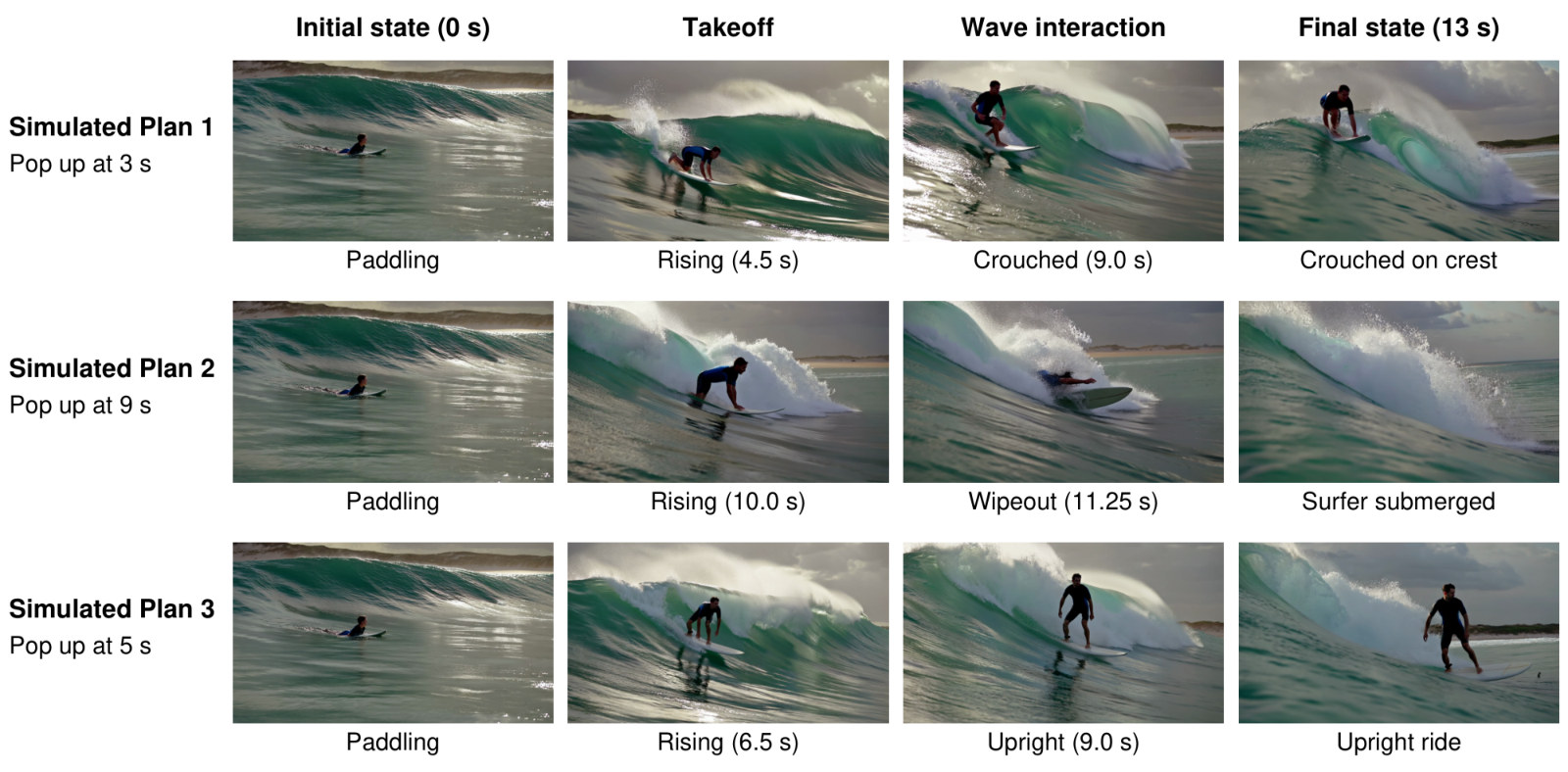
A simulative-reasoning example from the report. Source: IFM/PAN2
Official path
Outside ComfyUI, PAN 2 ships a Diffusers pipeline (pan2), a vLLM recipe and a generate.py that converts the checkpoint once and runs one worker per GPU. The same repository holds the pretrain and SFT configs, so the training recipe is reproducible.
Comments
Sign in with GitHub to join the discussion.