MOSS-Image Control LoRAs in ComfyUI: Canny, Depth, Pose
Seven ControlNet-style edit LoRAs for MOSS-Image-SFT, one per control map, each with a ready ComfyUI workflow, example grids and a single 290 MB weight file.
thedeoxen published seven control LoRAs for MOSS-Image-SFT on November 10: canny, depth, pose, normal, lineart, scribble and segmentation. Each one is a single ~290 MB rank-64 LoRA with its own ComfyUI workflow and control-to-result example grid, so you can pick the map you already have and run it.
They are edit LoRAs, not a new control model. The map goes in as the reference image and the prompt decides what the shapes become.

Depth control (leftmost) with generated results from different prompts
What each LoRA takes
| LoRA | Control map to feed | Preprocessor in the shipped workflow | Checkpoint |
|---|---|---|---|
| Canny | thin white edges on black | Canny | step 4500 |
| Depth | grayscale depth, near is white | Depth Anything V2 (ViT-L) | step 5000 |
| Pose | DWPose skeleton, black background | DWPose | step 4500 |
| Normal | camera-space normal map | BAE normal map | step 5000 |
| Lineart | fine white lines, coarse lineart | LineArt | step 5000 |
| Scribble | loose white strokes | HED | step 5000 |
| Segmentation | flat-color regions | UniFormer semantic seg | step 4500 |
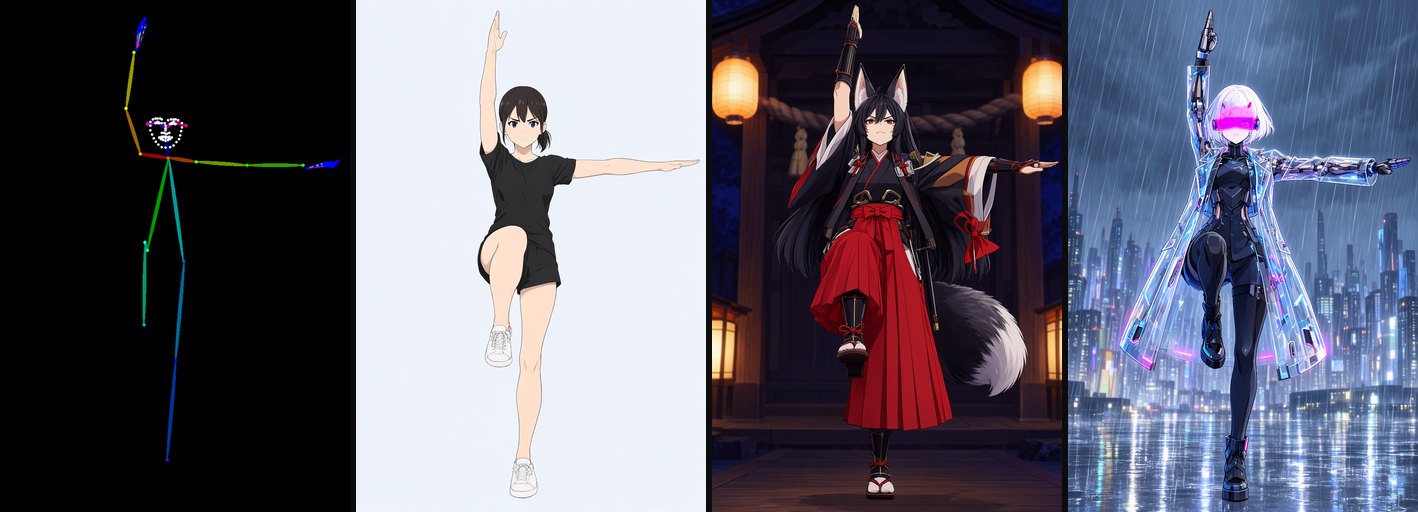 | 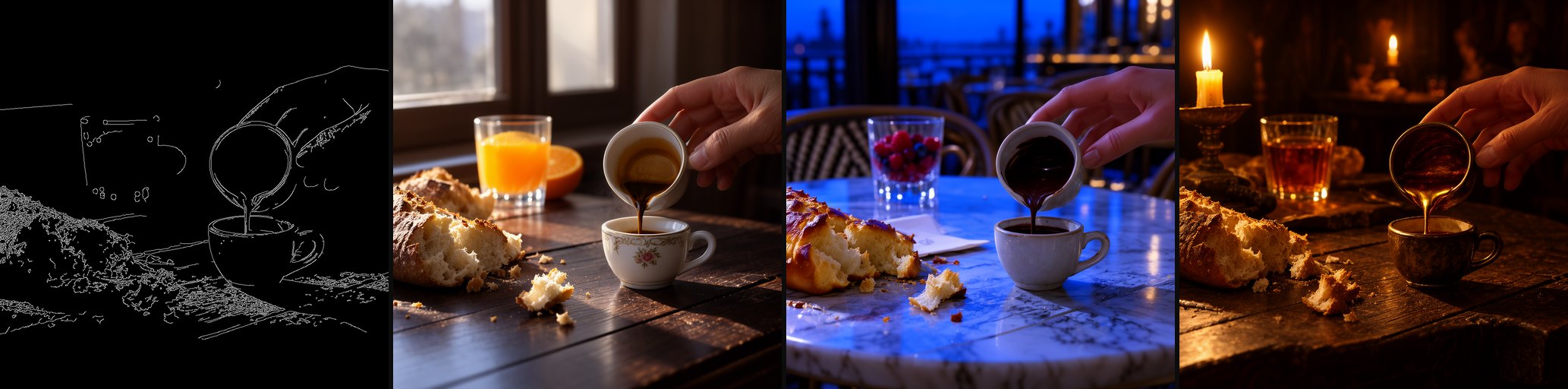 |
|---|---|
| DWPose skeleton to a leaping figure | Canny edges to a new material and setting |
How to run it
- Load MOSS-Image-SFT: UNet
moss_image_sft_int8_convrot.safetensors, CLIPqwen3.5_9b_w4a8_gptq.safetensorswith typemoss_image, VAEflux2-vae_small.safetensors. - Add the LoRA on the UNet at strength 1.0. Drop toward 0.7 if the control is too rigid.
- Feed the control map as the single reference image into Text Encode MOSS-Image Edit, and set
edit_formattoai-toolkiton both the positive and the negative encode. These LoRAs were trained with kv cache on. - Sample with 30 steps, CFG 4,
eulerandsimple.
The preprocessors in the workflows (Canny, Depth Anything V2, DWPose, BAE, LineArt, HED, UniFormer) come from the ControlNet Auxiliary Preprocessors pack, not from core ComfyUI. If you already have a map, skip the preprocessor and wire the image straight into the encode node.

Flat-color regions from UniFormer, restyled per prompt
How this differs from the official adapter
The official MOSS-Image color/depth control adapter starts from noise and takes a region map plus a depth map as conditioning. These LoRAs instead treat the map as a reference image, which is why they work with any of the seven map types and why the prompt carries all appearance. The trade-off is that strong controls can hold too tightly: the cards recommend strength 0.7 when the layout looks frozen.
Downloads
| Control | Weights and workflow |
|---|---|
| Canny | MOSS-Image-canny-controlnet |
| Depth | MOSS-Image-depth-controlnet |
| Pose | MOSS-Image-pose-controlnet |
| Normal | MOSS-Image-normal-controlnet |
| Lineart | MOSS-Image-lineart-controlnet |
| Scribble | MOSS-Image-scribble-controlnet |
| Segmentation | MOSS-Image-segmentation-controlnet |
Base model: OpenMOSS-Team/MOSS-Image-SFT. Each repo carries its own moss_image_<type>_control.json, which you can drag into ComfyUI once the three base files are in place.
Comments
Sign in with GitHub to join the discussion.