InstantHMR: 3D Body Capture From a Webcam Inside ComfyUI
ComfyUI-InstantHMR fits a full 3D body from a photo, video or live webcam with a 32M model, then drives rigged characters or streams the motion over VMC.
InstantHMR is a 20 to 32 million parameter model from Naturalpad Studio, released in early November 2026 with a published paper. It returns pose, body shape, 70 2D and 3D keypoints and a full MHR mesh, at roughly 1 ms per person on a desktop GPU and 5 ms on a phone NPU.
The node pack puts that model on ComfyUI's own SAM 3D Body pipeline. Three new nodes sit in front of the native ones:
| Node | What it does |
|---|---|
Load InstantHMR Model | Loads one of five checkpoints from models/detection |
Run InstantHMR Prediction | One MHR body per person box, output as MHR_POSE_DATA |
InstantHMR Live Capture | Live 2D/3D preview from a webcam or phone, drives rigged characters, records clips |
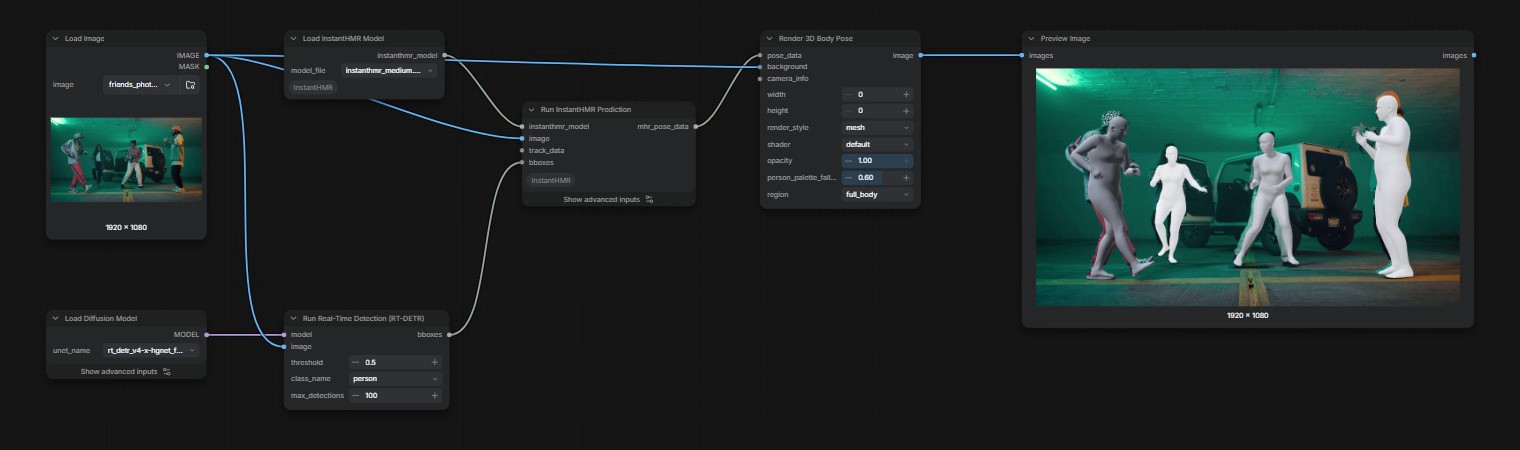
A photo workflow: RT-DETR boxes per person, InstantHMR prediction, then native rendering.
Photos and video
Run InstantHMR Prediction takes person boxes from Run Real-Time Detection (RT-DETR) or tracks from SAM3 Video Track. With neither connected, the whole frame is treated as one person. Set fov to the vertical field of view, or chain Load MoGe Model and Get FoV from MoGe Geometry to take it from the footage.
The result feeds the native nodes directly: Smooth SAM3D Body Pose Data for jitter, Render 3D Body Pose for meshes, silhouettes or OpenPose 2D/3D, and Create 3D Animation File for animated GLB or BVH. The body_mesh and bones_only styles and BVH output need a SAM 3D Body loader on the same graph for the rig.
| Checkpoint | Parameters | 3DPW PA-MPJPE |
|---|---|---|
instanthmr_nano | 20.0 M | 46.6 mm |
instanthmr_tiny | 20.3 M | 44.0 mm |
instanthmr_small | 24.4 M | 41.7 mm |
instanthmr_medium | 32.2 M | 40.0 mm |
instanthmr_medium_commercial | 32.2 M | 50.7 mm |
medium is the default. medium_commercial trades accuracy for a training set that allows commercial use.
Live capture
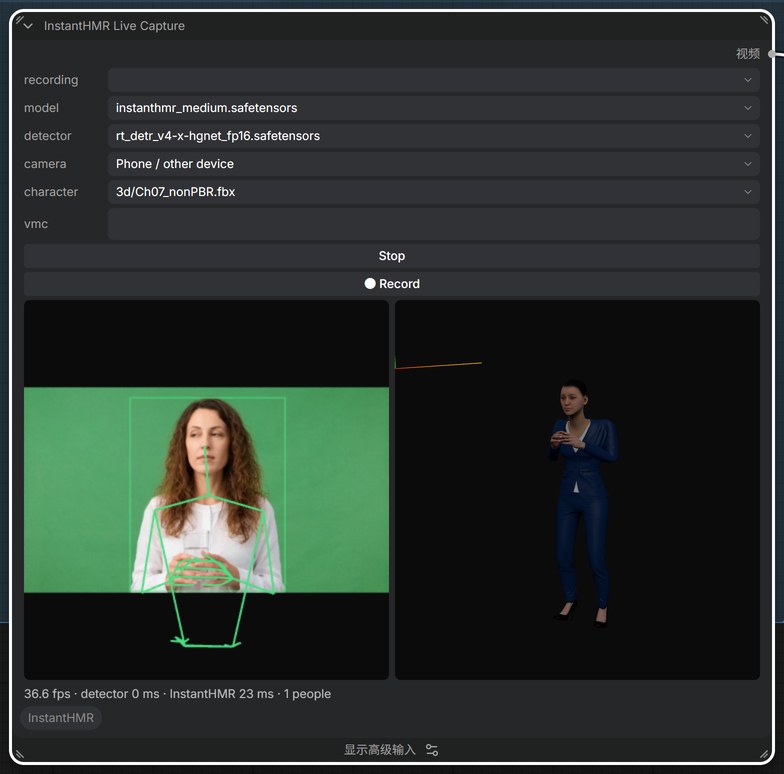
InstantHMR Live Capture runs the detector and the model on a camera feed while you watch. Pick This device for the browser webcam, or Phone / other device for a QR code that streams a phone camera over your network. A smoothing value of 0.5 steadies the body without lagging fast moves, and detect_every at 2 or 3 keeps the preview fluid since detection is the slow step.
Two things make it useful beyond previews. Pick a rigged .fbx, .glb, .gltf or .vrm from the input folder and the 3D view drives that character instead of the raw body, one copy per person, with Mixamo and VRM bone mapping handled. Fill in vmc and the pose streams to VSeeFace, Warudo, VNyan, Blender with VMC Link or Unity, so a webcam take becomes an animation on a character rig.
● Record saves the take to input/instanthmr_live/, where Get Video Components → Run InstantHMR Prediction turns it into a full pipeline run with smoothing, render and 3D export.
How to run it
Clone the repo into ComfyUI/custom_nodes/, put the checkpoints in models/detection, and restart. ComfyUI needs the native SAM 3D Body nodes, which landed in v0.34.0. RT-DETR, SAM3 and MoGe nodes are core, so no other custom pack is required for the shipped graphs.
To use the browser camera from another device the page must be HTTPS: start ComfyUI with --tls-keyfile and --tls-certfile, then open https://<lan-ip>:8188 on the phone and accept the certificate once.
Availability
Node pack: jtydhr88/ComfyUI-InstantHMR
Weights: jtydhr88/ComfyUI-InstantHMR
Model and training code: Naturalpad-studio/InstantHMR
ONNX release: momolesang/InstantHMR
Paper: hal-05854387
Comments
Sign in with GitHub to join the discussion.