H3 Relay Hires Finishes MiniMax H3 at 1080p in a Quarter of the Time
H3 Relay Hires renders a MiniMax H3 take at 0.5 MP in ComfyUI, then finishes at 1920x1088 with an anime upscaler and one DMAD step: 119 s instead of 503 s on an RTX 5090.
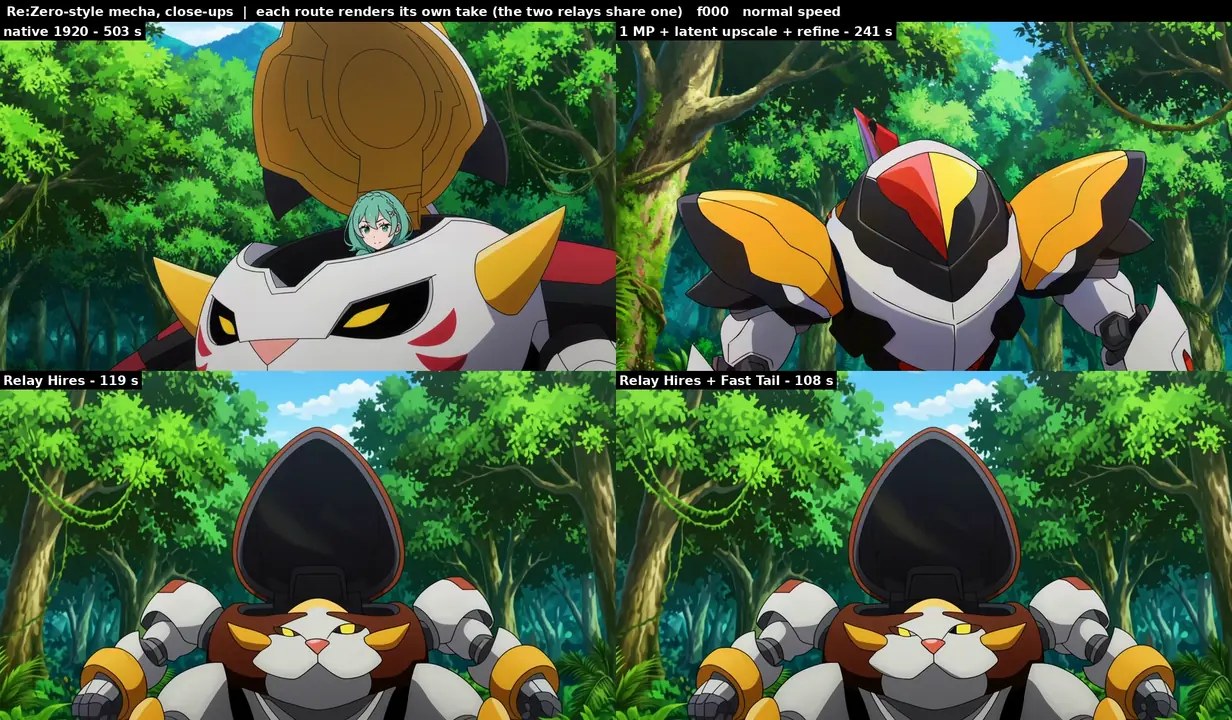
Top: native 1920 render. Bottom: Relay Hires. Each route renders its own take, so compare the drawing, not the pose.
The same comparison with sound, then at half speed.
The numbers
5 s clips (124 frames) at 1920x1088 on an RTX 5090, end to end:
| clip | native 1920 | 1 MP + latent upscale + refine | Relay Hires | + Fast Tail |
|---|---|---|---|---|
| Teen Titans-style punch | 492 s | 240 s | 116 s | 105 s |
| sword fight | 503 s | 241 s | 118 s | 107 s |
| Edgerunners-style rocket | 508 s | 245 s | 121 s | 109 s |
| Re:Zero-style mecha close-ups | 503 s | 241 s | 119 s | 108 s |
| wide shot, small faces | 500 s | 239 s | 117 s | 106 s |
How it gets there
- Pass 1 at 960x544 decides layout, motion, acting and audio. Most of the render time lives here: 60 s instead of 151 s at 1 MP.
- AnimeSR upscales the decoded frames in about 2 s. H3 draws ink lines roughly 2 px wide at any resolution, so a 0.5 MP frame has lines twice too thick for 1920, and this 1.3 M parameter upscaler was trained on 9,470 H3-style pairs to undo that.
- One step at sigma 0.60 re-noises the frames at 1920 and redraws detail in a single DMAD step, then decodes.
Settings the author measured: sigma 0.60 (0.45 stays soft, 0.75 redraws faces), one step, and window attention 4 with anchors every 8th latent frame, which halves the 1920 step on long clips. The H3 Fast Tail Sampler replaces euler in pass 1 and cuts about 20% off it without changing the take. A Pika H3 Flex pass 1 is the fastest route but renders its own take.
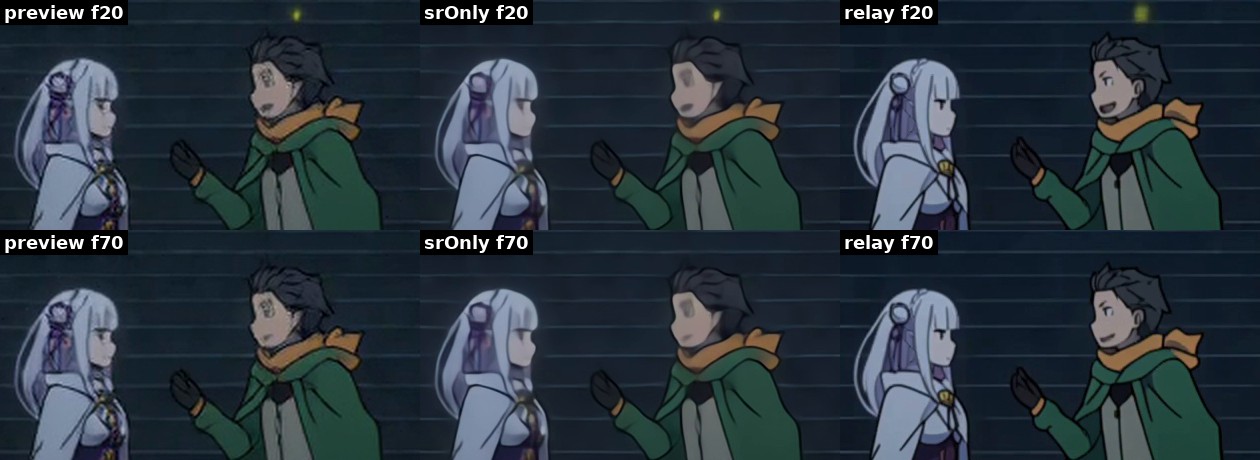
0.5 MP preview | AnimeSR alone | Relay Hires, 1:1 crops at 1920.
What it does not fix
- Ink lines land at 3.1-3.9 px against 2.2-3.0 px for a native render.
- Very fast action that already melts in the 0.5 MP take stays blurred. Fix those frames first with the author's de-rope workflow, then relay.
- AnimeSR is anime-only. Connect any ComfyUI upscale model through the node's
upscale_modelinput for realistic or painterly clips. On a painterly test, RealESRGAN x2plus kept the skin and card detail that AnimeSR turned into cel shading. - If brightness pulses every 4th frame, the optional Sol-H3 VAE workflow fixes it at twice the encode cost.
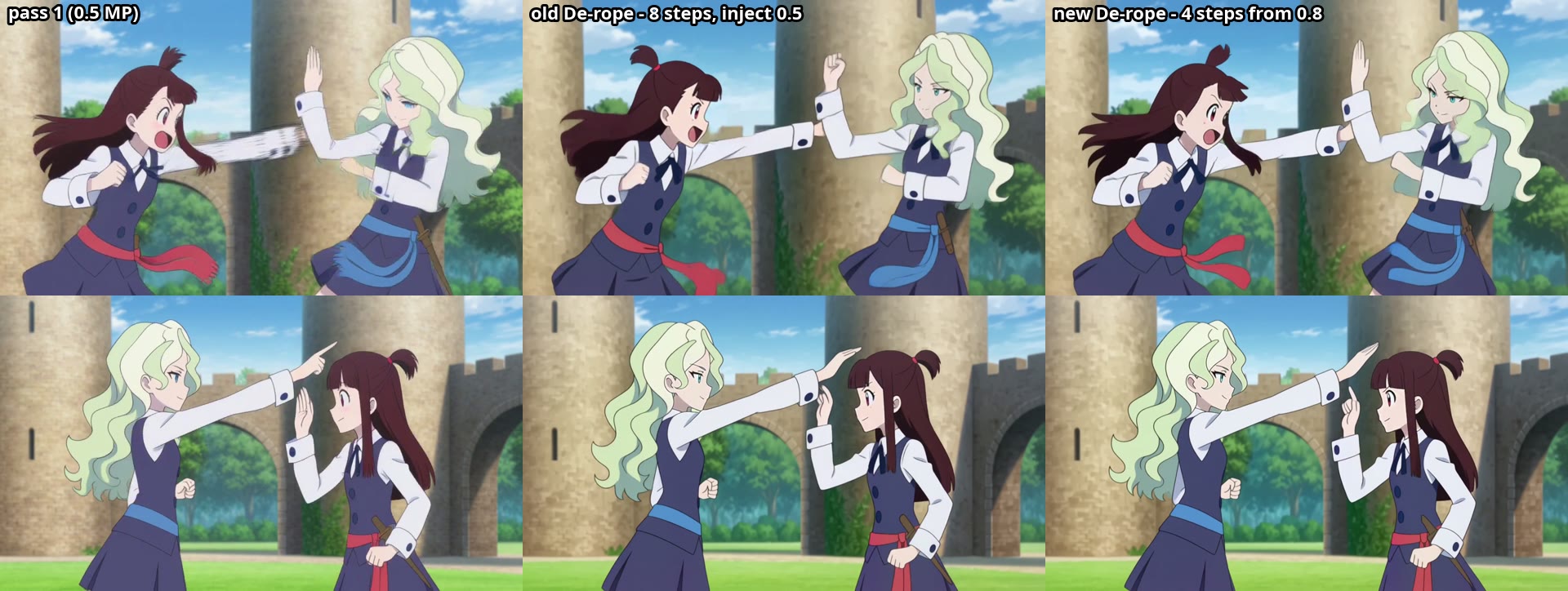
Pass 1 | old de-rope schedule | the 4-step version from 0.8 that keeps pass-1 framing.
Install
Install it like any node pack (ComfyUI Manager, or clone into custom_nodes/). You need MiniMax H3 in ComfyUI, the DMAD 4-step turbo LoRA, and a taeh3 loader for the encode. The AnimeSR weights ship with the repo.
Twelve example workflows sit in example_workflows/: relay only, then Fast De-rope, FaceDetail and Anime Cadence, each also with the Fast Tail Sampler and Pika variants. Some of them need the author's other packs, FastDerope, FaceDetail, ResCascade and AnimeCadence, plus MAINodes.
Availability
The pack lives at github.com/tazmannner/ComfyUI-H3-RelayHires (MIT, v0.3.0). Training scripts for your own AnimeSR (training/prep.py, training/train.py) take about 22 minutes on an RTX 5090.
Comments
Sign in with GitHub to join the discussion.