SnapRef: A Cached-KV Reference Adapter for Anima in ComfyUI
SnapRef v1a keeps an Anima character from a single reference image by caching its attention keys and values, at 8.9 s per image. ComfyUI nodes and FP8 weights included.
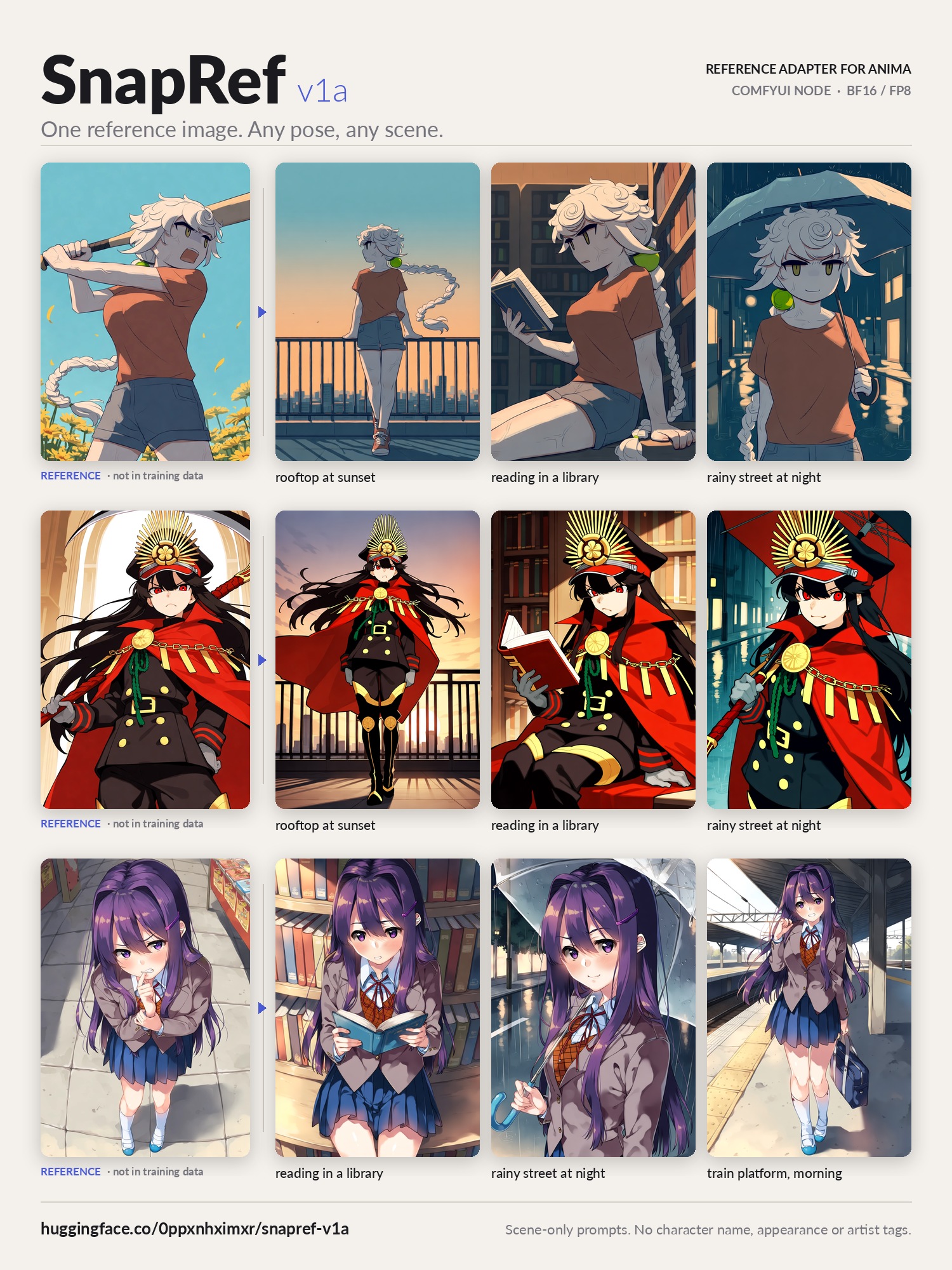
One reference image, a prompt that only names the scene.
Anima is a tag-prompted model, so a character is normally reproduced by spelling out hair, eyes and outfit in the prompt, and only for characters the model already knows. A reference adapter moves that job to the image: the text handles pose, framing and location, the reference handles who is drawn.
That idea is not new on Anima. Anima Reference Adapter did it on October 27 by appending the reference as an offset second latent frame, so the video-style prior could not continue it as a shot. SnapRef takes a different route: it puts the reference through the model once, caches what each layer produces, and re-reads that cache at every sampling step.
How the reference is cached
The adapter file is two LoRA branches bundled under one key, anima_ref_kv/1: a rank-128 reference branch on all 28 blocks' self-attention, cross-attention and both MLP layers, and a rank-64 branch on the target side's self-attention. That comes to 190.8M parameters, 382 MB in bf16.
The reference is encoded once and kept as a fixed set of tokens, with its own position in the model's coordinate space so that the model reads it for appearance rather than copying its layout. During sampling, each layer attends to its own tokens plus the cached reference. The target-side LoRA stays on in every target forward, and by default only the positive CFG branch reads the reference; ref_guidance sends it into both branches. Because the reference is not re-encoded per step, the model card puts the cost at about 15% over a reference-free generation.
Two modes are exposed: cs copies character and style together, char copies only the character so artist tags can set the style. A separate ref_guidance path pushes harder toward the reference at roughly 1.4× the time, with APG or CFG rescale to stop colours over-saturating, the same correction the earlier adapter needed.
What it costs next to other routes
The repository ships comparison_summary.json, a same-case timing table measured on an A100 at 832×1216, 28 steps, each adapter at its own defaults:
| Route | Seconds per image |
|---|---|
| SnapRef v1a | 8.95 |
| ElectronGirl v2 | 14.36 |
| Role-Ref-KV | 12.53 |
| Anima Base, no reference | 7.72 |
On identity, the model card reports that on characters held out of training the adapter predicts the target better with the right reference than with a wrong one, an identity gap of 0.0041 on held-out denoising loss, with the per-case numbers in heldout_loss.json.
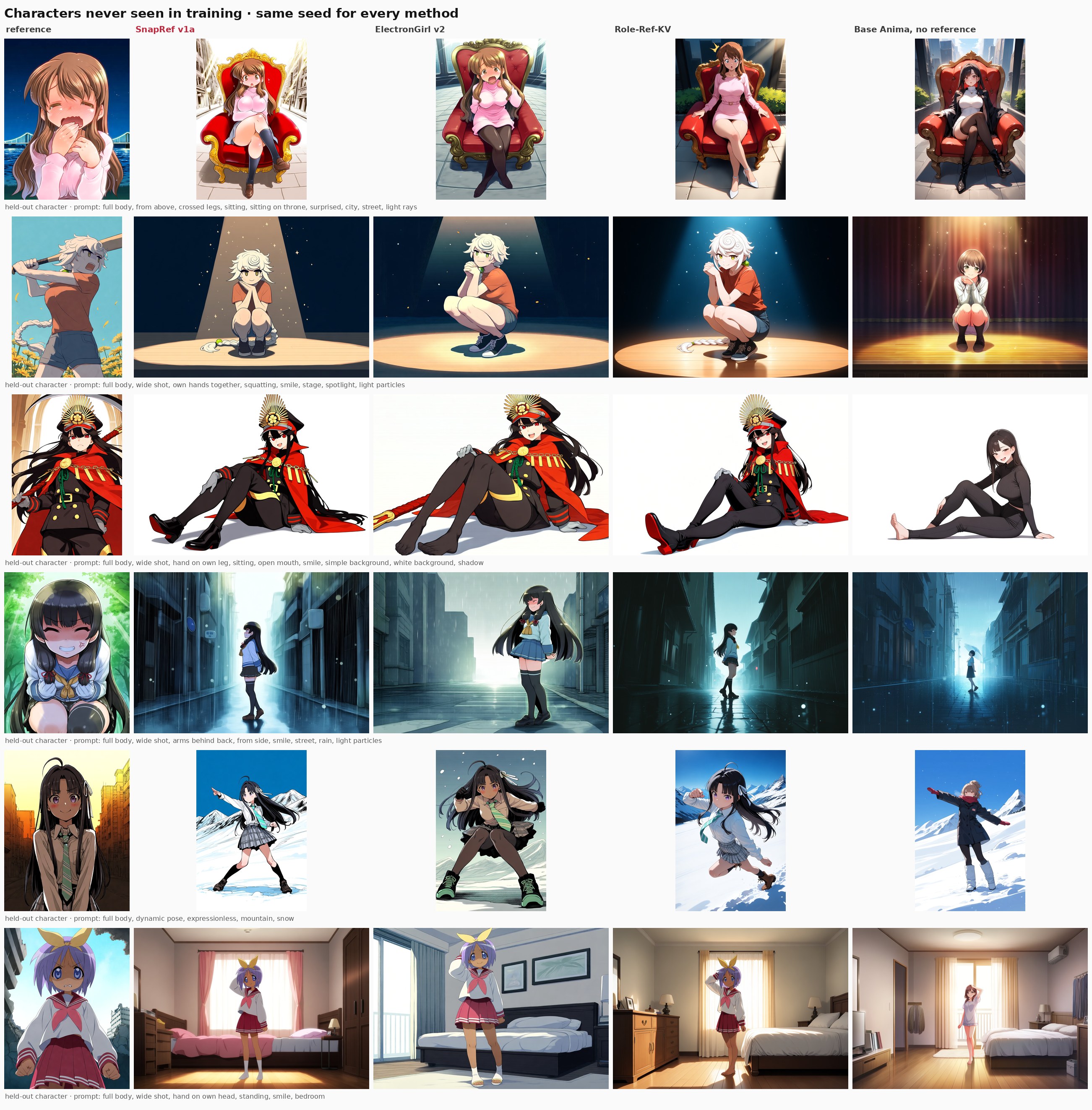
Characters absent from training. The prompt names only the scene; hair, eyes and outfit come from the reference.
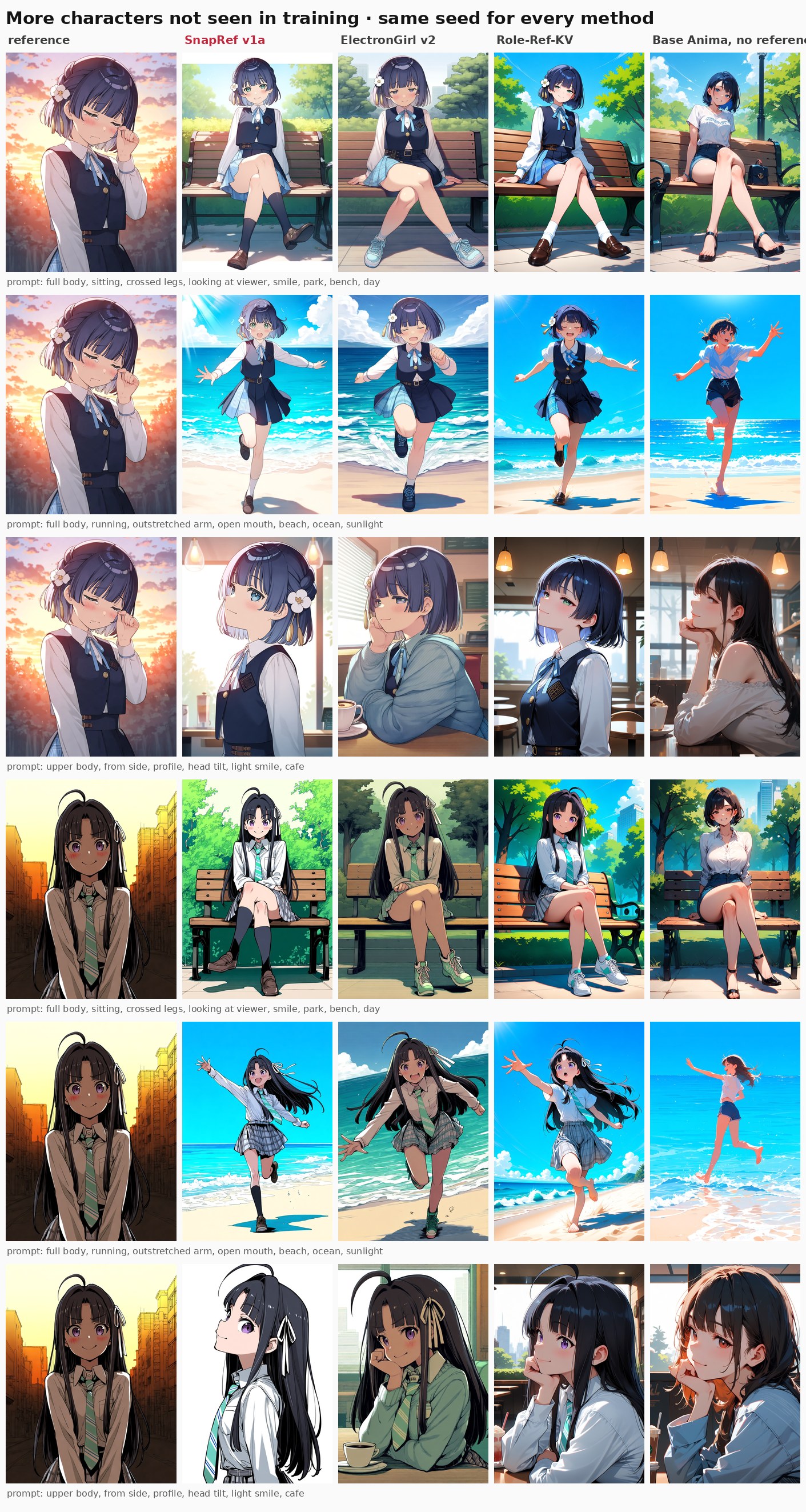
References from outside the training set, run through the adapter.
Training data was generated by Anima itself: 58,300 images across 2,367 characters, each character drawn in a range of scenes and poses in one artist style, then a run of about 120 H100 GPU-hours. A second checkpoint, SnapRef v1b, doubles the LoRA rank, follows the prompt more closely and keeps the character about as well.
The ComfyUI side
The node pack lives in the repository under comfyui/snapref/; copy it into custom_nodes/, drop the adapter into models/loras/, and load it with the SnapRef node rather than a LoRA loader, since the two branches are not a plain LoRA. The simple node takes one or two pictures, a mode, strength and fidelity; the advanced node exposes everything else, including ref_in_uncond, ref_megapixels and ref_caption.
Five workflows are included: single character, two characters, several references of one character, a side-by-side comparison against other adapters, and the minimal one below. For two characters, the instructions are to stitch the two references with the core Image Stitch node and describe who is on the left and right in the prompt. Recommended sampling is euler or er_sde with simple, 28 to 30 steps and CFG 4.5.
The FP8 adapter is 195 MB instead of 382 MB and is reported to give practically the same images, including on the FP8 Anima base. The node was updated on October 31 to keep the reference encode in fp32: with an fp16 checkpoint, --fp16-unet, or --fast with fp16 accumulation, the earlier version produced NaN and a black image.
Where it breaks
The model card lists the failure modes rather than hiding them. Very small details such as earrings, fine patterns and scars can be simplified, a dark-skinned reference can come out lighter, and some outdoor full-body prompts turn the bottom of the frame into a plain white floor unless the ground is named. A scene can override the reference outfit, so a beach prompt returns a swimsuit; raising strength or naming the outfit holds it. With two characters, attributes the references do not show clearly, closed eyes for example, can be mixed between them.
Comments
Sign in with GitHub to join the discussion.