P-H3-Image Puts MiniMax H3 Image Generation in ComfyUI
PrunaAI's P-H3-Image renders 8 MP images in 8 steps with no CFG and edits with up to 8 references. ComfyUI added native support the day it launched.

Samples from the official model card. The card positions P-H3-Image for photorealism, film and editorial looks, and graphic styles with short quoted text.
What the model is
The release is a 33.1B-parameter transformer with a 4B text encoder, a VAE and a separate prompt upsampler, 100 GB in bf16. It is a fine-tune of MiniMax H3 rather than a new architecture, so it inherits H3's VAE and attention stack and spends its training budget on still images instead of video.
| Tasks | Text-to-image, and editing with 1 to 8 input images |
| Sampling | 8 steps, no CFG or negative prompt |
| Resolution | 8 MP for text-to-image, 4 or 8 MP for edits |
| Prompt upsampler | Included, on by default, based on Qwen3.5-9B |
| Weights | 33.1B transformer, 4B text encoder, VAE, prompt upsampler |
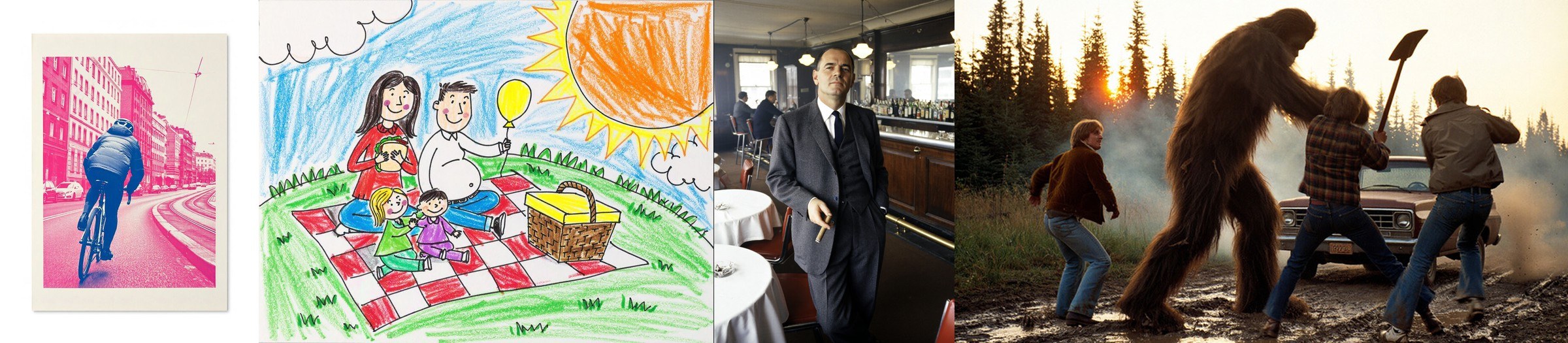
Style coverage from the model card, rendered at 8 MP.
Native ComfyUI support on launch day
ComfyUI merged PH3Image support in PR 17506 (CORE-697) on 2026-11-03, the same day PrunaAI pushed the update-for-launch revision to the weights. Both official templates in Comfy-Org/workflow_templates carry minComfyUIVersion: 0.44.0, so anything older than that release cannot open them.
The graph uses only built-in nodes: Load Diffusion Model loads the checkpoint, ModelSamplingMiniMaxH3 runs at 1.0 for both shifts, Load CLIP with type minimax loads the text encoder, and the new p-h3-image Conditioning node turns the prompt plus any images into conditioning and an image latent. Sampling is ManualSigmas on the 8-step grid into Sampler Custom Advanced with Basic Guider and euler, no CFG and no negative prompt. The optional LoRA loads through Load LoRA set to model-only.
Which files to download
PrunaAI/P-H3-Image-Comfy mirrors the weights in ComfyUI's native formats, and the precisions mix freely as long as each component comes from one row. MiniMax H3 itself is 143 GB of weights; the smallest P-H3-Image set is a 20 GB download that peaks at 21 GB of VRAM at 8 MP.
| Component | Folder | bf16 | int8 | w4a8 |
|---|---|---|---|---|
| Diffusion model | diffusion_models/ | 40.5 GB | 21.2 GB | 13.4 GB |
| Text encoder | text_encoders/ | 9.1 GB | 5.1 GB | 3.6 GB |
| Prompt upsampler | text_encoders/ | 19.3 GB | 9.7 GB | 6.7 GB |
| VAE | vae/ | 5.6 GB | 3.1 GB | none |
| Set | Download | Peak VRAM at 8 MP |
|---|---|---|
| bf16 | 55 GB | 56 GB |
| int8 | 30 GB | 31 GB |
| w4a8 + int8 VAE | 20 GB | 21 GB |
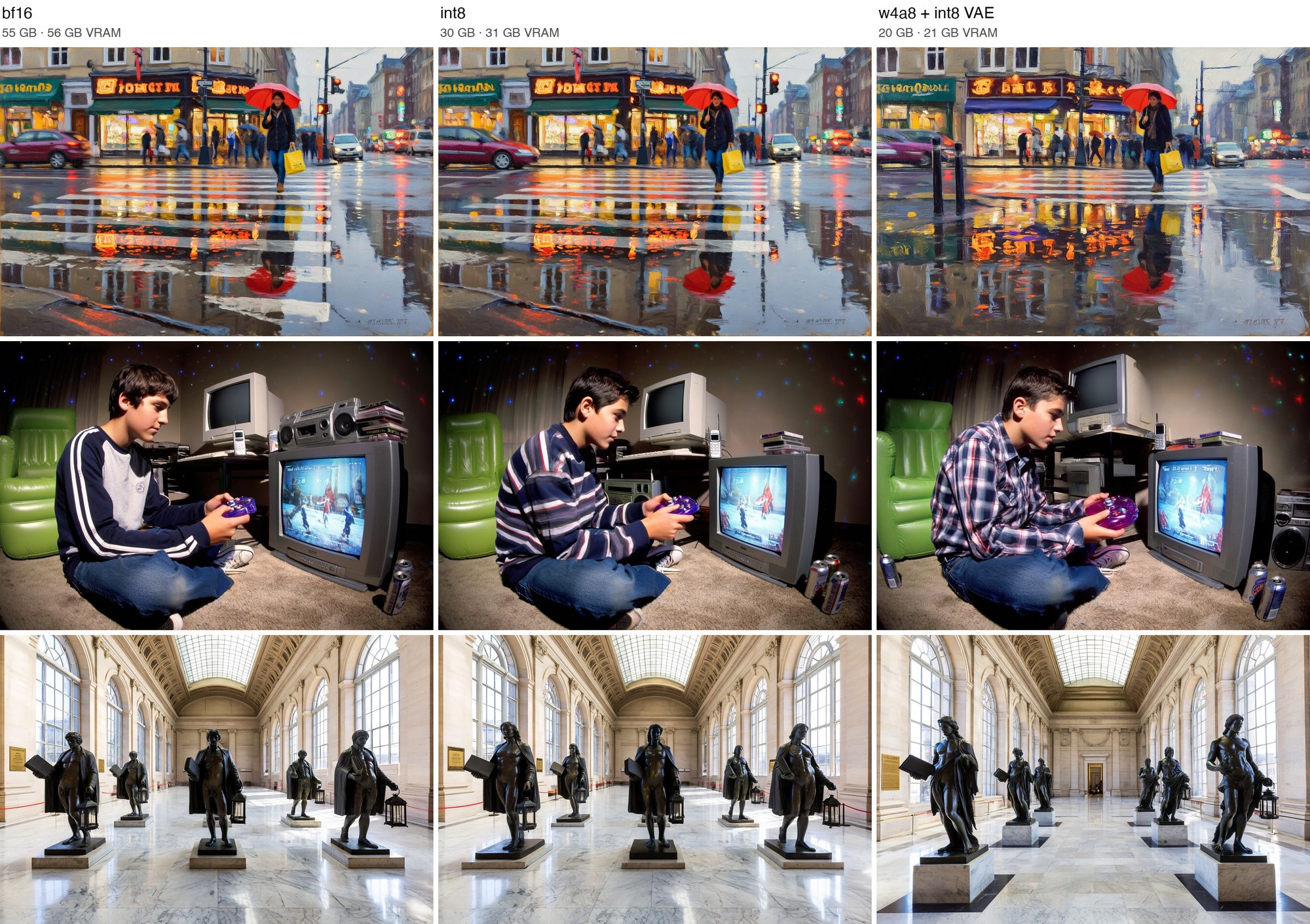
The same prompts and seed in bf16, int8 and w4a8 at 8 MP, with each header giving its download size and peak VRAM.
The int8 files stay very close to bf16, often almost pixel for pixel. w4a8 keeps the quality but moves more of the details and sometimes the composition. Both are ComfyUI's own quantization formats: int8 applies grouped Hadamard rotation against outliers and stores per-row scales with activations quantized on the fly, while w4a8 puts 4-bit weights on a 16-level codebook with an FP8 scale per 16 inputs and keeps the sensitive layers in int8. Neither needs calibration data, and both run on comfy-kitchen's INT8 kernels for NVIDIA Ampere or newer and AMD RDNA3/4.
There is also a 2.0 GB LoRA in loras/, which applies the same behaviour to your own MiniMax H3 weights instead of the full checkpoint. Two of the four workflows in the repo are built around it.
The prompt upsampler is part of the model
P-H3-Image renders full, specific prompts much better than short requests, so every example workflow runs the upsampler first. In ComfyUI it is not a custom node either: Load CLIP at type minimax plus Generate Text with greedy decoding, so the same request always produces the same prompt.
For text-to-image, Format Text composes Aspect ratio: 1:1 and Request: ... on two lines with thinking on. For edits it writes a <Picture N> block per image, with image_1 at 1 MP and the references padded to that size through Batch Images. A Use prompt upsampler If/Else switch set to false sends the request to the model verbatim.
The upsampler runs before the diffusion model and ComfyUI moves it out of VRAM when P-H3-Image needs the memory, and its output is cached so it only runs again when the request or the images change. The bf16 upsampler is the recommended one at 19.3 GB and about 21 GB of VRAM.
Editing with up to eight pictures
An edit takes the image to change as image_1 plus up to seven references, in the same order in Batch Images and on the conditioning node, with a <Picture N> block for each one in the upsampler input. The request can name them however it likes, so "the hat from the second photo" resolves to the second image. Only Picture 1 is edited; the rest are context.
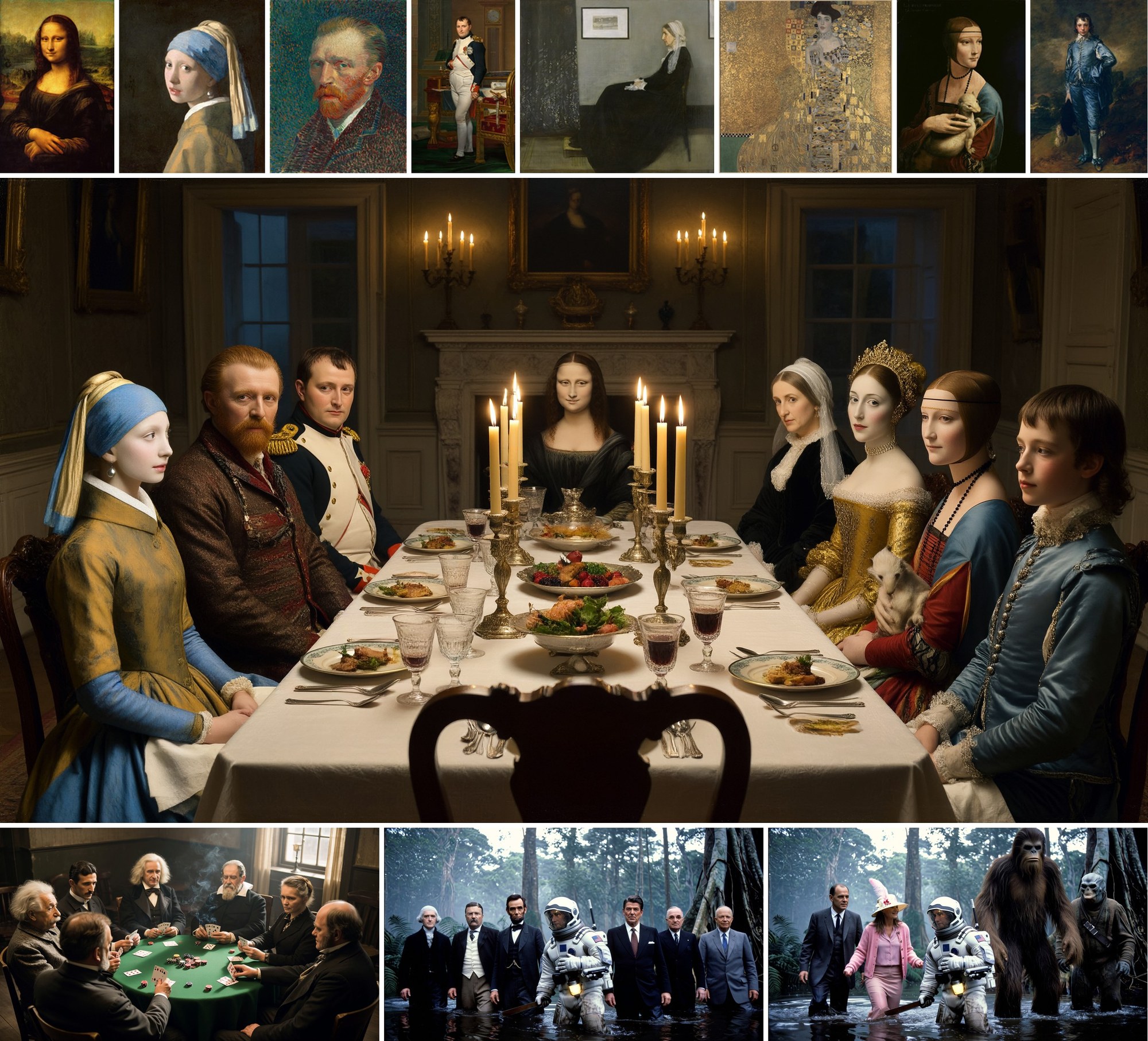
Eight public-domain portraits and the dinner party P-H3-Image composed from them in one request.
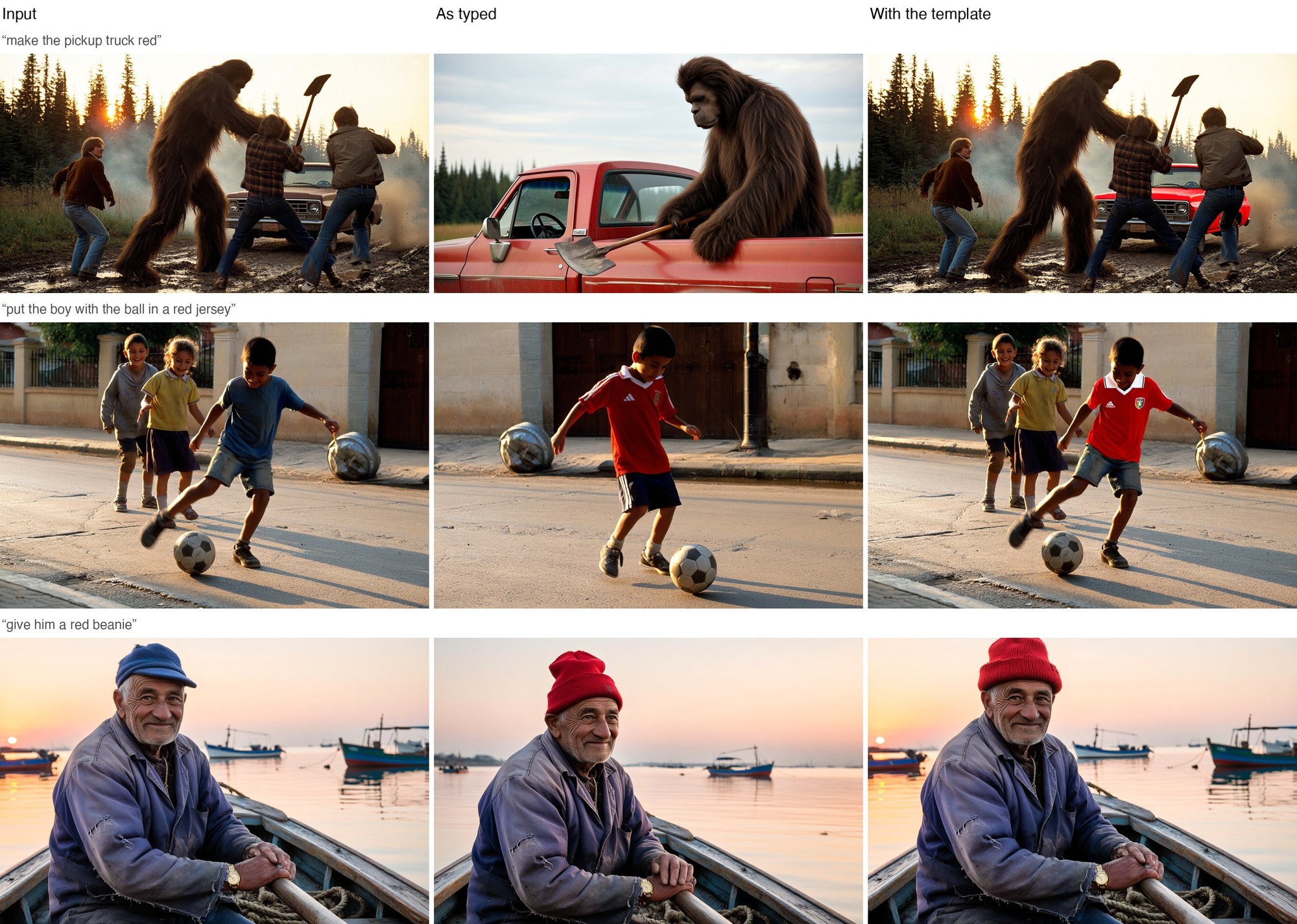
Edit outputs from the official card.
8 MP is the operating point
The model is trained for 8 MP and the card is blunt that 2 and 4 MP are worse, with artifacts most visible in faces, hands and small details. The default text-to-image size is 2912 x 2912, and sides are rounded to multiples of 32.
| Aspect ratio | 8 MP (width x height) | 4 MP, for edits |
|---|---|---|
| 1:1 | 2912 x 2912 | 2048 x 2048 |
| 4:3 | 3360 x 2496 | 2368 x 1760 |
| 3:4 | 2496 x 3360 | 1760 x 2368 |
| 3:2 | 3552 x 2368 | 2496 x 1664 |
| 2:3 | 2368 x 3552 | 1664 x 2496 |
| 16:9 | 3872 x 2176 | 2720 x 1536 |
| 9:16 | 2176 x 3872 | 1536 x 2720 |
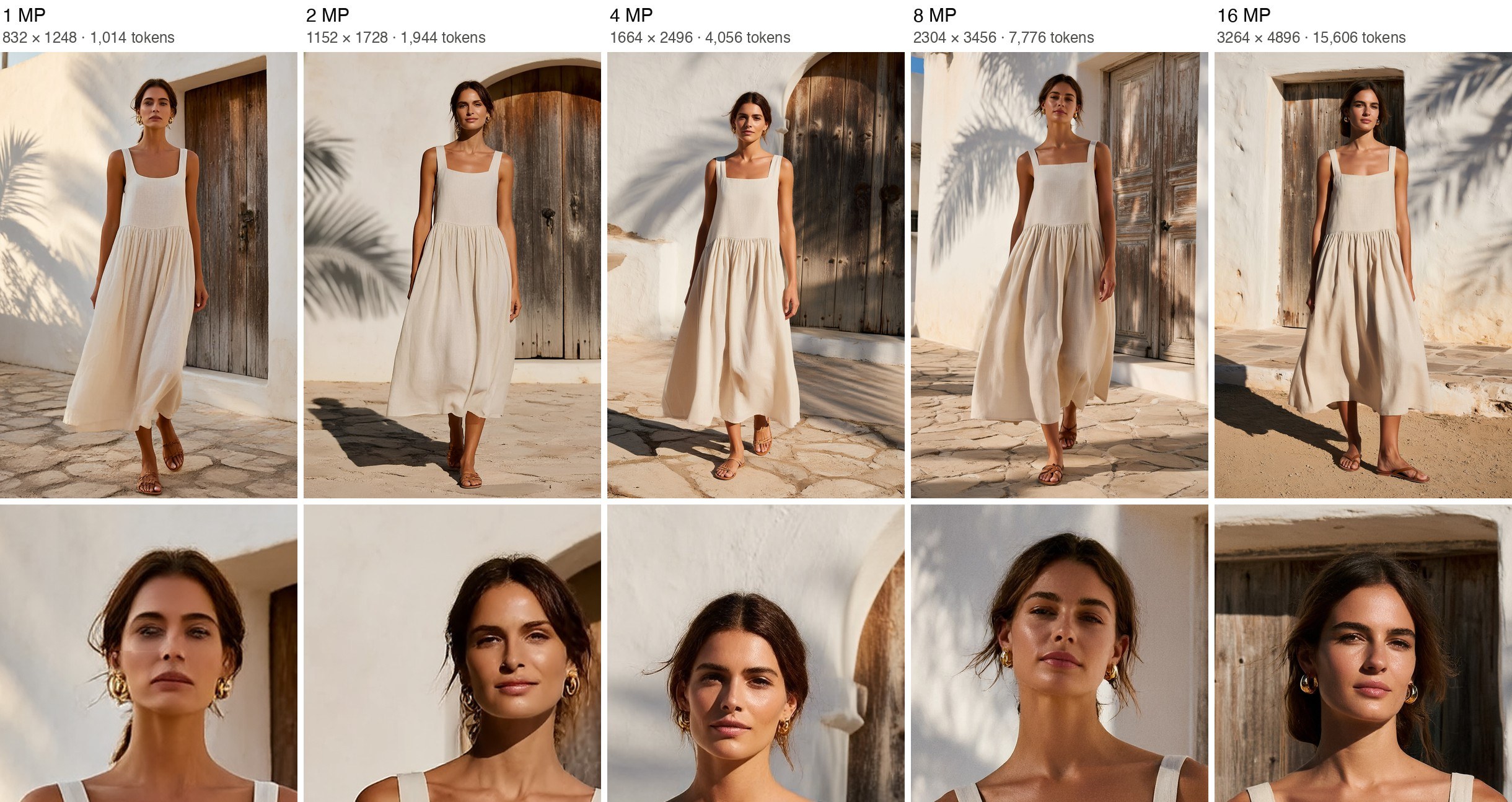
The same prompt and seed from 1 to 16 MP with the face enlarged. At 1 MP the skin is smooth and waxy; from 8 MP the texture, stray hairs and earrings come through.
Edits without explicit width and height are generated at the size of Picture 1, scaled up to at least 4 MP. Passing the two dimensions changes the canvas size, not the images inside it.
Availability
- Weights and diffusers pipeline: PrunaAI/P-H3-Image
- ComfyUI files and workflows: PrunaAI/P-H3-Image-Comfy
- Browser demo: PrunaAI/P-H3-Image on Hugging Face Spaces
- ComfyUI support: PR 17506, in v0.44.0
Comments
Sign in with GitHub to join the discussion.