H3 Continuity Studio Keeps MiniMax H3 Scenes Consistent Across Cuts
H3 Continuity Studio is a ComfyUI node pack that lays MiniMax H3 shots on a timeline and feeds five-frame visual memory into the next clip, so rooms and outfits survive a cut.
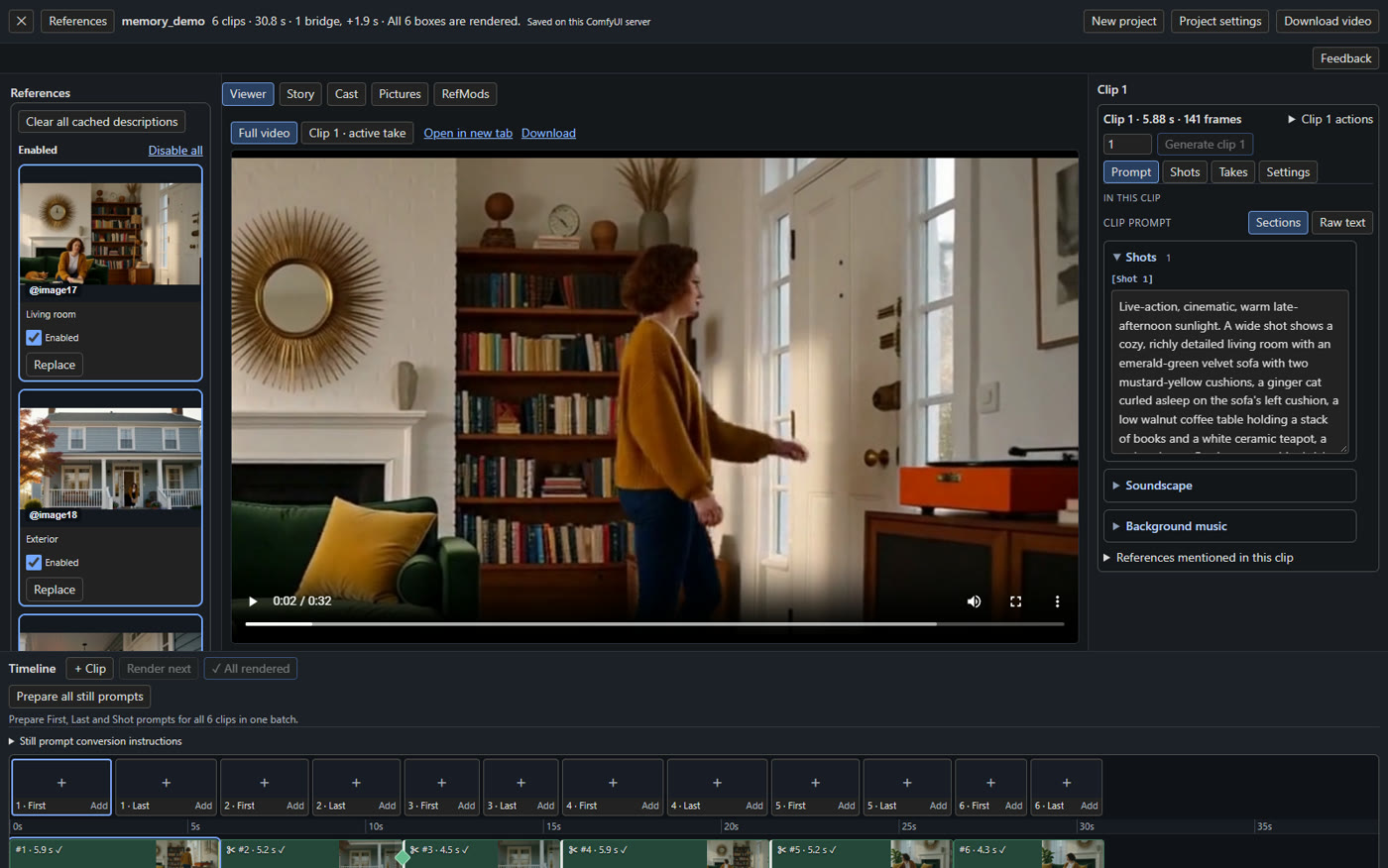
The Studio puts the timeline, viewer and clip inspector in one panel over a normal H3 workflow.
H3 generates roughly five seconds per pass, so anything longer is a chain of joins. Most chains are built by hand: reuse the last frame, feed it back as the first frame, hope the colour and the layout hold. The failure mode is well known on Banodoco: the third or fourth link drifts, and the fix is to re-render from an earlier point.
This pack moves that bookkeeping into a canvas. Clips sit on a timeline with their own prompts, pictures, reference slots and settings; the editor renders them one at a time or in sequence, and the join between any two clips is an explicit choice rather than an accident of how the last frame was wired.
Four kinds of join
The timeline distinguishes four relations between consecutive clips:
- Continue carries the previous clip's context so the new one picks up mid-action.
- Cut starts a fresh target from a new prompt, which is where drift usually enters.
- New scene starts a new scene while keeping the film's visual history, so the new prompt defines the setting.
- Bridge renders a short generated transition between two shots without re-rendering either of them.
Multiple takes per clip are kept as candidates rather than overwritten, and re-rendering a clip that a later clip remembers marks the dependent clip as needing a render, with the reason in its tooltip.
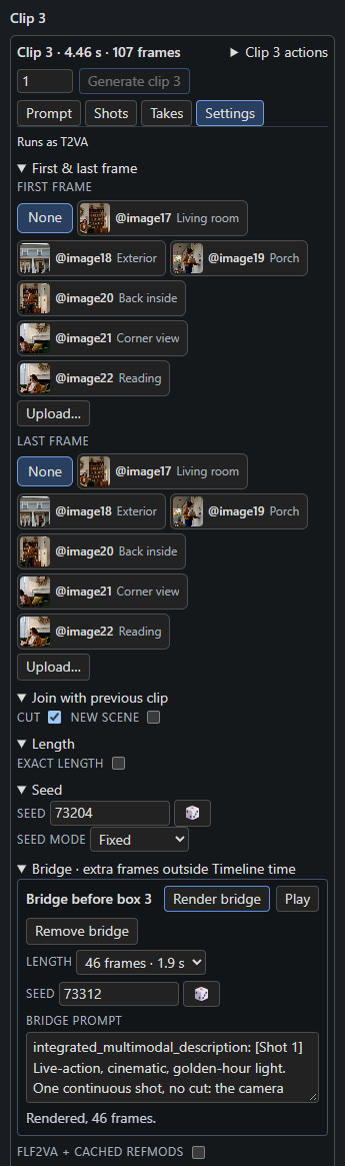
A generated bridge sits between two clips, so neither shot has to be re-rendered to hide the join.
Visual memory: five frames, read from the original latent
The interesting part is what happens at a cut. H3 normally sees only the new prompt, so a room, a coat or a house can quietly change. Visual memory shows H3 earlier moments of the film as a native video reference, written into the prompt as <Video N>.
Each remembered moment is a five-frame window. It is read from a saved clip's original video latent and handed to the diffusion model at the latent level, so there is no decode, re-encode or pixel round trip; only the text encoder sees a decoded presentation of it. No extra model, dependency or patch is involved. H3 snaps each moment to a 17-frame boundary before reading it, so a window can begin slightly before the timestamp you picked. At a cut, every enabled mode also supplies the full preceding clip's original latent, which is what carries layout and object appearance while the next shot starts from a fresh target.
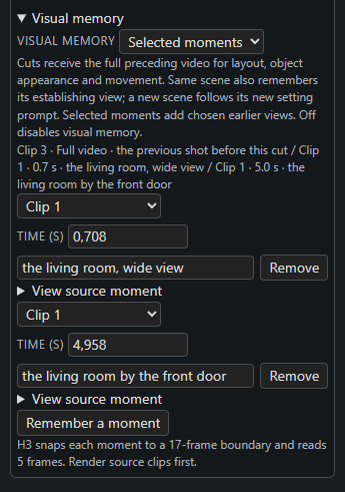
Two selected moments in one clip's settings, each listed with its source clip and time.
Four modes are exposed per clip:
| Mode | What the later clip is shown |
|---|---|
| Same scene | The scene's establishing view and a midpoint from the preceding clip; carries no frames at the cut itself |
| Selected moments | Up to three views you pick from any earlier clip, including across scenes, each with a description of what to keep |
| Cast | Each scheduled character as they look now, plus the place, when the timeline is driven by a Story bible |
| Off | No memory, the clip behaves like a plain H3 generation |
Selected moments are the manual route: pick the earlier clip and a time in its delivered footage, describe what matters (red brick house, blue door, three upstairs windows), and render the source clip first. A clip whose source is missing or stale stops with a "render the source first" message instead of generating something subtly wrong.
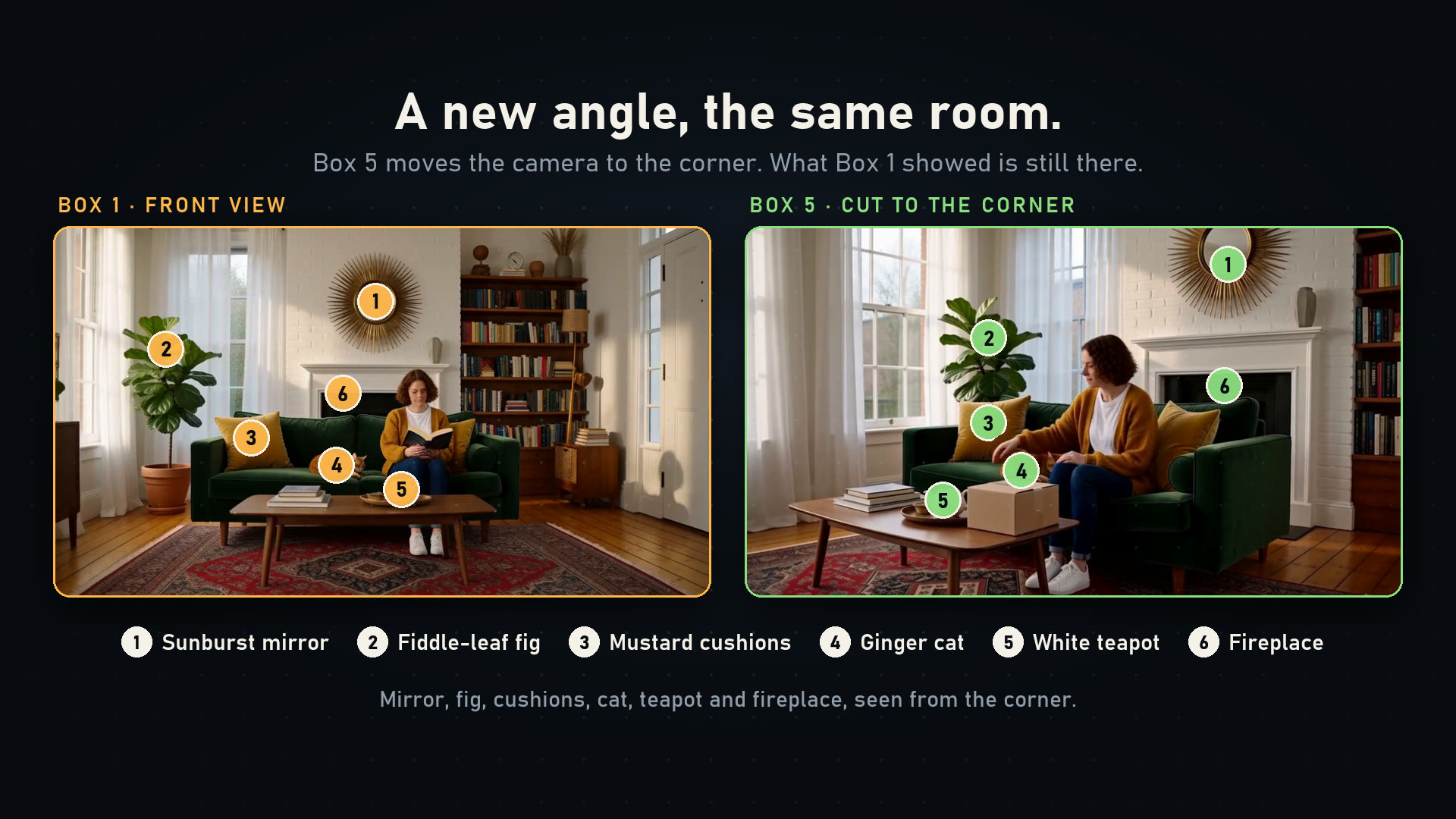
Left: the room the first clip established. Right: a later clip from another angle, rendered with selected moments from that first clip.
The demo, and what it does not prove
The repository ships examples/memory_demo.json, a six-clip film with one bridge: a living room, a cut outside, a bridge to a porch view, a cut back inside that reuses moments from the first clip, a corner view of the same room, and a continuing reading shot whose memory is off because continuation already carries the previous clip. It was rendered at 1024 x 576, 24 fps, with 39 carried frames, and needs no uploaded references or credentials to reproduce.
The project's contest cut: the complete film plus short explanatory sections, under two minutes.
The author is explicit about the limits. Regression checks cover latent reuse, delivered-time offsets, cross-cut recall, source invalidation and the editor, but the renderer has not been visually benchmarked across every memory mode. The suggested fair test is to render the same seeds three ways (memory off, automatic scene memory, hand-picked view) and compare detail retention, motion at the joins, runtime and VRAM. The example is a demonstration of retained details, not a guarantee of identical geometry across setups.
Installing it
Clone the repository into ComfyUI/custom_nodes/ComfyUI-H3-Continuity-Studio and run pip install -r requirements.txt with the same Python environment as ComfyUI, or use the portable build's python_embeded/python.exe on Windows. Restart, load examples/h3_story_studio.json, then point the model loaders at your own H3 diffusion model, text encoder, video VAE, audio VAE and optional LoRA: the example records the original author's file names and downloads nothing.
Context Windows needs a ComfyUI build that already contains the core MiniMax H3 Context Windows node, and the optional Story writer needs a separately configured OpenAI-compatible endpoint, local or cloud, which receives the story text and, if enabled, reference pictures. Generation still needs a GPU and H3 weights. The optional MiniMax prompt-guide text is not bundled; the pack runs without it and reports the missing guides.
The project has been releasing fast: five tags between November 2 and November 3, with the latest adding resizable Studio panes and timeline zoom, after earlier ones brought split-at-guide, a free aspect ratio for configured workflows, and saved stories that keep their frame guides.
Comments
Sign in with GitHub to join the discussion.