Krea 2 BBOX: Layout Control Finetune for Comics and Text
Krea 2 BBOX is a community finetune of Krea 2 that puts panels, characters and verbatim text in explicit boxes, shipped as ComfyUI single files, LoRAs and an HF Space.
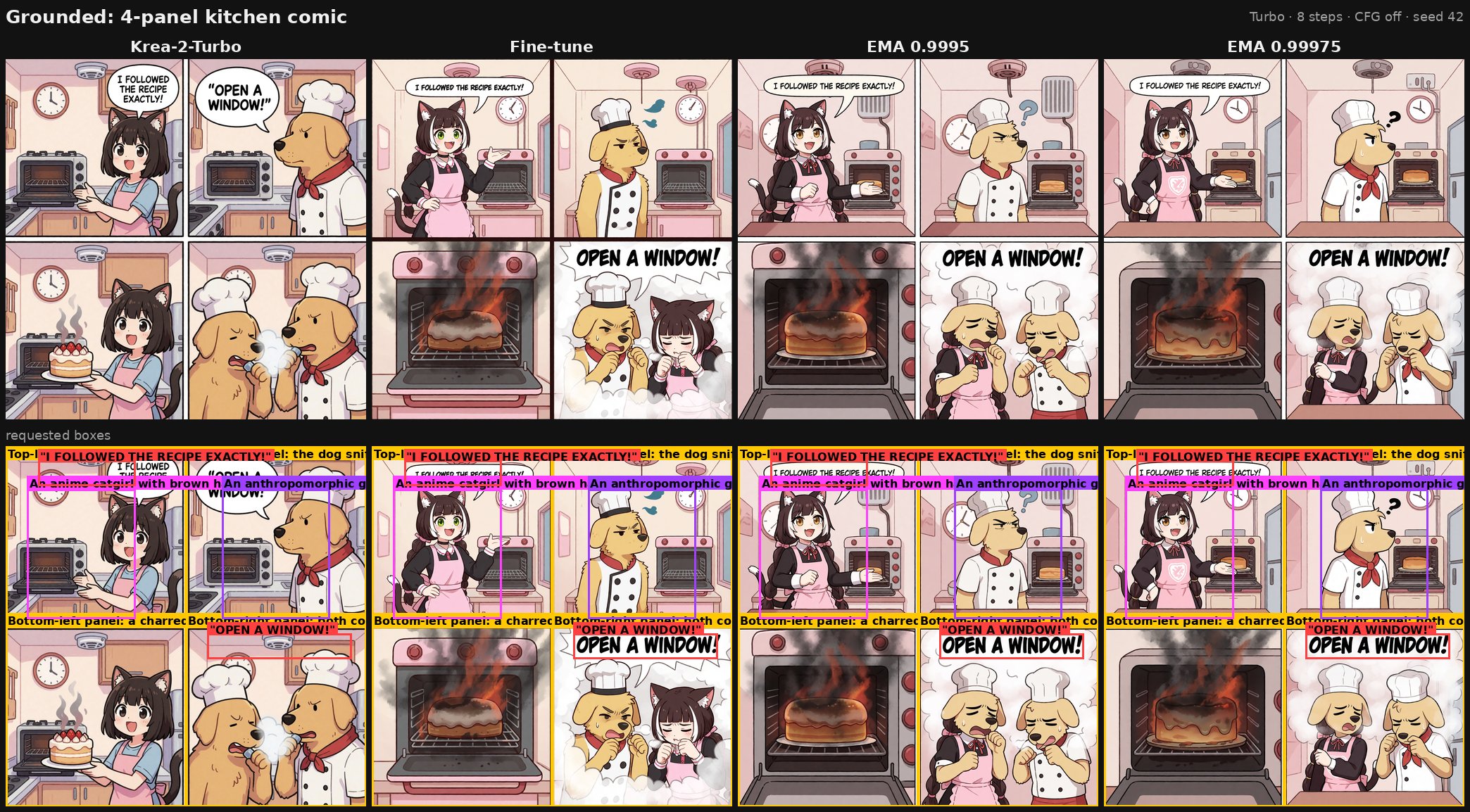
A grounded four-panel prompt. Columns: stock Krea 2 Turbo, the finetune, EMA 0.9995, EMA 0.99975.
Text and layout are the two things a text-to-image model usually approximates. Ask for a speech bubble with a line of dialogue and you get letter-shaped noise in roughly the right place; ask for four panels and the model invents a collage. This finetune attacks that directly by teaching the model a prompt format that names every element and gives it a box.
Two flavours, three weights each
The finetune is trained on Krea 2 Raw and shipped in two variants. Turbo is the finetune with the base-to-turbo distillation delta merged in, so it samples in 8 steps with CFG off. Raw is the finetune as trained, at 50 steps with CFG 5.5.
Each variant also comes with two EMA shadows of its weights, at decay 0.9995 and 0.99975. The author's note on them is that smoothing may raise image quality but can also make the model less precise about boxes.
| Variant | Sampling | Weights |
|---|---|---|
| Turbo fine-tune | 8 steps, CFG off | fine-tune plus two EMA shadows |
| Raw fine-tune | 50 steps, CFG 5.5 | fine-tune plus two EMA shadows |
The training checkpoints from epochs 1 through 19 stay in the repo for reference. They are superseded by the epoch 20 release.
The prompt is a layout specification
About 90% of the training used a compact grounding DSL rather than prose. It is plain text, one element per line, and every box is four numbers on a 0 to 1000 grid, x first:
A four-panel comic in which an anime handywoman and an anthropomorphic tabby cat assemble a flat-pack shelf and fail completely.
@clean line art, flat colors, light cel shading; Digital illustration
~A bare apartment living room with cardboard packaging and loose screws on a pale wood floor.
p[0,0,500,500] Top-left panel: the handywoman holding up the instruction sheet, confident.
p[500,0,1000,500] Top-right panel: the cat batting a single screw off the floor.
p[0,500,500,1000] Bottom-left panel: a lopsided half-built shelf wobbling.
p[500,500,1000,1000] Bottom-right panel: the shelf collapsed, the cat sitting smugly on the wreckage.
ac:1[60,80,340,470] A young woman with short dark hair in blue overalls, holding an instruction sheet, confident grin.
fc:2[560,90,880,470] An anthropomorphic tabby cat in a tool belt, one paw raised mid-swat, innocent expression.
t[80,40,420,120]"SOME ASSEMBLY REQUIRED." black text in a rounded speech bubble
t[540,530,960,610]"IT HAS FIVE LEGS NOW." black text in a rounded speech bubble
The prefixes are p for panel, o for object, t for verbatim text, and pe / ac / fc for person, anime character and furry character. An @ line carries style tags and a ~ line carries the scene description. The model card warns that writing the coordinates as y first is the most common failure, and that it fails silently: the image still looks plausible, just not where you asked.
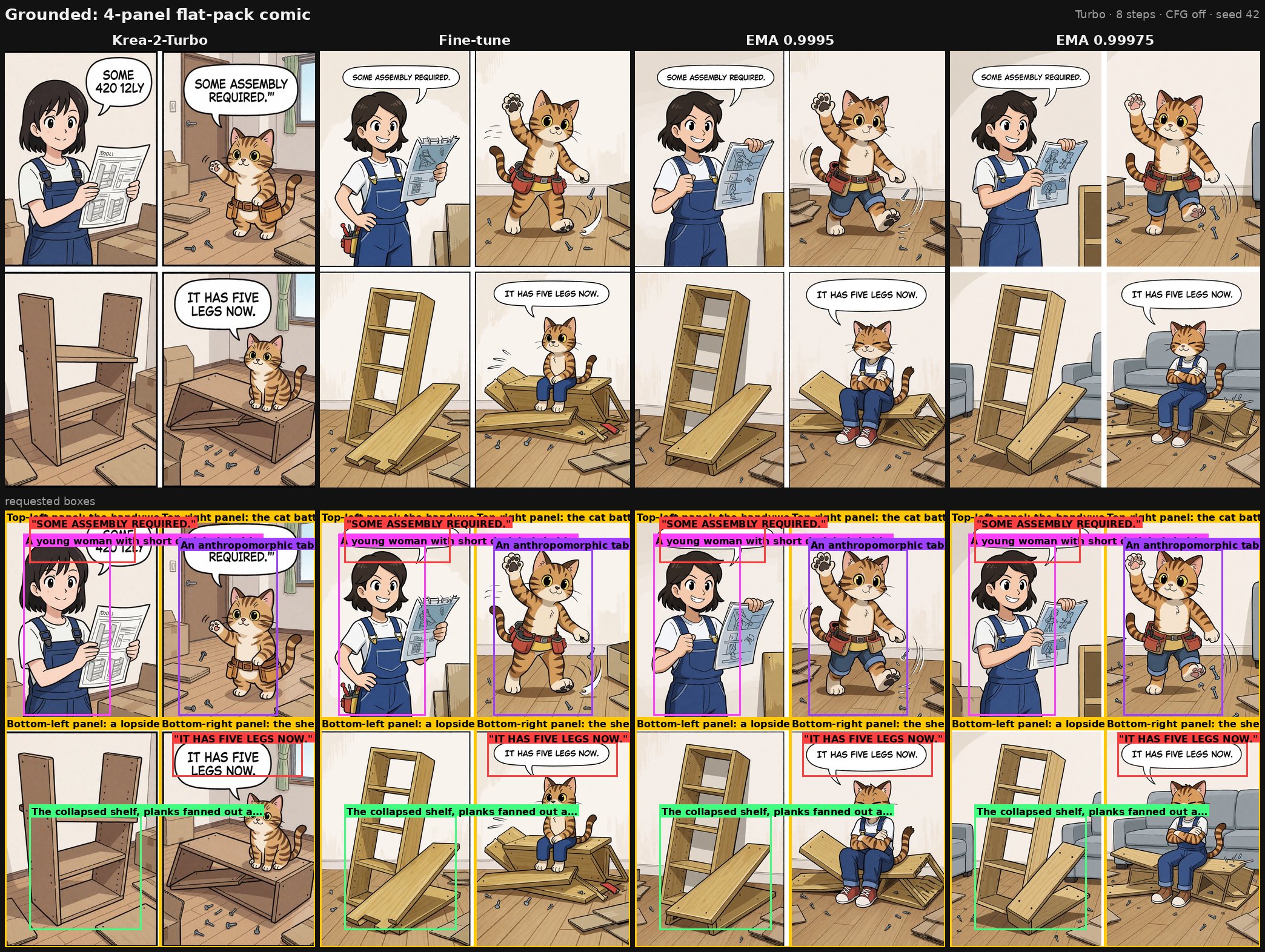
The same prompt as above. Grounded samples get a second row with the requested boxes overlaid.
Prose prompts still work, because plain text was the other 10% of training. The DSL is what makes the layout exact enough to be useful, and PROMPTING.md is a full spec with copy-pasteable examples.
In ComfyUI
Every variant ships as a single file in Krea's native layout, which is the layout ComfyUI loads. Six files cover Turbo, Raw and both EMA shadows:
| Variant | File | Sampling |
|---|---|---|
| Turbo fine-tune | krea2-bbox-turbo-comfy-latest.safetensors | 8 steps, CFG 1.0 |
| Turbo EMA 0.9995 | krea2-bbox-turbo-ema_0.9995-comfy.safetensors | 8 steps, CFG 1.0 |
| Turbo EMA 0.99975 | krea2-bbox-turbo-ema_0.99975-comfy.safetensors | 8 steps, CFG 1.0 |
| Raw fine-tune | krea2-bbox-raw-comfy.safetensors | 50 steps, CFG 5.5 |
| Raw EMA 0.9995 | krea2-bbox-raw-ema_0.9995-comfy.safetensors | 50 steps, CFG 5.5 |
| Raw EMA 0.99975 | krea2-bbox-raw-ema_0.99975-comfy.safetensors | 50 steps, CFG 5.5 |
The files go in ComfyUI/models/diffusion_models/. Nothing else changes: the text encoder and VAE are the stock Krea 2 ones, taken from Comfy-Org/Krea-2, and the built-in Krea 2 text-to-image templates work as they are once the diffusion model is swapped.
There is also a Gradio canvas demo running the turbo checkpoint, so the prompting format can be tried before downloading anything.
The LoRAs are an approximation
The release also includes LoRAs at rank 64, 128 and 256, for everyone who can only stack adapters rather than swap a 26 GB transformer. The author is explicit that these are approximate, and measured how much of the full finetune they carry on held-out training samples:
| Rank | Share of the full finetune's effect | On the high-noise steps |
|---|---|---|
| 64 | about 12% | about 16% |
| 128 | about 18% | about 24% |
| 256 | about 28% | about 38% |
The reason is that this was a full-rank finetune, with the change spread across almost every direction of every weight matrix, and a LoRA cannot carry norms, biases or modulation tables at all. In ComfyUI the LoRA files go in ComfyUI/models/loras/ and are applied at strength 1.0 with LoraLoaderModelOnly on top of the stock Krea 2 model, Raw or Turbo, using the matching sigma settings for each.
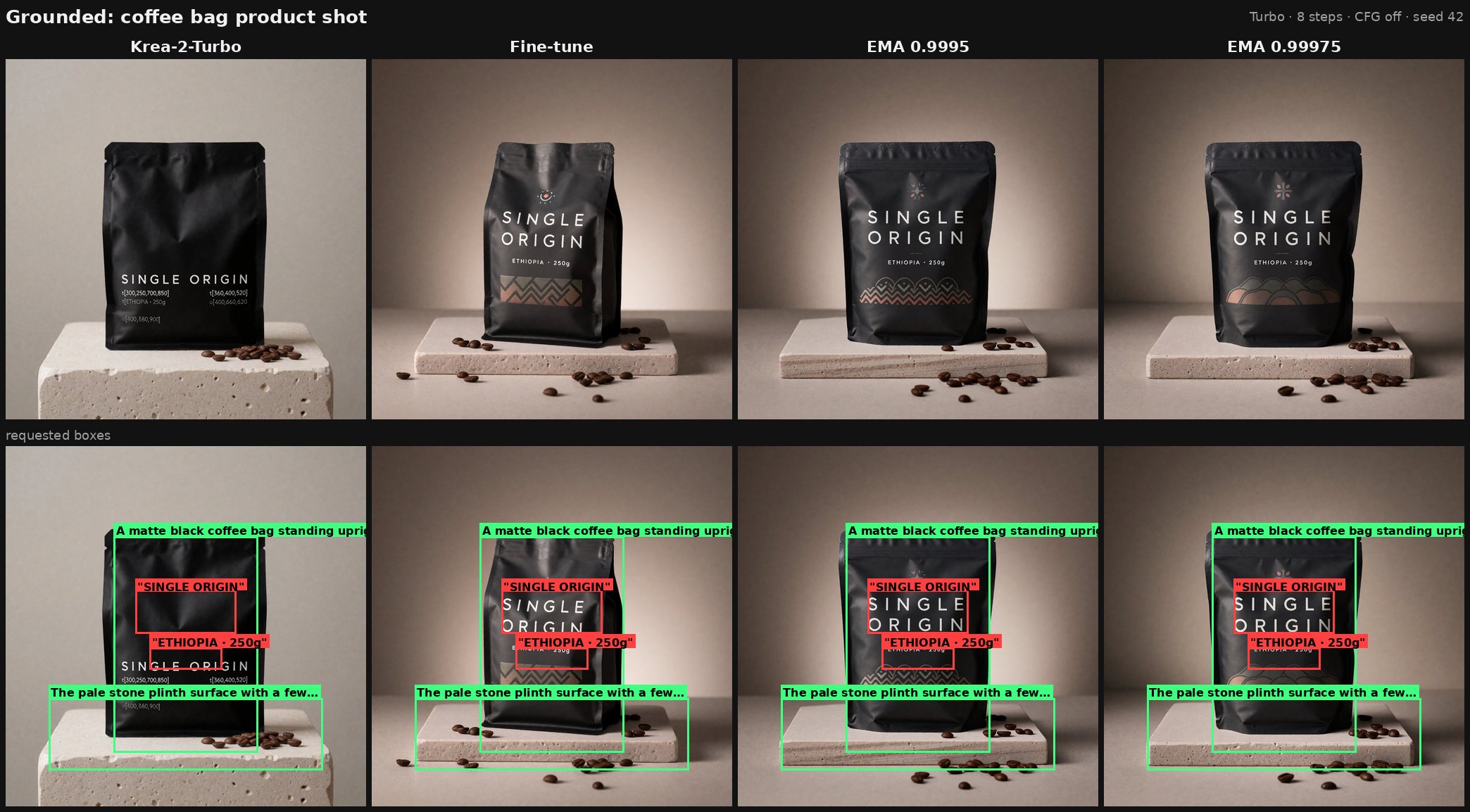
A product shot sample. Text placed by box, not by chance.
What it was trained on
The data side is where the layout ability comes from. A 30 million image pre-AI pool was clustered with DINOv3 and SigLIP2 and ranked for aesthetics; anything containing drawn art or comics was additionally tagged with wd-tagger and JTP and re-ranked for diversity.
The final set is 40,000 images: 20,000 general photographs, 10,000 comics and 10,000 art images. All 40,000 were boxed by a custom labelling pipeline on top of gemma-4-31B-it and LocateAnything-3B, and the resulting prompts were compressed to at most 512 tokens in the DSL format.
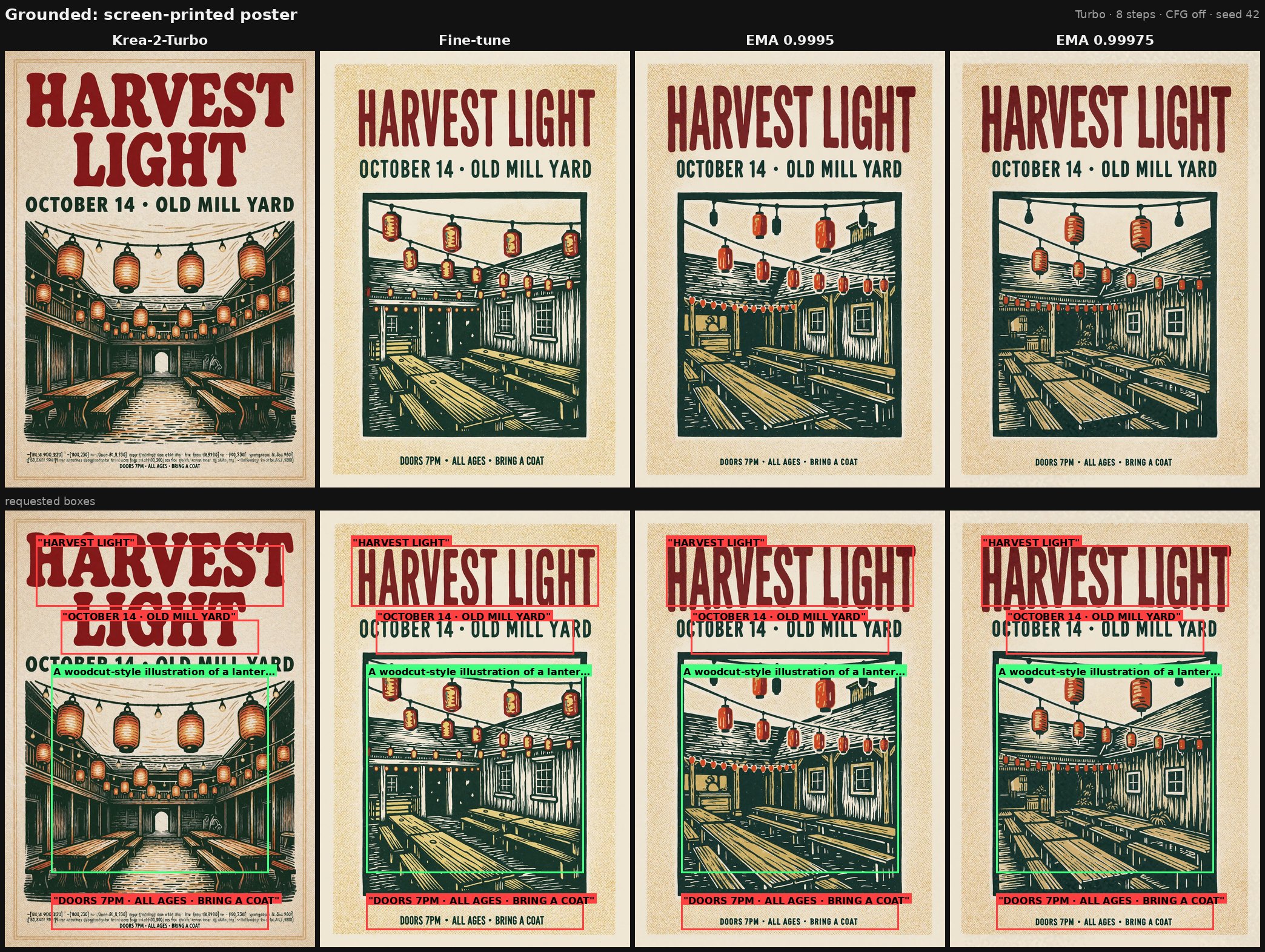
A screen-printed poster sample, the other end of the same ability.
Limits
- The DSL has to be written or generated correctly. Coordinate order, element letter and box size are all part of the prompt, and a wrong line produces a wrong image without an error.
- Grounded prompts are long. 512 tokens is the ceiling the training prompts were compressed to, so very dense pages run past what the model saw.
- The EMA shadows may be better looking and less accurate on boxes at the same time, which is a trade-off to test per use.
- The LoRAs carry a small share of the effect. For panel grids and precisely placed text, the full fine-tune is the version the samples were made with.
- It is a community finetune of Krea 2, so the Krea 2 text encoder and VAE are still required, and it inherits whatever the base model does not know about letters and short dialogue.
Comments
Sign in with GitHub to join the discussion.