Zip Ties: A ComfyUI Extension That Bundles Wires Into Ribbons
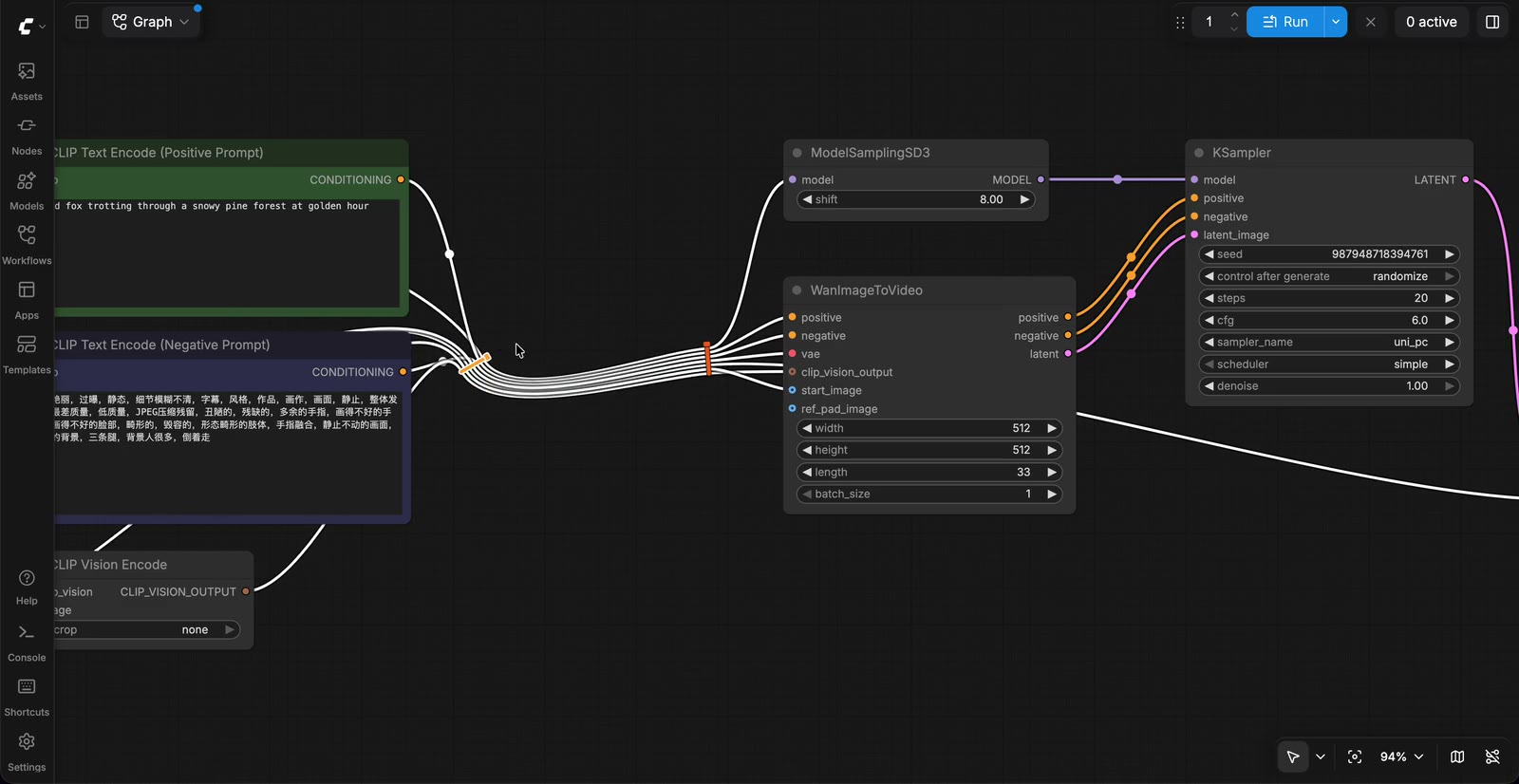
A frontend extension for ComfyUI's canvas ties links into a ribbon with small zip ties: Z-drag to tie, right-click to recolour or rotate, and the ties save with the workflow.
Big workflows have the same visual problem everywhere: a thicket of wires between the loaders on one side and the samplers on the other, each one drawn as a separate bezier that you have to follow with your eyes. Zip Ties does not hide them or route them around an obstacle. It gathers the links that cross a line you draw, and pins each link to that line the way a cable tie holds a bundle.
The extension was built from a prototype by @cmzw_, and it reached the front page of both r/comfyui and r/StableDiffusion within a day of its first release.
Gestures
| Action | Gesture |
|---|---|
| Tie wires together | Hold Z and drag a line across the wires |
| Tie wires without a keyboard | Right-click the empty canvas, choose Tie wires, then drag across the wires |
| Move a tie | Drag the tie |
| Select several ties | Ctrl/Cmd-click each tie, Shift-click to add one, or box-select them together with nodes |
| Rotate a tie | Shift-drag it. It snaps to 15 degree steps; hold Alt as well to rotate freely |
| Change colour, rotate 90 or 45 degrees, remove | Right-click the tie |
| Remove a tie | Hold Z and drag across the tie, or double-click it |
While you drag, the wires the line crosses turn white. If the line crosses an existing tie, both the line and the tie turn red, and releasing removes that tie. The key is configurable in Zip Ties → Key to hold while dragging across wires, which offers only letters ComfyUI does not already use on their own: X, C, G, T or Y. With Alt, Ctrl, Cmd or Shift held, a drag keeps its usual meaning, so Alt-drag still clones a node.
How the ribbon behaves
Each new tie takes a random cable-tie colour. Zip Ties → Colour of new ties switches that to Match wires, which picks the most common colour among the wires in the tie, or to plain grey; right-clicking changes a single tie. The wires keep their own colours and run side by side between ties, and hovering or dragging a tie highlights every wire in it.
A wire can pass through several ties, and rotating a tie turns the direction the wires take through it, so ties at 0 and 90 degrees make a right-angle bend. Pieces between reroutes can be tied too: a tie holds the segment it was drawn across, and a piece that ends at a reroute is shared by every wire passing through that reroute.
Ties follow their wires. Moving every node and reroute a tie connects carries it along, while moving only some of them leaves it where it is, the same rule a reroute follows. A tie inside a group moves with the group, and Ctrl/Cmd-dragging the group frame leaves it behind with the nodes. Selected ties move with the selected nodes, and Delete removes both in a single undo step.
Ties are stored in the workflow's extra.zipTies, so they save, load and undo with the rest of the graph. Workflows opened without the extension still load and draw their wires normally, and a malformed entry is dropped on load. Copying and pasting nodes brings their ties when every wire in a tie is part of the copy, again inside one undo step.
Under the hood, and where it stops
The extension wraps a handful of litegraph methods on the canvas: renderLink records where each wire piece starts and ends and redraws tied pieces as strands offset sideways from the tie centre, _renderAllLinkSegments keeps a tied wire drawn when its tie is on screen even if both ends are off screen, and drawConnections prunes ties whose wires are gone and moves the ones that should follow. Segment drawing is handed back to ComfyUI's own link renderer, so colours, borders and highlight behaviour come along. The drag gesture runs in capture-phase listeners on window, so it sees pointer events before litegraph, and the drawn line is tested against each wire's bezier curve.
The project lists two limits. A reroute piece drawn from a link badge, the hidden-link shortcut, cannot be tied. And the ribbon shape is tuned for spline links: straight and linear link modes still route through the ties, but the cut test treats each segment as a straight line. It has been tested on ComfyUI 0.42.0 with frontend 1.57.1, in both the classic canvas and the Vue nodes mode.
Availability
Install it by searching for "Zip Ties" in ComfyUI-Manager, with comfy node install comfyui-zip-ties, or by cloning the repository into ComfyUI/custom_nodes and restarting. Releases and the full gesture list are on GitHub.
Comments
Sign in with GitHub to join the discussion.