TARA: Native Temporal Alignment for MiniMax H3 References
ComfyUI-BFSNodes adds TARA, an experimental patch that keeps MiniMax H3's motion reference native and biases attention toward the matching guide moment.
Motion transfer on MiniMax H3 usually works by injecting the driving clip's latents as a guide: Add Guide, or a masked latent in the same latent space. TARA takes the other road. The clip goes in as a native <Video N> reference to MiniMax H3 Reference to Video, its temporal RoPE origin is aligned to the output clock, and attention from each output moment to distant guide moments is penalized. In the repository's wording, the mode "retains a native video reference, aligns its temporal RoPE coordinates with the target, and softly penalizes target queries attending to distant guide times".
Nothing is trained for the patch itself. It adds no learned weights and loads no LoRA of its own; the temporal preference is computed at sampling time and only touches output queries that attend to the selected motion video. Reference pictures keep their native coordinates, and text, reference audio and the target's own self-attention keep their normal rule.
The temporal rule
Only edges from output-video queries to the selected motion video's keys are modified:
dt = abs(output_time - guide_time)
penalty(dt) = min(strength * (max(dt - window, 0) / falloff)^2, cap)
score = dot(Q, K) / sqrt(head_dim) - penalty(dt)
The defaults are a free window of 0.20 s, falloff 0.25 s, strength 2.0 and cap 6.0, exposed on the node as window, falloff, strength and cap. Inside the free window there is no penalty at all. Outside it the penalty grows quadratically until it reaches the cap, so distant guide frames stay available at a small weight instead of being masked out. With the defaults the local correction goes to zero at about 0.633 s.
| Time difference | Penalty | Attention factor |
|---|---|---|
| 0.00 s | 0.00 | 1.000000 |
| 0.40 s | 1.28 | 0.278037 |
| 0.80 s | 6.00 | 0.002479 |
One caveat is documented plainly: setting strength to zero removes the bias but not the RoPE alignment, so a true "TARA off" comparison means bypassing the node and routing the original model to both the guider and the scheduler.
Wiring it
The standalone node is BFS MiniMax H3 TARA - Native Temporal Alignment (Experimental), placed on the MODEL path after LoRA loading and before the guider. The motion clip is a normal native <Video N> reference, and motion_video_index selects which one supplies the motion; picture and video numbering are independent.
The repository asks for 24 fps on both sides and matching frame windows (107 frames is a valid count), warns against stacking a second temporal patch, and keeps Add Guide, first-frame guides, VSA, SLA and unknown attention or block replacements off the MODEL path. Ordinary generation masks are still allowed, because a mask does not create a temporal guide. On CFG paths, every conditioning branch the patched model evaluates has to keep the motion reference.
Inside the Shot Planner (BFS Shot H3 Conditioning) the same behaviour is one dropdown entry, guide_mode = TARA - Native Temporal Alignment (experimental). The conditioning node returns the patched model, and the current shot's packed temporal grid is what gets sampled.
Three backends
- Flash Partitions (default since 1.115.11) keeps the rule but evaluates it through native CUDA FlashAttention with log-sum-exp outputs, merging three non-negative contributions instead of building a dense bias tensor or a
torch.compilekernel. It needs CUDA FP16/BF16 and PyTorch's FlashAttention-with-LSE primitive. - Comfy Kitchen one-pass kernels (1.115.16 and later) fuse the rule into dense INT8 and sol-attn kernels and drop the per-frame attention loop. Prebuilt libraries ship for SM80, SM86, SM89, SM90, SM100 and SM120 on Linux, with Windows DLLs for SM86, SM89 and SM120; the driver has to support CUDA 13 even when PyTorch runs on 12.x. From 1.115.17 first-use setup is automatic on Linux SM120, and a log line at sampling time says whether the fused path actually ran.
- sol-attn compatibility (1.115.14) is supported with documented limits, and the official Model Attention Backend node has been honoured since 1.115.13.
What the numbers say
The repository separates one isolated microbenchmark from one user's full-workflow logs, and labels both. On an RTX PRO 6000 Blackwell at 107,126 tokens, 8 heads and BF16:
| Backend | Attention call |
|---|---|
| Native FlashAttention | 0.327 s |
| Flash Partitions | 0.422 s |
| Original temporal FlexAttention | 0.628 s |
That is roughly 1.5x over the original temporal backend for that shape, measured while a training process was running, with 8 heads instead of H3's 56, and it is not a full-model speed claim. A user's RTX 5090 run at 544×928 and 360 frames reported 179.18 s for the first complete model evaluation at guide scale 1.0 (52,751 guide rows) and 54.45 s at scale 0.5 (11,984 rows), with a second evaluation at 47.19 s. The older FlexAttention path was logged at 603.40 s for its first step including initialization, which the docs call not comparable to a warmed-up attention call.
What you still need
TARA does not replace the motion-transfer LoRA, it changes how the reference is conditioned. The docs pair the node with a checkpoint trained through the feat/h3-native-temporal-motion branch of ai-toolkit (native_temporal_v1), while the public comparison in the repository uses a step-10500 LoRA trained for Add Guide. Under the temporal patch that LoRA follows the source performance and keeps the reference character's clothing, which the author records as an experimental observation rather than a guarantee. A fresh native-temporal checkpoint at step 750 is mentioned in the docs as showing weaker identity retention and is not published as a download, so there is no matched public adapter yet.
On the Banodoco Discord, one user tried the node on an RTX 4090 and an H100 the day it landed and reported both cards running it, with the Kitchen path slightly slower than flash partitions on that hardware.
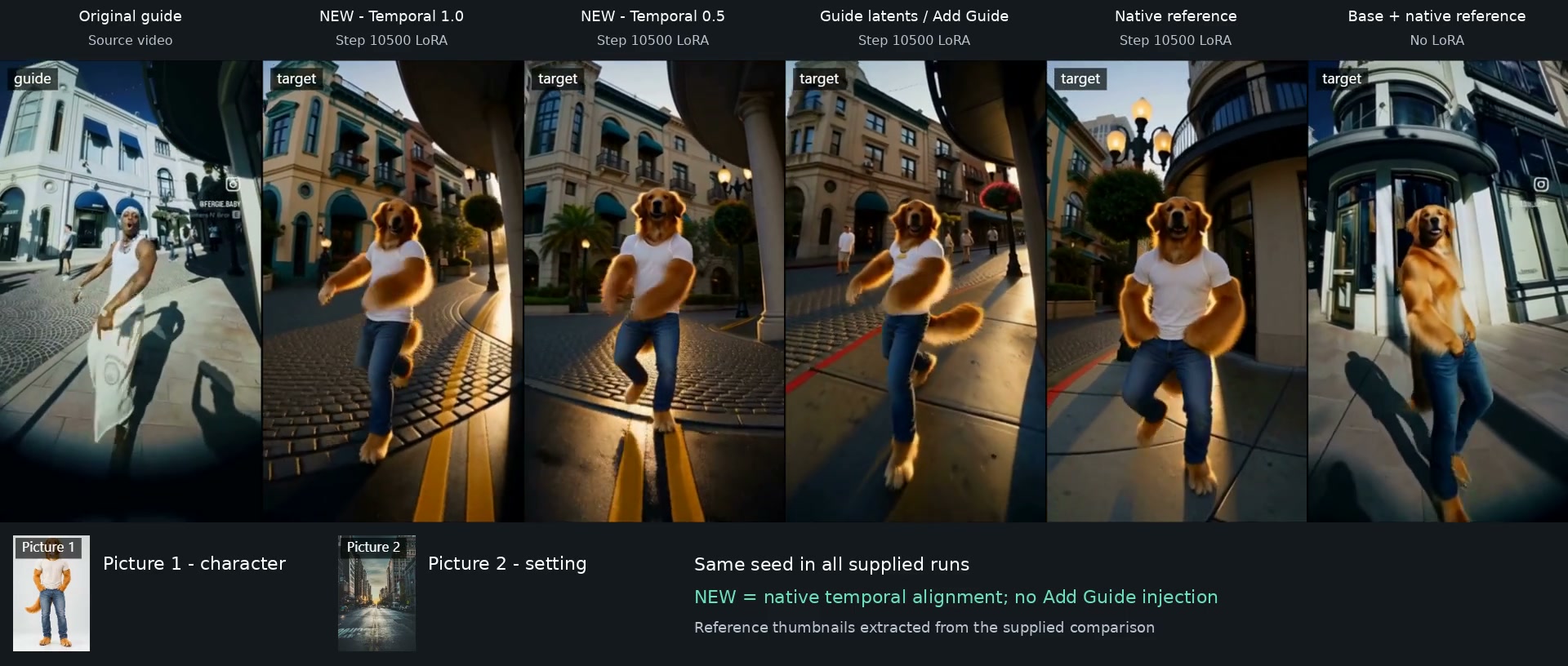
One frame from the six-column comparison, left to right: the original guide, the step-10500 LoRA with TARA at guide scale 1.0, the same LoRA with TARA at 0.5, the same LoRA with Add Guide latents, a native reference without the temporal patch, and the base model with a native reference. The temporal columns are marked NEW in the video.
The full 15-second side-by-side export from the repository, all six columns playing at once.
Tuning the four controls
The pack also ships an animated parameter guide with an offline HTML version whose sliders animate the same rule. Its advice is to start from the defaults, keep seed, LoRA, prompt, source and output fixed, and change one control at a time. Motion drift is a timeline problem first: the wrong <Video 1>, a frame-rate mismatch or a shifted frame window cannot be repaired by a stronger bias. Identity drift points at reference assignment, the LoRA and image conditioning rather than the temporal controls.
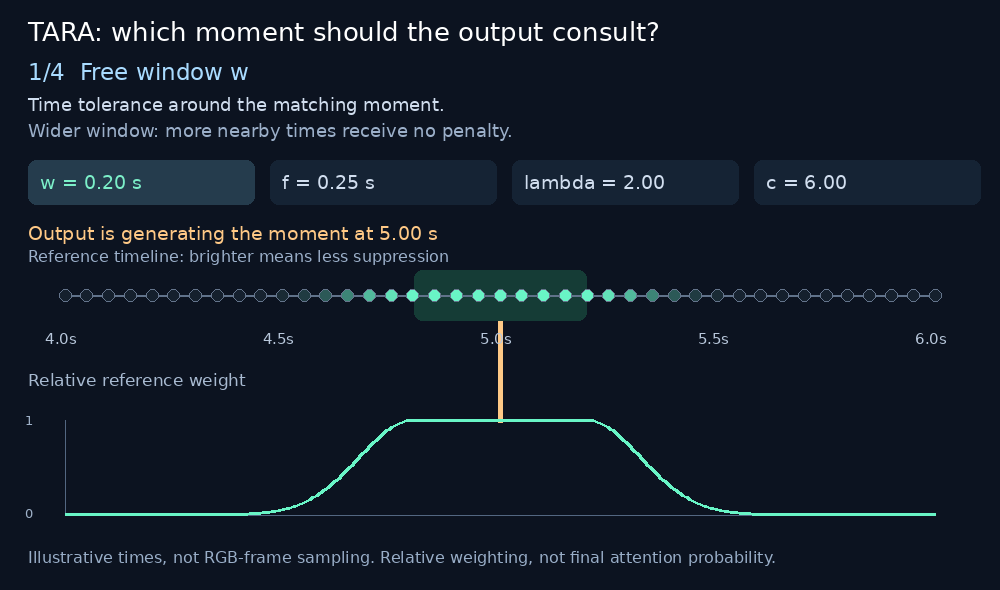
Free window, falloff, strength and cap, from the repository's parameter guide.
Limitations
- The feature is experimental and opt-in; the Planner default is still Add Guide, and the docs say full visual-quality validation is incomplete.
- The published demo is qualitative: identical seeds across columns, but not every generation setting was captured, and the requested background replacement stays partial.
- Both clips need matching temporal grids, and the policy keeps the dense quadratic attention work.
- Validation so far is CPU math and routing tests plus user-reported RTX 5090 evaluations. Guide audio is packed natively but is not temporally biased.
Availability
ComfyUI-BFSNodes is published in the Comfy registry as bfsnodes and installs through ComfyUI Manager, or can be cloned into custom_nodes/. TARA runs on top of the native MiniMax H3 nodes and the Comfy-Org/MiniMax-H3 weights used for regular H3 generation.
The full conditioning contract is in H3_NATIVE_TEMPORAL.md, the backend derivation and timing tables in H3_FLASH_PARTITIONS.md, and the research branch behind the method in alisson-anjos/ai-toolkit. For use outside this node pack there is a manual install guide.
Comments
Sign in with GitHub to join the discussion.