Character Card Studio Builds Character Sheets in ComfyUI
ComfyUI-CharacterCardStudio turns one reference image or a prompt into a sliced character sheet, with eight card templates, a scene six-view mode and Qwen-Image 2.1 workflows.
ComfyUI-CharacterCardStudio is a custom node pack that generates a character reference sheet and then slices and lays it out as a finished card (GitHub). It went up on October 20 and is at version 1.2.1. The input is either one reference image, used as an identity anchor, or a plain character description; the output is a multi-panel card where every panel is generated, cropped to a fixed 768x768 and put back in its slot.
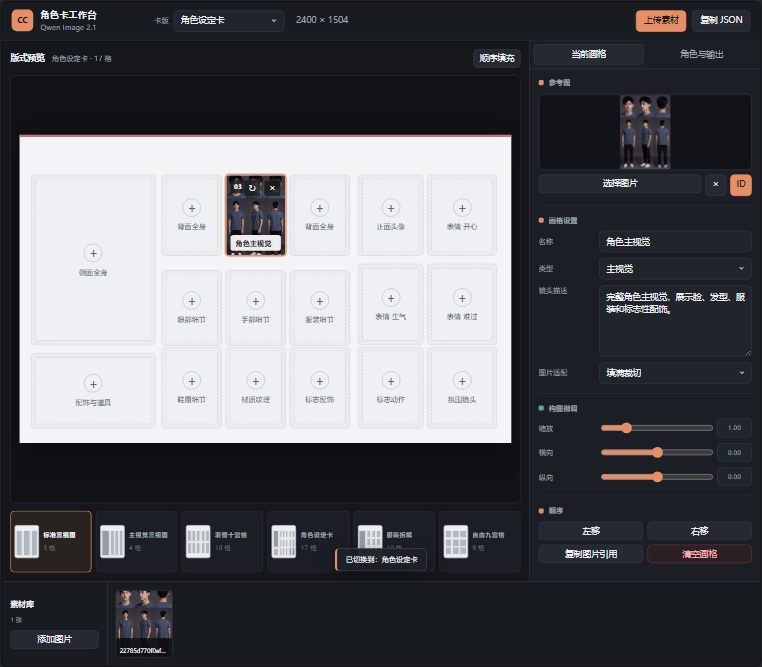
Preview from the project. Source: ComfyUI-CharacterCardStudio
The pack is built around the boring half of that job. Generating the views is something Qwen-Image 2.1 already does; the work that eats time is deciding how many panels a card has, which pose goes in which cell, keeping the full body inside each cell so heads and feet are not cut off, and mirroring the right-side profile so the two side views actually face opposite ways. All of that is baked into the node rather than left to a prompt.
What is inside
Eight card templates and one scene template ship with the pack, from four panels up to fourteen:
| Template | Name | Panels |
|---|---|---|
bighead_body3 | Four panels, portrait plus body | 4 |
dualfour_ref | Four panels, two frames | 4 |
fiveref | Five panels, front and back | 5 |
head_body_6 | Six panels, three views | 6 |
sixtilt_ref | Six panels, key visual | 6 |
expr_body_8 | Eight panels, expression sheet | 8 |
school_ref | Ten panels, setting sheet | 10 |
xianxia_ref | Fourteen panels, full compendium | 14 |
scene_six_view | Scene, 360 degree surround | 6 |
The nodes are split so the pipeline can be used at three levels:
| Node | Role |
|---|---|
AICG3D_CharacterCardOneClick | Picks the template, compiles the prompt, negative prompt, blank-layout guide image and template JSON |
AICG3D_CharacterSheetSplitter | Reads the first node's settings, slices, keeps full body in frame, reorders |
AICG3D_CharacterCardStudio | Manual workbench for replacing individual panels and adjusting crops |
AICG3D_CharacterCardAssetPrompt | Emits separate prompts for body, head, action, expression and detail assets |
AICG3D_CharacterCardAssetComposer | Assembles those assets into the final card |
AICG3D_CardSettingsFive | Template and ordering settings, kept under its old ID for compatibility |
AICG3D_Qwen21ModelLoader | Loads UNET, CLIP and VAE for Qwen-Image 2.1 |
AICG3D_CharacterCardGeneratorSingle | Generates each enabled cell on its own and pastes it into the template coordinates |
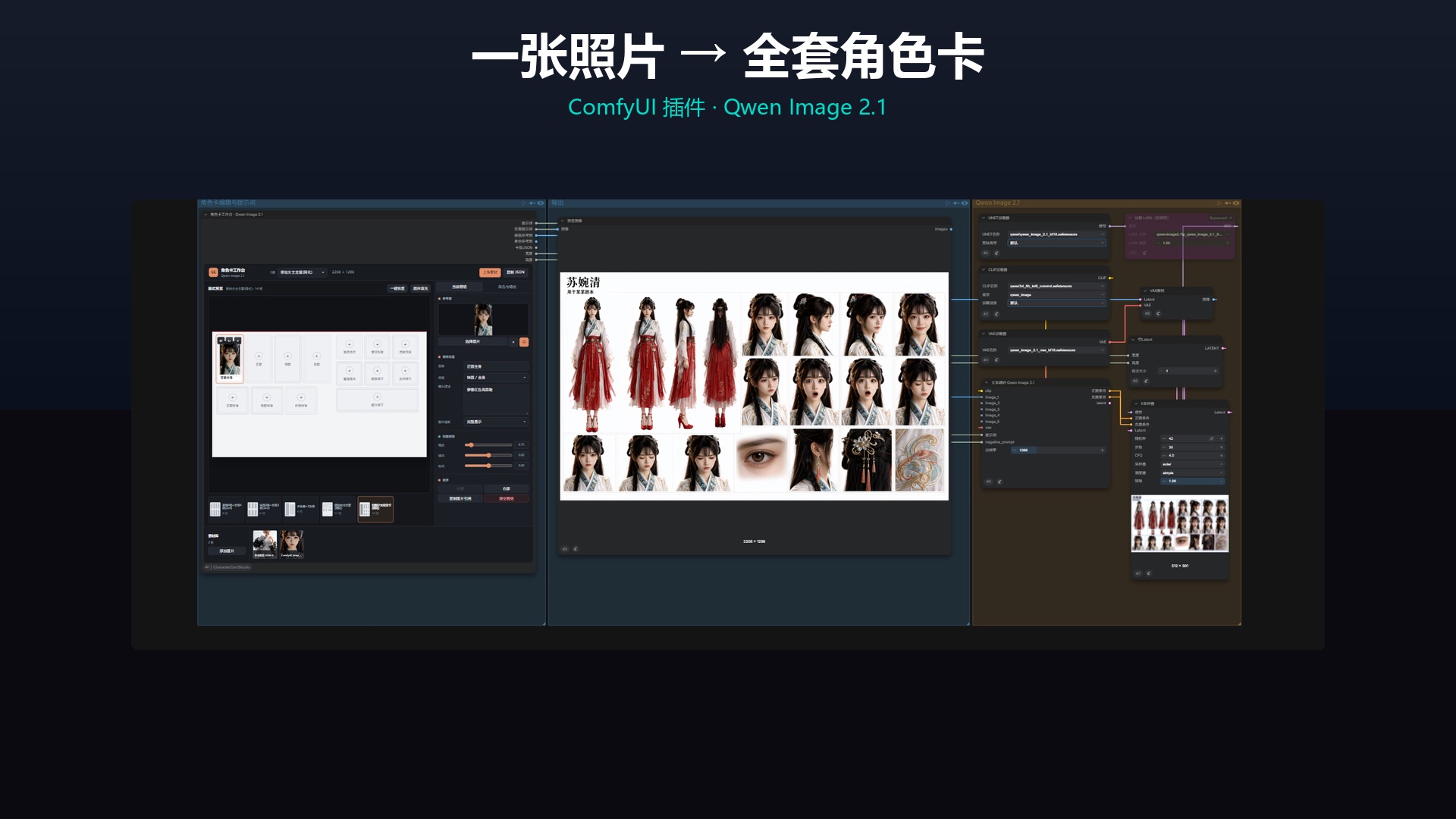
The one-click path, from the project README. Source: ComfyUI-CharacterCardStudio
Two settings do most of the layout work. panel_order accepts strings such as 1,3,2,4,5-9, so panels can be reshuffled without regenerating, and fit_mode defaults to showing the whole figure, which is what stops the top of the head and the shoes from being cropped when a cell is filled.
Whole card or panel by panel
The one-click workflow asks the model for the entire sheet in a single image, which is fast but inherits the model's randomness: the number of panels can drift and the grid can come out uneven. For a card that has to be reproducible, the pack ships a per-panel path that generates each cell separately from the same character description and then composes them into the template, so panel count and placement stay fixed.
A separate node, AICG3D_CharacterCardGeneratorSingle, runs that per-cell pass inside one node using the template coordinates.
The scene template works differently. Given any scene photo, it keeps the first cell as the original and generates the remaining cells at 90, 180 and 270 degrees plus a 360 panorama and environment detail, which is useful for a location sheet rather than a character one.
Workflows and models
Seven workflow JSONs are in the repo, including one-click image-to-card, one-click prompt-to-card, a five-template single-line workflow and a per-panel variant:
They default to qwen_image_2.1_bf16.safetensors for the diffusion model, with qwen_image_2.1_int8_convrot.safetensors as the lower-VRAM option, qwen3vl_8b_int8_convrot.safetensors as the text encoder with type qwen_image, and qwen_image_2.1_vae_bf16.safetensors for the VAE. Loading TextEncodeQwenImage21 as the encoder node is part of the graph.
Install
cd ComfyUI/custom_nodes
git clone https://github.com/JGRFW/ComfyUI-CharacterCardStudio
Restart ComfyUI afterwards. The pack needs nothing beyond what ComfyUI already ships: Pillow, NumPy, torch and aiohttp. Its README and node labels are in Chinese.
Limits
The project has no release tags and no published example gallery beyond the two preview images, and the repository has not collected issue reports yet, so the templates have not been tested by users outside the author's setup. A single-pass whole card is explicitly not deterministic, which the README states as the reason for the per-panel path. Everything here runs on Qwen-Image 2.1, so another base model means editing the loader nodes and the encoder.
Comments
Sign in with GitHub to join the discussion.