MiniMax H3 Character Swap v1.1: 80 MB LoRA, Better Likeness
Alissonerdx releases MiniMax H3 Character Swap v1.1, an 80 MB dynamic-rank SVD extraction with closer likeness, plus two ComfyUI workflows, one on native nodes.
The repository is the same one behind the H3 character swap and live wallpaper LoRAs, which covered v1.0 earlier in October, and it sits at roughly 458 likes and 144,700 downloads at the time of writing. Every adapter in the pack is trained against H3's ref2va weights and uses the same conditioning idea: the source clip is injected through MiniMaxH3AddGuide as an aligned guide lattice rather than a loose video reference.
v1.1 does not change the task. It is the same guide-driven body swap with the body_swap: trigger, and the whole release is about one complaint from v1.0: the swapped character did not look enough like the reference image.
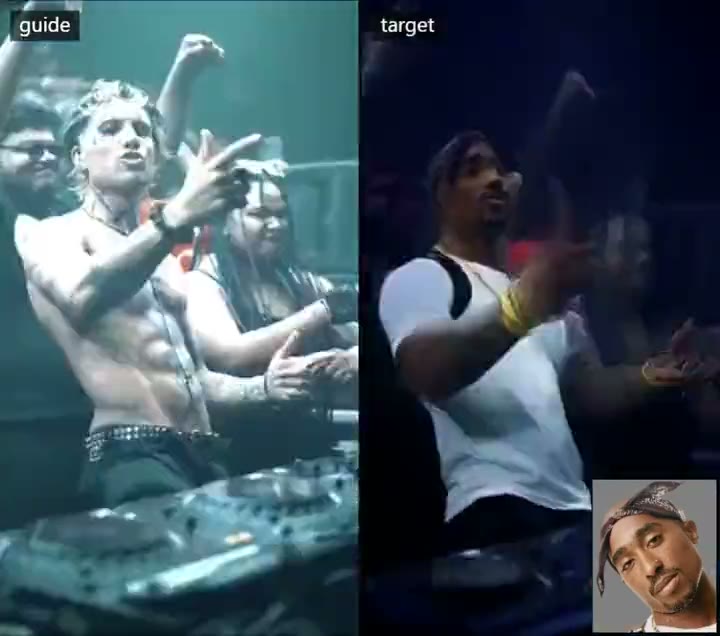
A frame from the guide-versus-target comparison clip in the author's v1.1 tests.
What v1.1 changes
The author did not retrain a new adapter for this release. v1.1 is an 80 MB SVD extraction of the v1.1 training run, with a dynamic rank chosen per layer by Frobenius-norm energy analysis: each of the 208 layers keeps the smallest rank that holds 95% of its own energy, which lands between rank 4 and rank 34 with a median of 7. That makes the file about eight times smaller than v1.0's rank-64 checkpoint while scoring better on likeness, so the reference applies to the face, hair, body and clothing more closely, and the guide still supplies the scene, camera and performance.
| Checkpoint | Size | What it is |
|---|---|---|
minimax_h3_character_swap_v1.1_ref2va_fro | 80 MB | Dynamic per-layer rank (4 to 34, median 7), the recommended release |
minimax_h3_character_swap_v1.0_ref2va_r64_gl | 620 MB | Rank 64, the previous release, kept for side-by-side comparison |
The guide asks for strength 1.0, which is also the author's stated rule for publishing: a LoRA that does not work at 1.0 does not get released.
The author posted three of the rank comparisons while the release was still in progress. The first uses ranks extracted by energy analysis, the second mixes the two training stages that feed v1.1, and the third is the full guide-versus-target comparison.
Rank extraction by Frobenius energy, the scheme that shipped in v1.1.
A mixed-rank test that combines both training stages behind v1.1.
A side-by-side guide versus swapped output clip.
Two v1.1 workflows
v1.1 ships a fresh pair of graphs, and the choice between them is mostly about clip length.
| Workflow | What it uses |
|---|---|
| Shot Planner | ComfyUI-BFSNodes 1.113.0 or newer. Long videos are split into shots, each shot is rendered and joined, references and {details} are described in the planner, and the graph builds a side-by-side comparison. |
| Native nodes only | Generate Text looks at the reference image and writes the complete prompt, then MiniMax H3 Reference to Video and Add Guide render one clip. No community node pack needed. |
Both run in 8 steps with a DMD turbo LoRA, and both have an optional second pass that adds the LMS sharpness LoRA and the latent upscaler at 1280×704. Each workflow carries a note with the download link of every model it loads, and the model loaders keep the folder names they were saved with, so each loader has to be reselected if your files live somewhere else.
Prompt template
The character description is the part that decides how much of the reference survives. The guide now ships a fixed template: use it on one line and replace only {details} with a comma-separated description of the reference character, starting with the gender.
body_swap: subject_definitions: <Subject 1> is the {details} shown in <Picture 1>, whose identity, face, head, hair or fur, skin, body shape, proportions and clothing define the character in the target video. The guide video provides the scene and the performance: its background, environment, lighting, camera, framing, body pose, hand and arm movement, head rotation, gaze direction, lip movement and facial expression, frame by frame; only the main subject of the guide video is replaced: its face, hair, body and clothing become <Subject 1>. summary: [video generation + reference] Replace the guide subject with <Subject 1>, keeping the scene, camera and the complete motion and performance of the guide video. detailed_description: [Shot 1] <Subject 1> takes the exact place of the guide subject and moves with the same timing, body pose, gestures, head motion, gaze, speech and facial expressions, while keeping the complete identity from <Picture 1>: facial structure, hair or fur, skin, body shape and clothing stay stable in every frame. The background, lighting, colors and camera of the guide video are preserved. Prevent identity drift, clothing changes, texture crawling and flicker.{details} is meant to be written from head to toe: gender, height and build, face shape and skin tone, hair, upper and lower clothing with colors and materials, footwear, accessories, and distinctive features such as tattoos, scars or wrinkles. The guide forbids describing the background, camera or lighting in that slot.
There are two ways to fill it automatically. In the Shot Planner, {details} stays in the prompt and the panel's Describe refs action writes the description of each reference, or the language model writes it when the workflow runs. In the native workflow, Generate Text receives the reference image and an instruction that returns the complete prompt, and the guide recommends setting max_length to about 768 so the end of the prompt is not cut off.
Availability
Place the LoRA in ComfyUI/models/loras/, load one of the v1.1 workflows, and check the note inside the graph for the models it expects. The published setup loads an H3 ref2va diffusion model (the pruned int8_convrot build in the author's example), the H3 text encoder, the video and audio VAEs and an 8-step DMD turbo LoRA. The optional qwen3.5_9b_w4a8_gptq vision-language model is only used to describe the reference.
The input order matters. Send the original clip to MiniMaxH3AddGuide at frame_idx = 0, since the LoRA was trained on guide latents, and send the character image through H3's native image-reference path as <Picture 1>. Keep the output aspect ratio and frame count aligned with the guide, using an H3 frame count of 17n + 5 (5, 22, 39, 56, 73, 90, 107, 124, and so on), and test on a short range before running a long clip.
Comments
Sign in with GitHub to join the discussion.