LightVAE: Faster Video VAE Decoding for Wan and H3
ModelTC releases LightVAE, compressed Wan2.1, Wan2.2 and MiniMax-H3 video VAE decoders that keep the original latent interface, up to 2.94x faster in ComfyUI.
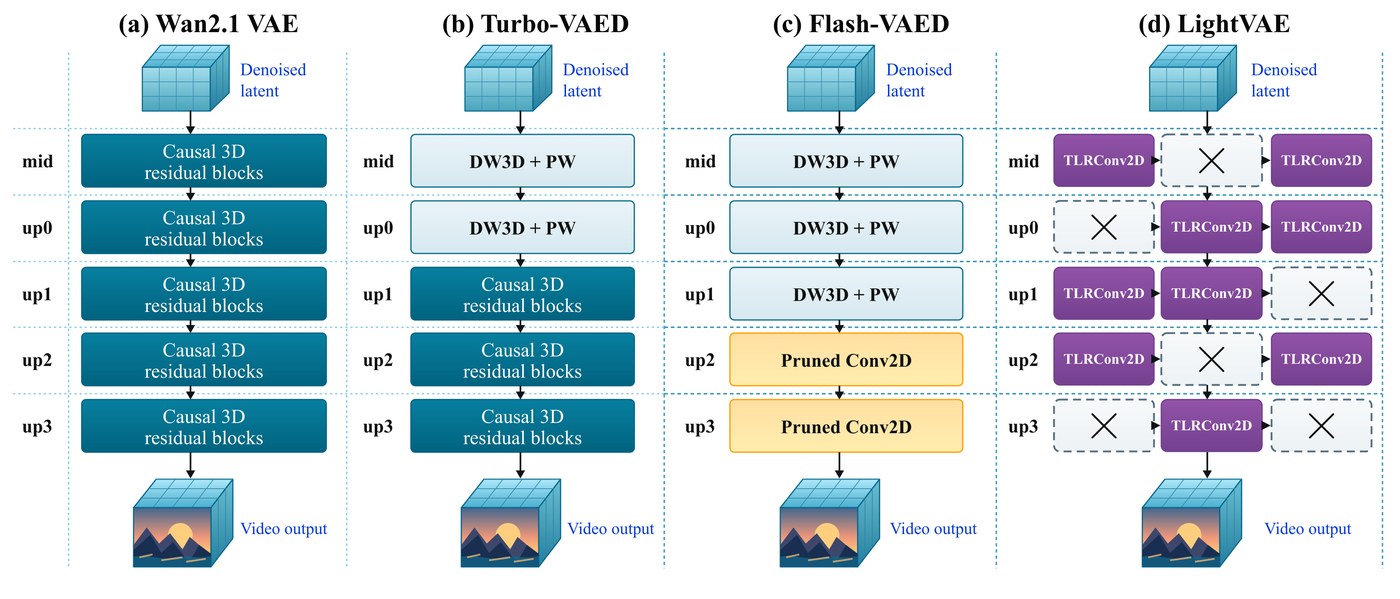
From the project repository: the Wan2.1 VAE next to Turbo-VAED, Flash-VAED and LightVAE.
What LightVAE does
Video VAE decoding is a large part of the cost of a video generation run: a latent clip has to be turned back into hundreds of frames every time. LightVAE keeps the decoder's job identical and shrinks the network that does it:
- LightVAE-Pro uses temporal low-rank convolutions at the original decoder depth, so reconstruction fidelity stays close to the original.
- LightVAE-Lite adds block pruning on top, trading a little fidelity for more speed.
- Original latent interface. Wan models keep their own uncompressed encoder, so an existing workflow only swaps the decode side. MiniMax-H3 gets both a pruned decoder and a separate Lite encoder.
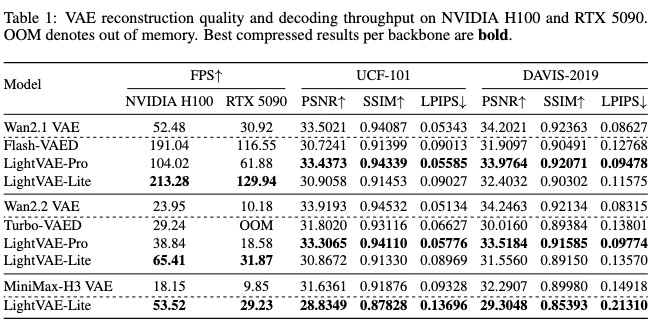
Table 1 of the paper: decoder throughput against reconstruction PSNR.
Decode speed
Measured by the authors in ComfyUI on an H200 at 768 x 1344, batch size 1, with 125 frames for Wan and 124 for H3, one warmup and the median of three runs:
| Backbone | Original VAE | LightVAE-Pro | LightVAE-Lite |
|---|---|---|---|
| Wan2.1 | 6.844 s / 18.26 FPS | 3.754 s / 33.30 FPS (1.82x) | 2.330 s / 53.64 FPS (2.94x) |
| Wan2.2 | 6.886 s / 18.15 FPS | 4.420 s / 28.28 FPS (1.56x) | 2.999 s / 41.68 FPS (2.30x) |
| MiniMax-H3 | 6.303 s / 19.67 FPS | not provided | 3.574 s / 34.69 FPS (1.76x) |
The measurement covers GPU-synchronized VAE.decode only, so it is a decode speedup rather than a full-generation speedup. LightVAE does not reduce the diffusion model's or the text encoder's memory cost.
Choosing a checkpoint
| Generation model | LightVAE decoder | Encoder |
|---|---|---|
| Wan2.1 / Wan2.2 14B | lightvae-{pro,lite}-wan21-decoder-comfy.safetensors | Original Wan2.1 VAE |
| Wan2.2 5B TI2V | lightvae-{pro,lite}-wan22-decoder-comfy.safetensors | Original Wan2.2 VAE |
| MiniMax-H3 | lightvae-lite-h3-decoder-comfy.safetensors | lightvae-lite-h3-encoder-comfy.safetensors or the original H3 video VAE |
Wan2.2 14B uses the Wan2.1 VAE (16 latent channels) while the 5B model uses the Wan2.2 VAE (48 channels), so the choice is not a free pick. Wan encoders and the H3 audio VAE stay unchanged in every configuration.
Using it in ComfyUI
python comfyui/install.py --comfy-root /path/to/ComfyUI copies the adapter to ComfyUI/custom_nodes/ComfyUI-LightVAE/, and the *-comfy.safetensors weights go in ComfyUI/models/vae/LightVAE/. The ComfyUI adapter now covers MiniMax-H3 only, and the H3 weights use block pruning rather than TLR. The node is Load H3 LightVAE, and the important part is that it loads the retained blocks into ComfyUI's native H3 video VAE: the original video VAE goes into its base_vae, and the Lite components are picked here rather than in the standard Load VAE node:
- Keep the original Load VAE node and connect it to LightVAE's
base_vae. - Select the H3 Lite decoder, and leave
encoder = noneunless you also want Lite encoding. - Connect LightVAE's
VAEoutput to the encode and decode nodes in the workflow.
For H3 the optional Lite encoder replaces both the reference-encoding path and decoding, so a LightVAE encoder plus decoder covers the whole VAE. Setting both selections to none restores the original VAE exactly.
The repository ships three flat H3 workflows for this node, and they need nothing beyond ComfyUI core:
| Workflow | Task | LightVAE components |
|---|---|---|
h3_fl2v_lightvae.json | H3 first and last frame to video, 1344x768 | H3 Lite decoder only, the original VAE encodes the keyframes |
h3_ref_image_lightvae.json | H3 reference image to video and audio, 1344x768 | H3 Lite encoder + decoder |
h3_ref_video_lightvae.json | H3 reference video plus soundtrack to video and audio | H3 Lite encoder + decoder |
All three are also in the workflows directory.
Hardware support
LightVAE is not limited to Hopper. On NVIDIA BF16 with Triton it uses fused kernels; without a working Triton compiler, or on other PyTorch devices, the TLR convolutions stay factored and run through a PyTorch fallback, and there is a CPU FP32 path for debugging. The H3 path uses PyTorch convolutions and attention rather than the Wan Triton kernels, and the authors note that untested GPU families are not speed-guaranteed. The node was validated against ComfyUI e8665ca at Python 3.11, with a complete H3 generation verified at 1344x768, 362 frames, 24 FPS.
Availability
Weights: lightx2v/LightVAE on Hugging Face. Code, benchmarks and workflows: ModelTC/LightVAE on GitHub.
Comments
Sign in with GitHub to join the discussion.