Qwen-Image 2.1 Restore LoRA: Upscales That Stay Yours
A community LoRA for Qwen-Image 2.1 keeps a restored or enlarged photo on its original frame: 0.3 px off against 2.2 px without it, plus a ComfyUI workflow and two checkpoints.
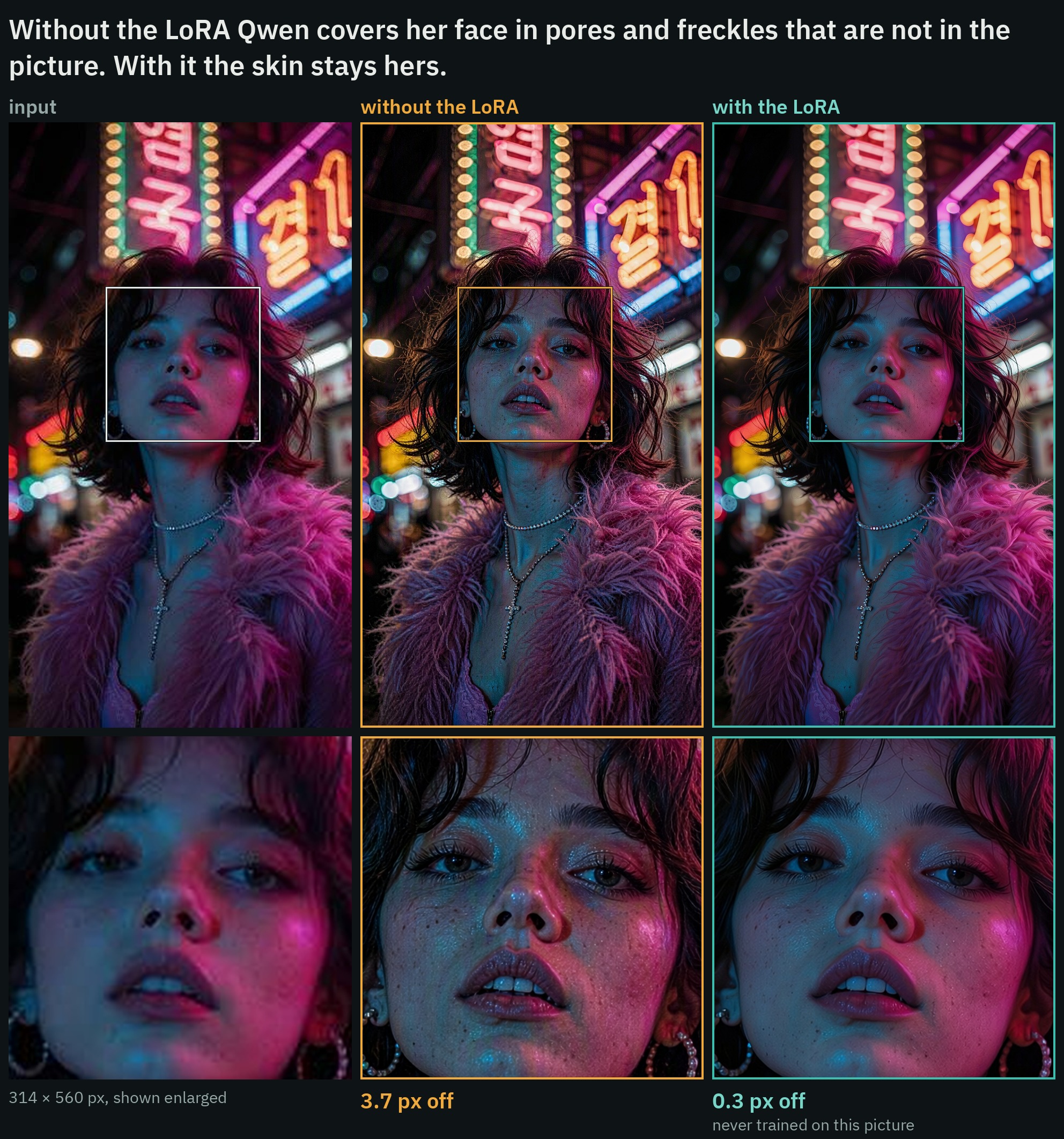
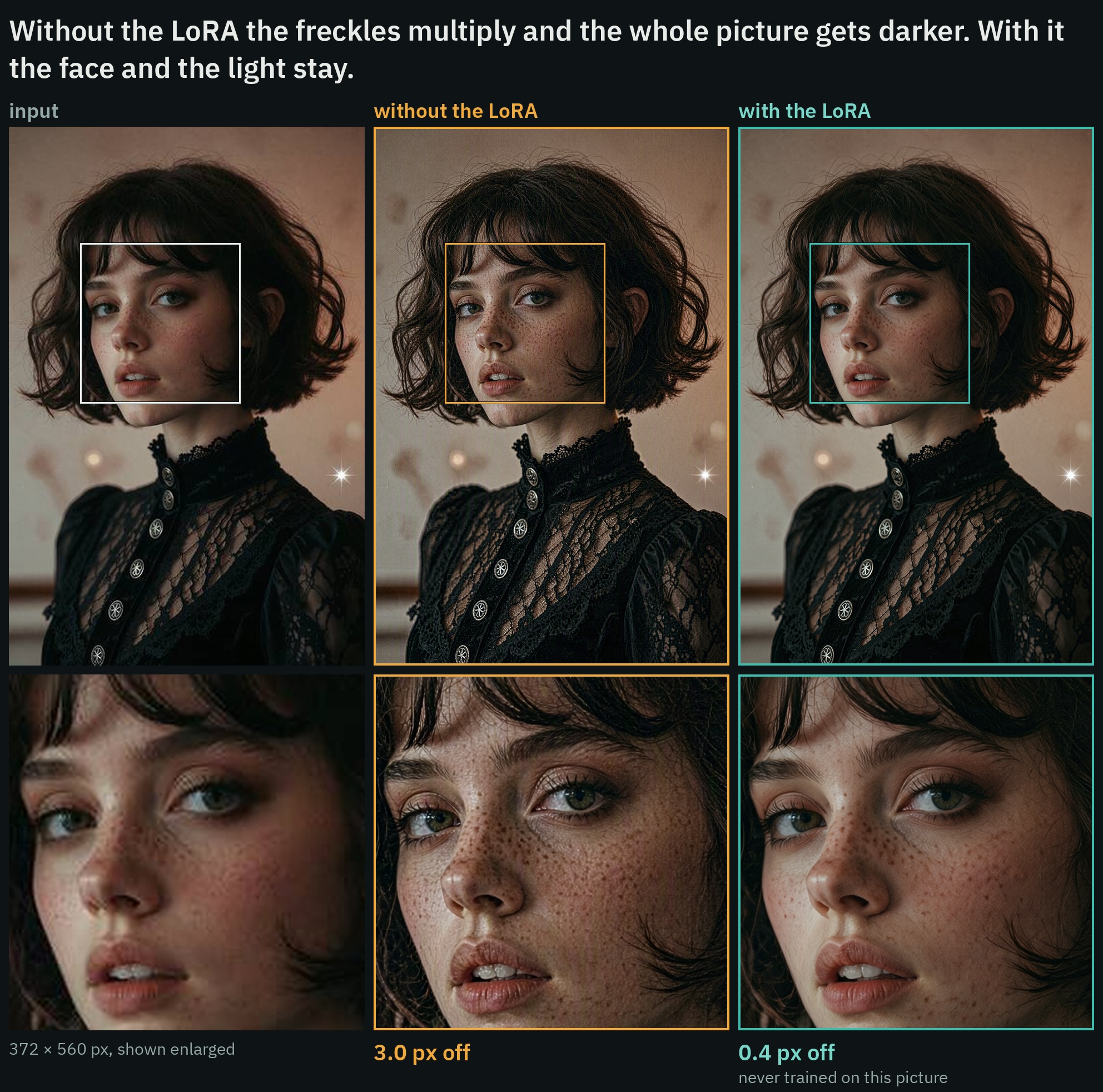
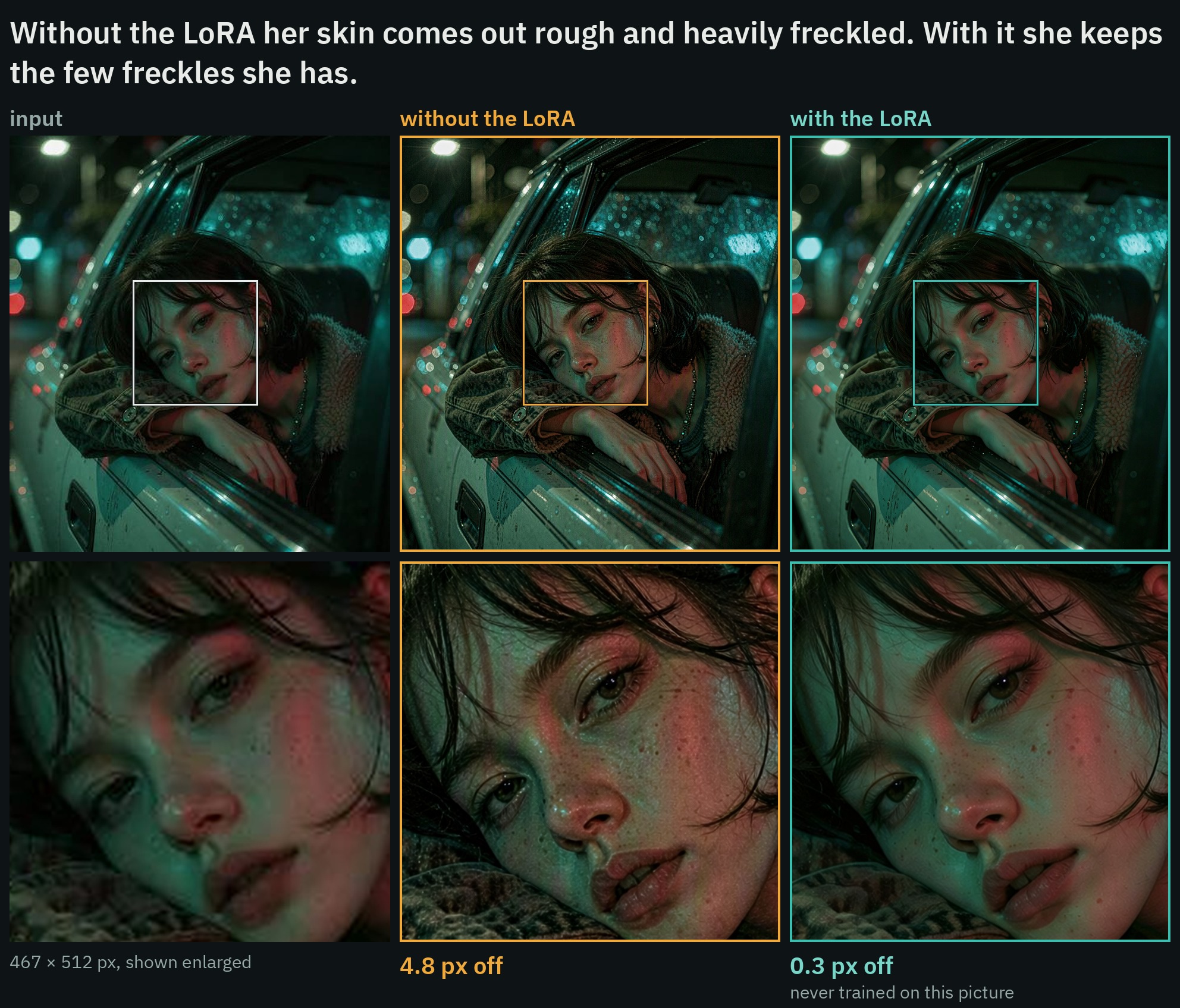
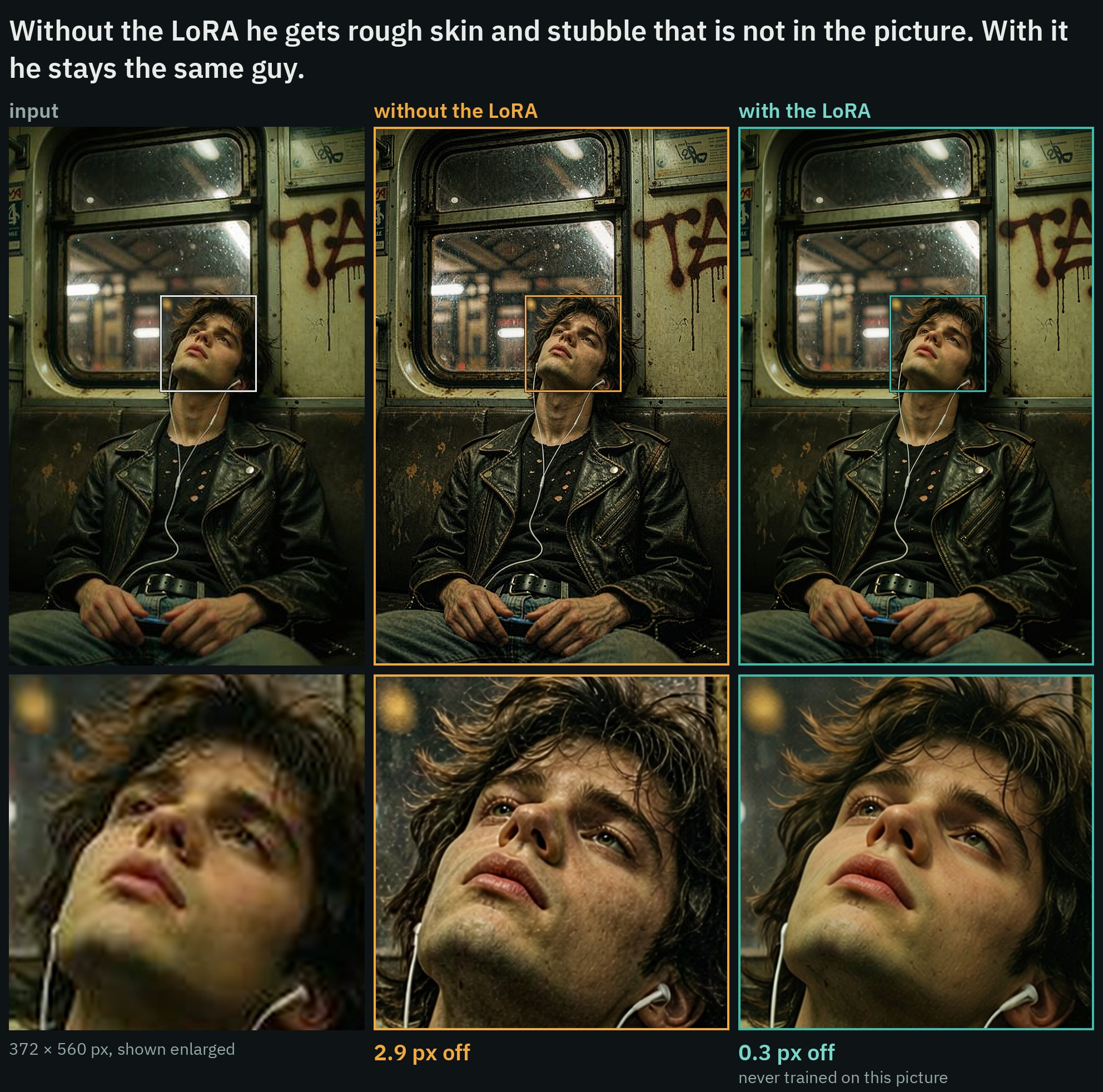
In each comparison: the small input, the result without the LoRA, the result with it, and the marked section enlarged underneath. All run through the repo's own workflow with the same prompt and seed, 8 steps with Viggle Turbo, about 2 MP. "px off" is how far the result sits from the full-size picture the input was shrunk from. None of these pictures is in the training set.
What plain Qwen-Image 2.1 does to a small picture
Qwen-Image 2.1 is a capable photo restorer on its own, and its failure mode is the opposite of blur. Asked to enlarge a compressed or low-resolution photo, it invents detail: pores, freckles, stubble and grain that the original never had, and it redraws faces a few years older than the person in the picture. It also moves things. Across the author's test set the worst corner of a plain Qwen-Image 2.1 result sat 2.35 px off the full-size original, which is small on screen but enough that the result cannot be laid back over the source.
The LoRA was trained to trade some of that invented texture for staying on the picture. It is a redraw, not a recovery: the fine detail is still made up, just less of it, and the card says so directly.
- No trigger word. Enlarge the picture to about 2 MP first (both sides divisible by 32), give it as image 1, and ask.
- Strength 1.0 for a small or compressed picture that is in focus.
- Strength 0.75 for a little more of Qwen's own texture.
- Strength 0.5 for a blurry photo, a shaky shot or a video frame.
Restore the photo: remove blur, noise and compression artifacts and recover sharp, natural detail, keeping the same composition, people and colors.For a scratched or faded print the card uses a second request, which also recovers color:
Restore the old photo: remove scratches, dust, fading and grain and recover sharp, natural detail and color, keeping the same composition and people.Measured hold
Eight of the author's own pictures, shrunk to 512 or 560 px on the long side and saved as JPEG at quality 70, then enlarged to about 2 MP and restored with the same seed, LoRA at 1.0, CFG 1, euler / simple. Every number is measured against the full-size original, which the model never sees. The 8-step columns use Viggle Turbo; the 25-step columns do not:
| eight held-out pictures | no LoRA, 8 steps | with it, 8 steps | no LoRA, 25 steps | with it, 25 steps |
|---|---|---|---|---|
| distance from the original, worst corner median | 2.35 px | 0.26 px | 1.59 px | 0.15 px |
| the same, worst of the eight | 3.83 px | 0.38 px | 3.25 px | 0.26 px |
| close to the original (SSIM, 1 = identical) | 0.578 | 0.766 | 0.743 | 0.812 |
| PSNR | 23.2 dB | 28.0 dB | 26.3 dB | 29.3 dB |
| color and brightness shift | 2.05 % | 0.97 % | 1.72 % | 1.04 % |
| same face (face recognition, 1 = identical) | 0.821 | 0.905 | 0.837 | 0.901 |
| fine detail, against the original's | 121 % | 78 % | 58 % | 36 % |
The fine-detail row is the trade in one number. Over 100 % means detail that was made up: at 8 steps plain Qwen-Image 2.1 draws more grain than the original has, and at 25 steps it draws about half as much as the original. With the LoRA both are lower than the original, so results read a little smooth. The author also ran 29 more pictures through the same 8-step test: 0.28 px off with the LoRA against 2.16 px without, same-face 0.88 against 0.79, SSIM 0.777 against 0.611.
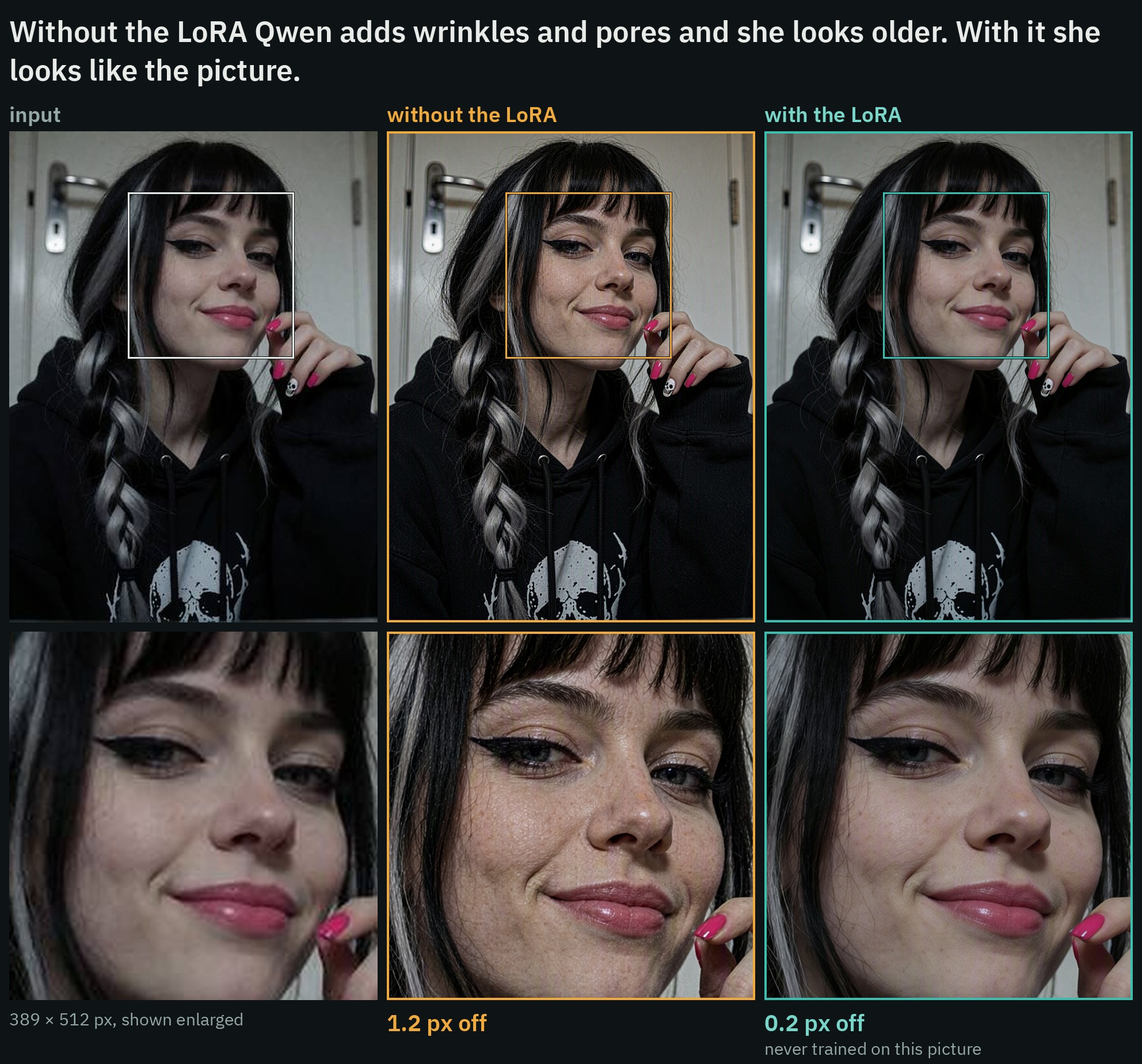
A 389 px JPEG enlarged to 2 MP. None of these pictures is in the training set.
Every kind of damage
The release also reports 57 held-out pairs damaged the way the training pairs were, one pass at 8 steps with the normal request. SSIM is measured against the clean picture, and "px off" is the median:
| kind of damage | pictures | SSIM, damaged input | SSIM, no LoRA | SSIM, with it | px off, no LoRA | px off, with it |
|---|---|---|---|---|---|---|
| small web picture | 15 | 0.772 | 0.524 | 0.716 | 2.53 | 0.31 |
| phone smoothing | 5 | 0.836 | 0.565 | 0.857 | 2.65 | 0.17 |
| video still | 5 | 0.771 | 0.578 | 0.745 | 2.77 | 0.50 |
| saved and re-saved | 5 | 0.816 | 0.560 | 0.794 | 2.21 | 0.24 |
| blur and noise | 5 | 0.496 | 0.521 | 0.678 | 2.48 | 0.24 |
| low-resolution JPEG | 5 | 0.777 | 0.531 | 0.763 | 3.16 | 0.23 |
| heavy mix | 5 | 0.735 | 0.646 | 0.746 | 1.28 | 0.25 |
| old print | 4 | 0.551 | 0.437 | 0.749 | 2.46 | 0.19 |
| banding | 4 | 0.915 | 0.463 | 0.843 | 2.34 | 0.17 |
| low-resolution PNG | 4 | 0.873 | 0.636 | 0.847 | 3.39 | 0.15 |
| all | 57 | 0.756 | 0.544 | 0.762 | 2.70 | 0.23 |
With the LoRA the result was closer to the clean picture on all 57, and it moved less on all 57. On several kinds the damaged picture itself scores higher than any restore, because a soft picture is close on average.
Old prints get their own numbers on four held-out examples: color and brightness sat 15 % off the clean picture before the restore, 7 % off after it with the normal request, and 4 % off with the old-photo request. Scratches, dust and grain went with either request. A kind of fading the model has not seen can stay: in a second test with a different fade, the scratches went and the faded color stayed.
Strength is a dial
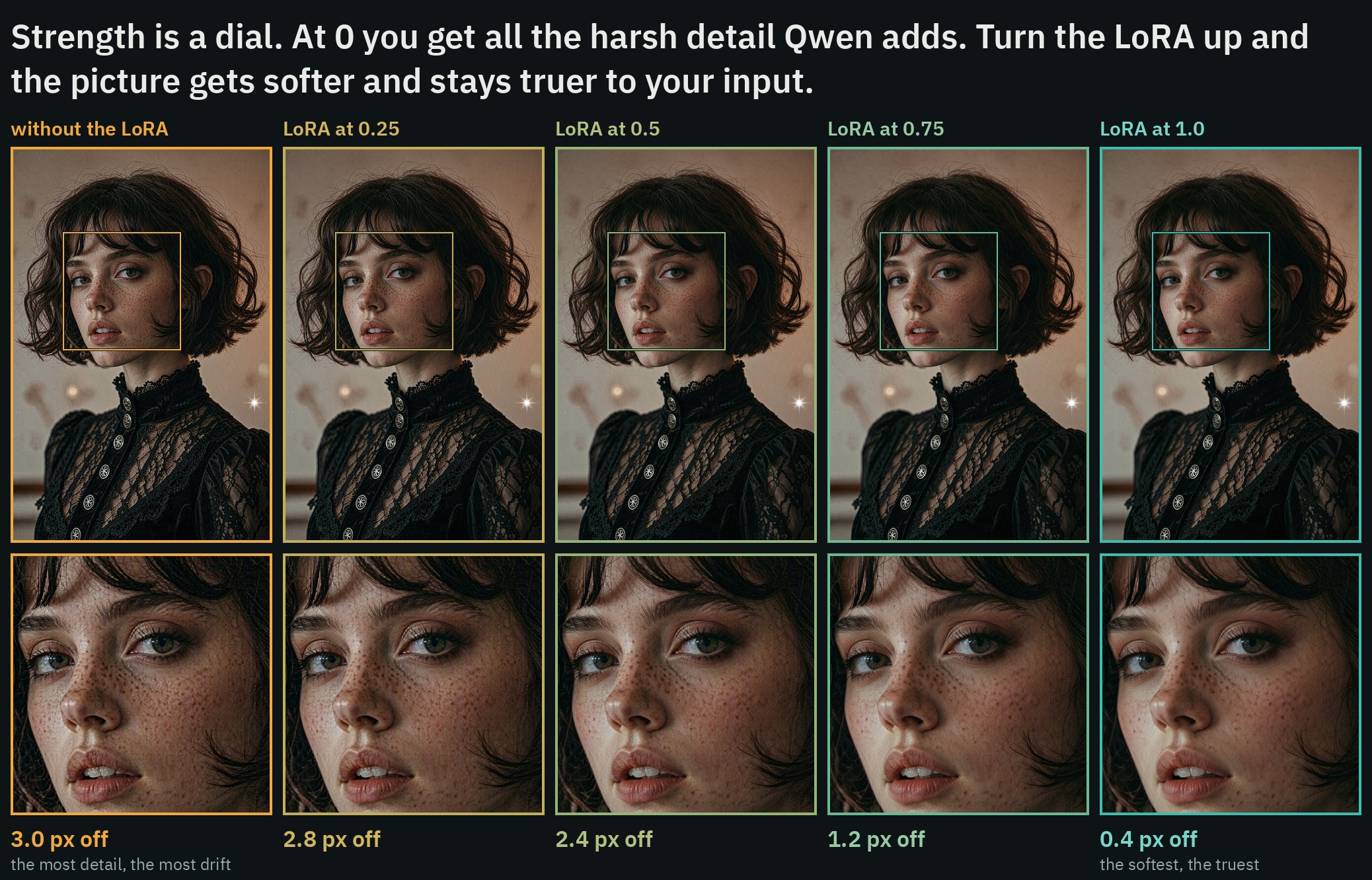
On the 29-picture set, the whole scale runs from plain Qwen at 0 to the truest result at 1.0:
| strength | off / 0.5 / 0.75 / 1.0 |
|---|---|
| distance from the original | 2.16 px / 1.31 px / 0.37 px / 0.28 px |
| same face | 0.794 / 0.858 / 0.875 / 0.880 |
| color and brightness shift | 1.88 % / 1.26 % / 1.05 % / 0.94 % |
| fine detail, against the original's | 102 % / 81 % / 77 % / 72 % |
Blurry photos are where the dial matters most. The author ran 26 real low-resolution photos (old selfies and phone pictures) at 1.0, 0.75 and 0.5. On the six blurriest, 1.0 came back soft, 0.75 barely helped, and 0.5 came back sharp; on the other twenty all three settings worked and 1.0 was the smoothest. Enlarging a soft photo in tiles to 8 MP also came back sharp at 1.0 on the three pictures that were tried that way.
The LoRA was trained on photos and holds on drawings too. On six test drawings (anime, a poster with lettering, watercolor, a 3D cartoon, manga, an oil painting) it kept the style and the lettering: SSIM 0.714 against 0.491 without it, and 0.27 px off against 2.65 px.
Against other tools
The card compares the release with the other tools it could find for the same job, on the same 29 pictures, with the same measurements, all run at 1.0. They are not all built for the same thing: some are made to add detail, and this LoRA is made to stay on the picture, so the table answers one question, how close the result stays to the original:
| 29 small pictures | off the original | same face | color and brightness shift | SSIM |
|---|---|---|---|---|
| Qwen Image 2.1 alone | 2.16 px | 0.79 | 1.88 % | 0.611 |
| SeedVR2 (3B), ComfyUI's own nodes | 0.42 px | 0.82 | 0.44 % | 0.771 |
| Deblur anything | 0.39 px | 0.85 | 1.42 % | 0.702 |
| Detail Enhancer, in the same graph | 2.07 px | 0.76 | 2.94 % | 0.673 |
| Detail Enhancer, its own workflow, 25 steps | 12.45 px | 0.71 | 4.16 % | 0.590 |
| this LoRA | 0.28 px | 0.88 | 0.94 % | 0.777 |
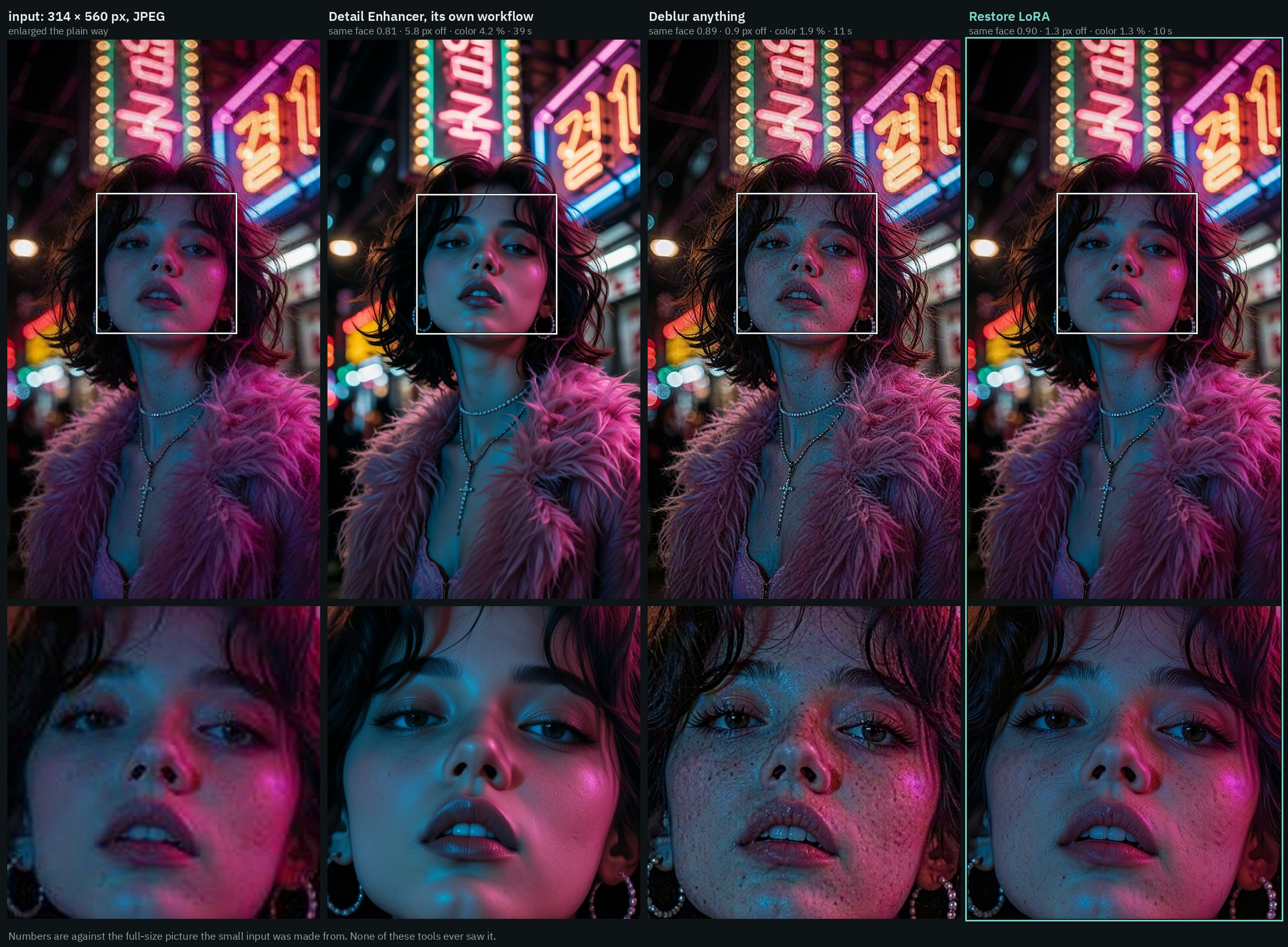
By SSIM the LoRA stayed closer to the original than the Detail Enhancer on all 29 pictures (28 of 29 when the Detail Enhancer runs its own workflow), than Deblur anything, and than SeedVR2 on 18 of 29. It kept the face better than the Detail Enhancer on 28 of 28, than Deblur anything on 26 of 28 and than SeedVR2 on 27 of 28. SeedVR2 is by far the fastest, about 3 seconds against 11, and it holds color best.
Which file to use
| file | notes |
|---|---|
qwen-image-2.1-restore.safetensors | step 1,500, start here. The closest of the two on the author's test pictures. Skin comes out a little smooth. |
qwen-image-2.1-restore-1250.safetensors | step 1,250. Draws more fine detail and keeps more skin texture on noisy phone pictures. A little less close. |
Both are rank 32 and use ComfyUI key naming, so they load onto the Comfy-Org Qwen-Image 2.1 weights with no conversion.
Running it in ComfyUI
The adapter is a model-only LoRA, so no custom nodes are needed for the restore itself. Put the .safetensors file in ComfyUI/models/loras/ and add a LoraLoaderModelOnly node after the model loader at strength 1.0, then give Qwen-Image 2.1 the small picture as image 1 and the request above as the prompt. The card's own setup is 8 steps with Viggle Turbo at CFG 1, or 25 steps without it.
A ready-made workflow ships in the repo's workflows/ folder, built with the author's ComfyUI-AusBoss nodes, the same pack his earlier releases use.
Limits
- It is a redraw, not a recovery. The fine detail is made up to fit, and plain Qwen-Image 2.1 draws more of it.
- Staying on the picture is the whole point, so a result that needs new content will not get it.
- Blurry input at full strength comes back soft. Drop to 0.5, or enlarge in tiles.
- The numbers come from the author's own test pictures and from 25 steps without Turbo on part of the comparison set.
- For results over 2 MP the author pairs it with his own tiled upscale workflow on Civitai.
Availability
- LoRA weights: ausboss/Qwen-Image-2.1-Restore-LoRA
- Per-picture numbers: comparison_numbers.csv
- Base model repack: Comfy-Org/Qwen-Image-2.1
- Author's node pack: ausboss/ComfyUI-AusBoss
Comments
Sign in with GitHub to join the discussion.