Qwen-Image 2.1 Outfit Swap LoRA: ComfyUI Swaps on Frame
A community LoRA for Qwen-Image 2.1 puts an outfit swap back on the original picture: framing, face and background hold while only the clothes change, with a ComfyUI workflow.
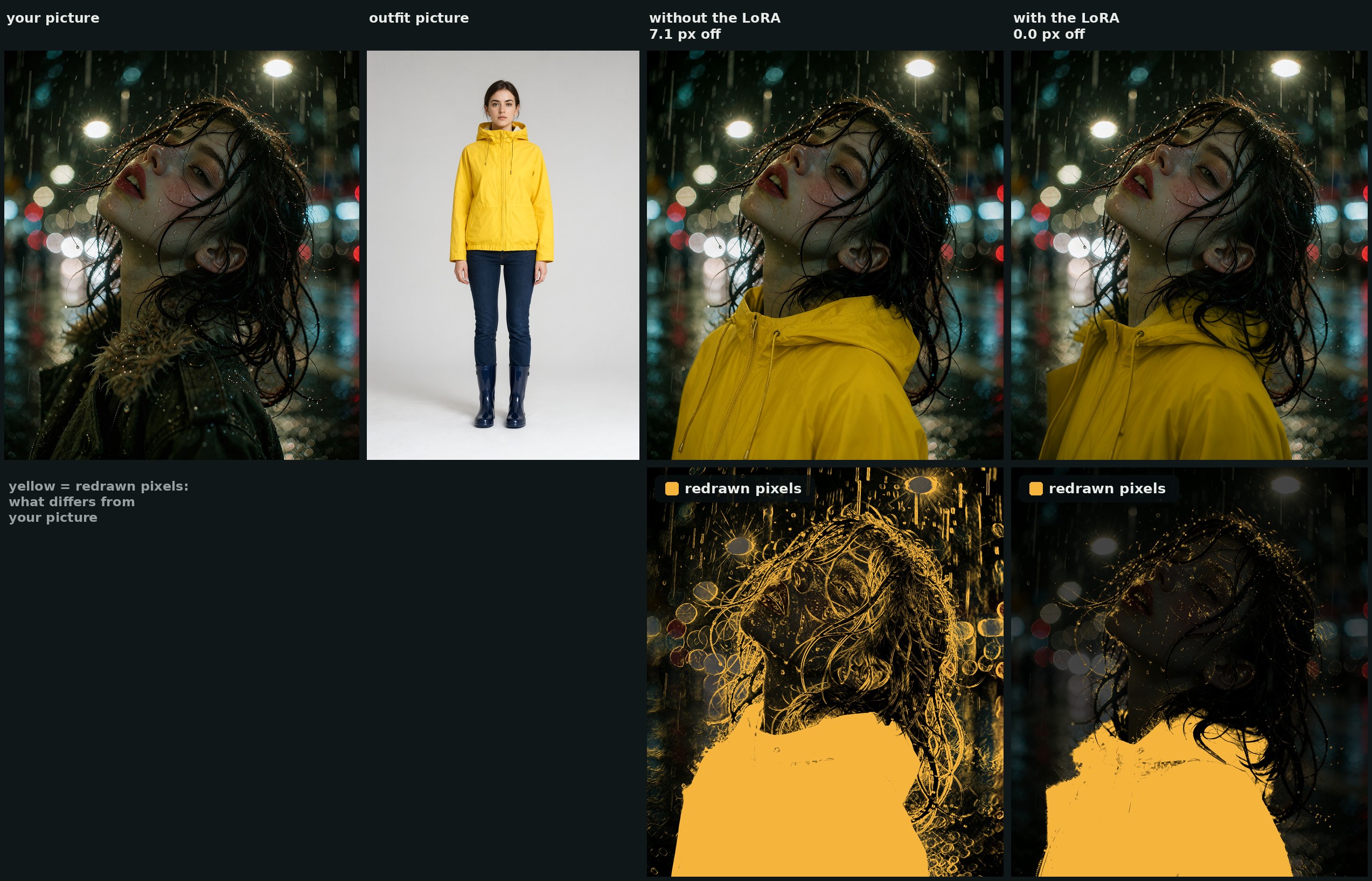
Top row: the swap, same request and seed. Bottom row: the redrawn pixels in yellow. Without the LoRA the face, the window and the wall light up; with it only the coat differs. Neither this person nor this coat is in the training set.
What plain Qwen-Image 2.1 gets wrong
Every Qwen-Image 2.1 edit is a fresh generation, so an outfit swap recomposes more than the clothes. The author ran 47 swaps with plain Qwen-Image 2.1 and marked every one by eye: 24 were usable, and the other 23 had something wrong with them. Usually it was not the outfit itself:
- the camera pulled back to fit the whole outfit into the frame,
- pants were pushed into a shot that had no legs in it,
- the body or the pose was redrawn to carry the new clothes,
- or everything simply moved a few pixels.
Measured against the person picture, the plain result sat about 3.4 px off at the worst corner. That is small, but it means the result cannot be laid back over the original: the face is redrawn a little softer and the background gets repainted even where nothing was asked for. Holding the pose with a ControlNet kept the scene in place, but the outfit failed to go on in about one swap in five, so it was dropped.
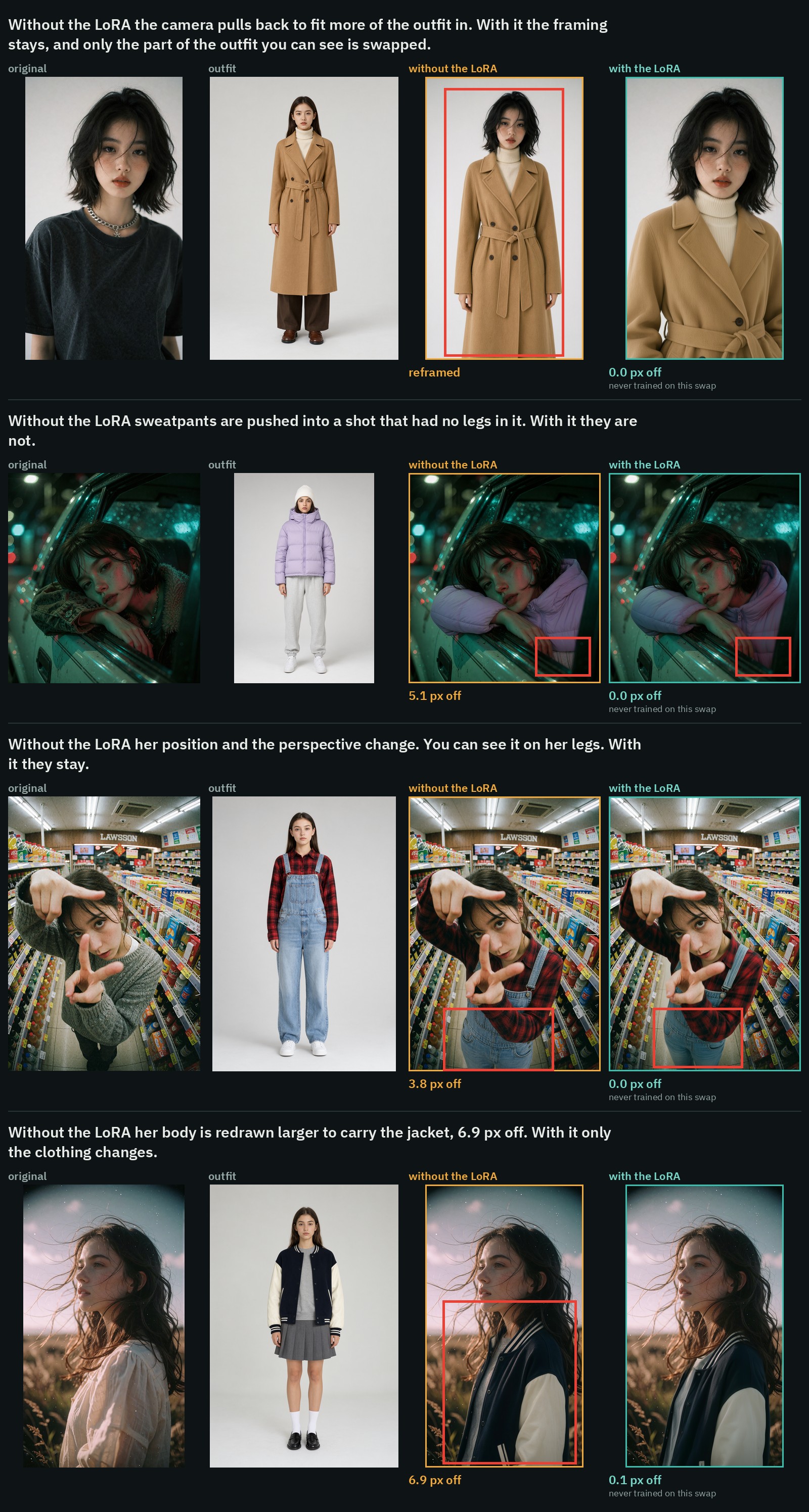
Four of those 47 swaps, with the same workflow and seed without the LoRA and with it. None of them is in the training set.
Measured hold
Sixteen swaps the LoRA never trained on, all run through the same workflow at about 2 MP with the same seed, 25 steps, CFG 1, euler / simple, adapter at 1.0. "Off" is how far the worst corner of the result sits from the person picture. The face and background numbers are taken after lining the result up with the person picture, so they count repainting, not drift:
| sixteen held-out swaps | no LoRA | step 1,000 | step 1,250 | step 1,500 |
|---|---|---|---|---|
| worst corner off, median | 3.6 px | 0.1 px | 0.1 px | 0.1 px |
| worst corner off, worst of the sixteen | 7.0 px | 0.2 px | 0.2 px | 0.2 px |
| face pixels that changed noticeably | 14.1 % | 1.7 % | 1.8 % | 2.0 % |
| face, PSNR against the person picture | 29.8 dB | 37.8 dB | 37.7 dB | 37.1 dB |
| background pixels that changed noticeably | 10.8 % | 0.9 % | 0.9 % | 1.2 % |
| background, PSNR | 27.6 dB | 40.5 dB | 40.4 dB | 40.0 dB |
Strength matters: step 500 at 0.5 sat 1.8 px off against 0.1 px at 1.0, so half the strength gives back about half the drift. Every step from 500 on holds the picture the same by the numbers. What differs between them is what happens to the clothes the new outfit does not cover.
For reference, the plain four comparisons above sat 4.8, 7.1, 5.2 and 7.2 px off without the LoRA, and 0.1, 0.0, 0.0 and 0.1 px off with it.
What happens to the old clothes
Plain Qwen-Image 2.1 often leaves on whatever the new outfit does not cover: boots under a bikini, ripped jeans under a skirt. The step decides most of that. Two swaps, three seeds each, plain request:
| jeans gone under the new skirt | boots gone with the bikini | |
|---|---|---|
| no LoRA | 0 of 3 | 0 of 3 |
| step 500 | 0 of 3 | 0 of 3 |
| step 1,000 | 2 of 3 | 2 of 3 |
| step 1,250 | 0 of 3 | 0 of 3 |
A sentence at the end of the request steers it further at step 1,000. Replace everything they wear. took the tights off under a swimsuit (the shoes stayed), and Keep their own shoes and legwear. kept boots that the plain request had removed. Neither sentence was in any training caption, so this is the base model listening while the LoRA holds the rest of the picture still. At steps 1,250 and 1,500 the same sentences made little or no difference, which is the other reason the release points at step 1,000. The shipped workflow adds Replace everything they wear. by default, in a box you can edit.
Which file to use
| file | notes |
|---|---|
qwen-image-2.1-outfit-swap.safetensors | step 1,000, start here. The one that most often clears the old outfit instead of leaving parts of it on. |
qwen-image-2.1-outfit-swap-1250.safetensors | step 1,250. Holds the picture just as well. Keeps more of what the person already wears (boots, jeans under a skirt). |
qwen-image-2.1-outfit-swap-1500.safetensors | step 1,500, the end of the run. The same hold, with a little more change on the face and background. |
All three are rank 32 and use ComfyUI key naming, so they load onto the Comfy-Org Qwen-Image 2.1 weights with no conversion.
Running it in ComfyUI
The adapter is a model-only LoRA, so no custom nodes are needed for the swap itself. Write the request as one sentence, with the person as image 1 and the outfit as image 2:
Dress the person in image 1 in the <outfit, in a few words> shown in image 2. Keep their face, hair, hands, pose and the background exactly the same.To add it to any two-picture Qwen-Image 2.1 edit graph:
- Put the
.safetensorsfile inComfyUI/models/loras/and add a LoraLoaderModelOnly node right after the model loader at strength 1.0. - Use a Text Encode Qwen Image 2.1 node with the person as
image_1, the outfit asimage_2,resolution0, and the request as the prompt. - Sample on the encoder's
latentoutput with KSampler at 25 steps, CFG 1,euler/simple, denoise 1. - Decode with VAE Decode and then Split Image with Alpha, since the Qwen-Image 2.1 VAE decodes RGBA.
A ready-made workflow ships with the repo. It was built with the author's ComfyUI-AusBoss nodes (2.5.1 or newer) and needs ComfyUI 0.38 or newer; the card notes any equivalent nodes will do.
A side-by-side run of the same swaps without and with the LoRA, from the model card.
More comparisons
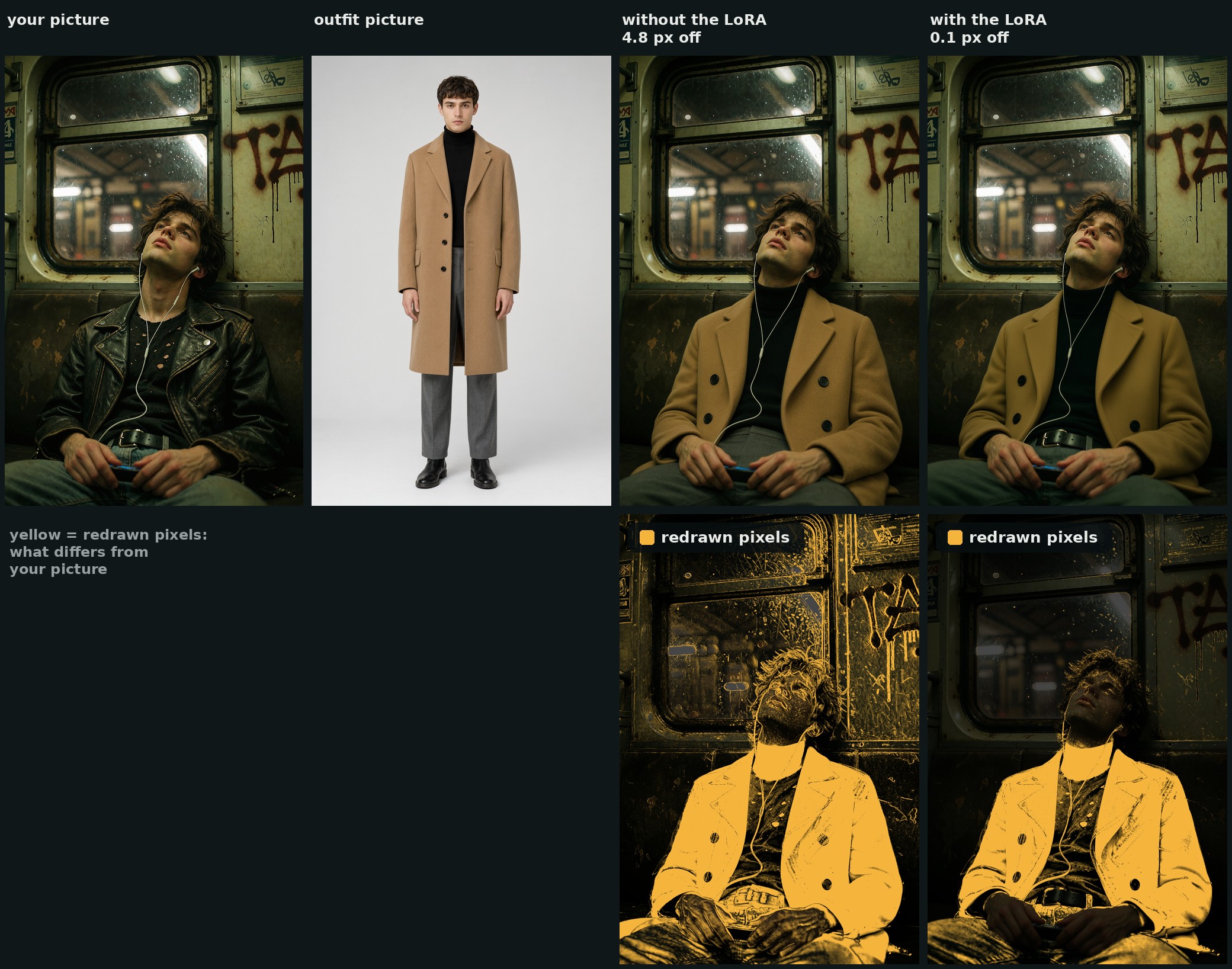
The same comparison in the rain. This person is not in the training set.
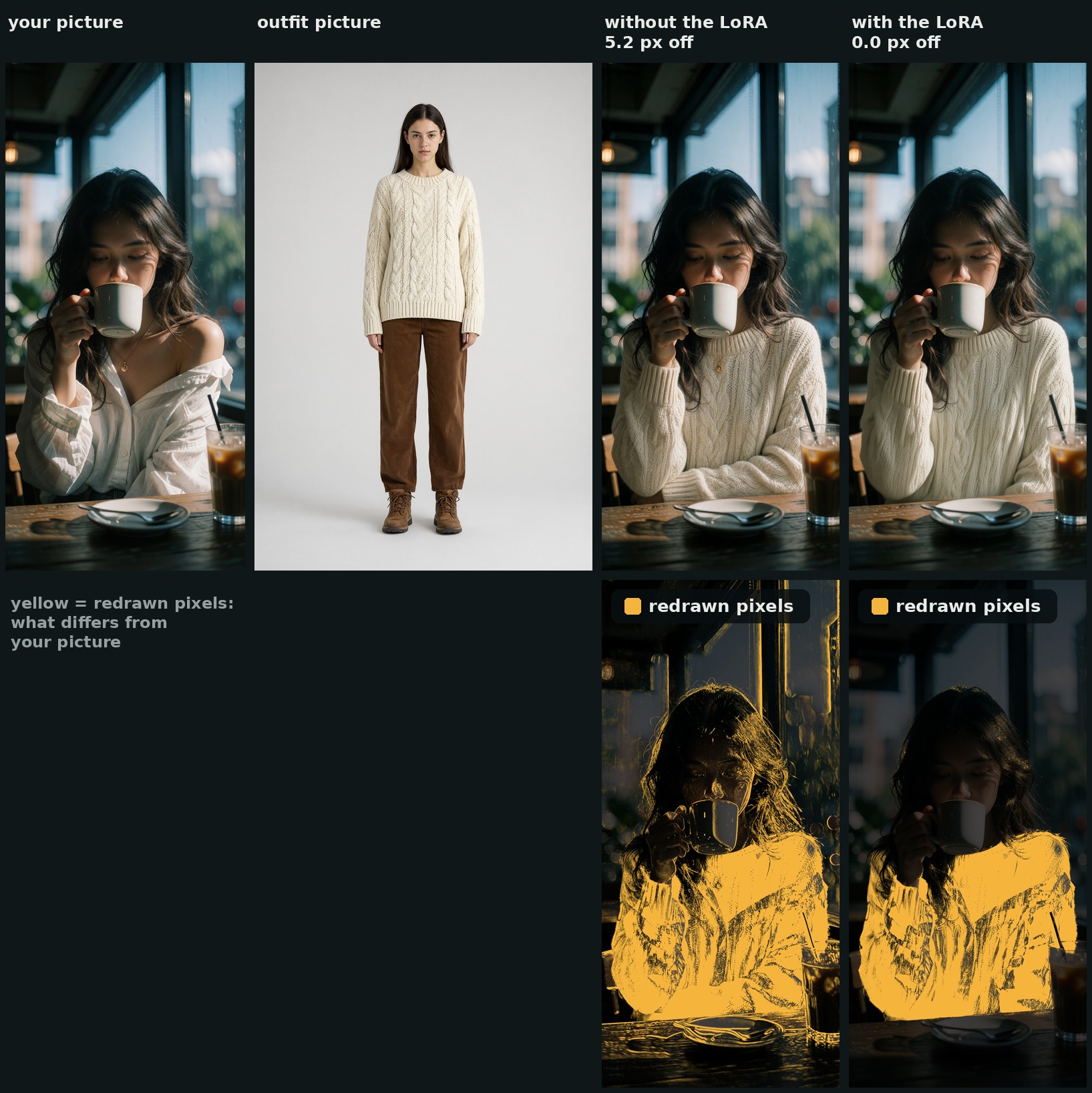
This person is not in the training set either.
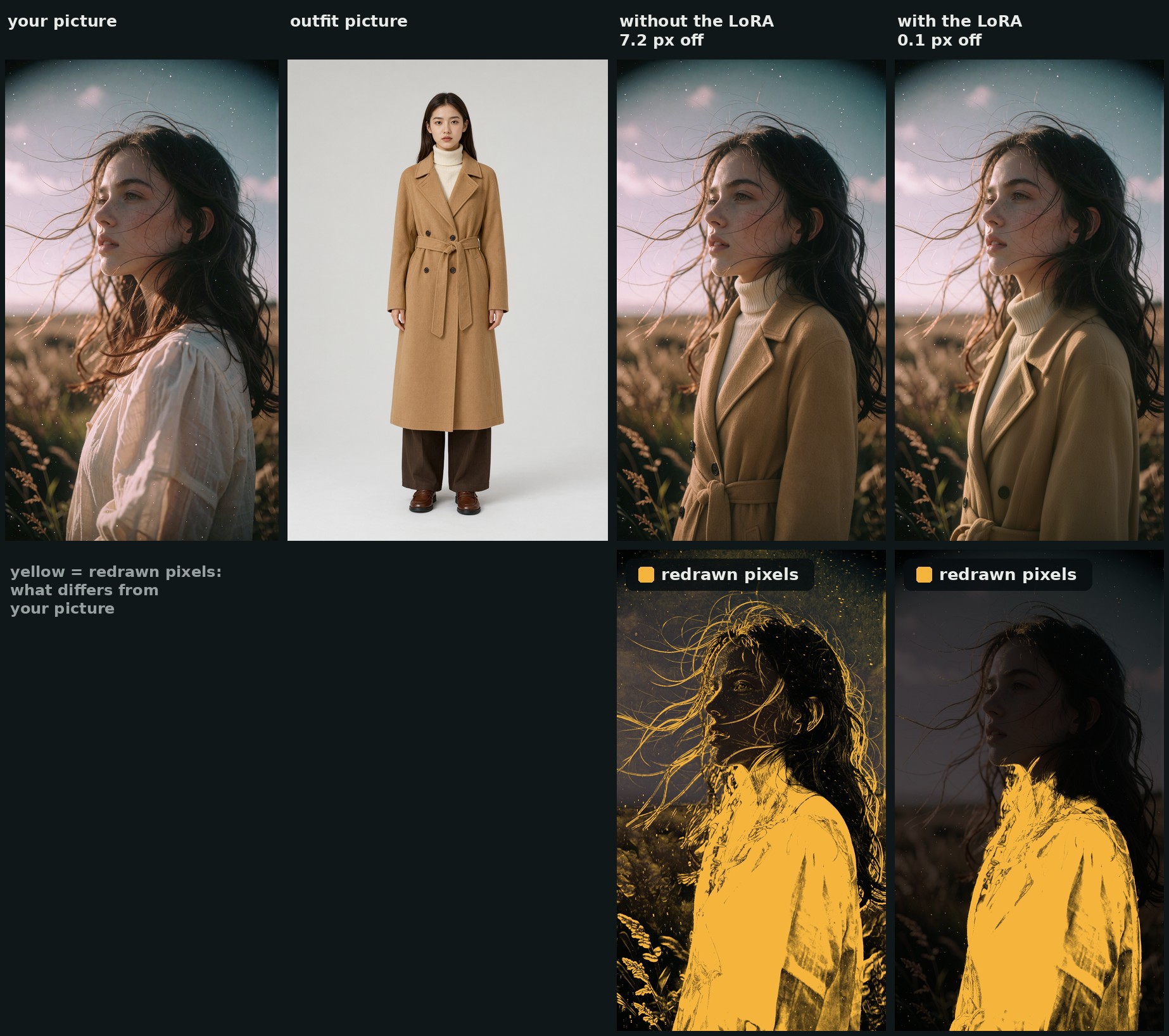
The LoRA never trained on a swap of this person, and this coat is not in the training set.
How it was trained
The dataset is built from real Qwen-Image 2.1 swaps, then corrected so that every training target sits on its source's frame. A raw swap is not a good target: it carries the drift, the softened face and the repainted background, and a LoRA trained on it learns them. Each result is moved back onto the person picture by whole pixels (never resampled), and only the clothes come from the swap. The face, the hair, the hands and the background are the person picture's own pixels again. Of the 66 training targets, 40 came from swaps made with the author's earlier Consistency LoRA switched on and 26 from plain swaps; 22 needed a whole-pixel move, and the median target takes 27 % of its pixels from the swap.
- 66 training pairs using 45 different people and 31 different outfits (worn, flat lays, product shots), four pairs held back for testing.
- Training: ostris/ai-toolkit with
arch: qwen_image_2on the Comfy-Org INT8 ConvRot base, two references per example (person and outfit), captions at dropout 0. Rank 32, alpha 32, AdamW8bit at lr 1e-4, batch 1,shifttimesteps, 1,500 steps with checkpoints every 250, on one RTX PRO 6000 at about 4.5 s per step.
One trainer detail cost a run and is written up in the repo's RESEARCH.md. AI-Toolkit fits a training target into a size bucket by scaling and cropping it, but loads a reference picture whole and squeezes it onto the 32 px grid. When the picture's shape is not a bucket shape the two stop lining up: at resolution: 1024, 1056 x 1888 pairs land on 768 x 1344, so the target loses 2 % of its height while the reference is squeezed by 2 % instead. The first run trained fine by its loss and produced a LoRA that made every picture 1.6 % taller. The fix is in the export rather than the trainer: write the target and the reference that has to line up at the same size, both sides a multiple of 32.
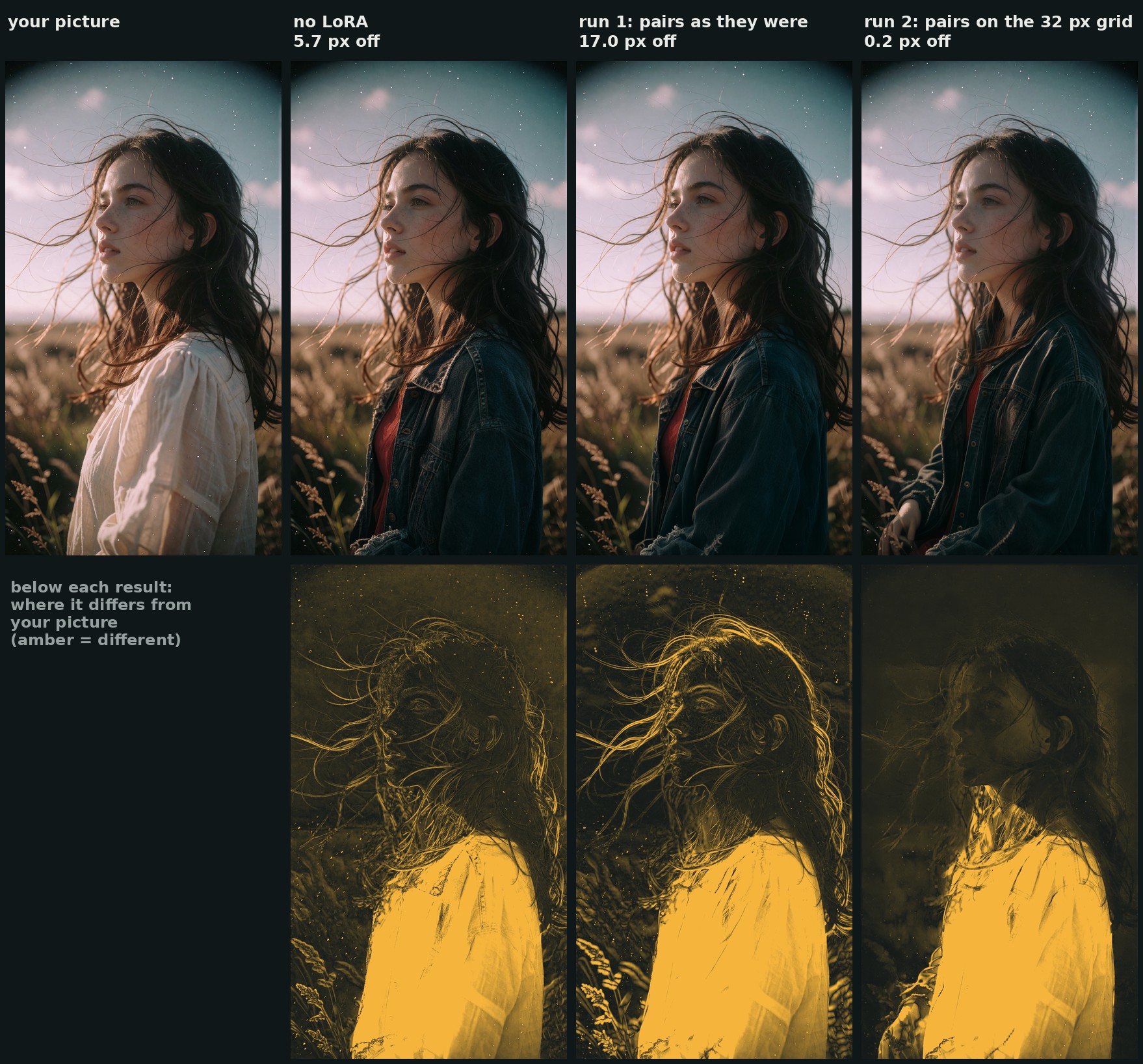
At step 250 the first run stretches the picture, so everything differs from the original. The fixed run does not.
Limits
The card is direct about how narrow the release is:
- It does not draw the outfit better than plain Qwen-Image 2.1 does. Buttons, belts and patterns come out the way they would anyway, and plain Qwen sometimes copies more of the outfit: in the first comparison above it swapped the pants too, where the LoRA kept the old jeans and belt.
- It holds on to what was there, so it also holds the pose. An outfit that needs a different pose will not get one.
- Shoes are the stubborn part. Even with
Replace everything they wear.a pair of shoes stayed on in one of three test swaps. - An early checkpoint (step 250) drew a hand that was not in the picture on one swap. Steps 500 to 1,500 did not on any of the sixteen, but only sixteen were checked.
- Trained at about 1 MP and tested at about 2 MP, 25 steps, CFG 1.
- With the Viggle Turbo LoRA at 8 steps it still holds the picture (0.05 to 0.24 px on five swaps), though plain fabric can come out a little grainy.
- Things that lie over the clothes can go with the old outfit or sit oddly on the new one: an earphone cable over a jacket was removed, and a purse strap looked wrong over a new jacket.
Availability
- LoRA weights: ausboss/Qwen-Image-2.1-Outfit-Swap-Consistency-LoRA
- Base model repack: Comfy-Org/Qwen-Image-2.1
- Author's node pack: ausboss/ComfyUI-AusBoss
Comments
Sign in with GitHub to join the discussion.