FastH3 Trim: A Pruned 8-Step MiniMax H3 for 8 GB GPUs
FastVideo ships FastH3 Trim, a 42-block pruned MiniMax H3 that runs 8-step video with audio in as little as 8 GB of GPU memory, with ComfyUI repacked files.
What Trim changes
Base H3 is three networks: a Qwen3-VL text encoder, a 50-block diffusion transformer that denoises video and audio latents together, and two VAEs. In BF16 that is 137.7 GiB, which does not fit a 32 GB card. FastH3 V2 shrank it with quantization; Trim also removes blocks.
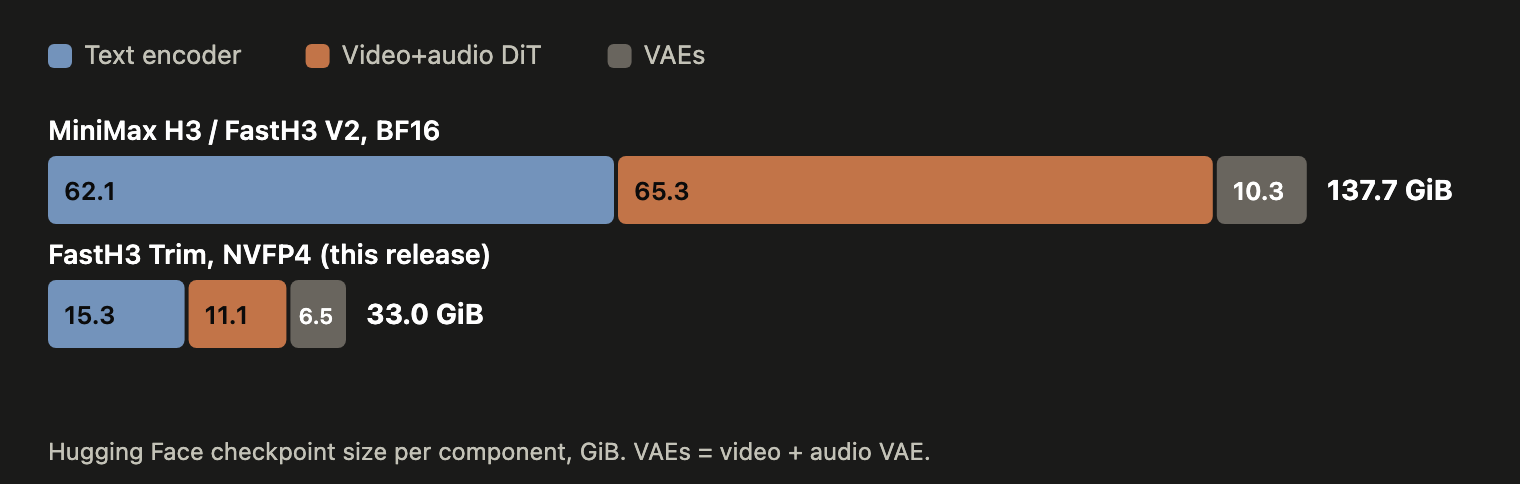
Checkpoint size by component. BF16 H3 is 137.7 GiB; the FastH3 Trim NVFP4 release is 33.0 GiB, with the transformer at 11.1 GiB.
- Block pruning: the team skipped one block at a time from base H3 and recorded how much the video and audio predictions changed, across four example types (motion, speech, music, sound events) at three noise levels, for 600 measurements. Each block was ranked by the largest change it caused under any condition, so a block that matters to either video or audio is kept. The eight removed blocks are all in the first half of the network; the first and last blocks changed the output the most.
- Timestep conditioning: H3 conditions every block on the diffusion timestep through an AdaLN projection that maps a 2,688-dimensional time embedding to six modulation vectors, and those projections take 24 GiB in BF16 across 50 blocks. Trim replaces them with one shared 2,688 to 16 basis plus a small per-block projection, stored in FP16 because BF16 gives about 1.7x larger reconstruction error.
- Training: the new 42-block model was trained directly with eight-step DMD2 using the FastH3 V2 objective. Base H3 initialises both the frozen teacher and the trainable critic, attention is 80% sparse, and the sampler steps at 999, 874, 749, 624, 500, 375, 250 and 125.
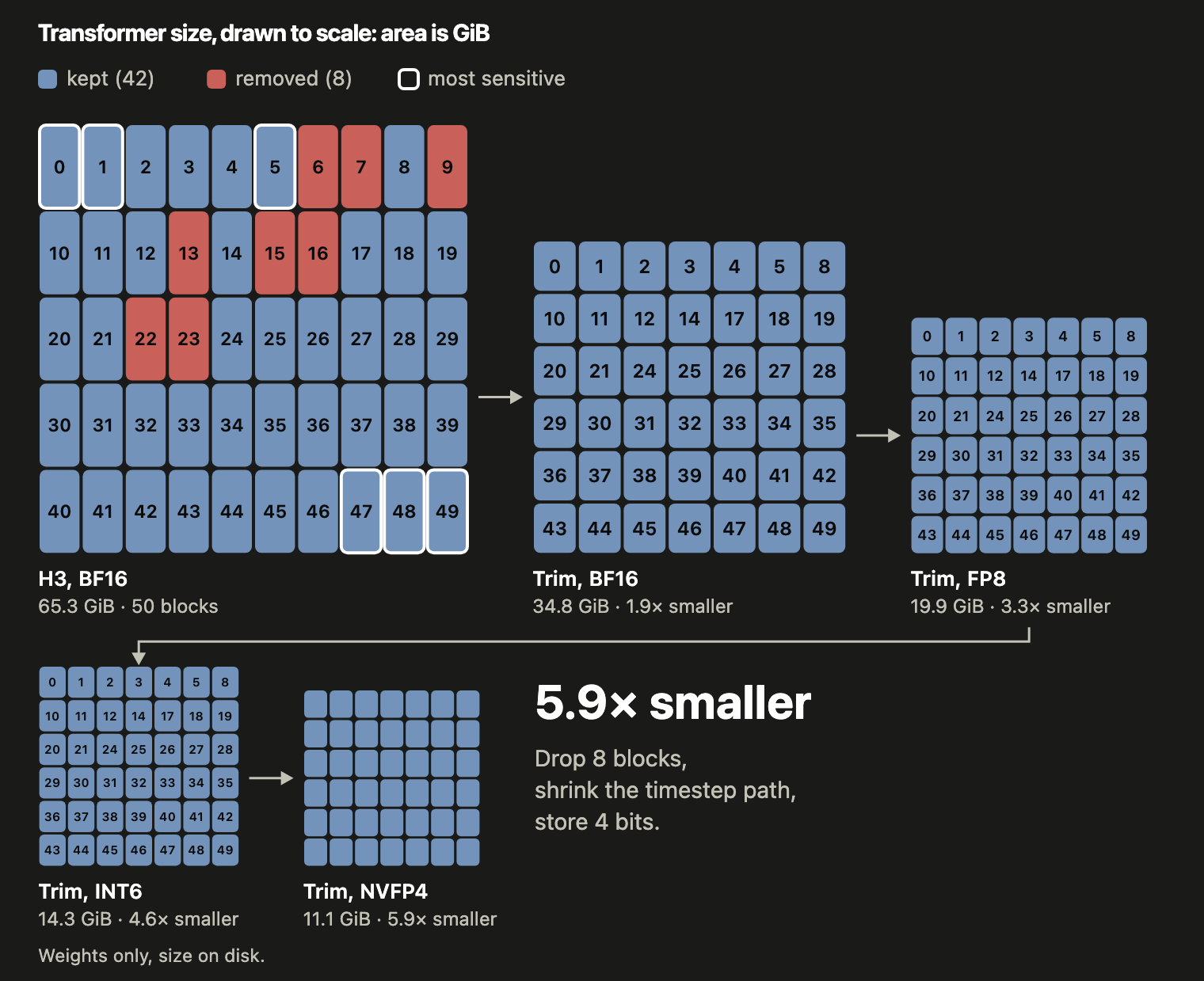
The FastH3 Trim transformer in each shipped format, drawn to scale: area is checkpoint size.
What is in the ComfyUI repack
The release is repackaged for ComfyUI in FastVideo/FastVideo-FastH3-Trim-Comfy. Pick one diffusion model file plus a matching text encoder:
| Diffusion model | Size | Use it on |
|---|---|---|
fastvideo_fasth3_trim_8step_nvfp4.safetensors | 11.9 GB | NVIDIA Blackwell: RTX 50 series, RTX PRO 6000, DGX Spark |
fastvideo_fasth3_trim_8step_fp8.safetensors | 19.7 GB | NVIDIA Ada and newer: RTX 40 series |
fastvideo_fasth3_trim_8step_int8_convrot.safetensors | 18.9 GB | Any recent NVIDIA GPU; matches the template default |
fastvideo_fasth3_trim_8step_bf16.safetensors | 37.5 GB | Reference quality, or for converting to other formats |
The repo also carries Qwen3-VL text encoders (BF16, INT8 ConvRot, NVFP4 AWQ) and the MiniMax H3 video and audio VAEs. Every NVFP4 layer uses activation scales calibrated on 1,000 prompts, and Trim has 294 calibrated layers.
Running it in ComfyUI
Use the FastVideo FastH3: Text to Video template that ships with ComfyUI (0.36.0 or later) and pick one of the Trim diffusion models in its UNETLoader. Keep the template's sampler settings: 8 steps, res_multistep, simple, and the MiniMaxH3SigmaShift node at 10 for video and 3 for audio.
How fast it runs
End-to-end seconds for a 5-second clip with audio, median of two runs on each of two prompts, from the blog post:
| Machine | V2, 480p | Trim, 480p | V2, 768p | Trim, 768p |
|---|---|---|---|---|
| RTX PRO 6000 96 GB | 13.5 | 12.0 | 36.5 | 32.5 |
| RTX 5090 32 GB | 14.8 | 13.4 | 38.6 | 35.4 |
| RTX 4090 24 GB | 54.6 | 43.9 | 154.6 | 132.8 |
| RTX 4090, 16 GB limit | 79.9 | 72.1 | 153.7 | 139.9 |
| RTX 4090, 12 GB limit | 91.2 | 74.1 | 170.7 | 147.1 |
| RTX 4090, 8 GB limit | - | 82.0 | - | - |
| DGX Spark 128 GB unified | 141.4 | 125.8 | 340.1 | |
| 2x DGX Spark | 87.2 | 78.3 | ||
| Mac, M4 Max 36 GB unified | 925.2 |
The 8 GB, 12 GB and 16 GB rows are the same RTX 4090 with GPU memory capped; a real card with less memory will be slower. The blog notes that on the 4090 the FP8 path has no FP4 tensor cores to use, so it works around the slower per-token, per-channel FP8 matmul with a fused per-tensor kernel plus output scaling, and quantizes queries and keys to INT8 for the score computation.
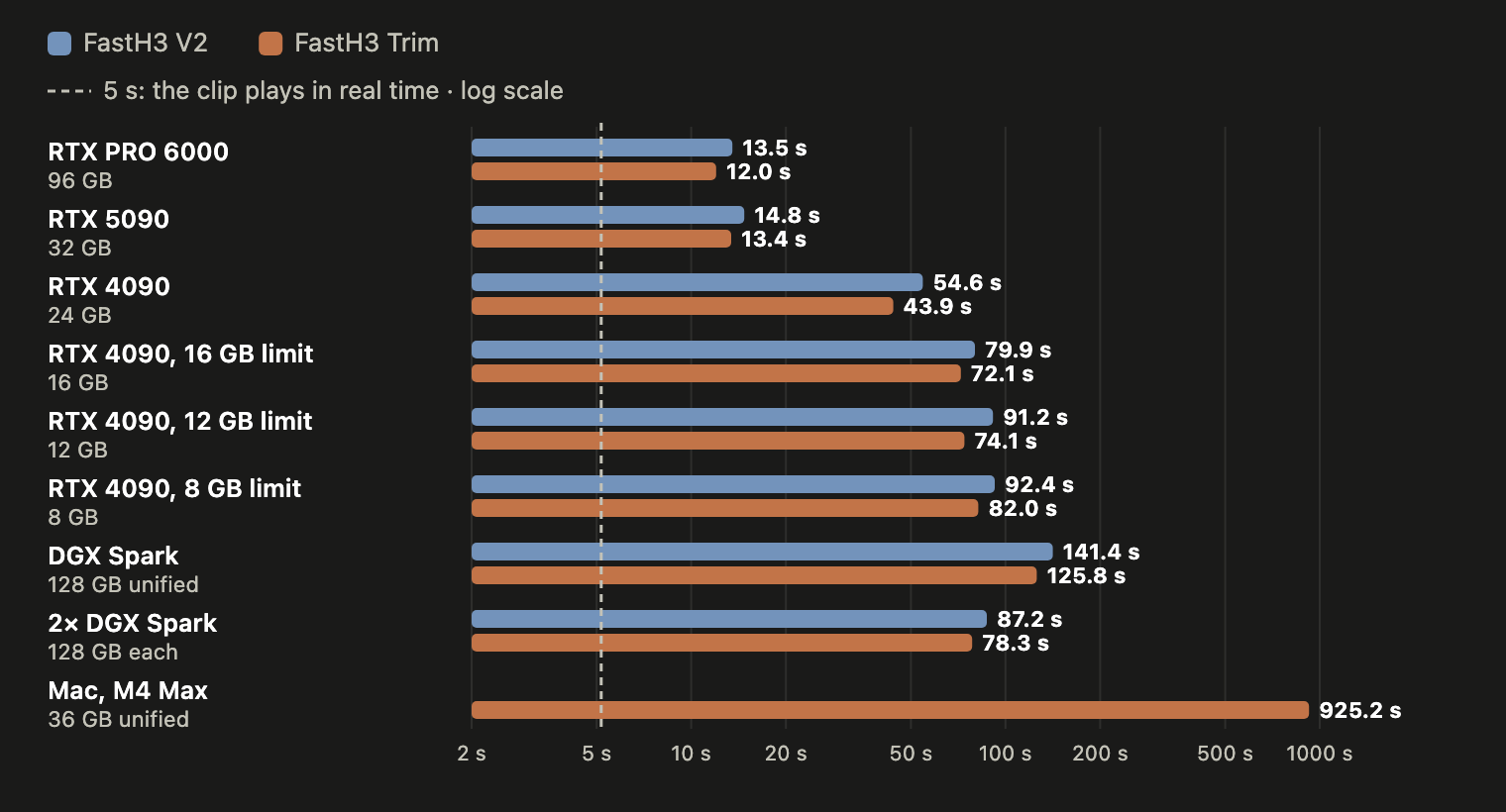
End-to-end time for a 5-second, 832x480 clip with audio, per machine.
Same prompt and seed on the RTX 5090, first FastH3 V2 then FastH3 Trim:
FastH3 V2 on an RTX 5090.
FastH3 Trim on the same RTX 5090, same prompt and seed.
Limits
- Trim is labelled an experiment, not the quality leader: the blog says removing blocks makes the model faster and smaller but costs some quality, and recommends FastH3 V2 when quality matters most.
- The 8 GB figure is a Trim-only, NVFP4 number on a memory-capped card. V2 does not fit in 12 GB on the tested configuration.
- Trim exists for the eight-step FastH3 line only. It does not change the base MiniMax H3 model, which still needs the full 50-block transformer.
- The ComfyUI path depends on the FastH3 template shipping with ComfyUI 0.36.0 or later.
Availability
ComfyUI repack: FastVideo/FastVideo-FastH3-Trim-Comfy
Source weights: FastVideo/FastVideo-FastH3-Trim-8-Step
Blog post: FastH3 on Consumer Hardware
Code: hao-ai-lab/FastVideo
Quality counterpart: FastVideo/FastVideo-FastH3-8-Step-V2
Base model: MiniMaxAI/MiniMax-H3
Comments
Sign in with GitHub to join the discussion.