FreeVideo: Run MiniMax H3 on 8 GB of VRAM
FlashML's FreeVideo runs MiniMax H3 on as little as 8 GB of VRAM, shipped as a ComfyUI plugin and Windows launcher built on the 8-step VDN-H3 model with FP8 execution.
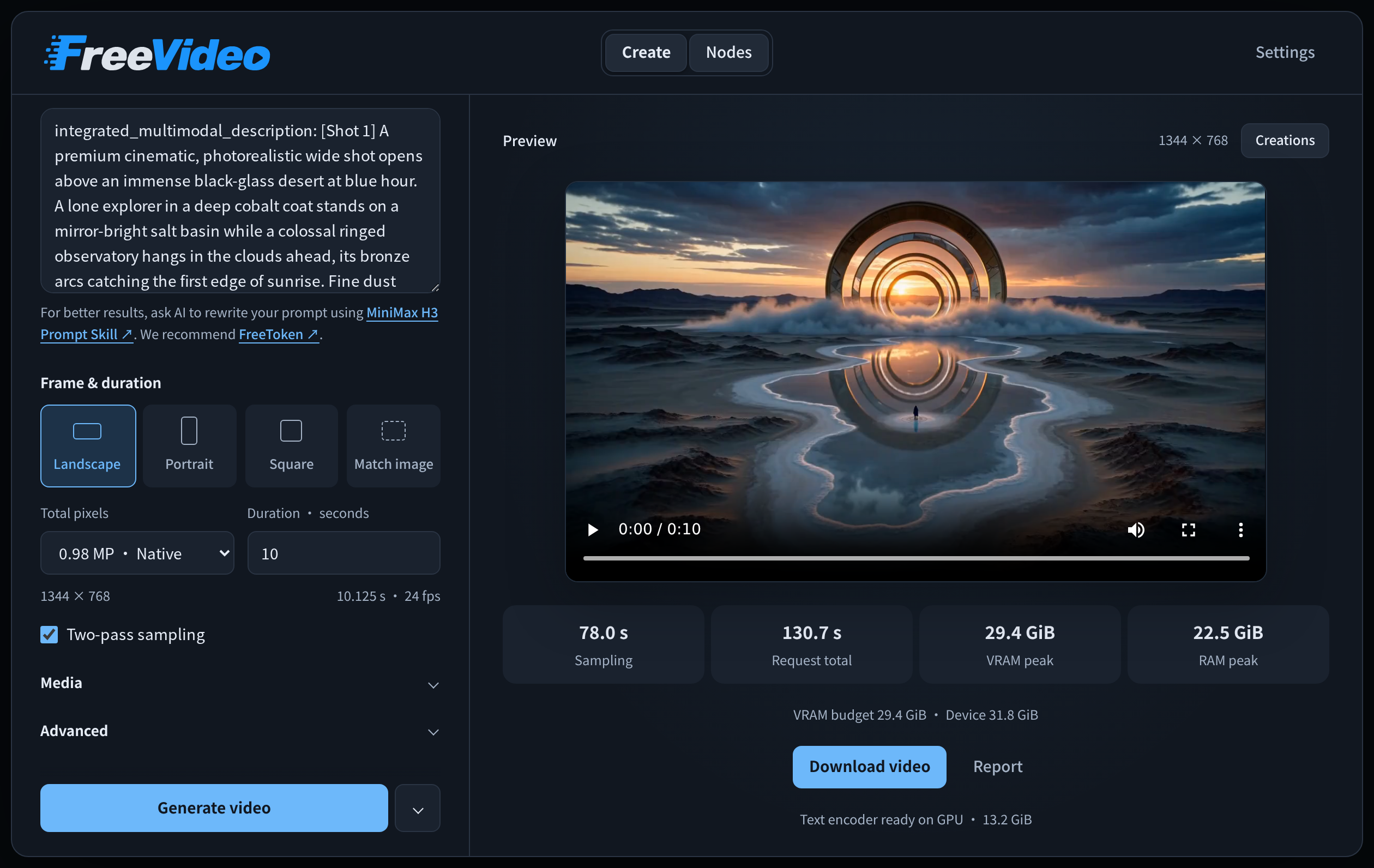
The FreeVideo workspace inside ComfyUI. A node view is available for LoRAs and workflow edits.
Built on VDN-H3
FreeVideo does not run the dense H3 transformer. It runs OpenVDN's 8-step VDN-H3 checkpoint, the Video DeltaNet hybrid-attention rework that replaces H3's quadratic long-range attention with a linear branch (see the VDN-H3 coverage). FreeVideo packages that model as the prepared FP8 vdn-minimax-h3-edge release, about 22.9 GB per format, and layers a planner on top that decides where every one of H3's 50 transformer blocks lives at run time.
Hardware-adaptive execution
For each request the Adaptive Execution Planner measures free VRAM, available host memory and the probe results of the attention kernels, then fixes:
- Block residency: how many of the 50 transformer blocks stay in VRAM, how many live in pinned host memory (up to 22 GB) and how many are read from disk at every step.
- FP8 GEMM path: per-tensor scales on Blackwell (SM120), per-channel scales on Ada and Hopper, and FP8 weights with BF16 compute on Ampere.
- Attention backend: the first of SageAttention 2, PyTorch flash attention, cuDNN, FlashAttention 2 and FlashAttention 4 that passes its on-device probe.
- VAE decoder placement: below a 20 GB budget, part of the decoder's 36 blocks stay resident and the rest are streamed, with clips decoded in sequence.
Budgets are re-measured before every request, and completed runs store their timings and memory peaks in resource-history.sqlite3, which the engine uses to swap in a faster placement when one is predicted to be at least 2% faster.
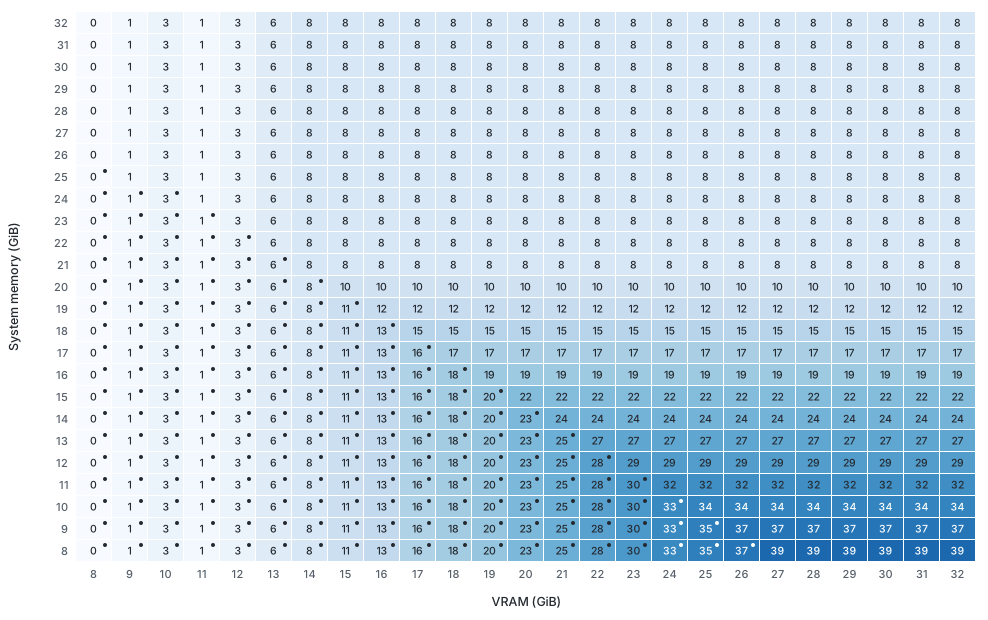 | 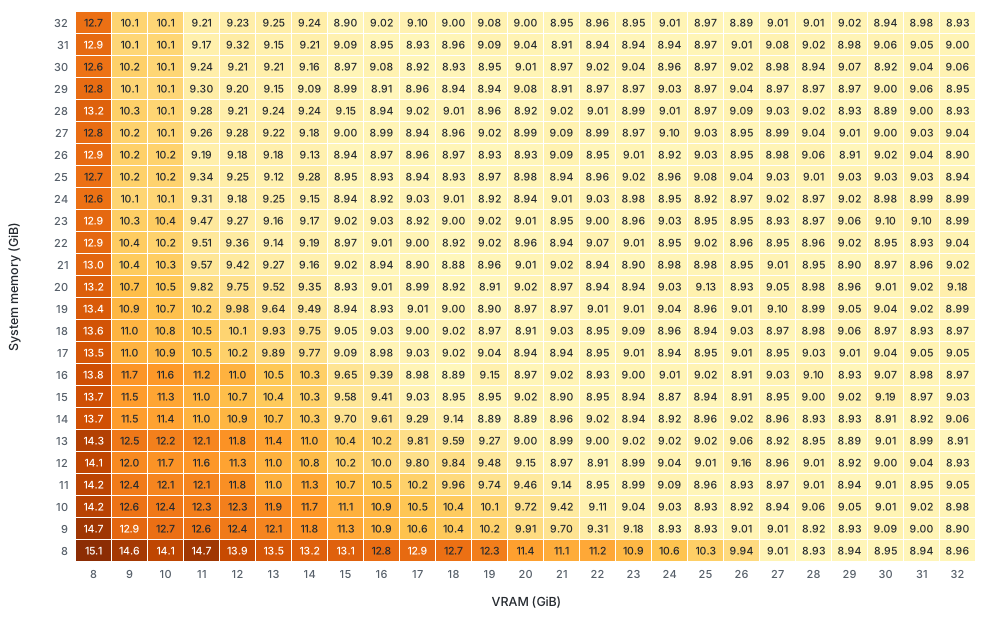 |
|---|---|
| Where the 50 transformer blocks live at each VRAM budget | Throughput the planner expects at each VRAM budget |
What it runs
- Text prompts to video with audio
- First and last frame conditioning
- Image, video and audio references
- Community MiniMax H3 LoRAs in the same workflow
- Two-pass sampling and batch generation from the ComfyUI workspace, with a history of past creations
Getting started
On Windows, download FreeVideo.exe from the windows-preview release and run it. The launcher installs ComfyUI, the runtime and the model pack that matches your GPU, reuses existing model folders, and supports offline installation from downloaded packages.
To add FreeVideo to an existing ComfyUI install:
cd ComfyUI/custom_nodes
git clone https://github.com/FlashML-org/FreeVideo.git
Restart ComfyUI, open Workflow -> Browse Templates -> FreeVideo -> FreeVideo-All-in-One, and finish the setup in FreeVideo Settings. On Linux the repository also offers a CLI:
git clone https://github.com/FlashML-org/FreeVideo.git && cd FreeVideo
./setup.sh
./freevideo generate --prompt-file prompt.txt --out video.mp4
The bundled example workflow is the one shown in the template browser:
Availability
FreeVideo lives at github.com/FlashML-org/FreeVideo, and the prepared FP8 weights come from OpenVDN/vdn-minimax-h3-edge, which the launcher downloads automatically for the detected architecture.
Comments
Sign in with GitHub to join the discussion.