OmniChar ComfyUI Nodes: One .char Across H3, FLUX.2 and Krea 2
OmniChar ships an official ComfyUI node pack that loads a portable .char file and reuses one character identity across MiniMax H3, FLUX.2 and Krea 2 workflows.
.char file that holds a character's reference images, a locked description and, when one exists, a trained LoRA, then feeds that identity into image and video models from inside a normal graph. The pack lists support for MiniMax H3, Krea 2, FLUX.2 dev and FLUX.2 Klein 9B / 4B.
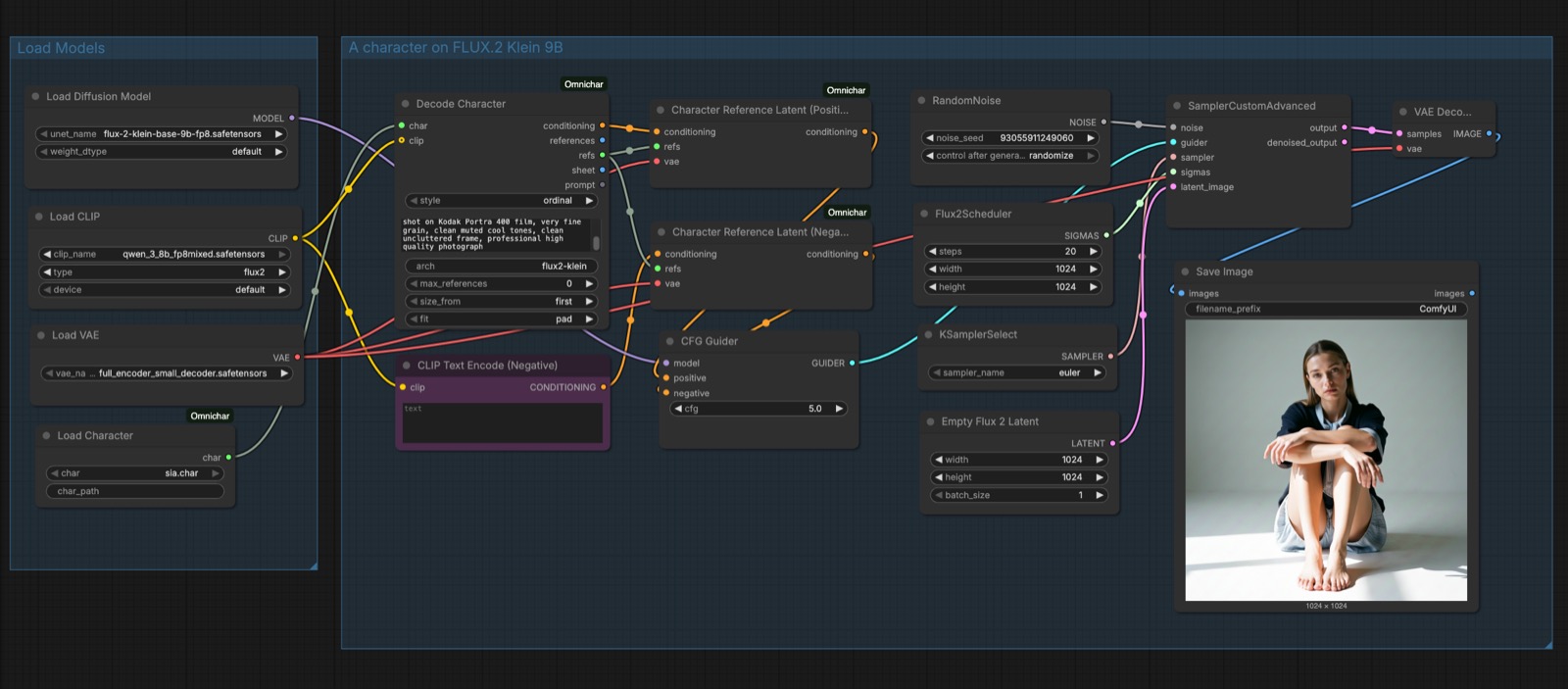
The OmniChar nodes on the canvas: Load Character, Decode Character and the reference nodes that hand a resolved character to a sampler.
What a .char carries
A .char describes a character rather than an image. It keeps the reference photos, the description locked to them, and usually a trained LoRA, so the same person can be rebuilt in any model that takes references. Characters live in ComfyUI/models/characters/, and the loader simply lists whatever sits in that folder.
References are grouped by role. Encode Character sorts face, body and clothing shots into three slots each, so the face is always the first reference and prompt numbering follows that order. Decode Character turns the file back into a prompt plus a resolved reference list, which is what a sampler actually sees.
The nodes
| Node | Inputs | Outputs |
|---|---|---|
| Load Character | char, char_path | char |
| Decode Character | char, style, clip, prompt, arch, max_references, size_from, fit | conditioning, references, refs, sheet, prompt |
| Character Reference | refs, index | image, role, count |
| Character References Split | refs | image_0 to image_4, count |
| Character Reference Latent | conditioning, refs, vae | conditioning |
| Apply Character LoRA | model, clip, char, strength, arch, min_key_coverage | model, clip |
| Encode Character | name, description, resolution, face/body/cloths (three slots each) | char |
| Save Character | char, filename, overwrite | path |
How the references are handed over depends on the model. Models that take a single batch read references. Models with numbered reference slots, MiniMax H3 among them, split refs through a Character References Split node or one Character Reference node per slot. Edit models that read references as latents, FLUX.2 for instance, pass refs into a Character Reference Latent node wired to both the positive and the negative conditioning.
Workflows that ship with the pack
Three example graphs come in the repository: one to build a .char from face, body and wardrobe references, one that drives FLUX.2 Klein 9B to an image, and one that drives MiniMax H3 to a video.
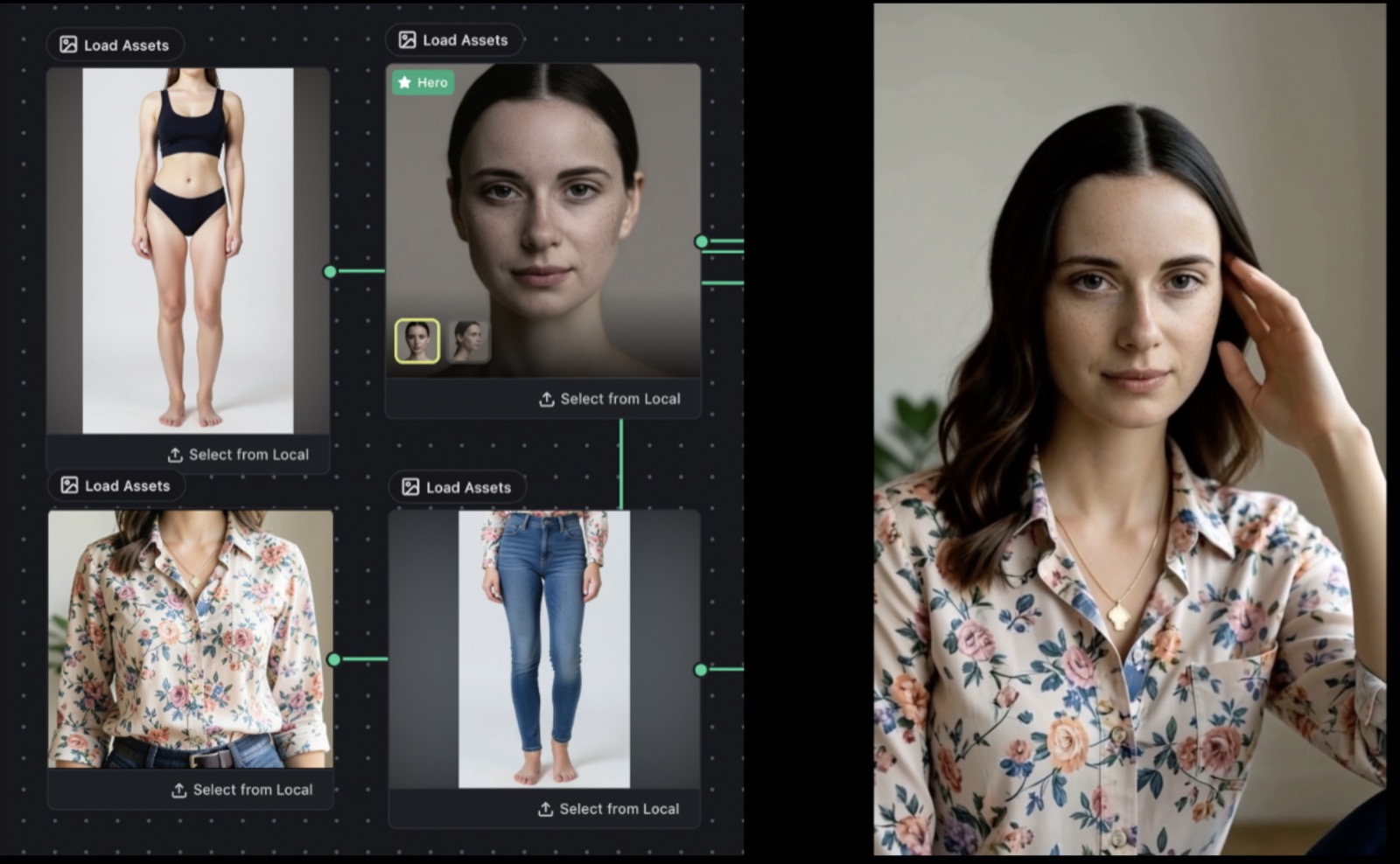
The MiniMax H3 reference-identity example: separate reference slots on the left, the generated shot on the right.
Install
The pack needs ComfyUI and Python 3.10 or newer, and pulls its reader from requirements.txt.
cd ComfyUI/custom_nodes
git clone https://github.com/omnichar/ComfyUI-Omnichar
cd ComfyUI-Omnichar
pip install -r requirements.txt
Restart ComfyUI afterwards, then search the node menu for Character. Pointing INLINE_CHARACTERS_DIR at OmniChar Studio's characters folder makes the studio and the nodes read the same .char files.
Availability
Node pack: omnichar/ComfyUI-Omnichar
Studio app: omnichar/OmniChar
Website: omnichar.org
Python SDK: pip install omnichar-sdk
Base models: Comfy-Org/MiniMax-H3, black-forest-labs/FLUX.2-klein-9b
Comments
Sign in with GitHub to join the discussion.