LanPaint 2.2.0: Qwen-Image 2.1 Inpainting and Alpha Editing
LanPaint 2.2.0 brings Qwen-Image 2.1 under its masked sampler: inpaint the text-to-image or edit model, and let transparency change shape along with the pixels.
If LanPaint is new to you, it is a sampling-based inpainting and outpainting tool that works on models with no dedicated inpainting checkpoint, from SD and Flux through Wan and Krea 2. It replaced the checkpoints-and-masks approach with a masked sampler: paint a region, describe what should be there, and LanPaint reasons over the surrounding image while denoising that region. The MiniMax H3 video and audio pipeline is covered in our earlier write-up.
Masked editing with Qwen-Image 2.1 Edit
The new pair of examples split into two jobs. The first applies LanPaint to Qwen-Image 2.1's image edit model: write what you want changed, paint over the part the edit should touch, and only that part changes, with everything else, transparency included, coming back exactly as it was. In the shipped example a second picture supplies the material for a pair of headphone earcups while the headband and its stitching stay untouched.
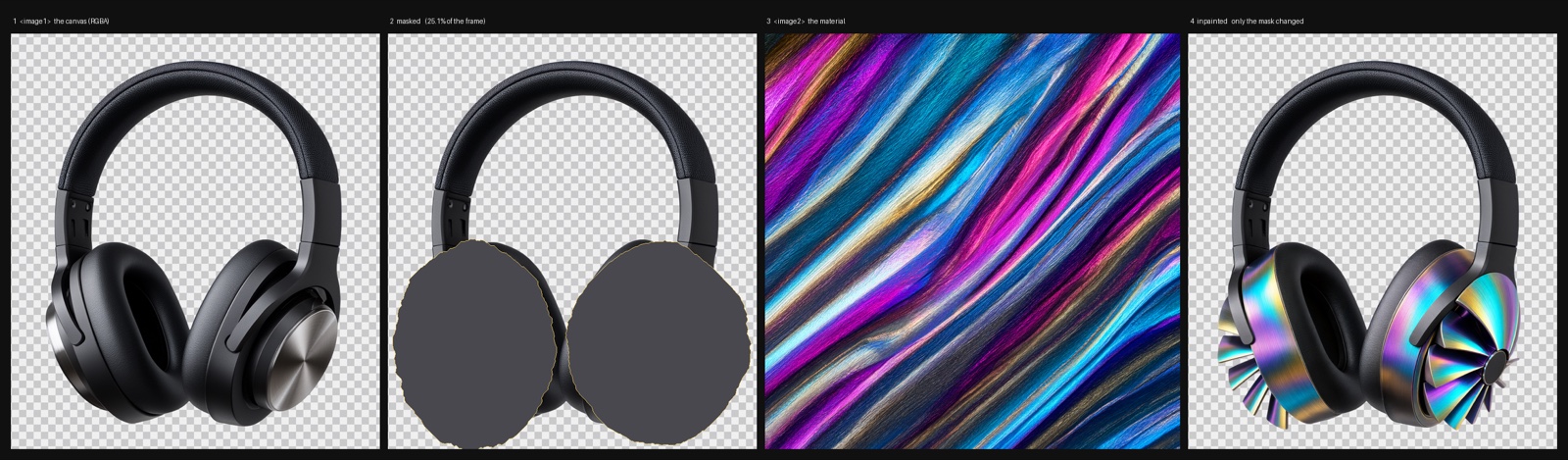
Example_32: canvas, mask, the reference that supplies the material, and the masked result. Second-image conditioning carries through the mask.
The workflow and its images are in examples/Example_32, and drag-loading InPainted_Drag_Me_to_ComfyUI.png into ComfyUI opens it with the models wired up. It runs alongside the official Qwen Image 2.1 Image Edit template, so you keep ComfyUI's own model downloads and node layout.
Inpainting transparency
The second example is the more unusual one. Qwen-Image 2.1 generates images with an alpha channel, and LanPaint treats that channel as part of the image: when you inpaint a region, the rebuilt area can take on a new silhouette rather than being confined to the old one. In the README's example the sole of a boot is replaced and the outline grows with it, which is not something a mask-limited inpaint on an RGB image can do.
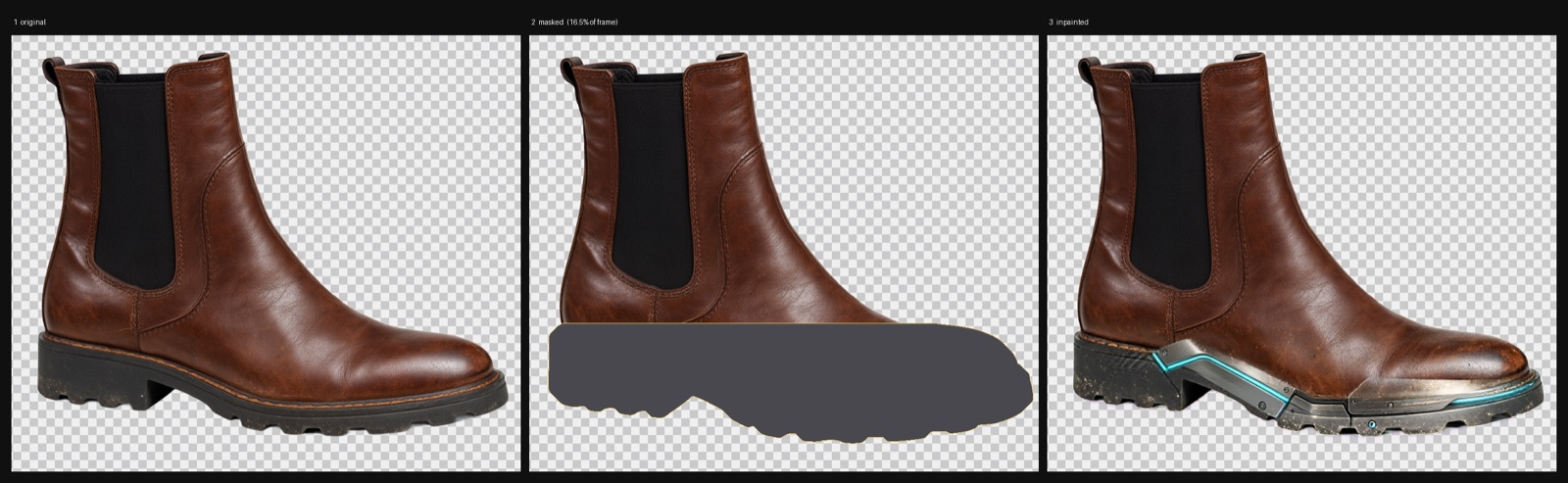
Example_31: original, mask and result. The rebuilt region comes back with a new outline, not only new colors.
Mechanically this works because the Qwen-Image 2.1 VAE is four-channel in and four-channel out, so the alpha travels through the latent space and is edited next to the RGB pixels instead of being discarded before sampling. One practical consequence is called out in the changelog: keep the inpainting mask in its own greyscale file, because in Qwen-Image 2.1 an image's alpha channel means transparency, not a mask. The same update makes LanPaint_ImageDecode match the decoded channel count to the source image, so an RGBA input comes back RGBA and an RGB input still comes back RGB.
How the sampler fits in
LanPaint installs as sampler nodes that replace the usual KSampler in an inpainting graph, following the same SetLatentNoiseMask layout most ComfyUI inpainting workflows already use.
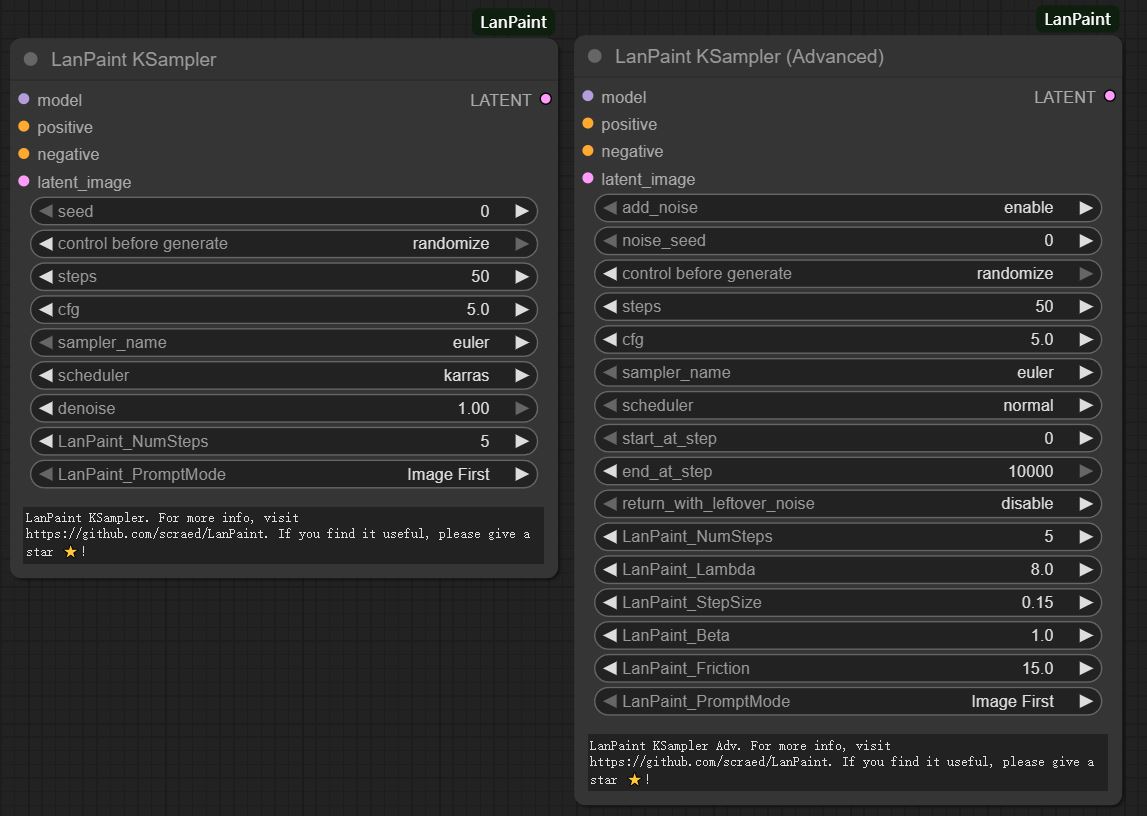
The LanPaint KSampler and its advanced counterpart, with the thinking-step controls exposed.
The examples above use five thinking steps per denoising step. The advanced sampler exposes the full set: LanPaint_NumSteps for reasoning depth per step, LanPaint_Lambda for content alignment strength, LanPaint_StepSize, LanPaint_Beta for the balance between masked and unmasked regions, LanPaint_Friction for how stable the Langevin updates are, LanPaint_EarlyStop for cutting the iteration short, and a prompt-versus-image priority switch. Easy tasks sit around 2 to 5 steps; the harder ones go to 5 to 10.
Availability
- Source and all examples: github.com/scraed/LanPaint
- Release: LanPaint 2.2.0
- Install: search LanPaint in ComfyUI-Manager, or clone the repository into
ComfyUI/custom_nodes/and restart. The nodes appear under the sampling category. - Qwen-Image 2.1 models come from the official ComfyUI Qwen Image 2.1 and Qwen Image 2.1 Image Edit templates.
Comments
Sign in with GitHub to join the discussion.