Krea 2 Inpaint Edit LoRA: Masked Edits With ComfyUI Workflows
A Krea-2-Raw LoRA that repaints the black-masked region of an image from a text prompt, in mild, default and strong variants, with four example ComfyUI workflows.
Masked editing is what Krea 2 already does when you hand it a reference and an instruction. This LoRA narrows the job down to the mask: the black area is the only thing that moves, and everything outside it is treated as fixed context. The repository compares its results against the earlier yijunwang2/krea2-anypaint adapter, column by column, with per-row difference maps.
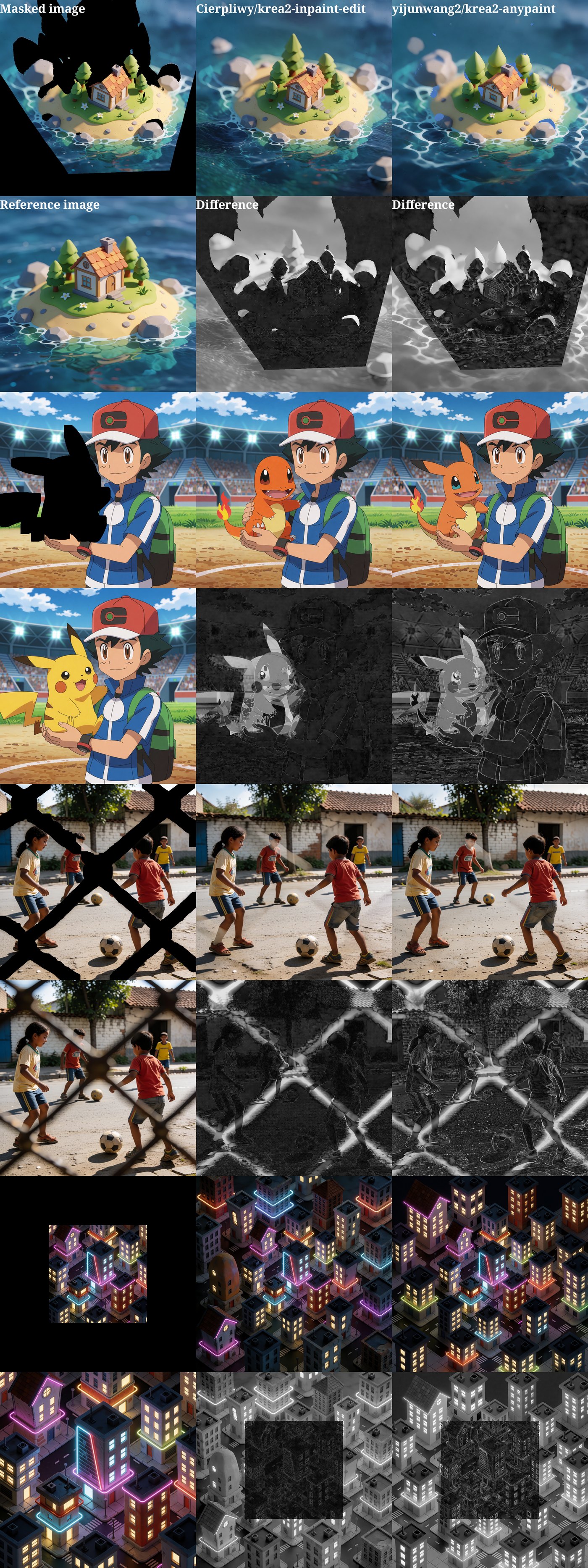
Columns show the masked input, this LoRA's result and the krea2-anypaint adapter, with difference maps per row.
Three strength variants
| File | Purpose |
|---|---|
krea2_inpaint_edit.safetensors | Default strength |
krea2_inpaint_edit_mild.safetensors | Makes fewer changes outside the mask, and handles masks that cover the main subject better |
krea2_inpaint_edit_strong.safetensors | Better at outpainting, and adapts more strongly to the prompt |
All three go into ComfyUI/models/loras/.
What you need
- ComfyUI
- The ComfyUI-Krea2-Ostris-Edit node pack for the
TextEncodeKrea2OstrisEditandKrea2OstrisEditModelPatchnodes - The Krea-2-Raw base weights
Krea2OstrisEditModelPatch node. It is off by default, and masked editing comes out wrong without it.
The example workflows use only the ComfyUI-Krea2-Ostris-Edit nodes plus stock ComfyUI and comfy_extras nodes.
Quick start
- Download the strength variant you want into
ComfyUI/models/loras/. - Mask the image: paint the region to regenerate with solid black. The mask can cover part of the image or all of it.
- Load an example workflow (Workflow → Open).
- Connect your masked image to the
image1input of the inpaintTextEncodeKrea2OstrisEditnode, the one after the LoRA loader, replacing the reference the workflow feeds it by default. - Write a prompt describing what should appear in the masked region.
- Confirm kv_cache is enabled on
Krea2OstrisEditModelPatch, then queue the prompt.
Four example workflows
Each workflow first generates a base image with stock Krea-2, builds the black-masked reference from it, then runs the inpaint LoRA to fill the black region.
| Workflow | What it does | Extra models |
|---|---|---|
| Outpaint | Pads the image onto a larger black canvas and extends the scene into the border | None |
| Background replacement | Cuts out the subject and inpaints a new background behind it | birefnet.safetensors in models/bg_removal/ |
| MoGe rotate inpaint | Estimates geometry with MoGe-3, rotates the mesh and inpaints the scene around the new viewpoint | moge_3_vitl_fp16.safetensors in models/geometry_estimation/ |
| SAM 3 detect | Detects a subject from a text description, moves it onto black and inpaints a new background | sam3.safetensors in models/checkpoints/ |
If you change the base generation size or the canvas size in any of these graphs, keep the composite offsets and canvas dimensions in sync.
Comments
Sign in with GitHub to join the discussion.