Fisher Pose: Pose and Camera Editor for Qwen-Image 2.1
Fisher Pose is a ComfyUI node that redraws a character in a new pose or camera angle for Qwen-Image 2.1, using a 3D mannequin, 209 OpenPose skeletons and a matching LoRA.
Qwen-Image 2.1 already handles instruction-based editing well, but posing is where prompt-only editing gets fiddly. Asking for a specific limb angle in text, or for the camera to swing 40 degrees to the left, tends to produce either the original pose or a stiff approximation of it. Fisher Pose hands the model a picture of the pose instead, drawn with the same mannequin the pose LoRA was trained on.
The node pack was created on September 24, 2026 and installs with no extra Python dependencies.
Two modes
| Mode | Node | What it does |
|---|---|---|
| Free pose | Fisher Qwen2.1 自由姿势 | Any single-character pose: a human-proportioned 3D mannequin plus the VNCCS PoseStudio LoRA redraws the person from your reference image into the new pose |
| Free camera | Fisher Qwen2.1 人物与姿态编码 | Camera and staging for 1 to 3 characters: orbit the camera, change positions and actions with a Chinese editing instruction, with optional prompt rewriting |
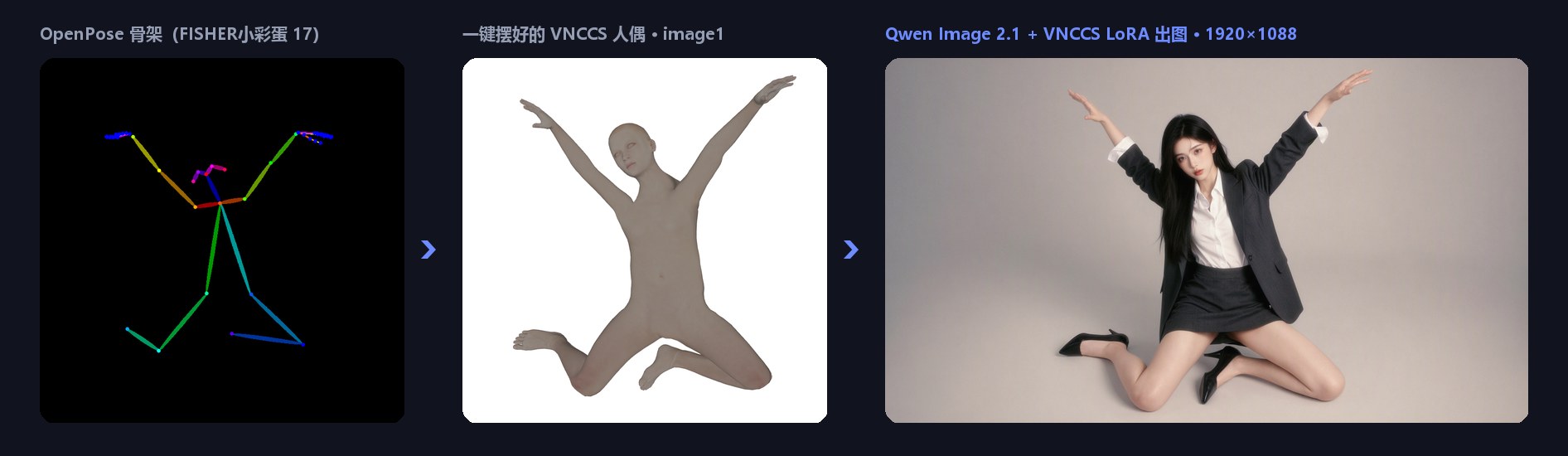
The free-pose pipeline: skeleton, mannequin and the generated result.
Free pose: a mannequin the LoRA already knows
The free-pose mode is built on the MakeHuman mannequin from VNCCS Pose Studio, which is the same body the VNCCS PoseStudio QI2.1 LoRA was trained against. The mannequin goes in as image1 and your reference character as image2, with the prompt fixed to Draw character from image2, so the LoRA reads the pose from one image and identity and clothing from the other.
Around that core the pack adds a set of editing conveniences:
- One-click OpenPose posing. Click a coloured skeleton image and the mannequin takes that pose. Because a 2D skeleton has no depth information, the pack estimates depth from how much each bone appears to shorten; when it guesses wrong, the torso and each limb segment can be flipped front to back with one click.
- 209 built-in skeletons. Standing, sitting, kneeling, crouching, lying, splits and suspended poses ship with the pack, sorted into a clickable library.
- My library and My poses. Skeleton images you add are remembered between sessions, and a posed mannequin can be saved with its body type, proportions, on-canvas position and hand gestures. Each pose is a single JSON file under
ComfyUI/user/default/fisher_pose/poses/, so poses can be handed to other people directly. - Hand and proportion controls. Open, closed and fist hand presets with a grip slider, plus per-part sliders for head size, neck, shoulder width, torso, upper arm, forearm, thigh and calf. Proportions change while the pose is held.
- Separate canvas and output sizes. The mannequin image is sized in the editor, while the node's own
widthandheightdecide the output, so a resolution node can drive it. - Apply and preview. Pressing "apply to node" shows the mannequin on the node immediately, without a test run.
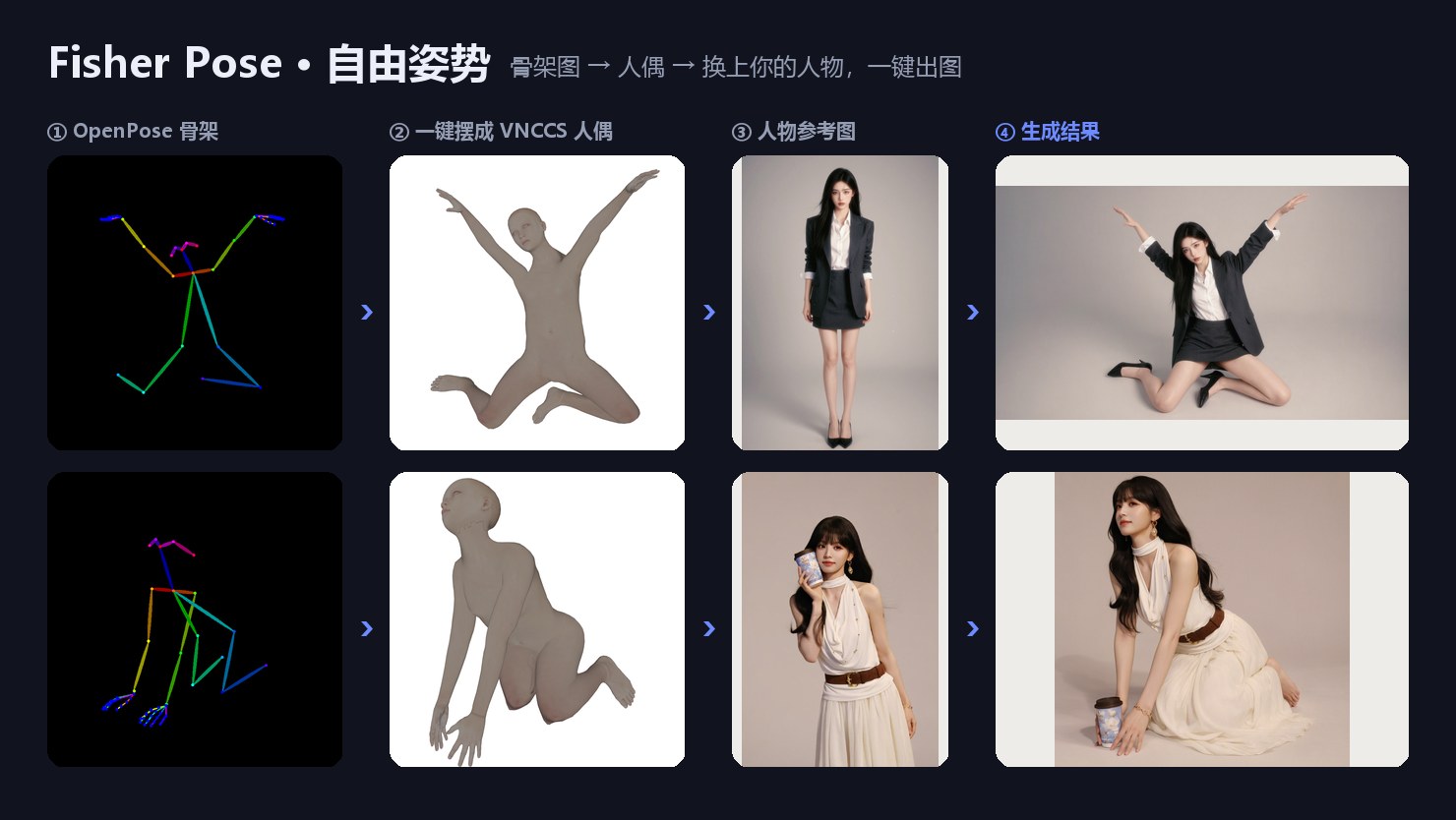
Example results. The character image is image2, the mannequin is image1, with the prompt fixed to Draw character from image2.
Free pose editor
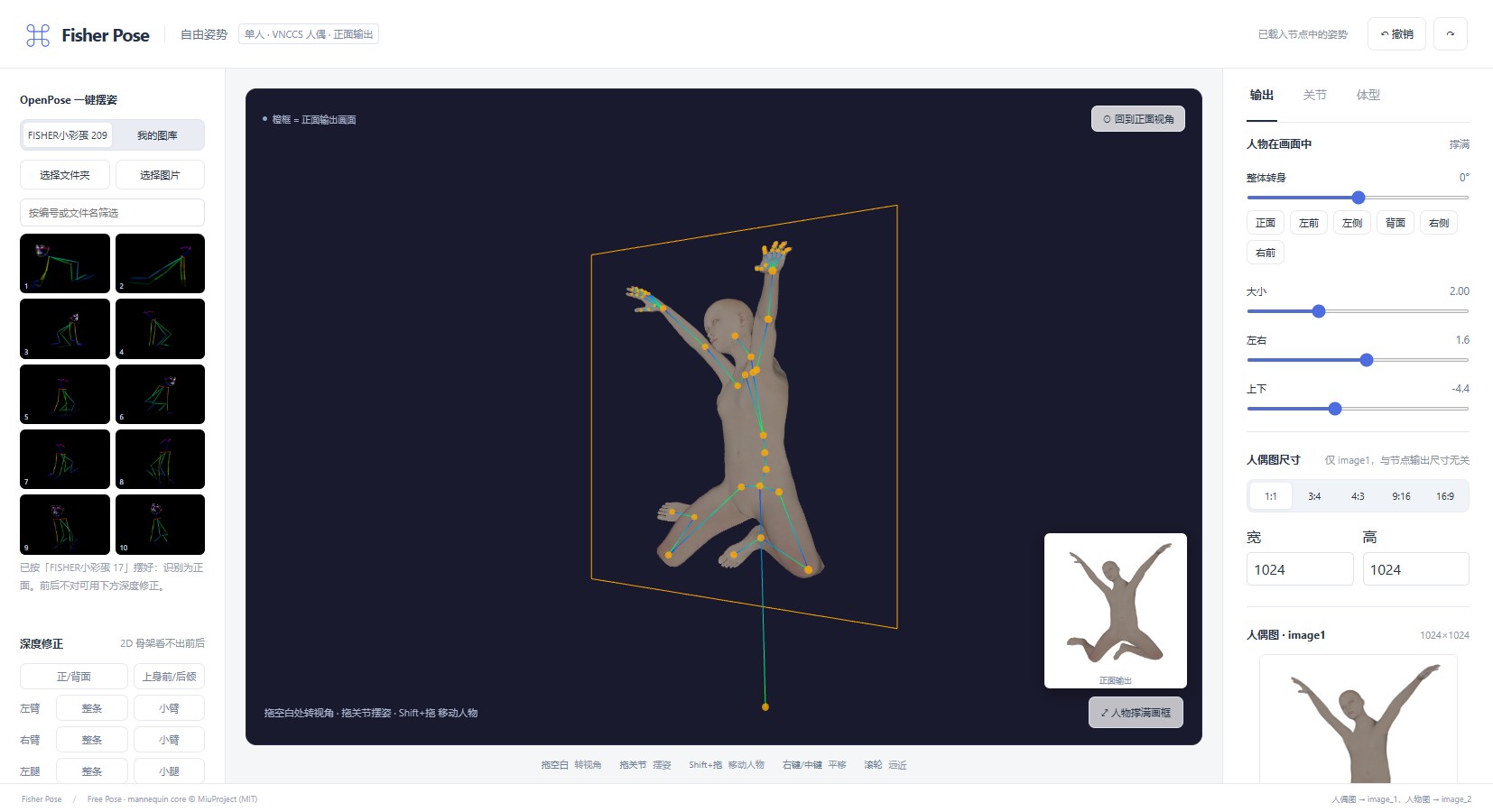
The editor is a 3D viewport with the output frame outlined in orange and a small live view of the actual front-facing render in the corner. Dragging empty space orbits the camera, dragging a joint poses the mannequin (hands, feet and hips have inverse kinematics), and Shift-dragging moves the character. The left panel holds the skeleton library, saved poses, depth correction and hand presets; the right panel holds on-canvas size and position, mannequin image size, joint nudges, body type and proportions.
The free-camera mode uses a front-facing VNCCS camera for output and takes Chinese editing instructions, following the Qwen-Image 2.1 prompt_rewrite specification, with an optional prompt-expansion hook.
Getting started
Install by cloning the repository into ComfyUI/custom_nodes/, then restart ComfyUI and refresh the browser. The pack has no extra Python dependencies and its nodes appear when you search the node menu for Fisher.
Free pose needs these files in place:
| File | Folder | Notes |
|---|---|---|
qwen_image_2.1_*.safetensors | models/diffusion_models | Qwen-Image 2.1 base model |
qwen3vl_8b_*.safetensors | models/text_encoders | Set the type to qwen_image |
qwen_image_2.1_vae_*.safetensors | models/vae | |
VNCCS_QI2_PoseStudioV1.1.safetensors | models/loras | Required, strength 1, from MIUProject/VNCCS_PoseStudio_QI2.1 |
ComfyUI also needs to be new enough to include the TextEncodeQwenImage21 node.
The shipped workflow walks through all of it: load the workflow, pick your character photo in the 人物图 → image2 node, open the free-pose editor, click a skeleton or pose the mannequin by hand, correct depth if needed, apply to the node, set the output size and run. The author's recommended settings match VNCCS official values: 25 steps, cfg 1, euler / simple. An extra_prompt field appends an extra line after the fixed instruction, and English is suggested there.
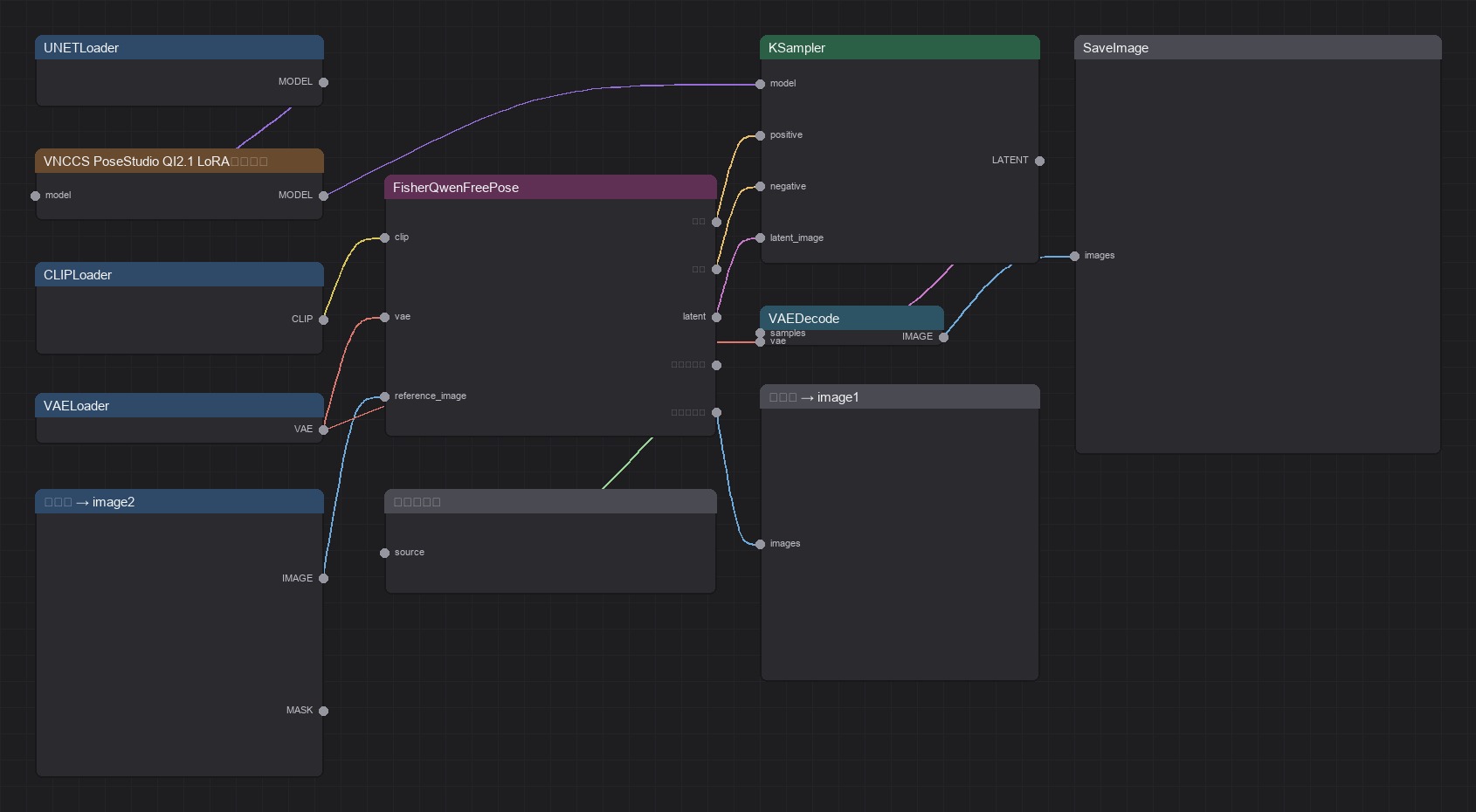
The shipped free-pose workflow: base model and VNCCS LoRA into the Fisher Qwen2.1 自由姿势 node, then KSampler, VAEDecode and SaveImage, with the mannequin image and the final prompt previewed alongside.
Known limitations
- Free pose is single-character only. If an OpenPose image contains several people, only the largest figure is used.
- A 2D skeleton does not uniquely determine front and back, so complex poses need manual flipping or nudging. Head direction, fingers and feet are not read from the skeleton at all.
- The mannequin supplies the pose only. If the output proportions differ a lot from the mannequin, where the character sits in the frame is left to the model.
Availability
Node pack: Work-Fisher/ComfyUI-Fisher-Pose
Required LoRA: MIUProject/VNCCS_PoseStudio_QI2.1
Mannequin and editor core: AHEKOT/ComfyUI_VNCCS_Utils
Base model: Qwen/Qwen-Image-2.1
Camera vocabulary reference: jtydhr88/ComfyUI-qwenmultiangle
Comments
Sign in with GitHub to join the discussion.