Ming-Image 0.1 Design: 6B UI and Poster Model in ComfyUI
Ming-Image 0.1 Design is inclusionAI's 6B text-to-image model for UI, infographics and text-heavy posters, with RGBA transparency and official ComfyUI support.

Design examples from the official model card.
What Ming-Image 0.1 Design is
Ming-Image 0.1 Design comes from inclusionAI, the team behind the Ling and Bailing model families, and it is aimed at a job general image models handle badly: laying out a clean, readable design rather than a photograph. Screens, dashboards, responsive card layouts, infographic panels, product posters and logo sheets are the target content, and the official samples lean heavily on rendered text being legible and typographically sane.
- 6B diffusion transformer. The DiT is a 30-layer, 3840-dimension design with 16 input channels and 2x2 patching, paired with a separate vision-language encoder and its own connector. Kijai describes the base as Z-Image derived with a new text encoder.
- Design-first training data rather than a general photo corpus, which is why the outputs read as composed layouts with real text blocks.
- Two native output buckets, 1024 and 2048, with 2048 recommended for full layouts.
- Sampling defaults are short: 12 steps at CFG 1.0, so a design comes out in a small number of passes.
- Prompt enhancement is part of the intended flow. The official pipeline recommends rewriting the prompt with
Ling-3.0-flash-VLorqwen3.8-27Bbefore generation, which matters most for dense layouts with a lot of text to place.
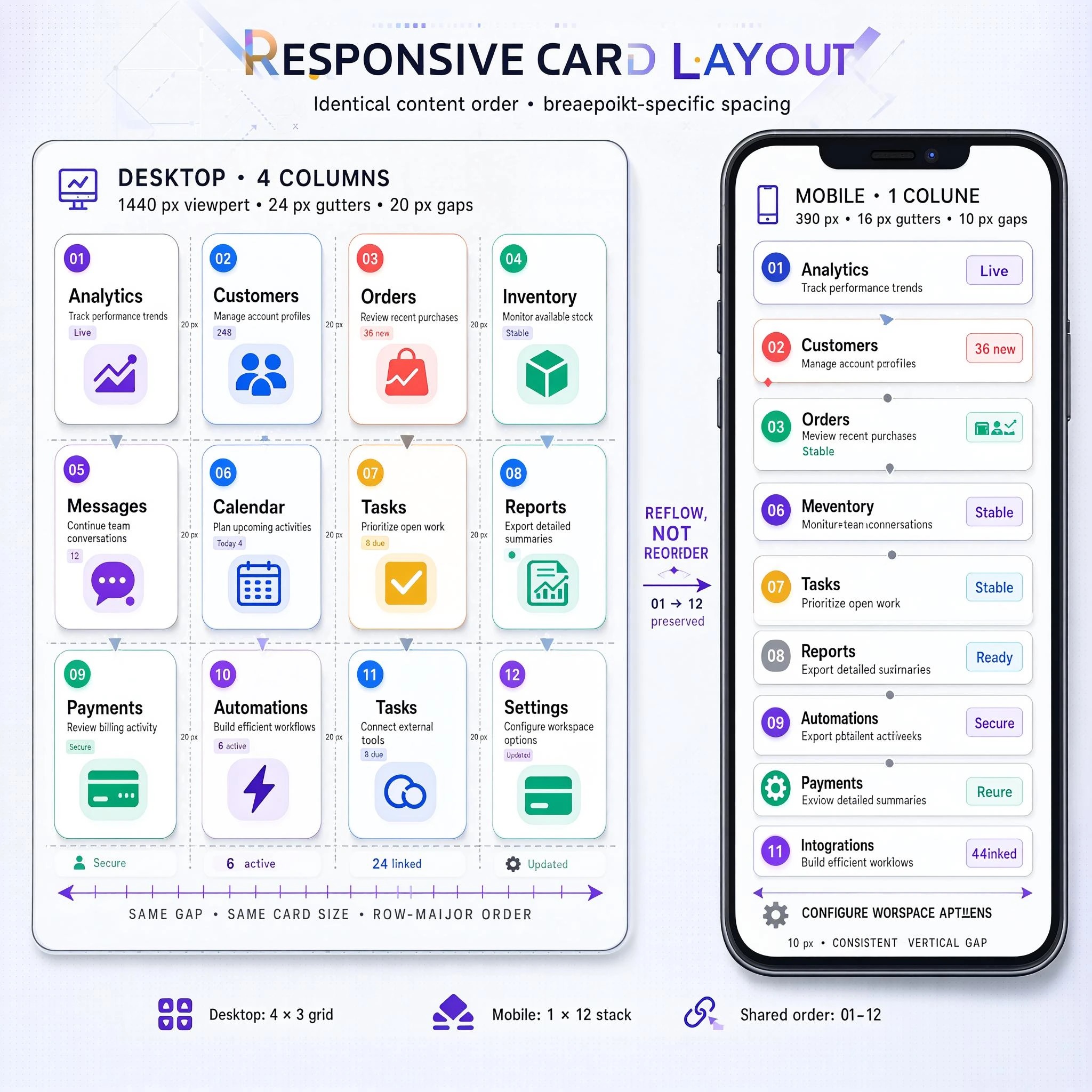
A responsive card layout, one of the official text-to-image samples.
Transparent backgrounds as a first-class output
Alongside ordinary images, Ming-Image 0.1 Design can emit an RGBA image with a real alpha channel, so a generated poster element, product cutout or UI asset arrives ready to composite instead of needing a separate matting pass. The model card ships a set of recommended trigger phrases and asks you to prepend exactly one of them, which is the same pattern Qwen-Image 2.1 uses for its transparency mode.
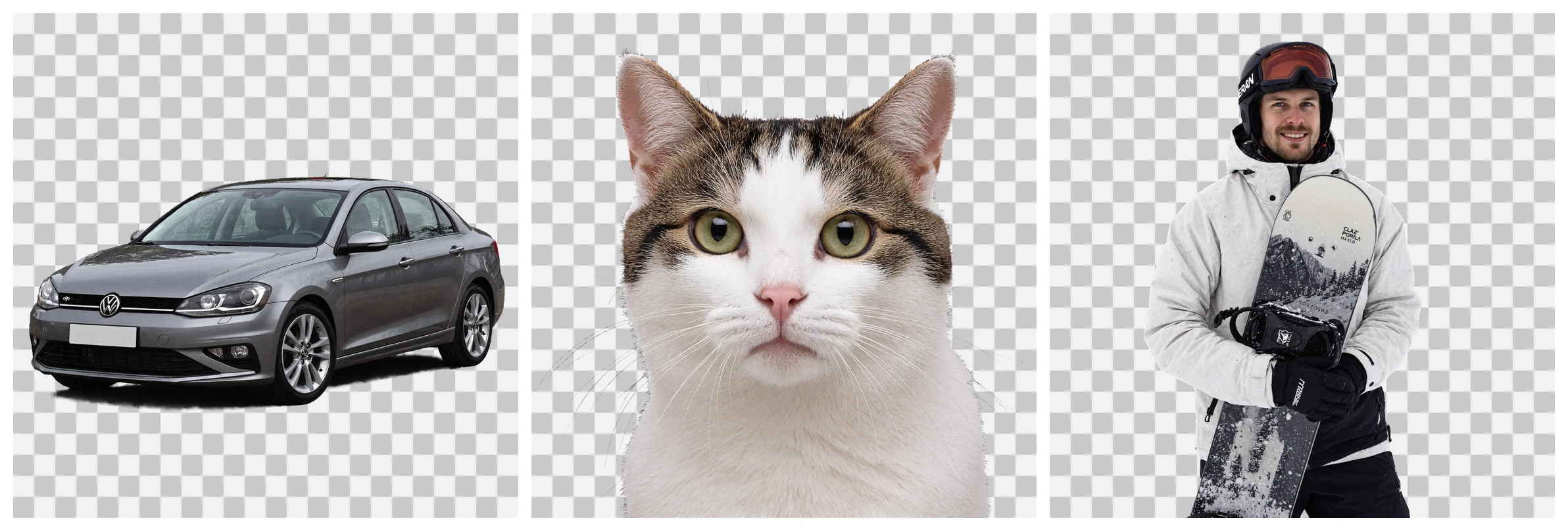
Transparent-background outputs. The checkerboard previews the alpha channel and is not part of the generated image.
The Layer sibling: design to editable layers
The series has a second 6B checkpoint, Ming-Image 0.1 Design Layer, that runs the problem in reverse: it takes a flattened design image and decomposes it into separately editable transparent layers. That is the step that turns a generated mockup into something you can actually work on in a design tool, and inclusionAI pairs it with two published agent workflows, a Ling UI Design skill that uses generated references plus layer decomposition to build and visually check UI code, and an image-to-editable-PPT skill that recreates a generated page as native PowerPoint elements.
The Layer checkpoint uses different sampling defaults from the design model: 12 steps at CFG 2.0, with 512 and 1024 working buckets.
Where it sits on the UI/UX leaderboard
inclusionAI published the model on the Artificial Analysis UI/UX Design leaderboard together with the release, which is the clearest signal of who the model is competing with.
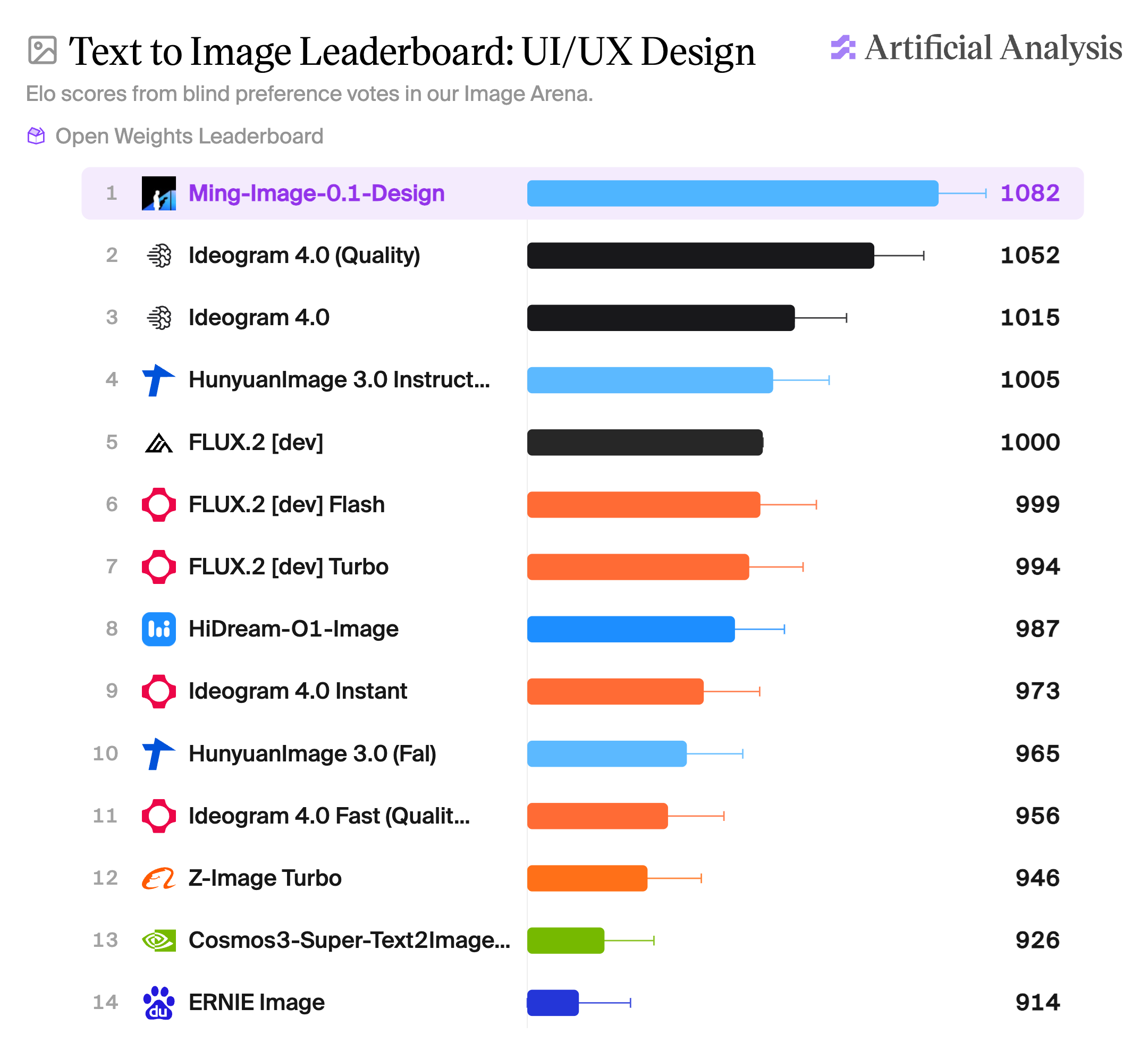
Ming-Image 0.1 Design's placement on the UI/UX Design leaderboard, from the official repository.
ComfyUI availability
Core ComfyUI support for Ming-Image merged on September 24, 2026 in Comfy-Org/ComfyUI PR #16482, so both checkpoints now load in an unmodified install:
- The repacked weights are published as
Comfy-Org/Ming-Image: BF16 andint8_convrotbuilds of both the Design and Layer transformers, the Ling-Mini-2.0 text encoder (plus aw4a8build and Layer-specific variants) and the VAE, laid out in the usualdiffusion_models/text_encoders/vaefolders. Kijai's earlierKijai/Ming-Image-ComfyUIrepack covers the same ground. - The core implementation adds a
Text Encode Ming Image Editnode (TextEncodeMingImageEdit) that takes the clip, up to 8 reference images and an optional VAE. Without the VAE the references reach the text encoder only through its vision tower; with it they are encoded and appended to the latent sequence as clean reference frames. Design and Layer are told apart from the repack metadata, so Layer loads through the same path. - No official workflow template has shipped yet, so the graph still has to be built by hand around the checkpoint loaders.
Early testing in the Banodoco #ming-image channel suggests samplers matter more than usual here: Kijai notes that LCM output is clean but overly smooth and that random text failures are still common at INT8, while RuneX reports the model responds to bounding-box style prompts and edits quickly thanks to its small size.
Comments
Sign in with GitHub to join the discussion.