Camera H3: Visual Camera Path Editor for MiniMax H3 in ComfyUI
A ComfyUI custom node that turns camera moves into MiniMax H3 prompts: drag a 3D camera, set keyframes and orbit presets, and get a compiled trajectory prompt.
What the node does
The panel opens as an overlay on your source image. You move the camera, drop keyframes, and pick per-segment interpolation: Smooth for continuous motion between keyframes, Linear for straight moves, plus timing redistribution to keep speed even across the path. An Unwrap option converts angle crossings such as 350° → 10° into the short arc so orbits do not spin the wrong way.
Presets cover the common moves: orbit, rise, fall, move closer, move away, and static camera. A Start / End Hold adds a 0.5 second pause at either end, and Loop Closure in auto mode closes compatible orbit paths.
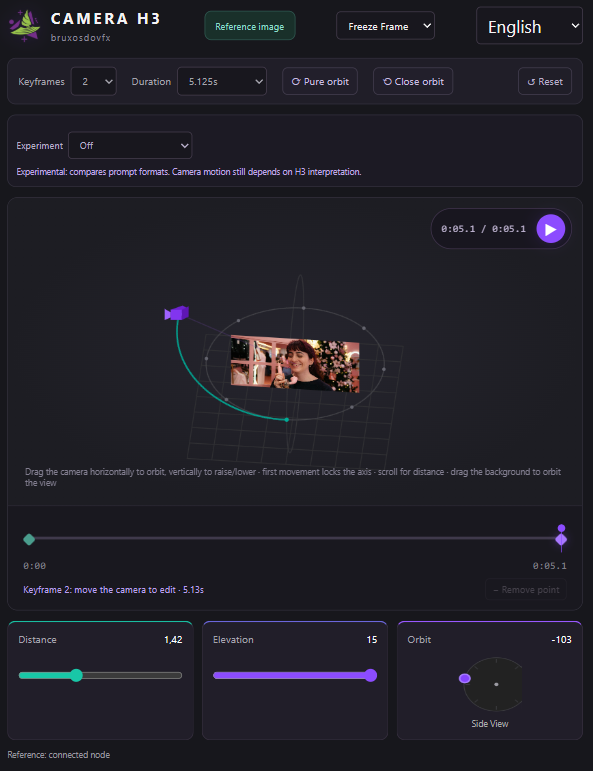
The optional Subject Box input tells the node who to orbit around: draw a box over your subject in the first frame with the companion bruxosdovfx • H3 Subject Box node, and the trajectory is compiled relative to that position instead of the image center.
It compiles prompts, not geometry
One thing to know before trying it: the author is explicit that the node compiles prompts. It is not a geometric adapter, and it cannot guarantee that H3 tracks the path perfectly. In the README and in the Reddit threads the author explains the principle with an example of the camera parameters MiniMax H3 understands, including subject position, azimuth, elevation, and distance.
The node also ships a Diagnostics panel that detects static paths, unwanted holds, and zero crossings in your trajectory before you burn a render.
How the community is using it
The update threads on r/comfyui and r/StableDiffusion drew active testing. One recurring question was why subjects look frozen while the camera moves: the author explains the demo clips are built for training Gaussians, and that adding character motion to the prompt brings the subject back to life. Users also confirmed the node works with the pruned H3 model, asked about integrating the trajectory prompt into regular REF2VA and FL2VA workflows (planned for a next update), and requested an English UI, which is now in.
Official demo: an orbit move generated from the compiled trajectory prompt.
Workflow
The repo includes a ready-to-run workflow using the node:
Availability
Camera H3 is a free custom node. Clone NyckM/3d-Camera-control-H3-Minimax into ComfyUI/custom_nodes, restart, and search for bruxosdovfx • Camera H3. The node works with the pruned MiniMax H3 model, and the UI and diagnostics are available in Portuguese or English. The author also maintains BruxosSplat, a companion tool for training the Gaussians used in the frozen-subject demo clips.
Comments
Sign in with GitHub to join the discussion.