ComfyUI Adds Native Loops: Start Loop and End Loop Nodes
ComfyUI core now loops a workflow natively. Pair Start Loop with End Loop to iterate a graph over a count, an index range or a list, with carried values and accumulated outputs.
utilities/looping category.
How a loop is drawn
There is no loop container to configure. A loop is a pair of nodes, and the body is whatever sits between them: anything wired from Start Loop through to End Loop runs once per iteration.
Loop structure is checked during normal prompt validation, so a malformed loop fails before execution starts. Every Start Loop must pair unambiguously with exactly one End Loop, nested scopes must stay consistent, and a loop branch cannot escape its End Loop. Start Loop and End Loop declare themselves as loop boundaries in their node schema, which is what the pairing check reads.
At execution time the original body is inhibited and each iteration is projected as fresh queued graph nodes, including the first one. Iterations stay ordinary scheduler work rather than being handled by a separate loop interpreter, and iteration progress is reported on the node as Iteration n / total.
Three ways to count iterations
Start Loop's mode input picks how the iteration counter is produced, and only the inputs for the selected mode are shown.
| Mode | Iterates over | Own inputs |
|---|---|---|
simple | A fixed number of repetitions | num_iterations (default 4) |
For | A numeric index range | start_iteration_index (default 0), max_iteration (default 4, exclusive), step (default 1) |
List | One pass per item in a connected list | list |
step is at least 1 and a value of 0 raises an error. If the computed iteration count is zero, the loop body does not run and is_last is reported as true.
What Start Loop returns
| Output | Meaning |
|---|---|
iteration_index | Index of the current iteration |
is_first | True on the first iteration |
is_last | True on the last iteration |
list_item | The current item in List mode, empty in the other modes |
current_iteration_value | The loop-carried value for this iteration |
is_first is the usual hook for a different first pass, for example seeding a video loop from a source frame instead of the previous window's last frame.
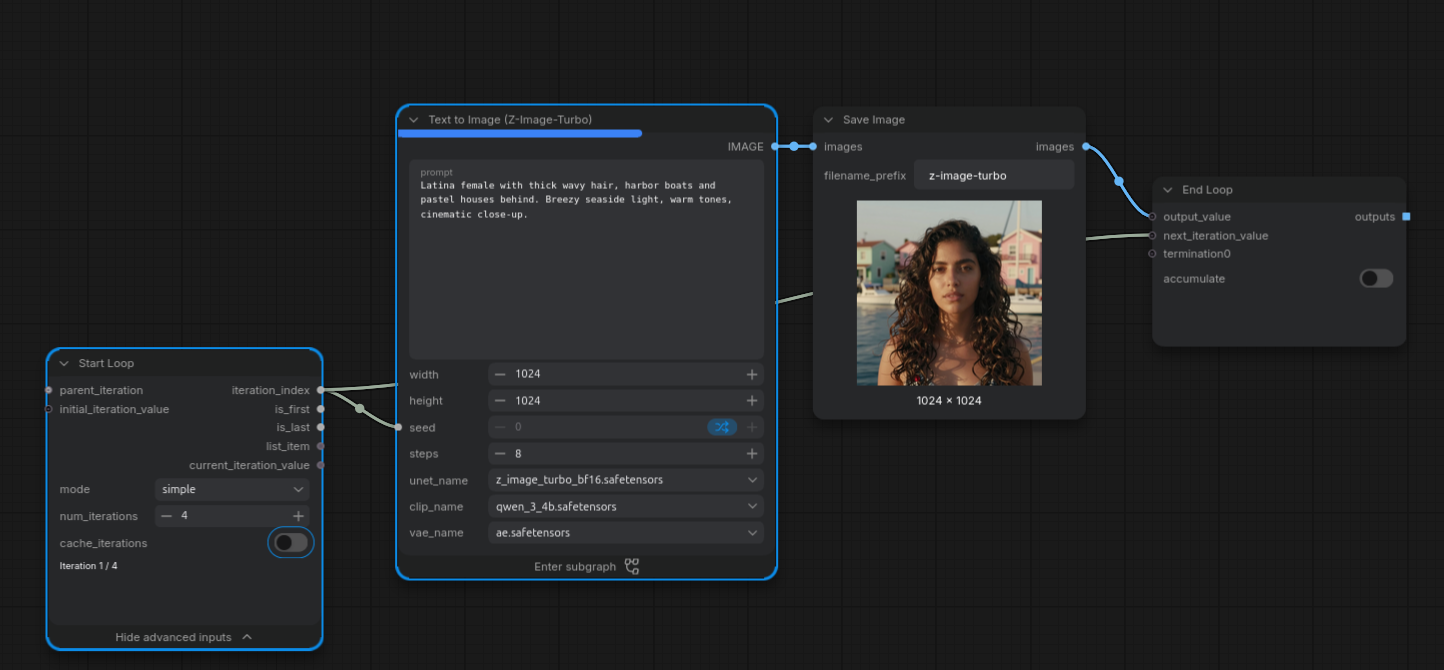
The minimal case: one Start Loop, a small generation body, one End Loop. The Save Image passthrough is wired to a termination input so it still executes once per iteration.
Closing the loop
End Loop closes the scope and decides what leaves it.
| Input | Role |
|---|---|
output_value | The value returned after the loop finishes |
next_iteration_value | Sent back to Start Loop as current_iteration_value for the next iteration |
accumulate | When enabled, every iteration's output_value is returned instead of only the final one |
termination inputs | Dynamically growing inputs for previews, savers and other side effects that must run on every iteration. Their values are not returned |
End Loop has a single output socket whose type follows output_value. With accumulate enabled the values come out as a normal ComfyUI list, concatenated in iteration order.
The termination inputs are the fix for a common surprise: a Preview Image or Save Image node sitting inside the body would otherwise only fire for the final iteration, because the earlier projected bodies are superseded. Wiring that node's passthrough into a termination input keeps it running once per iteration and keeps it inside the loop boundary.
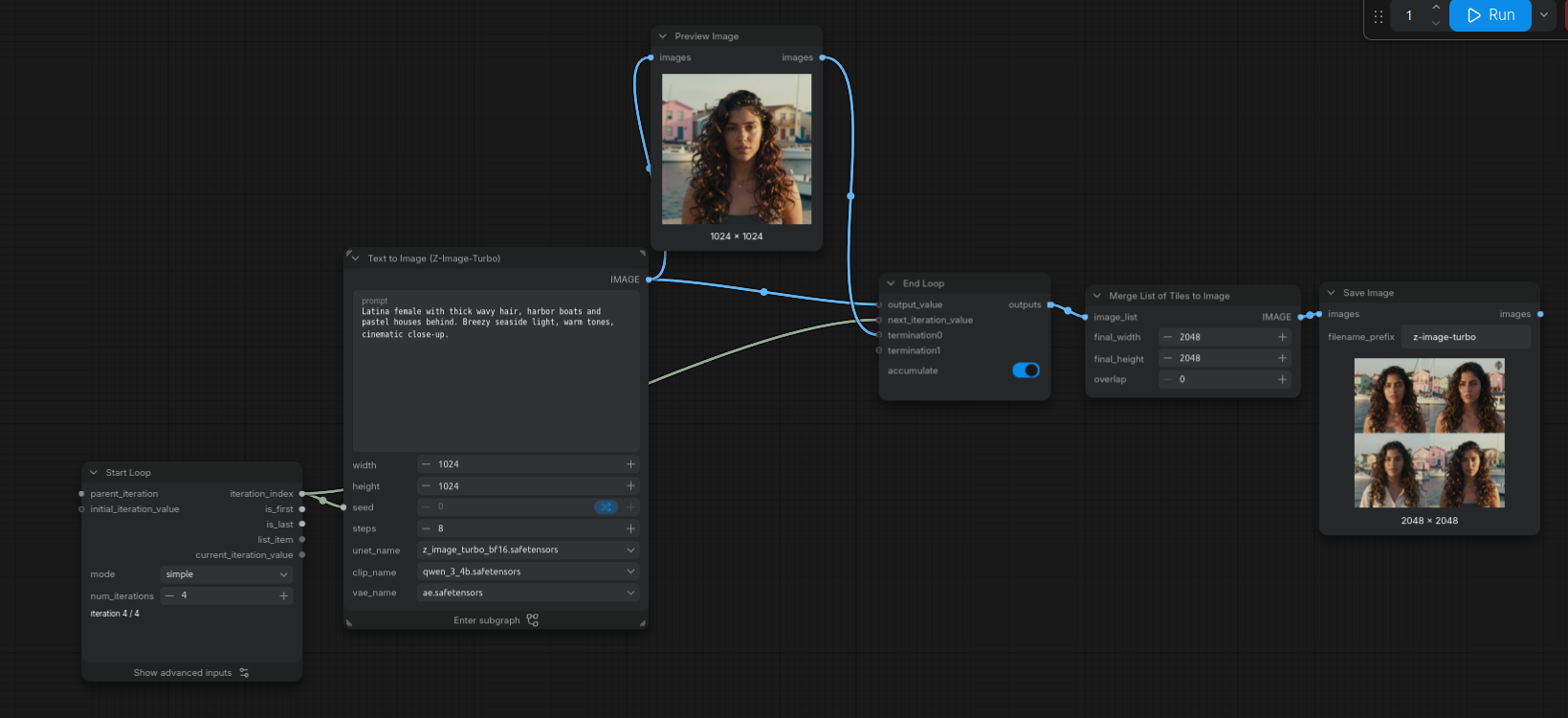
With accumulate on, all four generations come back as one list. Preview Image is terminated so each iteration is visible as it completes.
Varying the work per iteration
Because iteration_index is a normal integer output, it can drive anything downstream: resolution, step count, prompt variants, or a LoRA strength ramp.
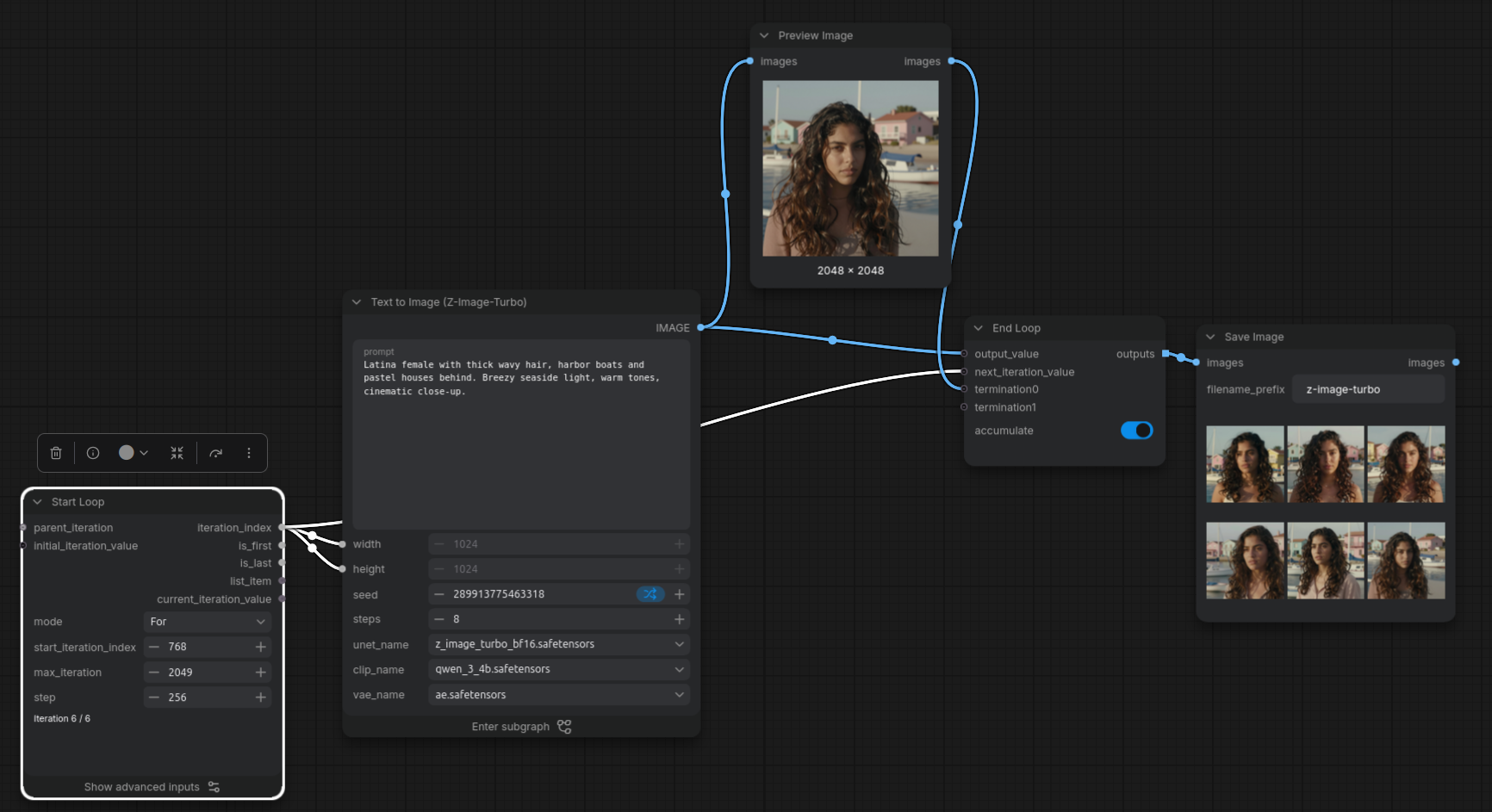
For mode feeding iteration_index into the resolution, with differently sized results accumulated at the end.
Carrying state between iterations
initial_iteration_value seeds the carried value on the first iteration, and each iteration's next_iteration_value becomes the next iteration's current_iteration_value. That is the whole state channel, and there is exactly one per Start and End Loop pair.
To carry more than one thing, put them in a list. The existing Create List node now accepts heterogeneous inputs, so one carried value can hold mixed state such as an image and the text prompt that produced it. Two nodes in the utilities category support the pattern:
- Create List: builds the carried value from mixed inputs.
- Get Item From List: new in the same release. It takes a list and an index and returns that item as a normal value, so the components of the carried state can be unpacked inside the next iteration.
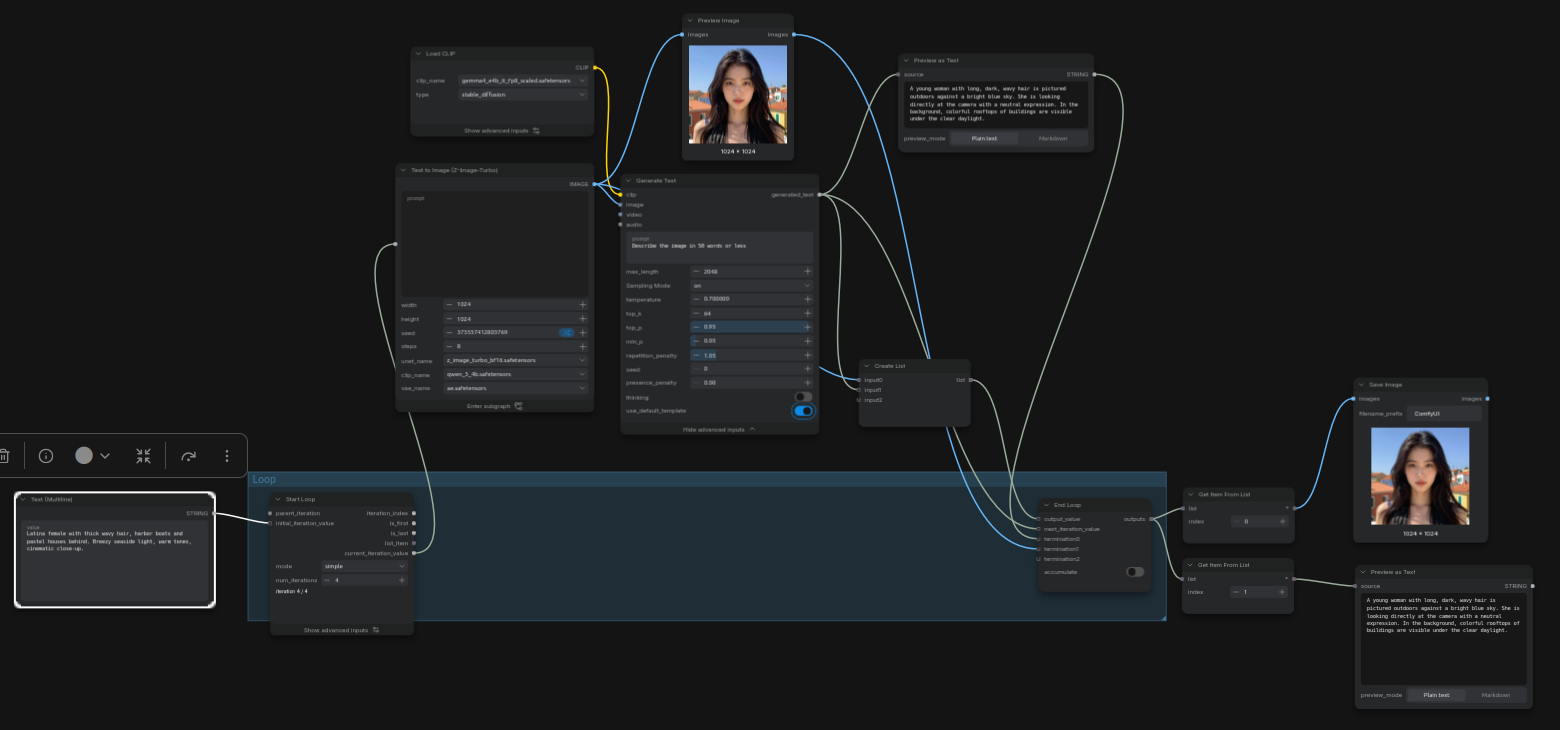
Z-Image generation and vision-language captioning passed back and forth through a single carried image and text value.
Nesting and caching
parent_iteration on Start Loop is a force input: connect the outer loop's iteration_index to it to nest a loop inside another one. Nesting is explicit rather than inferred, and each Start Loop still needs exactly one End Loop.
cache_iterations on Start Loop is advanced and off by default. When enabled, projected iteration nodes may reuse cached results from earlier executions. The End Loop node itself is an ordinary executed node, so its final output is cached normally either way.
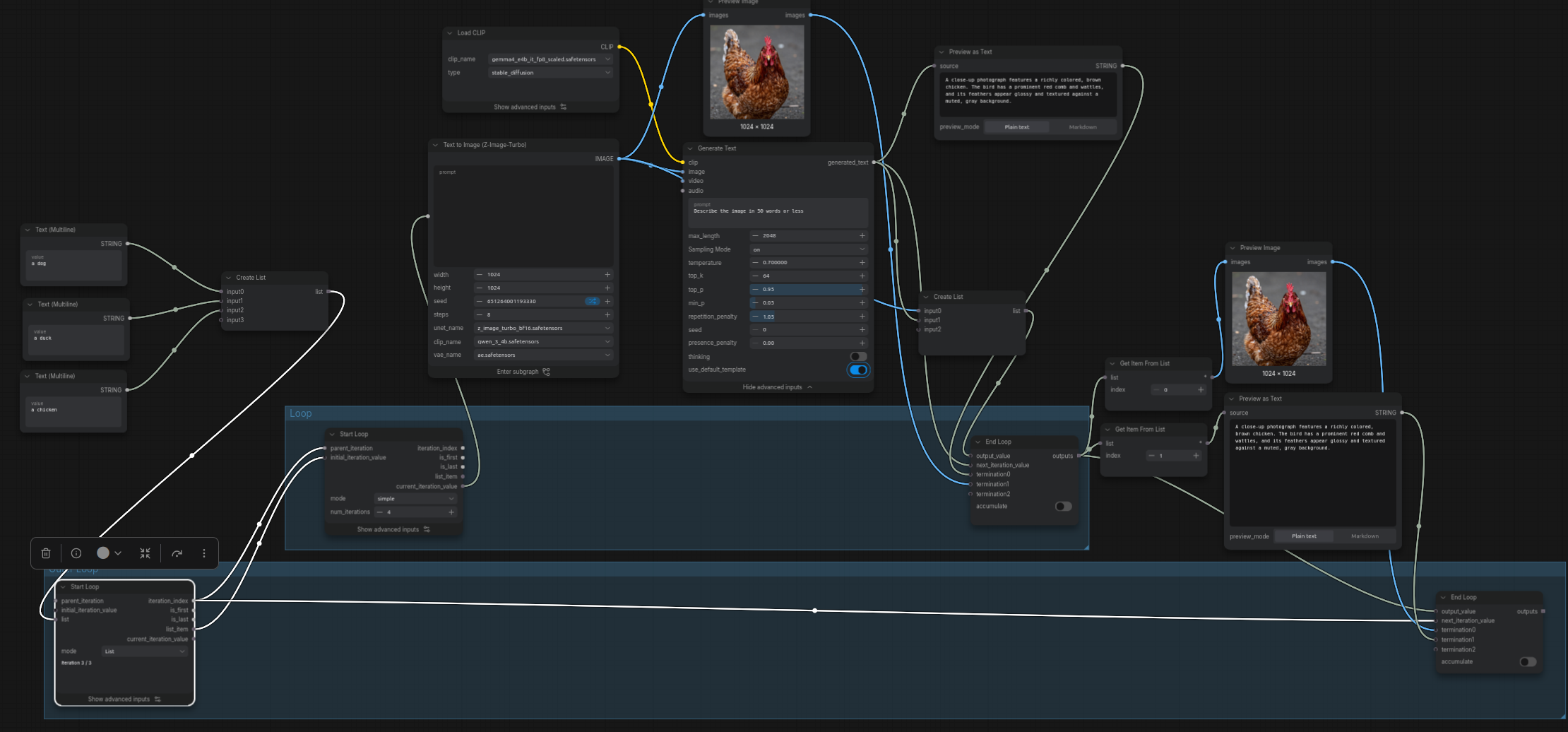
A List mode outer loop over prompts, with the generation loop nested inside it via parent_iteration.
Video and latent examples
The mechanism was built with video extension in mind, where each window depends on the previous one. Two published examples show the pattern directly.
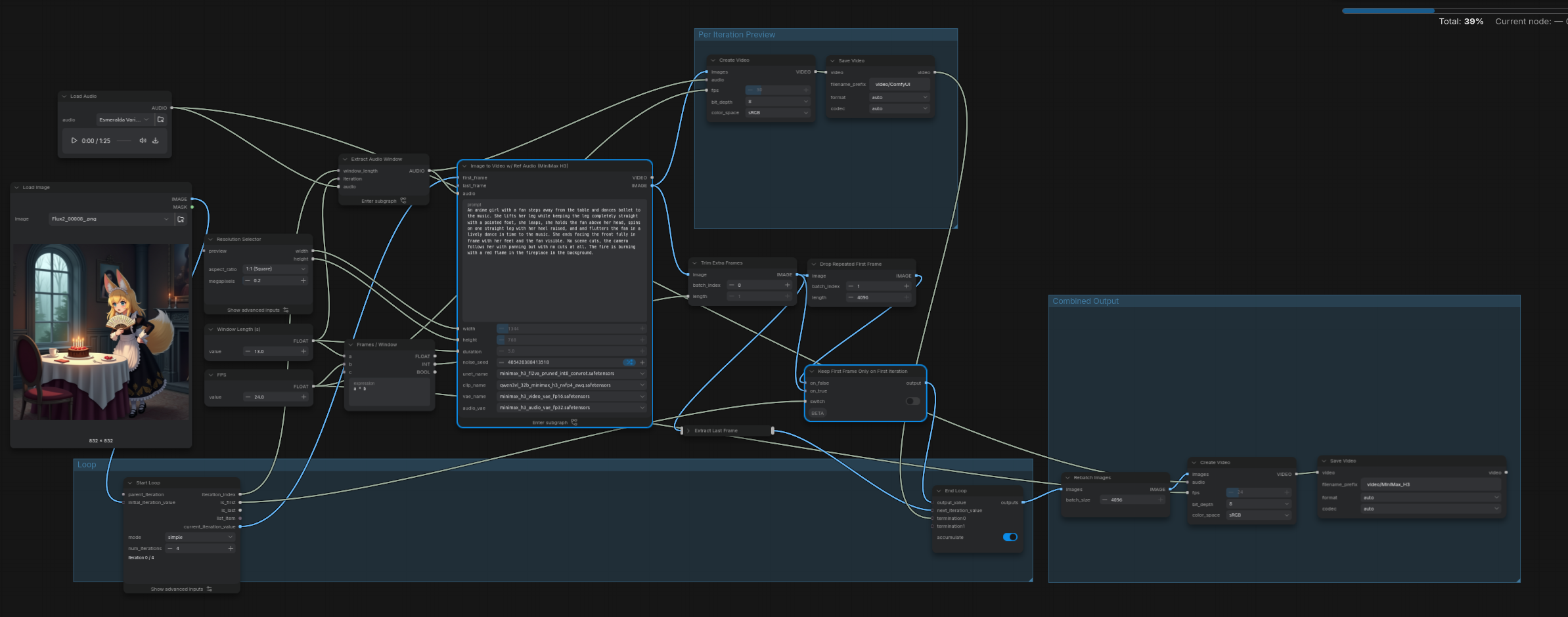
A last-frame-to-first-frame video loop: the source image seeds initial_iteration_value, each generated window's final frame becomes the next window's first frame, and the frame batches are accumulated and rebatched into one clip.
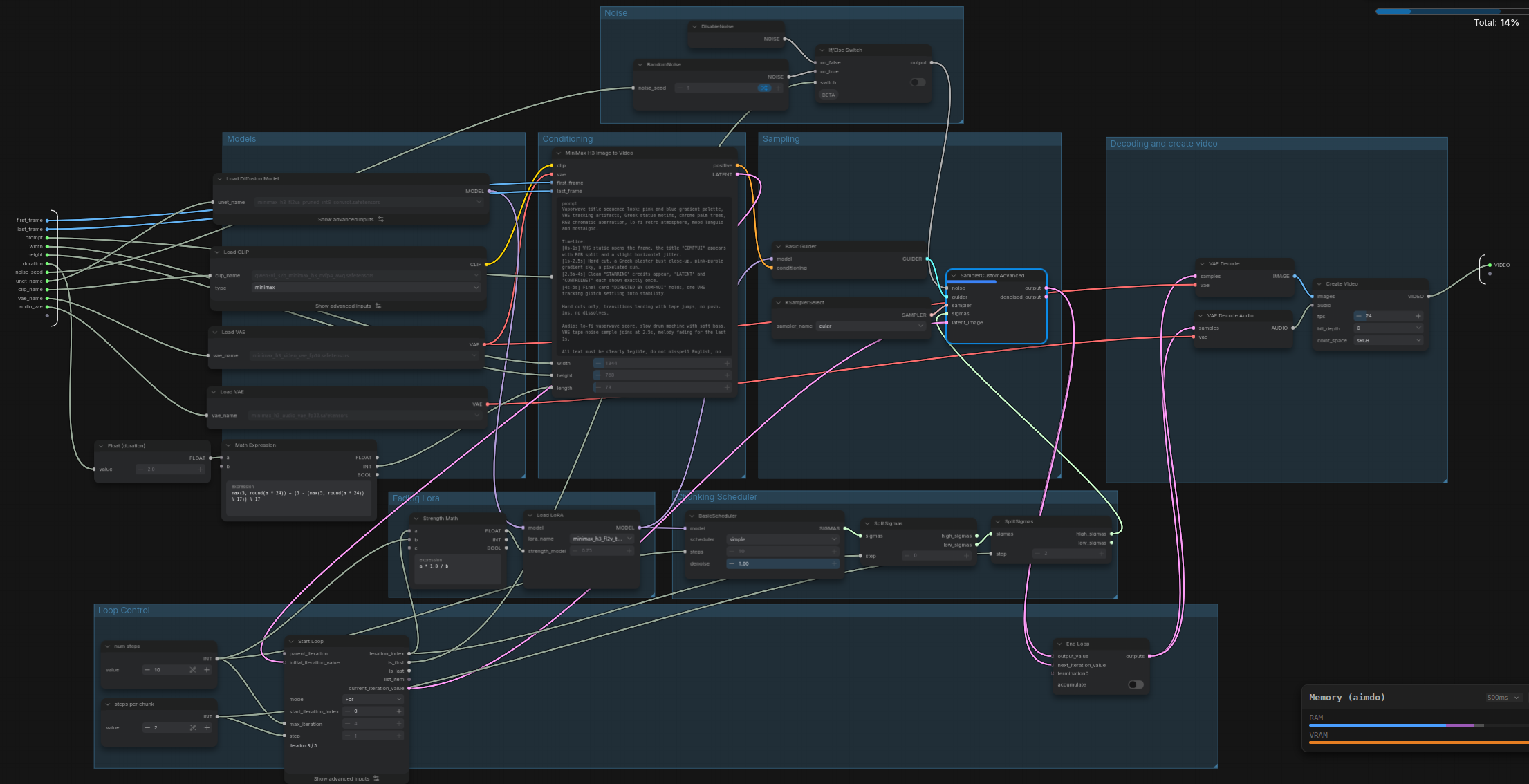
A latent carried directly through the loop with accumulate off, so only the final latent is returned, plus a lazy switch for first-iteration handling and a LoRA strength that changes gradually as sampling proceeds.
The simplest starting point, a four-iteration generation loop with no carried state, is a single Start and End Loop pair:
Where the nodes live
Start Loop and End Loop are core nodes in the utilities/looping category and ship with ComfyUI itself, so no node pack is needed. Create List and Get Item From List sit in utilities. The looping behaviour is documented on the official built-in node pages for Start Loop and End Loop.
Existing workflows are unaffected: loops are opt-in, and a graph with no Start and End Loop pair queues exactly as before.
Comments
Sign in with GitHub to join the discussion.