Tencent AuK: One 1.5B Model for Speech Generation and Editing
Tencent Hunyuan open-sources AuK, a 1.5B speech model covering TTS, voice cloning, lyric editing, enhancement, and separation, with official ComfyUI nodes and a workflow.
ComfyUI-AuK) and a ready-to-run workflow, plus a distilled AuK-Flash variant for 4-step fast inference. Code and weights are available under MIT on GitHub and Hugging Face.
Overview
AuK is trained on millions of hours of diverse audio. Instead of splitting speech work across separate tools (one model for TTS, another for cleaning, a third for stem separation), AuK puts every task behind the same message-based interface: you pass an instruction in plain language, optionally attach an audio clip, and the model does the rest. The project's technical report describes benchmarks across generation, editing, enhancement, and separation.
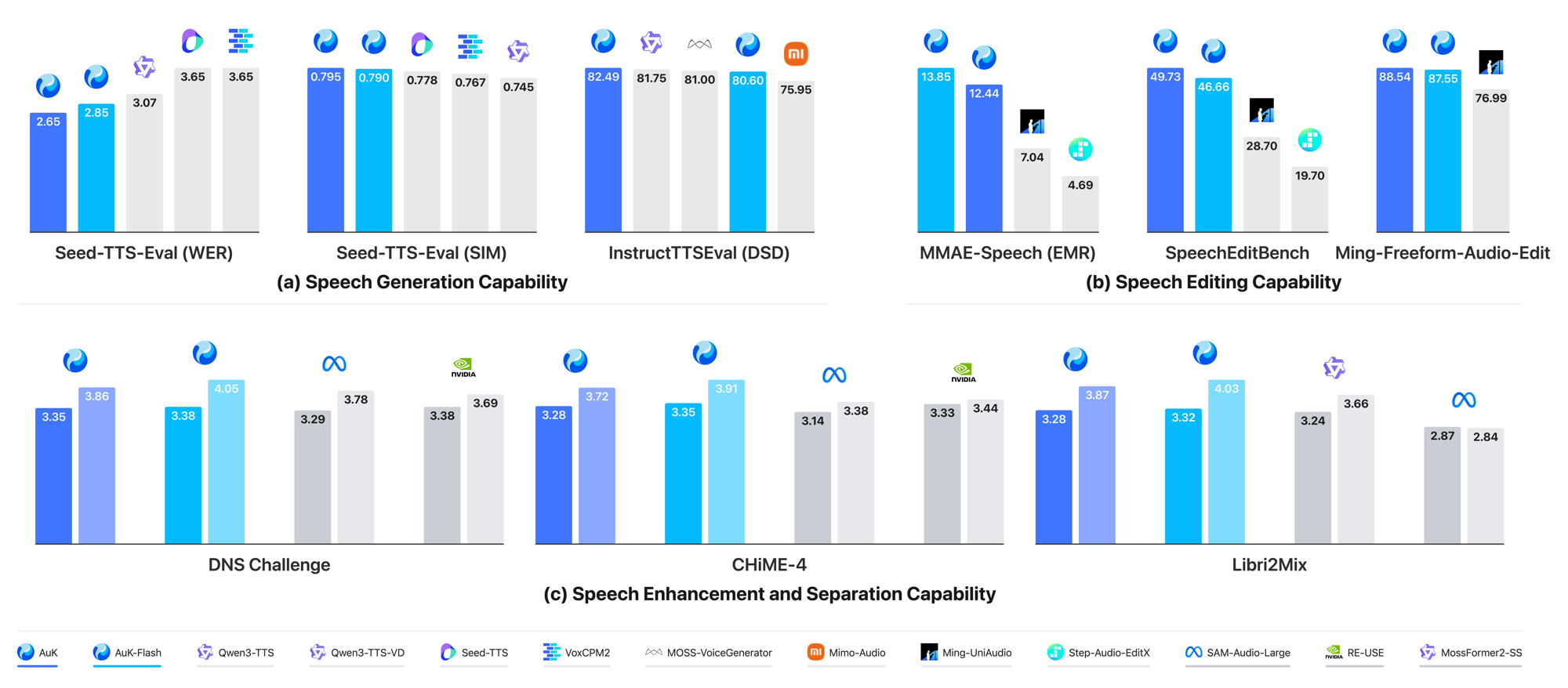
Benchmark results across the five task families AuK supports.
Two variants are available:
| Model | Description |
|---|---|
| AuK | Base model for high-quality generation, configurable NFE and CFG |
| AuK-Flash | Distilled model, fixed 4-step inference with CFG=0 |
Supported Tasks
All tasks share the same natural-language instruction format. Highlights:
- Zero-shot TTS: speak target text in the voice of a reference clip, or describe a voice with no reference audio at all (instruct TTS)
- Content editing: rewrite what is said, replace, insert, or remove words; even rewrite lyrics in a singing recording while keeping melody and voice
- Acoustic editing: adjust pitch by semitones, speaking rate, and volume
- Paralinguistic editing: change emotion or timbre, remove an accent, add or remove breaths and laughs, convert between normal speech and whisper
- Enhancement and separation: denoise and dereverberate, keep one speaker from a mix, extract vocals from music, or isolate a target speaker by what they say
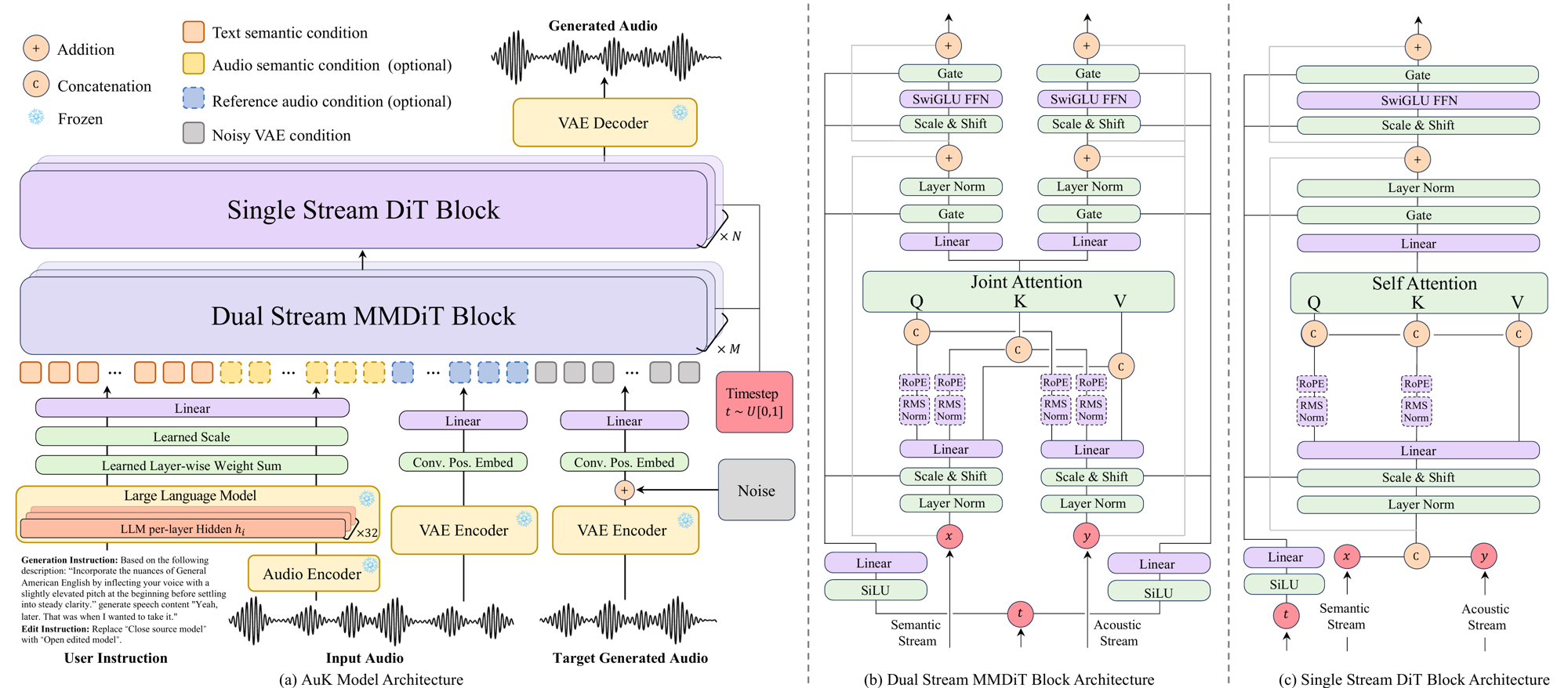
AuK architecture. The diffusion transformer and layer-fusion weights ship in the checkpoint; the MLLM encoder (Qwen2.5-Omni-3B) and VAE load as separate files.
ComfyUI Support
The official repository includes a ComfyUI integration with two core nodes, AuK Model Loader and AuK Generate / Edit, covering generation, editing, enhancement, and separation. An optional Prompt Enhancer turns free-form requests into ready-to-run instructions using an OpenAI-compatible LLM.
Setup follows the repository's ComfyUI guide:
- Install the
comfyuiextra in the Python environment that runs ComfyUI:pip install -e ".[comfyui]" - Link
comfyui/ComfyUI-AuKintoComfyUI/custom_nodes - Download the weights:
AuK(orAuK-Flash) plus theQwen2.5-Omni-3Bencoder - Open the bundled
auk.jsonworkflow and set the paths in AuK Model Loader
Things to know before running:
- 30-second limit: source/reference audio plus the generated target must fit within 30 seconds; the node does not split long audio automatically
- Flash settings: for AuK-Flash set
nfe_steps=4,cfg_strength=0, andsway_sampling_coef=-1in the loader - Memory: models stay resident on the selected device; ComfyUI's automatic VRAM offload is not supported for these nodes
- PE credentials: the Prompt Enhancer reads an OpenAI-compatible
.envthat must be loaded before starting ComfyUI
Availability
AuK and AuK-Flash weights are on Hugging Face and ModelScope under MIT, with code at Tencent-Hunyuan/AuK. Interactive demos run on the Hugging Face Space and ModelScope Space. SGLang-Omni announced day-0 serving support for both variants.
Comments
Sign in with GitHub to join the discussion.