MiniMax H3 RefMods: Zero-Training Reference Adapters
RefMods are 1 MB conditioning adapters for MiniMax H3: encode a character once, load it like a LoRA in ComfyUI, and reuse it across unlimited generations.
A community project called RefMods (Reference Latent Adapters) brings a new way to keep characters consistent in MiniMax H3 videos: instead of feeding a reference image or video on every generation, you encode the reference once into a tiny .safetensors file (about 1 MB to 1.6 MB) and load it like a LoRA whenever you need it. The project comes from Reddit user malcolmrey, who published the full RefMods weights library on Hugging Face together with an installation and usage guide.
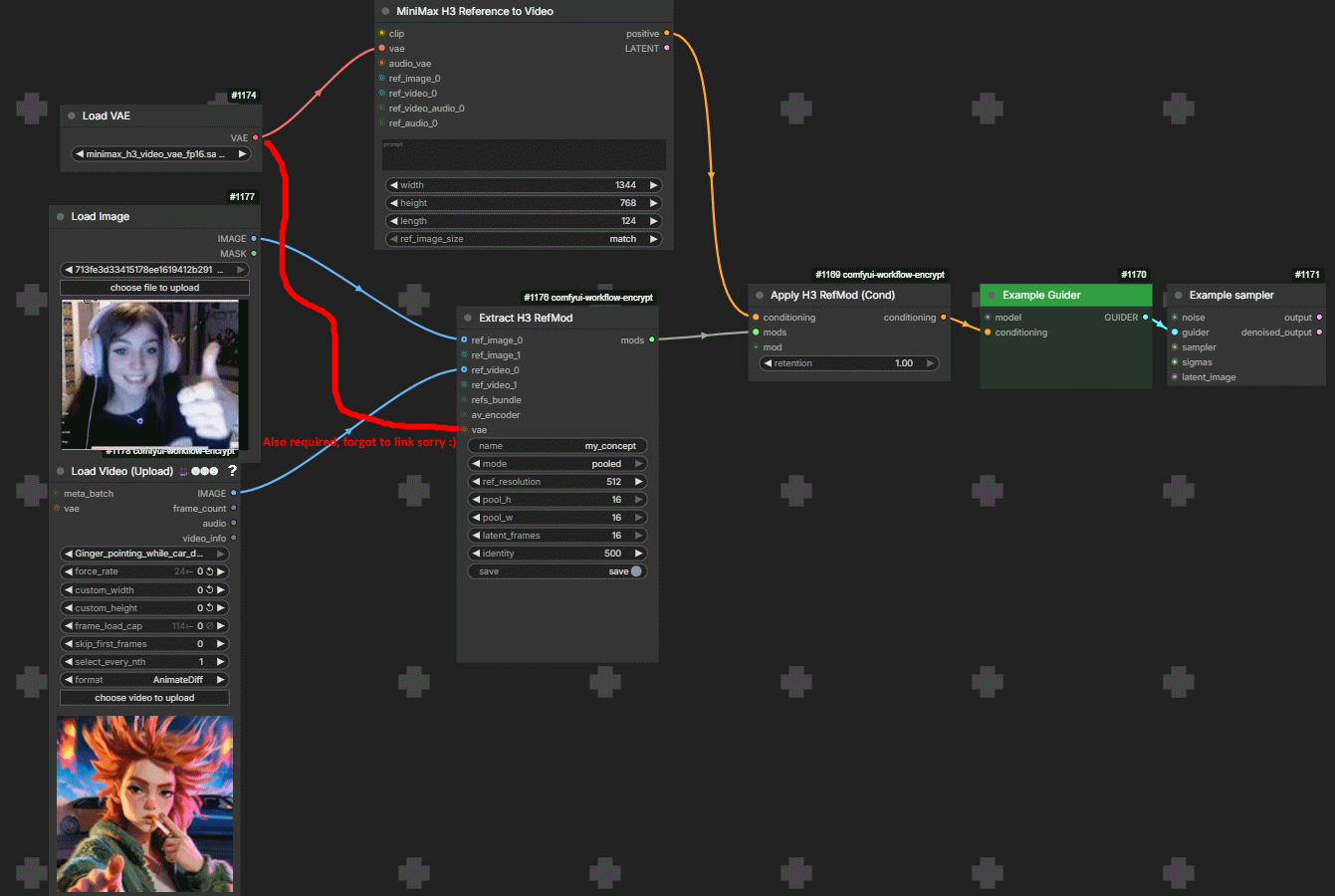
The ComfyUI side is handled by the open-source node pack ComfyUI-MiniMaxH3Mod (MIT, 99 stars), which extracts, loads, and applies RefMods through the conditioning pathway.
What RefMods actually are
RefMods are pre-encoded conditioning-level adapters: a reference image, video, or GIF is VAE-encoded once, distilled down to its identity information, and saved as a standalone file. At generation time the adapter is injected directly into the H3 conditioning stream, so:
- No live VAE encoding of a reference on every run
- No positional image tags such as
<Picture 1>in prompts - No "bleeding" of the reference look into unrelated parts of the scene
- No training loop: extraction takes one pass, unlike LoRA training
The node pack: extract, load, apply
ComfyUI-MiniMaxH3Mod ships five nodes (v0.1.0):
| Node | Purpose |
|---|---|
| Extract H3 RefMod | Image / video / GIF to one .safetensors mod, with training (pooled concept/identity thumbnails) and encode (full-resolution VAE) modes |
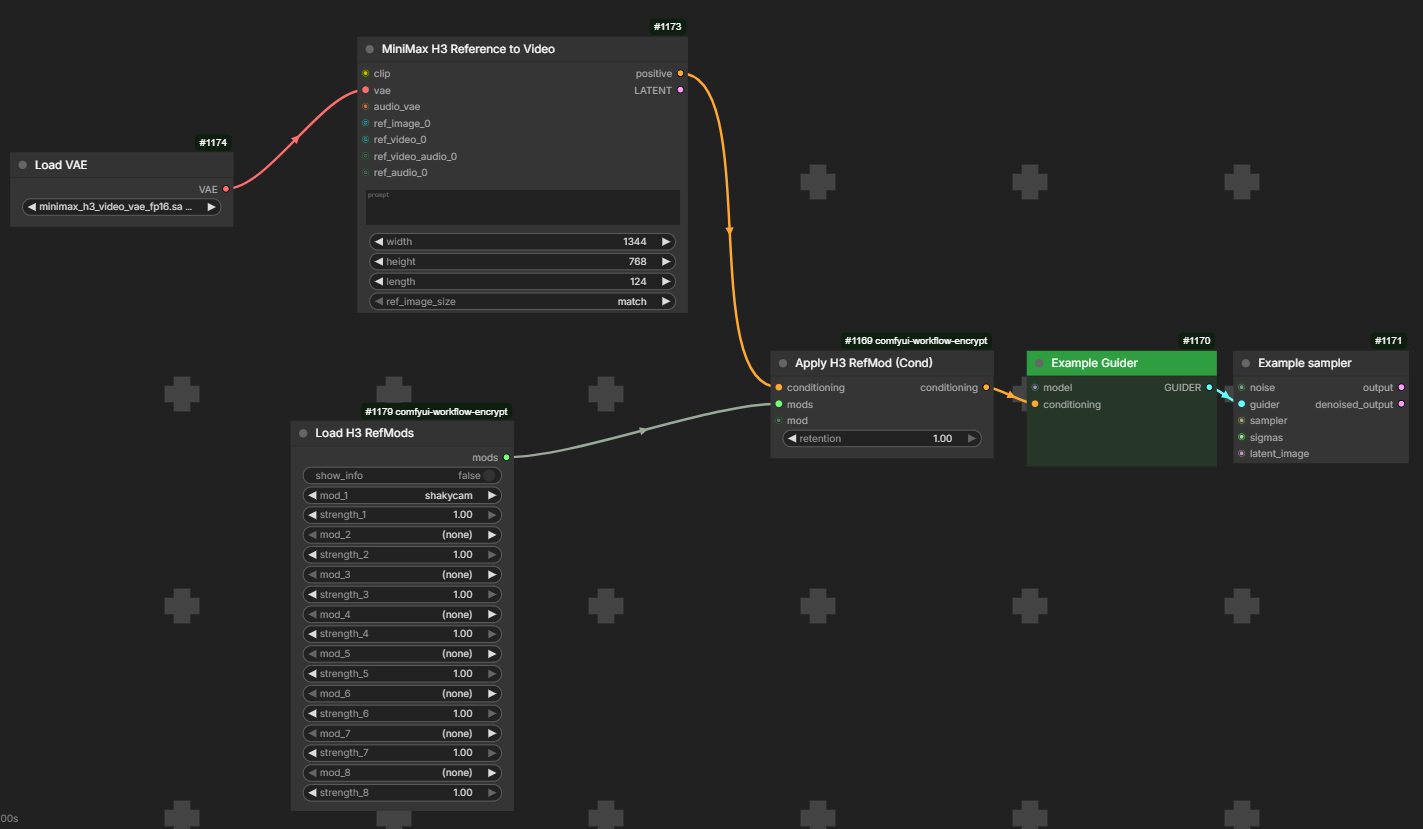
| Load H3 RefMods | LoRA-loader-style rows, up to 8 slots, each with a strength and a copies token-repeat multiplier |
| Load H3 RefMod Axis | Signed A/B slider: negative picks mod A, positive picks mod B |
| Load H3 RefMod Folder | Every image/video in a folder as an ordered reference list |
| Apply H3 RefMod | Injects the mods into conditioning, with retention and per-step curve controls |
A separate H3 RefMod Step Curve node controls when during denoising the reference is strongest, with curve directions such as concept_at_start, concept_at_middle, and concept_at_ends, plus a seedable scramble_seed that rotates multi-reference mods between runs.
Wiring into an H3 workflow
The two RefMod nodes sit between the conditioning loader and the guider or motion-context stage:
[ MiniMaxH3ImageToVideo / ReferenceToVideo ] (conditioning out)
                    |
                    v
          [ MiniMaxH3RefModApply ] <--- [ MiniMaxH3RefModsLoader ]
                    | (conditioning out)
                    v
     [ BasicGuider ] / [ MiniMaxH3MotionContext ]
Prompts use ordinary subject tags (<Subject 1>, <Subject 2>) with biometric descriptions; for multi-character scenes you assign one mod per loader slot and the adapter maps each identity without token collisions.
Sample outputs
| Adam Driver RefMod | Adele RefMod |
|---|---|
The weights library
The Hugging Face library currently hosts hundreds of ready-made RefMods at roughly 1.1 MB to 1.6 MB per file, spanning public figures, fictional characters, and anatomy/concept adapters, all under Apache-2.0. Files go into ComfyUI/models/refmods/, where the loader node auto-populates its dropdowns. The project also ships a sample video library and a workflow collection covering T2V, I2V, R2V, and C2V pipelines.
Availability
- Node pack: Luisacaotica/ComfyUI-MiniMaxH3Mod on GitHub (MIT)
- Weights: malcolmrey/minimaxh3 on Hugging Face (Apache-2.0)
- Guide: RefMods Installation & Usage Guide
Comments
Sign in with GitHub to join the discussion.