MiniMax H3 Director: Timeline Storyboard Editor for ComfyUI
A ComfyUI timeline editor for MiniMax H3: drag images, video and music onto tracks, write a prompt per shot, and preview the exact storyboard prompt before rendering.
ComfyUI-MiniMaxH3-Director is a timeline editor for MiniMax H3 inside ComfyUI, ported from WhatDreamsCost's LTX Director. Instead of hand-writing a whole storyboard prompt, you drag images, videos and music onto tracks, trim them on a ruler, write a prompt per shot, and press Run. The exact prompt the model will receive is compiled live, so you can read it before spending a render on it.
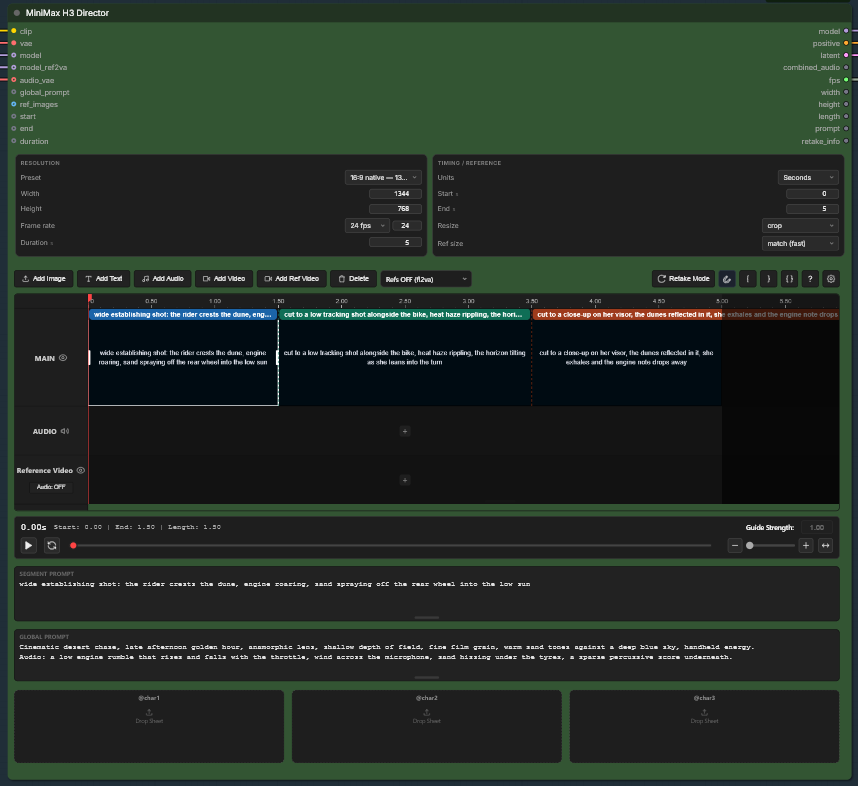
The Director node with its timeline tracks, per-shot prompt zones and reference slots.
What it does
MiniMax H3 generates video and audio jointly, takes reference images, videos and audio, and anchors on a first and last frame. All of that is reachable through core ComfyUI nodes, but you normally have to hand-write a storyboard prompt, count frames onto H3's 17k+5 grid, and wire conditioning nodes for every reference. The Director turns that into an editor: segments on a track become shots with timestamps, images dropped on the track become keyframes or <Picture i> references, and audio becomes either a reference or the muxed soundtrack.
Five nodes under the MiniMax H3 category:
| Node | What it does |
|---|---|
| MiniMax H3 Director | The timeline. Outputs a patched model, the compiled positive conditioning, an empty joint AV latent, the muxed combined_audio, plus fps / width / height / length / prompt / retake_info. |
| MiniMax H3 Preview Override | Watch the whole shot denoise, not a single frozen frame. |
| MiniMax H3 Retake Stitch | Splices a regenerated range back into the base video. |
| MiniMax H3 Enhance Prompt | A local vision model writes the prompt from your reference images. |
| MiniMax H3 Save Last Frame | Saves the last frame of a batch and passes the batch on unchanged. |
Highlights (v0.2.2)
- Main track, reference-video track and audio track with a ruler in seconds or frames; drag, resize, copy and paste segments
- Per-shot prompt zones with a live compiled-prompt panel, waveform preview, retake mode for regenerating a range, and shot chaining for longer-than-15-second videos
@ref1…@ref9subject slots with a kind (scene, prop, style, …) and a retention marker fromfully_preservedtoweak_reference- Optional local VLM Analyze button (Ollama / LM Studio / any OpenAI-compatible endpoint) that writes the prompt from your reference images
- Resolution presets for every aspect ratio in H3's envelope, in both orientations and two size tiers
- Refs OFF uses the FL2VA checkpoint for text-to-video and first/last keyframes; Refs ON uses the REF2VA checkpoint for reference conditioning
Quick start
- Install via ComfyUI Manager (search "MiniMax H3 Director") or
git cloneintoComfyUI/custom_nodes/, then restart ComfyUI and hard-reload the browser (Ctrl+F5). - Requires ComfyUI ≥ 0.30.0; no extra pip packages needed.
- Open the bundled example workflow, or drag the workflow overview image below onto the canvas (the graph is embedded in it).
- Fix any red nodes (usually the model dropdowns), double-click a segment and type what should happen, drag an image onto the track for a first-frame anchor, then Run.
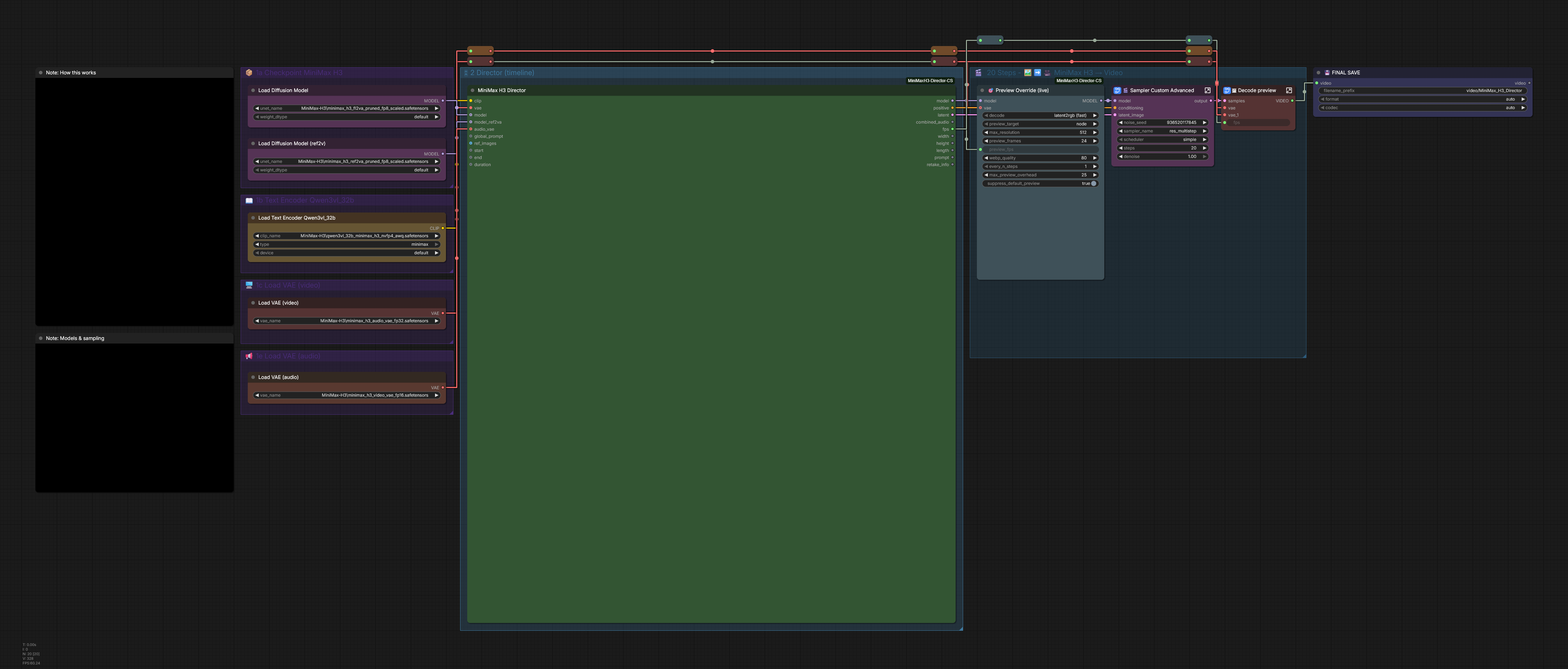
The example workflow graph. Dragging this image onto the ComfyUI canvas loads the same graph.
Availability
- Code and docs: seesee75-commits/ComfyUI-MiniMaxH3-Director on GitHub
- Models: fp8 checkpoints, text encoder and VAEs from Comfy-Org/MiniMax-H3
- Original LTX Director: WhatDreamsCost/WhatDreamsCost-ComfyUI
Comments
Sign in with GitHub to join the discussion.