CharacterSheet: Multi-View LoRAs for FLUX.2 Klein 9B and Krea 2
Image-editing LoRAs that convert a character image into clean TripleView and QuadView reference sheets, with bundled ComfyUI workflows for FLUX.2 Klein 9B and Krea 2.
CharacterSheet is a collection of image-editing LoRAs that converts an existing character image into a clean, multi-view reference sheet. The models preserve the character's identity, clothing, proportions, and overall appearance across front, side, and back views, making them useful for character design turnarounds, dataset preparation, and CharacterID workflows.
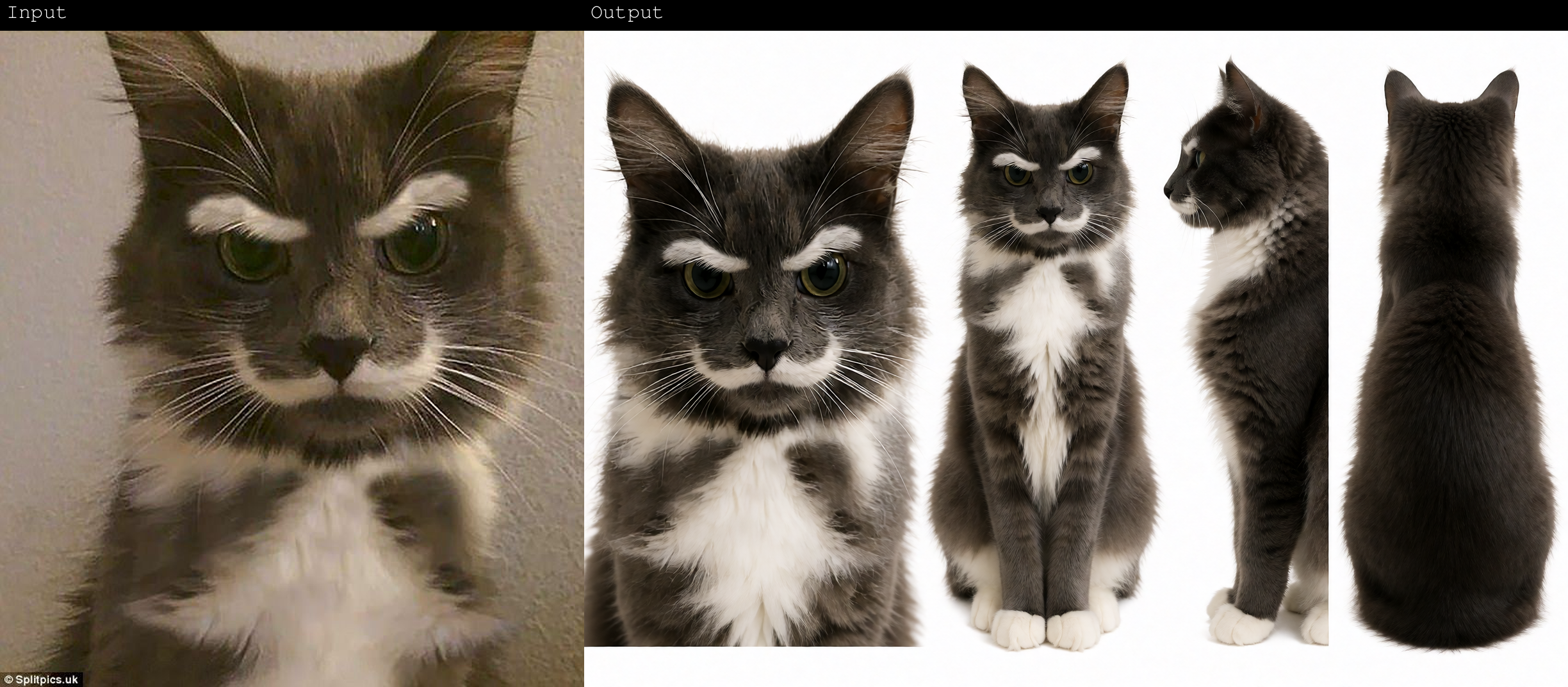
Available Models
| File | Base model | Output layout |
|---|---|---|
TripleView_klein9b_v1.safetensors | FLUX.2 Klein 9B | Front, side, and back full-body views |
QuadView_klein9b_v1.safetensors | FLUX.2 Klein 9B | Face close-up plus front, side, and back full-body views |
QuadView_krea2_v1.safetensors | Krea 2 (Turbo) | Face close-up plus front, side, and back full-body views |
The collection was trained on approximately 300 character-sheet examples, with a primary focus on human characters. Anime, cartoon, animal, creature, and other stylized subjects can also work, though results outside the main training distribution may be less consistent.
How to Use in ComfyUI
Each model ships with a ready-made workflow JSON in the repo, so no custom nodes are required:
- Download the LoRA that matches your base model and put it in
ComfyUI/models/loras/ - Open the corresponding JSON from the
workflowsfolder in ComfyUI - Load a clear reference image of the character
- In the LoRA Loader node, select the downloaded file (the filename stored in the workflow may differ from the repo's)
- Use the trigger caption for the selected layout, then queue
Trigger captions
| Variant | Trigger caption |
|---|---|
| TripleView (FLUX.2 Klein 9B) | Convert the character in the image to a Character Sheet showing front, side and back full body views |
| QuadView (FLUX.2 Klein 9B) | Convert the character in the image to a Character Sheet showing a face close-up, front, side and back full body views |
| QuadView (Krea 2) | Convert the character in the image to a Character Sheet showing a face close-up, front full body, side full body and back full body views |
Recommended starting settings
| Variant | Resolution | Steps | CFG | Sampler | Scheduler | LoRA strength |
|---|---|---|---|---|---|---|
| TripleView (FLUX.2 Klein 9B) | 1536×1024 | 8 | 1 | Euler | beta57 | 1.0 |
| QuadView (FLUX.2 Klein 9B) | 1536×1024 | 8 | 1 | Euler | simple | 1.0 |
| QuadView (Krea 2 Turbo) | 1536×1024 | 10 | 1 | Euler | simple | 1.0 |
For Krea 2 Turbo, 8 steps can favor stronger composition or instruction adherence, while 12 steps can improve facial detail. When using Krea 2 Raw instead of Turbo, start around 40 steps with CFG 3–4.
Limitations
- The model can introduce differences in anatomy, facial features, clothing, accessories, or proportions between views
- Side and back views may require additional generations or manual cleanup
- Detailed accessories, asymmetric designs, hands, and complex garments can be difficult to preserve exactly
- A clear, well-framed input image generally produces a more consistent sheet
Availability
- Model: Alissonerdx/CharacterSheet
- Workflows: bundled in the repo under
workflows/(TripleView + QuadView JSON) - Usage terms: follow the original Civitai model listing
Comments
Sign in with GitHub to join the discussion.