Qwen-Image-Layered Released - Image Generation Model with Layer-Based Editing Support
Qwen-Image-Layered can decompose images into multiple RGBA layers, with each layer independently editable without affecting other content, supporting operations like recoloring, replacement, deletion, resizing, and repositioning

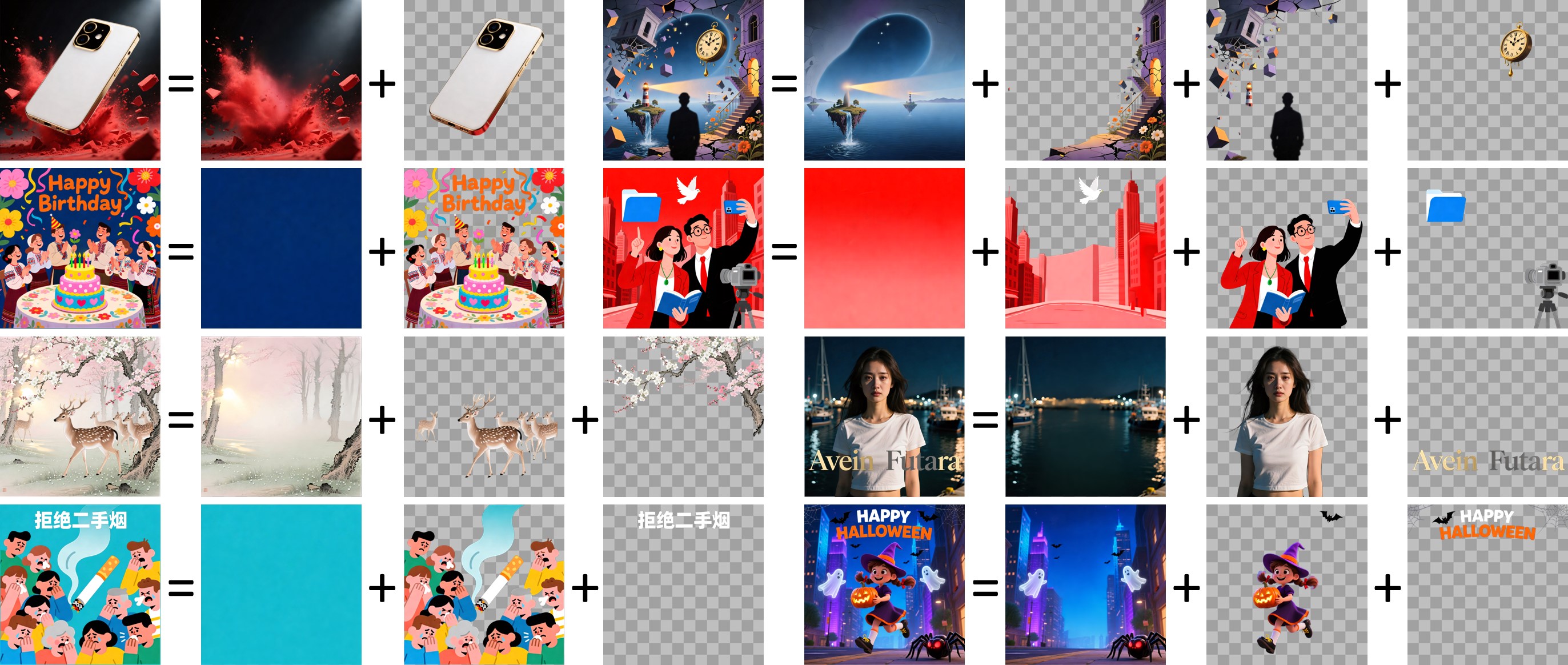
Qwen-Image-Layered is a generative model capable of decomposing images into multiple RGBA layers. Through this layered representation, each layer can be independently edited without affecting other content in the image. This physical isolation approach enables more precise and consistent image editing.
Key Features
Layer Decomposition Capability
Qwen-Image-Layered can decompose a single image into multiple independent RGBA layers. Each layer contains specific semantic or structural components from the image, such as foreground objects, background elements, text, and more. This decomposition provides the foundation for subsequent editing operations.

Independent Layer Editing
Decomposed layers can be independently edited in various ways:
- Recoloring: Change the color of a specific layer while keeping all other content unchanged

- Content Replacement: Replace content within a layer with other content, such as changing a person from a girl to a boy

- Text Modification: Modify text content within images

- Object Deletion: Cleanly remove unwanted objects

- Resizing: Adjust object size without distortion

- Repositioning: Freely move objects within the canvas

All these operations only affect the target layer and do not impact other layers, ensuring consistency and precision in editing.
Flexible Layer Count
The model does not limit the number of layers to a fixed amount. Images can be decomposed into different numbers of layers as needed. For example, an image can be decomposed into 3 layers or 8 layers, depending on the specific requirements.

Recursive Decomposition
The model also supports recursive decomposition, where any layer can be further decomposed into more sub-layers. This feature allows the decomposition process to continue infinitely, providing greater flexibility for complex editing needs.

Technical Features
Qwen-Image-Layered is developed based on the Qwen-Image model and uses the Apache 2.0 open-source license. The model uses RGBA format to represent layers, meaning each layer contains complete color information and transparency information, making the composition between layers more natural.
Native ComfyUI Support
Qwen-Image-Layered has received native support in ComfyUI, allowing users to directly use the model for layer-based image editing in ComfyUI. Related workflow files can be obtained from GitHub.
Practical Applications
This layer-based editing approach is particularly suitable for scenarios requiring precise control over different parts of an image, such as:
- Product Design: Adjust product colors independently without affecting the background
- Advertisement Creation: Easily replace or modify text and elements in advertisements
- Image Composition: Precisely combine multiple elements, with each element independently adjustable
- Content Creation: Flexibly adjust various components within images
For non-technical users, this layer-based editing approach is also easier to understand and operate, as each operation only affects specific layers, making results more predictable.
Comments
Sign in with GitHub to join the discussion.